A technical SEO audit helps uncover issues through technical analysis and evaluation of how a website is crawled, rendered, and indexed in search results. Even strong content and high-quality backlinks can struggle to perform if search engines cannot crawl, render, or interpret pages correctly. That is why a technical SEO audit is often the starting point for improving visibility, performance, and long-term search stability.
In this guide, you will learn how to approach a technical SEO audit systematically, what elements influence search performance, and how to identify and resolve issues that limit visibility. It also covers common mistakes to avoid, practical ways to improve Core Web Vitals, and how Wellows Site Audit can help you identify and fix page-level technical issues with confidence.
What is a Technical SEO Audit?
A technical SEO audit is the process of evaluating how well a website can be crawled, rendered, and indexed by search engines. It focuses on the technical elements that affect visibility, such as site structure, page speed, mobile usability, indexing signals, and server responses.
The goal is to ensure search engines can access and understand your content without obstacles.
In simple terms, a technical SEO audit evaluates whether search engines can crawl, render, interpret, and index a website efficiently.
Unlike content or link audits, a technical SEO audit examines the foundation of a website. It uncovers issues like crawl errors, duplicate URLs, slow-loading pages, broken redirects, and incorrect use of canonical or noindex tags.
Resolving technical SEO issues helps search engines interpret the site accurately and supports consistent, long-term search performance.
Why is a Technical SEO Audit Important?
A technical SEO audit is important because it ensures search engines can access, interpret, and index your content correctly. Without it, even strong content and backlinks may fail to perform due to hidden technical barriers.
How To Perform a Technical SEO Audit
To perform a technical SEO audit, follow a structured step-by-step process that includes identifying crawlability and indexation issues, analyzing performance signals, validating technical configurations, and prioritizing fixes based on impact.
This approach ensures that fixes are prioritized based on how they impact crawling, rendering, and indexing efficiency.
Wellows Site Audit applies this process at the page level, helping you identify issues, prioritize fixes, and verify improvements through re-crawling.
Follow the steps below to audit a page effectively:
Step 1: Select the Page You Want to Audit
Wellows is built for URL-level audits. Start by choosing a high-impact URL where fixes can directly impact rankings and conversions, instead of auditing random pages.
Step 2: Paste the URL Into Wellows Site Audit
Copy the page URL and paste it into Wellows to begin the audit. Once submitted, Wellows evaluates that page against 100+ checks spanning technical SEO, on-page signals, structure, and machine-readability indicators.
Because it audits one URL at a time, the output stays specific to that page rather than producing a broad site-wide report you still need to interpret.
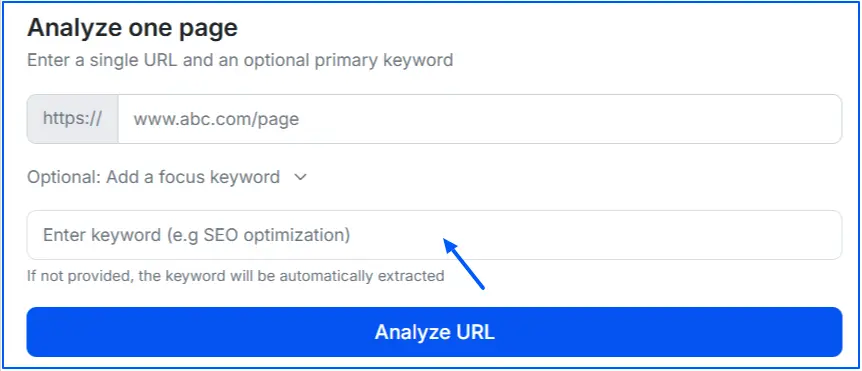
Step 3: Add a Focused Keyword (Or Let Wellows Extract It)
Add a focused keyword for the page. If you skip this, Wellows can extract a likely keyword from the page content. This step matters because it helps interpret certain checks in context, especially those tied to headings, structure, and on-page relevance, rather than scoring the page in a generic way.
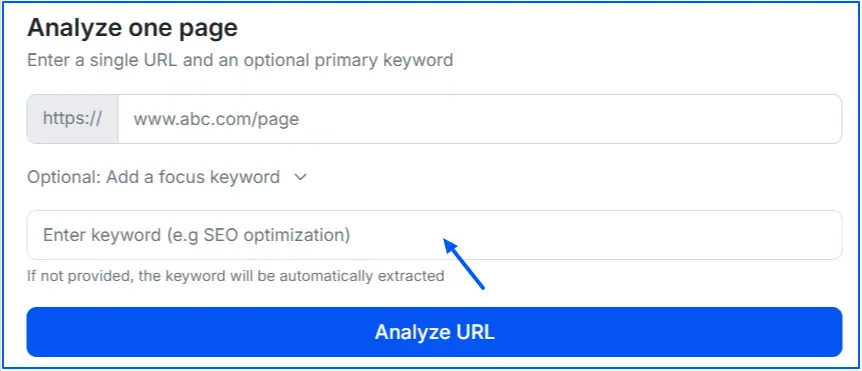
Step 4: Review the Overview Dashboard
After the audit runs, start with the overview. This is where you get a fast sense of what’s happening:
- Page health score (a snapshot of overall condition)
- Issue distribution across errors, warnings, and notices
- Total factors analyzed, so you understand the audit depth
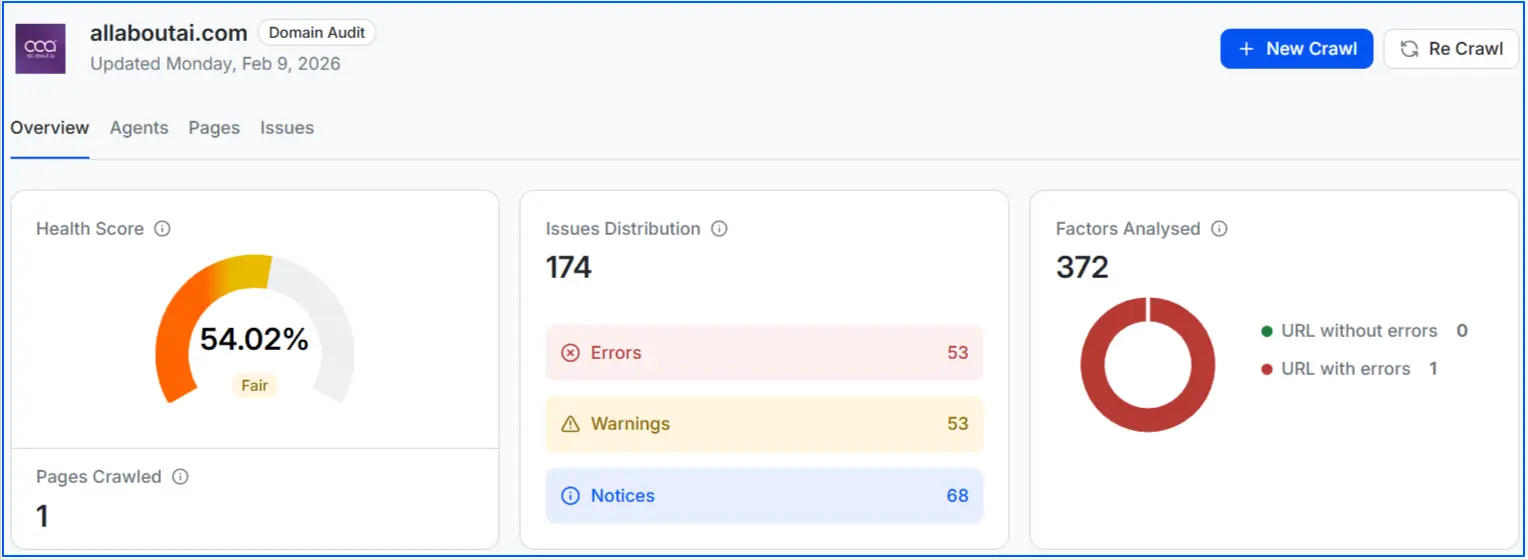
This top layer helps you decide whether the page has blocking issues that can prevent crawling and indexing, or whether it mainly needs refinement improvements.
Step 5: Fix What Matters First Using Prioritized Issues
Instead of a long report, Wellows surfaces prioritized issues and categorizes them into errors, warnings, and notices, helping you focus on what directly impacts crawling, indexing, and performance.

It also helps you understand:
- what the issue is
- why it matters
- how to fix it
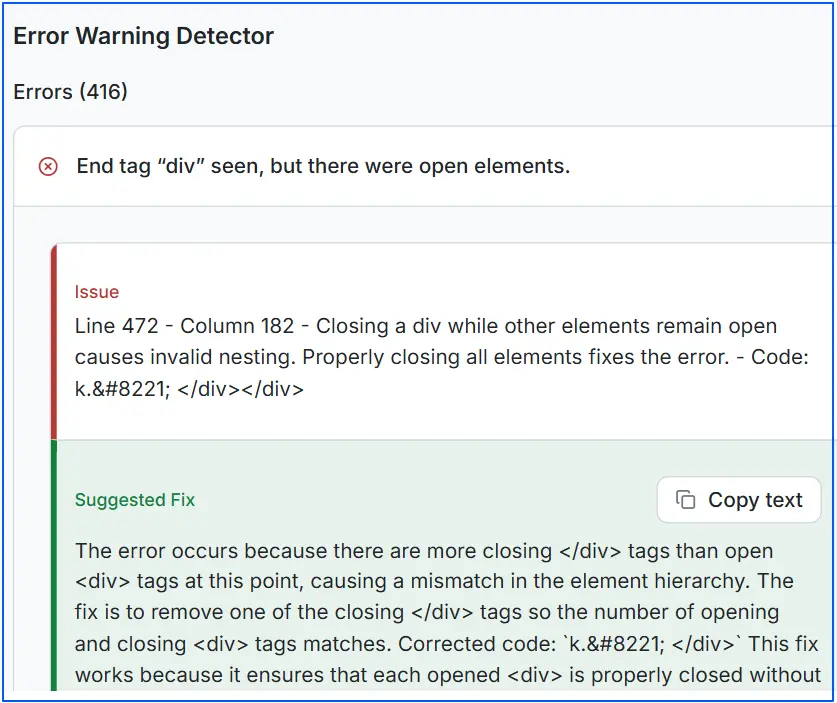
This is the part that saves the most time in real workflows because it reduces the usual problem of “everything looks urgent” and turns the audit into an execution plan your team can follow.
Step 6: Review Agent Analysis and Full Factor Breakdown
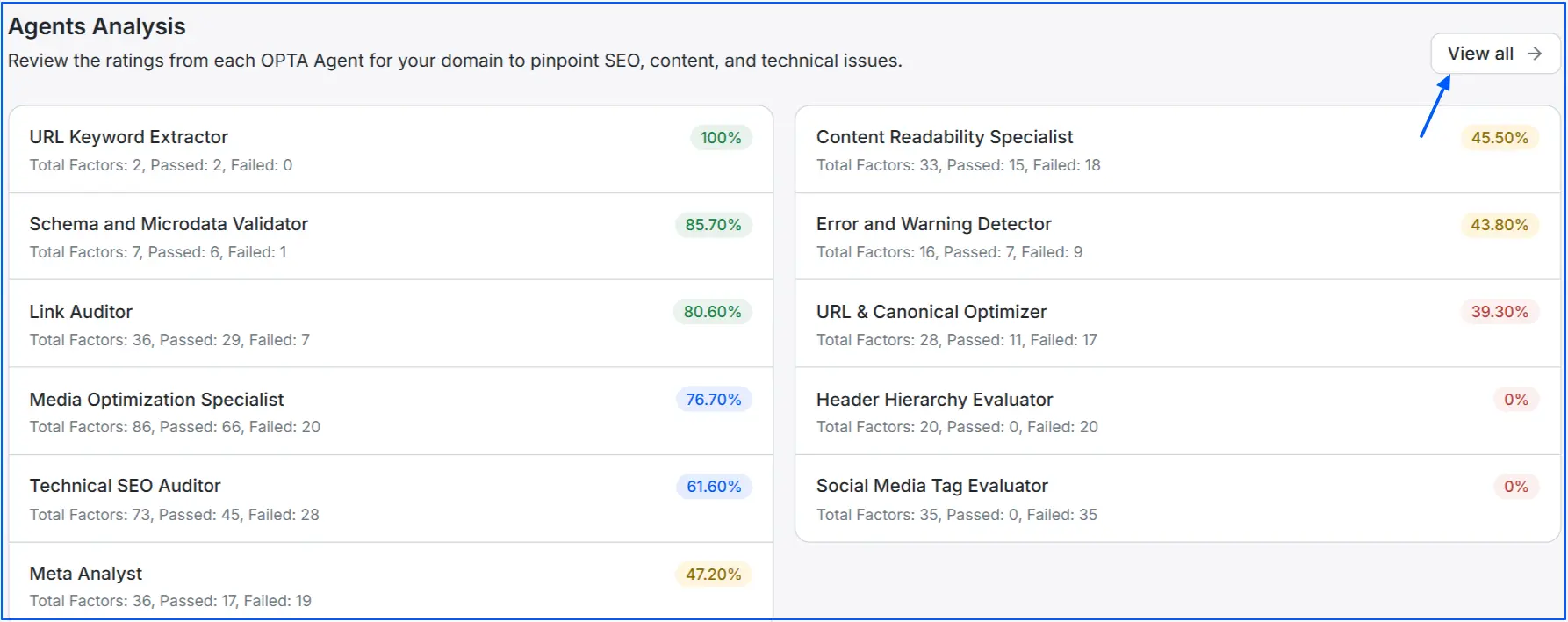
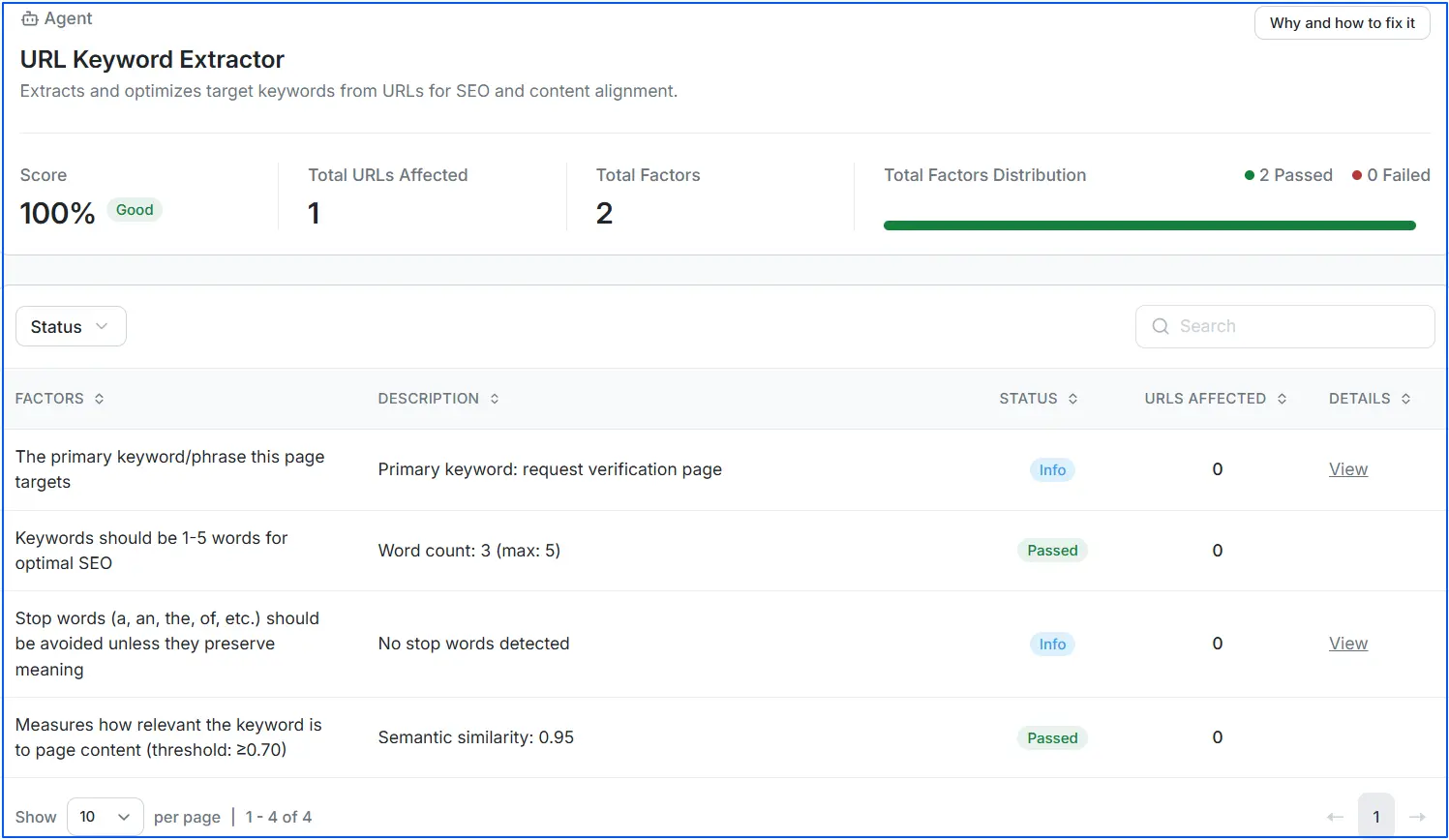
Move into Agent Analysis to see the audit organized into clear, category-level sections. This view helps you quickly identify whether issues are mainly technical (crawlability and indexation), structural (headings and layout), semantic (schema and microdata), or quality-related (readability and media).
Each agent shows a percentage score, total factors checked, pass and fail counts, and how many items are flagged as errors, warnings, or notices, making weak areas easy to spot.
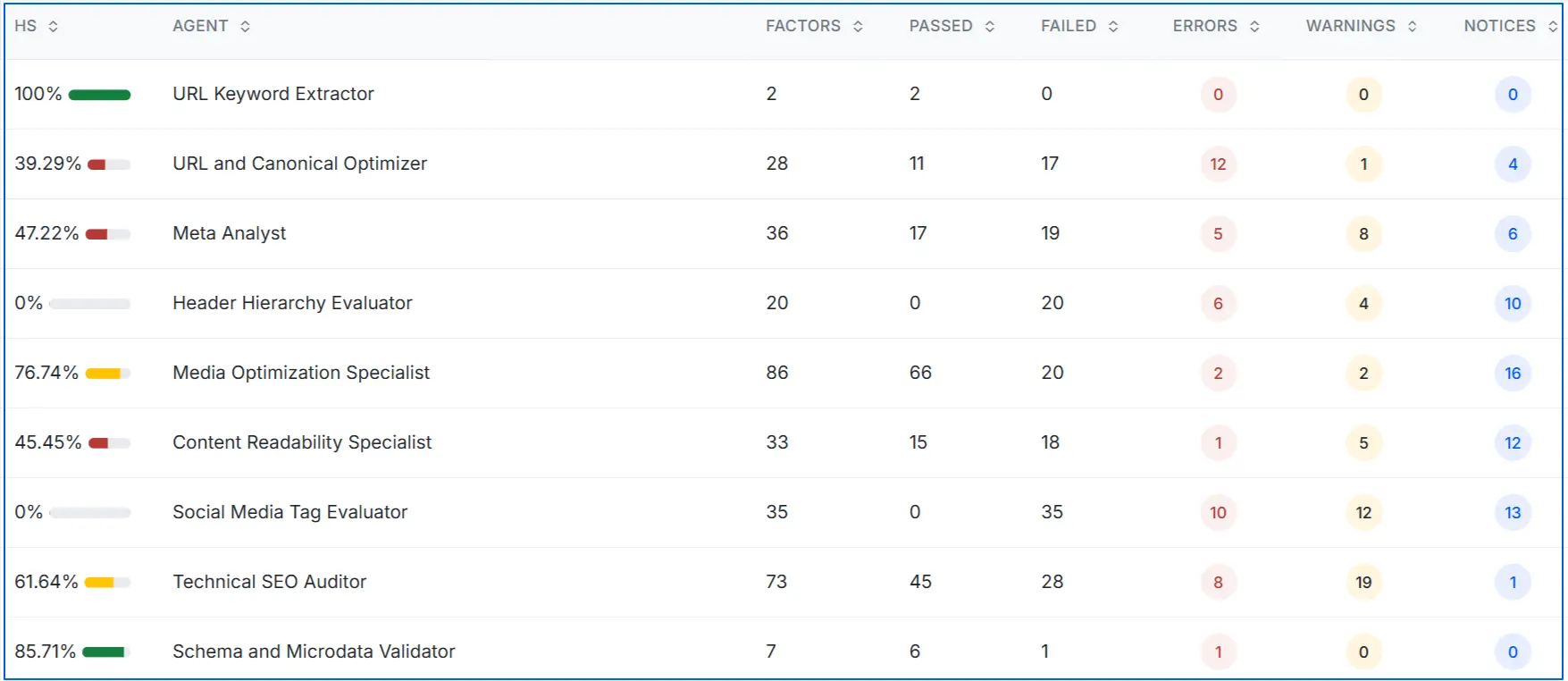
Clicking View All expands the audit into a complete list of every technical SEO factor evaluated for the page. This allows you to confirm what was checked, review which factors passed or failed, and share detailed findings with developers or stakeholders.
It is especially useful when auditing critical pages and validating coverage for areas like canonicalization, crawl signals, structured data, and internal linking.
Step 7: Drill Into Any Factor for Deeper Diagnosis and Fix Guidance
From the full list, click any factor to open a deeper explanation with:
- the exact issue detected
- why it affects SEO
- practical fix guidance
Step 8: Implement Fixes on the Page
Apply the suggested changes on your page or website. In practice, this may include updating canonical tags, correcting redirect behavior, improving heading structure, fixing broken links, optimizing images, or adjusting structured data so it validates correctly.
The goal is to resolve the highest-impact items first so the page becomes easier to crawl, interpret, and index.
Step 9: Re-Crawl the URL to Confirm Fixes Are Resolved
After changes are deployed, run a re-crawl in Wellows to confirm the fixes worked. This verification loop is one of the biggest advantages of the tool because it provides:
- clear proof of improvement (Fail → Pass)
- visible score movement after changes
- confirmation that an issue is truly resolved, not just “assumed fixed”

What does a Technical SEO Audit Include?
A technical SEO audit includes crawlability, indexation, site structure, page speed, mobile usability, canonicalization, structured data, and technical error detection, complementing structured on-page SEO efforts.
Each element plays a specific role in ensuring your site is technically sound, easy to crawl, and free from signals that can limit visibility or performance.
Crawlability and Indexation: This ensures search engines can access and index your pages correctly. It involves reviewing robots.txt rules, XML sitemaps, noindex directives, and index coverage to prevent important pages from being blocked or ignored.
URL Structure and Site Architecture: A clean, logical URL structure helps search engines understand page relationships and hierarchy. This element evaluates URL consistency, parameters, trailing slashes, and internal linking depth to ensure pages are easy to discover and properly connected.
Page Speed and Core Web Vitals: Page performance affects both rankings and user experience. This check focuses on loading speed, responsiveness, and visual stability using metrics like LCP, INP, and CLS to identify performance bottlenecks.
Mobile SEO and Rendering: Since Google uses mobile-first indexing, pages must render and function correctly on mobile devices. This includes checking responsive design, viewport settings, font sizing, tap targets, and mobile rendering behavior.
Canonicalization and Duplicate Content: Duplicate URLs can confuse search engines and dilute ranking signals. This element reviews canonical tags, URL variations, pagination, and parameter handling to ensure the correct version of each page is indexed.
Redirects and Status Codes: Proper use of HTTP status codes ensures search engines interpret page states accurately. This includes identifying broken pages, soft 404s, redirect chains, loops, and incorrect redirects that disrupt crawling.
Structured Data and Schema Markup: Structured data helps search engines understand page context and entities. This check validates schema types, required properties, syntax accuracy, and eligibility for rich results and enhanced search features.
Security and HTTPS Signals: Secure pages build trust with users and search engines. This element audits HTTPS implementation, certificate validity, mixed content issues, and secure redirects from HTTP to HTTPS.
Error Detection and Technical Warnings: Technical errors can silently block performance. This includes identifying broken links, missing resources, invalid tags, and warnings that may not stop indexing but weaken overall technical health and impact your search engine visibility.
Technical SEO Audit Checklist (2026)
A technical SEO audit checklist and step-by-step framework help ensure nothing critical is missed while identifying and fixing crawl, indexation, and performance issues.
Rather than listing isolated elements, this checklist groups them based on how search engines interact with your site, while also covering deeper areas such as crawl behavior, rendering, structured data, and performance bottlenecks across high-impact pages:
Access: Crawlability, robots.txt rules, XML sitemap accuracy
Interpretation: Canonical tags, structured data, internal linking
Performance: Core Web Vitals, page speed, mobile usability
Stability: Redirects, status codes, duplicate URLs
This structure helps prioritize fixes based on impact instead of treating all issues equally.
How To Check Crawlability and Indexability in a Technical SEO Audit?
To check crawlability and indexability in a technical SEO audit checklist, review robots.txt rules, verify status codes, inspect meta directives, confirm sitemap inclusion, and validate index coverage in Search Console.
These checks ensure search engines prioritize important URLs and avoid wasting crawl resources on low-value pages.
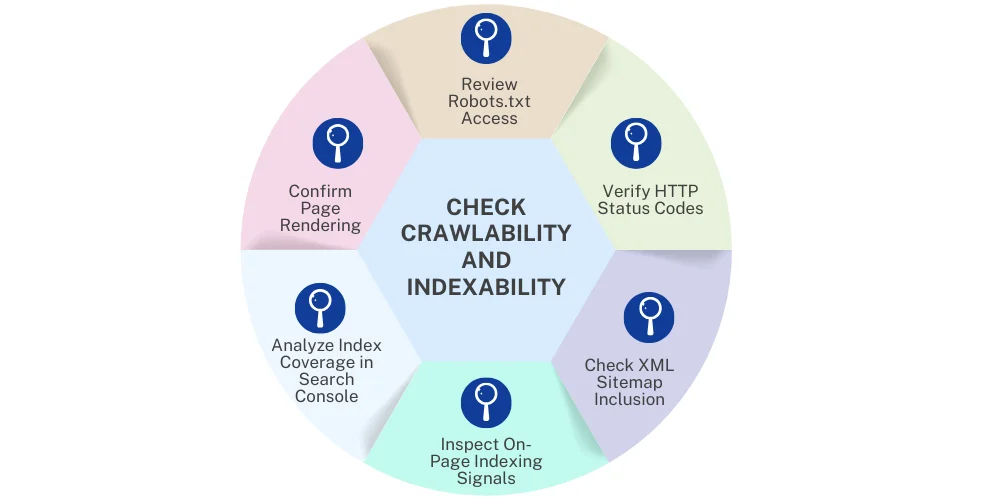
- Review Robots.txt Access: Check the robots.txt file to confirm search engines are allowed to crawl the page. Look for disallow rules that may be blocking important URLs or entire directories by mistake.
- Verify HTTP Status Codes: Ensure the page returns a 200 status code. Pages returning 3xx, 4xx, or 5xx responses may be crawled incorrectly or excluded from indexing.
- Check XML Sitemap Inclusion: Confirm the page is listed in the XML sitemap and that the sitemap only includes URLs intended for indexing. Sitemap URLs should be indexable and free from errors.
- Inspect On-Page Indexing Signals: Review meta robots tags and HTTP headers for noindex, nofollow, or conflicting directives. Also check canonical tags to ensure they point to the correct version of the page.
- Analyze Index Coverage in Search Console: Use Google Search Console to see whether the page is indexed, excluded, or flagged with coverage issues. This helps identify indexing problems that are not visible on the page itself.
- Confirm Page Rendering: Check how search engines render the page, especially if JavaScript is involved. Incomplete or blocked rendering can prevent content from being indexed properly.
These steps together help determine whether a page is accessible to crawlers and eligible to appear in search results.
How Can I Improve Core Web Vitals as Part of a Technical SEO Audit?
Improving Core Web Vitals during a technical SEO audit starts with identifying which metrics are failing and why. Core Web Vitals reflect real user experience, so the goal is not just to score well in tools, but to remove performance bottlenecks that affect how pages load, respond, and remain visually stable.
- Diagnose Core Web Vitals Using Field and Lab Data: Begin by reviewing Core Web Vitals in Google Search Console to understand real user data for LCP, INP, and CLS. Pair this with lab tools like PageSpeed Insights or Lighthouse to pinpoint the specific elements causing poor performance, such as slow server responses or heavy scripts.
- Improve Largest Contentful Paint (LCP): LCP measures how quickly the main content loads. To improve it, optimize server response time, compress and properly size images, use modern image formats, and ensure critical resources load early. Reducing render-blocking CSS and JavaScript also helps the main content appear faster.
- Reduce Interaction to Next Paint (INP): INP reflects how responsive a page feels when users interact with it. Improve this by minimizing long JavaScript tasks, breaking up heavy scripts, deferring non-critical code, and reducing third-party scripts that delay interactions. Cleaner event handling leads to faster input responses.
- Fix Cumulative Layout Shift (CLS): CLS measures visual stability. Prevent layout shifts by defining width and height for images and media, reserving space for ads and embeds, and avoiding dynamic content insertion above existing elements. Fonts should load in a way that avoids sudden layout changes.
- Validate Improvements and Monitor Over Time: After implementing changes, re-test pages and monitor Core Web Vitals in Search Console to confirm improvements. Core Web Vitals should be reviewed regularly, especially after design updates, content changes, or script additions, to ensure performance remains stable.
Did You Know? Meeting Google’s Core Web Vitals standards (LCP ≤ 2.5s, INP ≤ 200ms, CLS ≤ 0.1) leads to measurable performance gains. Websites that pass these benchmarks see up to a 24% increase in user engagement, which then carries through the funnel and supports higher conversion rates at each stage.
What robots.txt Issues Should I Fix in a Technical SEO Audit?
During a technical SEO audit, robots.txt should be reviewed carefully because small mistakes can block important pages or waste crawl budget. The goal is to ensure search engines can crawl what matters and avoid areas that provide no SEO value.
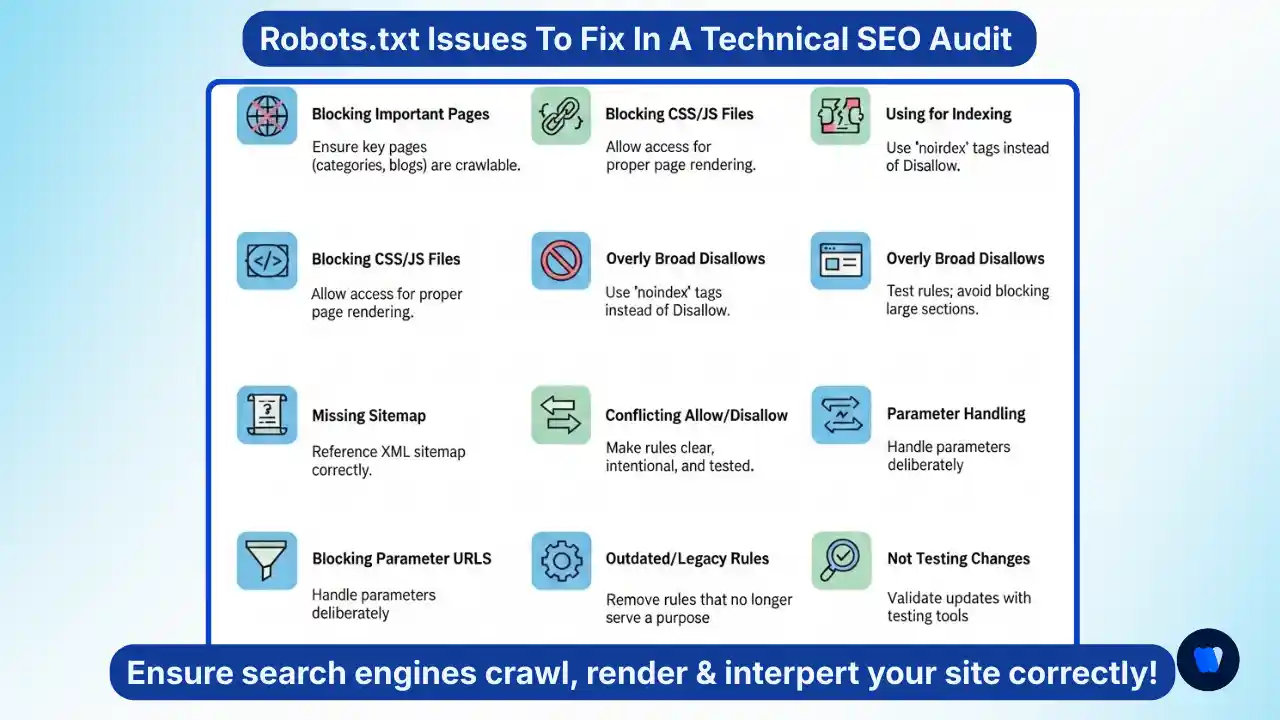
Common Robots.txt Issues to Fix in a Technical SEO Audit
- Blocking Important Pages or Directories: Check for Disallow rules that accidentally block key pages such as category pages, landing pages, or blog sections. Important URLs should always be accessible to search engine crawlers.
- Blocking CSS or JavaScript Files: Blocking /css/, /js/, or /assets/ directories can prevent proper rendering. Search engines need access to these resources to fully understand page layout and content.
- Using Robots.txt to Control Indexing: Robots.txt controls crawling, not indexing. Blocking a URL does not guarantee it will be removed from search results if it is linked elsewhere. Use noindex tags instead for index control.
- Overly Broad Disallow Rules: Rules like Disallow: / or broad wildcard patterns can unintentionally block large sections of the site. Always test rules to confirm they only affect intended URLs.
- Missing or Incorrect Sitemap Declaration: Ensure the XML sitemap is referenced correctly in robots.txt. An incorrect or missing sitemap path reduces crawl efficiency and slows discovery of important pages.
- Conflicting Allow and Disallow Rules: Conflicts between Allow and Disallow directives can confuse crawlers. Rules should be clear, intentional, and tested to confirm expected behavior.
- Blocking Parameter URLs Improperly: Blocking URL parameters without understanding their purpose can block important filtered or paginated pages. Parameter handling should be deliberate and consistent with indexing strategy.
- Outdated or Legacy Rules: Old rules from previous site structures, migrations, or CMS changes can remain unnoticed. Regular audits help remove rules that no longer serve a purpose.
- Not Testing Robots.txt Changes: Changes made without validation can introduce new crawl issues and also impact LLM SEO of your page. Always test updates using tools like robots.txt testers or URL inspection tools.
Fixing these robots.txt issues helps ensure search engines can crawl, render, and interpret your site correctly, forming a strong foundation for technical SEO performance.
How To Audit Schema Markup and Structured Data?
Auditing schema markup helps ensure search engines can accurately understand page content and display it correctly in search results. The process should focus on relevance, accuracy, and validation.
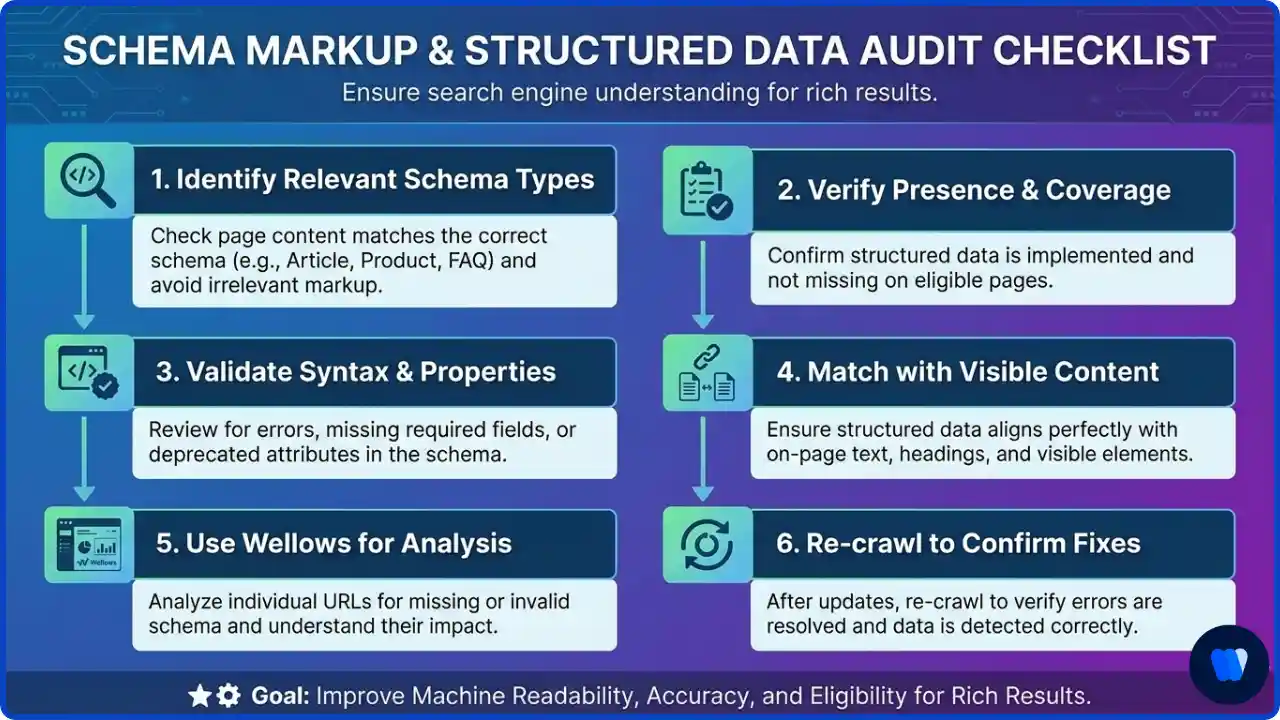
- Identify relevant schema types: Check whether the page uses the correct schema type, such as Article, Product, FAQ, or Breadcrumb, based on its content and purpose. Avoid applying schema that does not reflect what users see on the page.
- Verify schema presence and coverage: Confirm that structured data is actually implemented on the page and not missing entirely. Many pages fail to include schema even when they are eligible for rich results.
- Validate syntax and required properties: Review the schema for errors, missing required fields, or deprecated attributes. Invalid markup may be ignored by search engines even if it is present.
- Match schema with visible content: Ensure structured data aligns with on-page text, headings, prices, reviews, and other visible elements. Mismatches can lead to rich result ineligibility or manual actions.
- Use Wellows for page-level schema analysis: Wellows Site Audit analyzes structured data for individual URLs, flags missing or invalid schema, and explains how each issue affects machine readability and search enhancements.
- Re-crawl to confirm fixes: After updating schema markup, re-crawl the page to verify that errors are resolved and the structured data is detected correctly. Wellows supports this validation step to close the audit loop.
Did You Know? Structured data improves how pages appear in search results. Websites using it correctly are 58% more likely to earn rich snippets, which can boost click-through rates by up to 30%. Despite this, less than 40% of websites currently leverage structured data effectively, making it a common technical SEO opportunity.
What Makes a Good Technical SEO Audit?
A good technical SEO audit focuses on identifying issues that directly impact crawling, indexation, and performance rather than treating all findings equally.
It prioritizes high-impact pages, provides clear fix guidance, and validates improvements through re-crawling to confirm that issues are resolved.
What are the Top Technical SEO Audit Mistakes to Avoid?
Technical SEO audits often fail not because teams miss issues, but because they fix the wrong things first or skip validation. Use the table below to spot common mistakes quickly and apply fast, practical fixes.
| Technical SEO Audit Mistake | Why It’s a Problem | Quick Fix |
|---|---|---|
| Auditing everything without prioritization | Treating all issues as critical slows execution and overwhelms teams. | Fix crawlability, indexability, and rendering issues first, then performance and minor warnings. |
| Relying only on tools without manual review | Tools may flag valid configurations and miss intent or context. | Manually review priority pages and validate tool findings before making changes. |
| Blocking important pages unintentionally | Robots.txt, noindex, or wrong canonicals can remove key pages from search. | Audit robots rules, meta robots tags, and canonicals on high-impact URLs. |
| Ignoring JavaScript rendering issues | Search engines may not fully render JS-heavy pages, so content isn’t indexed correctly. | Test rendering in GSC URL Inspection and use SSR, pre-rendering, or hydration fixes if needed. |
| Fixing symptoms instead of root causes | Superficial fixes lead to recurring issues and growing technical debt. | Trace the cause (parameters, duplication, templates, crawl traps) before redirecting or excluding. |
| Over-optimizing based on audit scores | Chasing perfect scores can cause unnecessary changes and risks. | Prioritize fixes tied to crawling, indexing, UX, and measurable impact, not just “warnings.” |
| Skipping validation after fixes | Without verification, you can’t confirm the issue is resolved or that new issues weren’t introduced. | Re-crawl the URL and confirm changes with GSC URL Inspection and/or your audit tool. |
| Treating all pages the same | Low-impact pages steal time from pages that actually drive revenue and rankings. | Start with money pages, landing pages, comparison pages, and top impression URLs. |
| Ignoring mobile-first signals | Mobile issues can hurt crawling, rendering, and overall page experience signals. | Test mobile usability, layout stability, and performance, then fix viewport and UX issues. |
Technical SEO Audit Best Practices
To make a technical SEO audit effective and scalable over time:
- Focus on high-impact pages before scaling fixes sitewide
- Validate changes using re-crawling instead of assuming resolution
- Align technical fixes with search intent and page purpose
- Re-audit after major updates, migrations, or design changes
Treat technical SEO audits as an ongoing process rather than a one-time activity, especially after site updates or structural changes.
Who Needs a Technical SEO Audit?
A technical SEO audit is essential for websites that depend on search visibility for traffic, leads, or revenue. It is especially important in the following situations:
Did you know?
- Ecommerce websites: Large product catalogs can create crawl depth, duplication, and indexing issues.
- SaaS and startups: Fast development cycles often introduce technical inconsistencies, often requiring support from technical SEO agencies to maintain consistency at scale.
- Websites after migration or redesign: URL changes, redirects, and structural updates require validation.
- Enterprise sites: Complex architectures increase crawl budget and rendering challenges.
- Shopify and CMS-based sites: Default settings can create canonical, parameter, or duplication issues.
If your site is large or complex, this Crawl Budget SEO guide helps you prioritize what gets crawled and indexed first.
Technical SEO Audit for Large Websites
Large websites often face unique technical SEO challenges because of their size and complexity.
When thousands or millions of URLs exist, crawl budget, index management, and site architecture become critical factors.
A technical SEO audit for large websites focuses on:
- Crawl budget optimization: Ensure search engines spend time crawling important pages instead of duplicate or parameter URLs.
- Scalable site architecture: Maintain a clear hierarchy so deep pages remain discoverable.
- Index management: Use canonical tags, pagination signals, and noindex directives to prevent index bloat.
- Log file analysis: Review server logs to understand how search engine bots actually crawl the site.
- Internal linking depth: Ensure high-value pages are reachable within a few clicks.
E-commerce Technical SEO Audit
E-commerce websites require a specialized technical SEO audit because product catalogs, filters, and dynamic URLs often create crawl and duplication issues.
An e-commerce technical SEO audit typically evaluates:
- Faceted navigation and parameter URLs: Filters can generate thousands of crawlable URLs that dilute crawl budget.
- Product page duplication: Variants such as size or color should use proper canonicalization.
- Category page optimization: Category pages should be indexable and internally linked from navigation.
- Pagination signals: Large product lists must use clear pagination structure.
- Structured data for products: Product schema helps search engines understand pricing, availability, and reviews.
WordPress Technical SEO Audit
WordPress websites have their own technical SEO considerations due to themes, plugins, and default CMS behavior.
A WordPress technical SEO audit focuses on issues such as:
- Plugin conflicts: SEO, caching, and security plugins can introduce duplicate tags or slow loading scripts.
- Indexation control: Category, tag, and archive pages may create duplicate content if not configured properly.
- Theme performance: Poorly coded themes can affect Core Web Vitals and page rendering.
- XML sitemap configuration: Ensure the sitemap only includes indexable pages.
- Image and media optimization: Large images are common performance bottlenecks in WordPress sites.
FAQs
SEO auditing is the process of evaluating a website to identify issues that limit search visibility. It reviews technical setup, content quality, structure, and performance to ensure search engines can crawl, understand, and rank the site correctly.
Site speed directly affects user experience and Core Web Vitals, which are ranking signals. Slow pages increase bounce rates, reduce engagement, and limit how efficiently search engines crawl and evaluate your site.
To audit schema markup, validate the presence, accuracy, and completeness of structured data using testing tools. Wellows Site Audit helps by analyzing schema at the page level, flagging missing or invalid markup, and explaining how to fix it correctly.
If you have technical expertise and time, you can audit pages yourself using focused tools. Wellows makes this easier by providing prioritized issues and fix guidance, reducing the need for expensive external audits.
Yes, affordable options exist, especially when using tools instead of full consulting services. Wellows offers a cost-effective way to run detailed, URL-level technical SEO audits without committing to high agency retainers.
You can run a free, page-level technical SEO audit for Shopify URLs using tools like Wellows. It helps identify crawl, performance, and structured data issues specific to individual Shopify pages.
Common tools for technical SEO include Google Search Console, PageSpeed Insights, and auditing tools. Wellows is used for focused URL-level audits, offering prioritized insights, fix guidance, and re-crawl validation.
Final Thoughts
A technical SEO audit is essential for building a strong foundation for search visibility and performance. By addressing crawlability, indexing, speed, and structural issues, you ensure search engines and users can interact with your site without friction.
The most effective audits prioritize high-impact pages and verify fixes after implementation. With Wellows Site Audit, teams can run focused technical SEO audits, apply the right fixes, validate improvements, and maintain long-term technical SEO health with confidence.