Images make websites beautiful but they also play a big role in how your site shows up on Google. This is where SEO for images becomes critical, helping visuals drive traffic, speed, and rankings as part of a broader on-page SEO strategy.
If you’ve ever uploaded a great-looking photo and wondered why it’s not getting any traffic or appearing in image search, you’re not alone. I’ve been there too.
In 2026, image SEO isn’t just about looks. It’s about speed, search visibility, accessibility, and user experience. The right image, properly optimized, can boost your rankings, improve page load time, and even drive clicks from Google Images.
In this blog, I’ll walk you through the best and most up-to-date Image SEO guidelines that actually work this year. Whether you’re a blogger, SEO, marketer, developer, or just someone who wants their site to perform better, these tips will help your images stand out for users and for search engines.
What Is Image SEO?
Image SEO (Image Search Engine Optimization) is the practice of optimizing images so that search engines can understand, index, and rank them effectively. Done right, it not only helps your visuals appear in Google Images and SERPs but also improves your site’s overall performance, accessibility, and user experience
Image SEO (Image Search Engine Optimization) is the practice of optimizing images so that search engines can understand, index, and rank them effectively. Done right, it not only helps your visuals appear in Google Images and SERPs but also improves your site’s overall performance, accessibility, and user experience
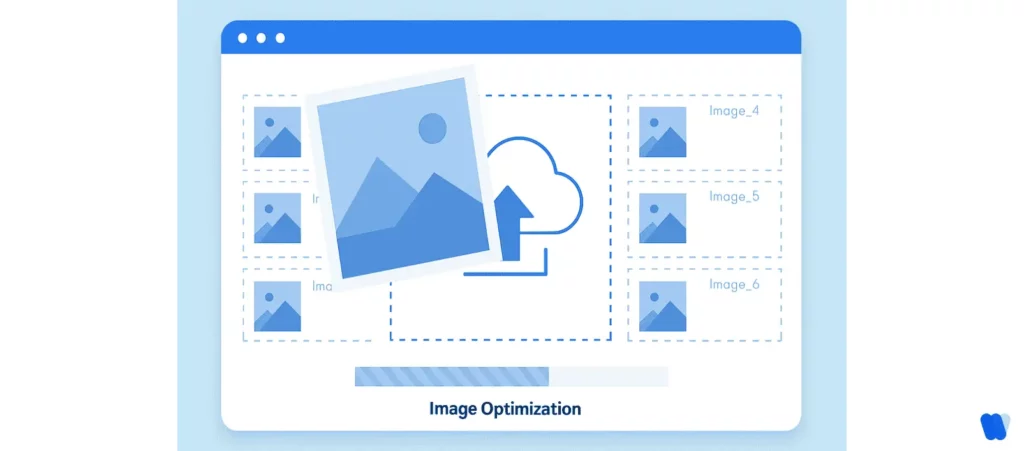
Key aspects of Image SEO include:
- Descriptive File Names – Use keyword-rich, descriptive names (e.g., sunset-over-ocean.jpg instead of IMG_1234.jpg).
- Alt Text – Provide concise, accurate descriptions to improve accessibility and give search engines more context.
- Image Compression – Reduce file sizes without losing quality to speed up page load times.
- Responsive Images – Ensure visuals adapt seamlessly across different devices and screen sizes.
- Structured Data – Add schema markup (e.g., ImageObject, Product) to help images appear in rich results.
- Image Sitemaps – Include images in your XML sitemap so crawlers can find and index them efficiently.
To connect image optimization with the rest of your page-level strategy, use an on-page SEO checklist so file names, alt text, compression, and image placement all support the page’s overall relevance, speed, and usability.
By following these best practices, Image SEO becomes more than just a design choice — it strengthens your site’s technical SEO, enhances accessibility, and helps your content stand out in increasingly visual search results.
Why Image SEO Matters More Than Ever in 2026
Why Image SEO Matters More Than Ever in 2026
In 2026, Image SEO is no longer optional—it’s central to ranking well, driving organic traffic, and meeting evolving user expectations. Here are the key reasons why optimizing your images is critical today:
- Enhanced Search Engine Capabilities
Modern search engines now use AI-powered image recognition to interpret content and context far more accurately. This means your images must truly align with their file names, alt text, and surrounding content—misleading or poorly optimized visuals can hurt rankings.
- The Rise of Visual Search
Visual-first tools like Google Lens and Pinterest Lens have shifted how people search online. Increasingly, users rely on images instead of text queries. To capture this traffic, businesses must optimize images for visual discovery to appear in these results.
- Improved User Experience & Engagement
Optimized images load faster, reduce bounce rates, and improve Core Web Vitals like LCP (Largest Contentful Paint), metrics typically evaluated during a technical SEO audit. A smoother browsing experience leads to longer dwell times and stronger engagement—both of which signal relevance to search engines.
- Increased Organic Traffic
Google Images contributes a large share of overall web searches. When properly optimized, your images can become entry points to your website, driving meaningful organic traffic beyond standard SERPs.
- Adaptation to AI-Powered Search
The search ecosystem is moving toward AI-driven, generative engines that provide synthesized answers rather than just ranked links. This paradigm, known as Generative Engine Optimization (GEO), requires images to be machine-readable and semantically relevant for sustained visibility.
What Are the Best Strategies for Optimizing Images for SEO?
Optimizing images for search engines is essential for boosting your website’s visibility, load speed, and user experience. Search engines can’t “see” images the way humans do, so they rely on contextual signals like file names, alt text, and metadata. Below are the most effective strategies to ensure your images rank well in Google Image Search and contribute to your site’s overall SEO performance.
Below are the top best practices you should follow to make sure your images help boost your SEO, improve user experience, and get discovered in search. It also ties directly into important SEO metrics like LCP and CTR that affect performance.
1- Use Descriptive, Keyword-Rich File Names (Image file naming for SEO)
Before you even upload an image, the filename plays a key role in helping search engines understand what the image is about.
Unlike humans, search engines can’t “see” an image—they rely on the file name, alt text, and surrounding content to figure it out. That’s why using generic names like IMG1234.jpg doesn’t help your SEO at all.
Instead, use clear, descriptive filenames that include relevant keywords. This improves your chances of showing up in Google Image search and makes it easier for your content to be indexed properly.
This mirrors how AI-generated content must be structured for clarity and relevance.
Example:
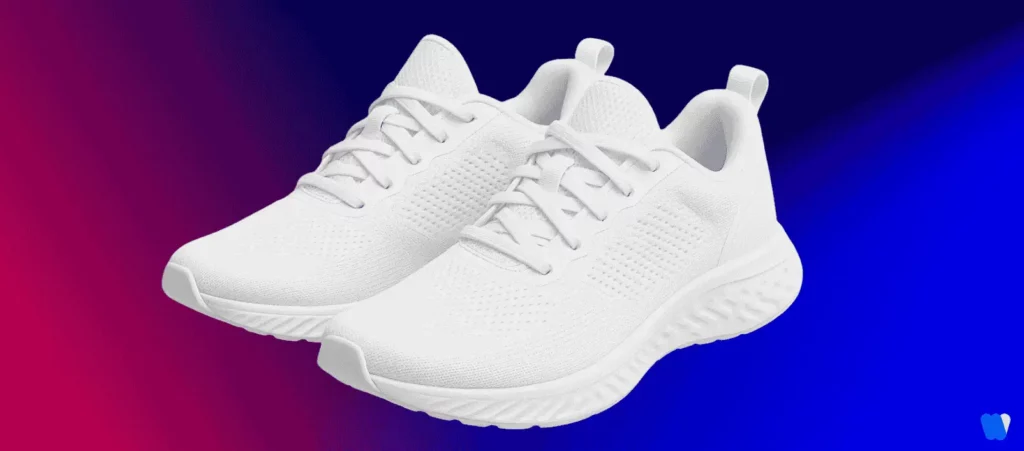
Take a look at the image above. It’s a perfect example of how something as simple as a file name can impact your image SEO.
Instead of uploading your image with a generic name like:
❌ IMG1234.jpg
Use a descriptive, keyword-rich file name that clearly tells both Google and users what the image is about:
✅ white-running-shoes-women.jpg
Why it works:
The second filename describes exactly what’s in the image, making it more useful to both users and search engines. It also increases the image’s relevance to keyword searches like “white running shoes for women.”
2- Write Clear and Relevant Alt Text
Alt text optimization for images is a short description added to an image’s HTML that explains what the image shows. It’s important for two key reasons: accessibility and search engine understanding.
For users with visual impairments, alt text allows screen readers to describe images out loud. For search engines, it offers additional context that helps them understand and index your images correctly.
To write effective alt text, follow these simple guidelines:
- Be descriptive and accurate.
- Keep it concise—no need to write full sentences.
- Avoid keyword stuffing. Only include relevant keywords naturally.
Example:

Let’s take this image of a red hatchback car as an example. Writing good alt text isn’t just about saying what’s in the picture—it’s about being specific and helpful for both users and search engines.
Instead of using something vague like:
❌ alt=”car”
Use a clear, keyword-focused description:
✅ alt=”modern-red-hatchback-vehicle-shown-in-angled-front-view”
Why it works:
The second example clearly tells both users and search engines what the image is about. It’s specific, relevant, and helps improve your chances of ranking in both standard and image search results.
It’s also key when trying to humanize AI-generated content for accessibility and real-user value.
What do Google’s guidelines say about avoiding keyword stuffing in alt text?
Google’s guidelines emphasize that alt text should be written to serve users first — offering clear, accurate descriptions of images — rather than being overloaded with keywords. Keyword stuffing can harm accessibility, weaken SEO performance, and even put a site at risk of penalties. Here are the main reasons:
- Accessibility for Users
Alt text helps visually impaired users understand image content. Overloading it with keywords makes descriptions confusing and takes away from its true purpose. - Compliance with Best Practices
Keyword stuffing is considered a manipulative SEO tactic. Following Google’s guidelines ensures your site maintains credibility and avoids penalties. - Clearer Search Engine Understanding
Well-crafted alt text gives search engines accurate context about an image. Keyword stuffing, however, dilutes meaning and reduces relevance. - Enhanced User Experience
Natural, concise alt descriptions feel authentic and improve user trust. Keyword-heavy alt text looks spammy and reduces overall site quality. - Long-Term SEO Success
Rather than boosting rankings, excessive keywords can actually harm visibility. Balanced, descriptive alt text supports sustainable SEO growth.
By focusing on clarity, conciseness, and relevance, digital marketers can create alt text that aligns with Google’s guidelines, improves accessibility, and strengthens long-term SEO results.
3- Choose the Right Image Format (WebP, AVIF, JPEG XL)
In 2026, the image format you choose can significantly impact your website’s load speed and overall performance. Modern formats like WebP, AVIF, and JPEG XL are designed to offer high-quality visuals at much smaller file sizes compared to older formats like JPEG and PNG.
Each format has its own strengths:
- WebP: Widely supported, good balance of quality and compression.
- AVIF: Superior compression and quality, but not supported by all browsers yet.
- JPEG XL: Emerging format with excellent quality retention, especially for large images.
When choosing a format, consider browser compatibility, compression efficiency, and image quality. It’s also smart to serve fallback formats when needed.
Example:
Instead of uploading a 400 KB JPEG, convert and use a 130 KB WebP version of the same image.
Tool:
Photopea – a free, online photo editor that lets you easily export images in WebP format with adjustable quality settings.
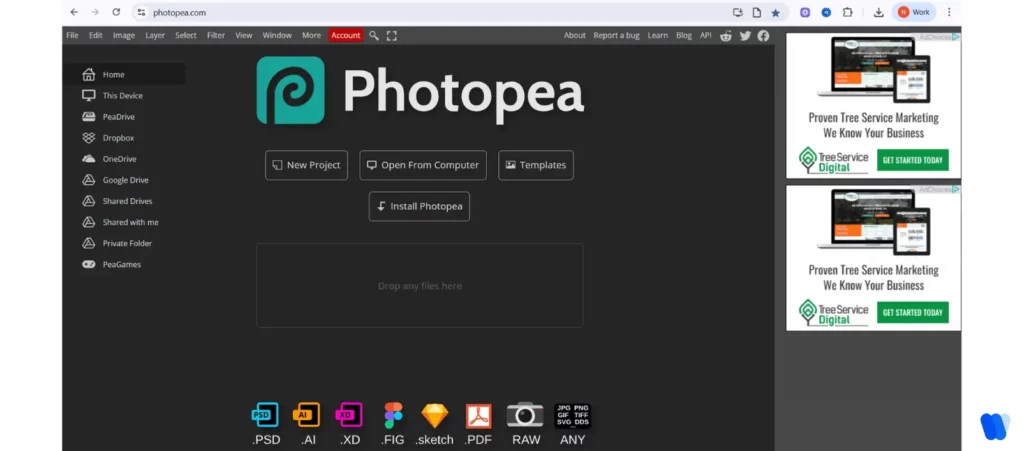
Why it works:
WebP cuts down the file size without compromising image clarity, which leads to faster page loads and better SEO Visibility.
4- Compress Images Without Sacrificing Quality (Image compression techniques for SEO)
Large image files can seriously slow down your website—especially on mobile devices. Since page speed is a known Google ranking factor, reducing image file sizes is one of the quickest ways to improve both user experience and SEO performance.
The key is to compress images without noticeable quality loss. This keeps your pages looking sharp while loading faster.
Recommended tools:
- TinyPNG: Great for PNG and JPEG compression.
- Squoosh: Browser-based tool with lots of control.
- ImageOptim (Mac): Useful for batch compression offline.
Most CMS platforms like WordPress and Shopify offer plugins that automatically compress images as you upload them (e.g., ShortPixel, Smush, or Optimole).
Example:
A product image reduced from 1.2 MB to 160 KB using TinyPNG, with no visible drop in quality.
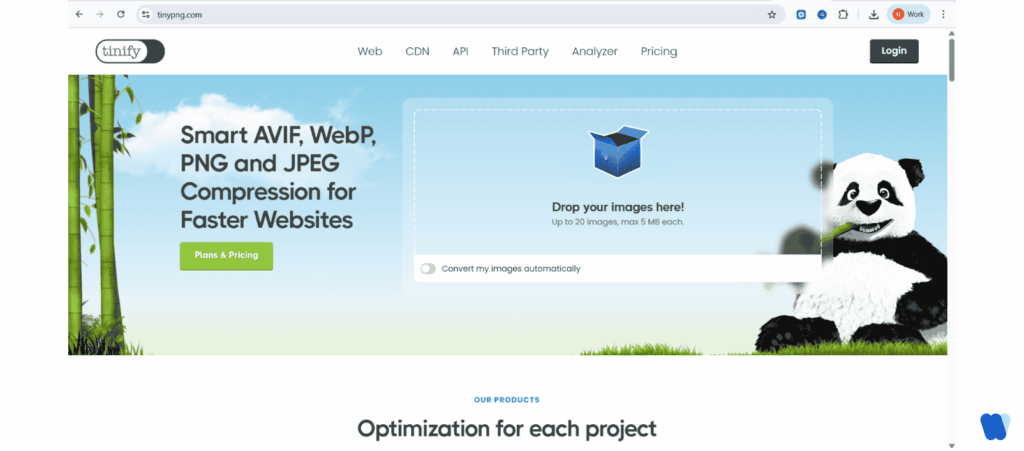
Why it works:
Smaller images help pages load faster, improve Core Web Vitals like LCP (Largest Contentful Paint), and reduce bounce rates—making your site more SEO-friendly.
5- Implement Responsive Images and srcset
Not all screens are the same size—and your images shouldn’t be either. A responsive image setup allows your website to serve different image sizes based on the user’s device, saving bandwidth and improving performance without sacrificing visual quality.
Using the srcset and sizes attributes in HTML, you can tell the browser which image version to load depending on screen width. This is especially important for mobile-first design, where users often have slower connections and smaller screens.
Example:
<img
src=”shoes-600.jpg”
srcset=”shoes-1200.jpg 1200w, shoes-800.jpg 800w, shoes-600.jpg 600w”
sizes=”(max-width: 600px) 100vw, 600px”
alt=”White running shoes on pavement”>
Why it works:
This code allows the browser to choose the best-sized image for the user’s screen. On a mobile phone, it might load the 600px version, while a desktop might get the 1200px version—reducing unnecessary load time and improving page speed and Core Web Vitals.
6- Use Lazy Loading for Faster Page Performance
Lazy loading is a simple but powerful technique that tells the browser to delay loading images until they’re actually needed—like when a user scrolls to them. This significantly speeds up the initial page load and reduces data usage, especially on long pages or mobile devices.
As of 2026, lazy loading is natively supported by all major browsers, and it only takes a single attribute to enable it: loading=”lazy”.
Using lazy loading can also improve Core Web Vitals, particularly LCP (Largest Contentful Paint), which Google uses to measure how quickly the main content of a page loads.
Example:
<img src=”hiking-boots.jpg” loading=”lazy” alt=”Brown hiking boots on trail”>
Why it works:
The image won’t load until it’s about to appear on screen. This reduces the initial page load time, improves performance metrics, and gives users a smoother, faster experience—especially on mobile.
7- Add Structured Data for Image Enhancement
Adding structured data to your images using schema markup—like ImageObject or Product—helps search engines understand and surface your visuals in richer formats.
This approach increases your chances of appearing in Google Images, rich results, and visual SERP features, especially when paired with zero-click content strategies.
Example (JSON-LD):
{
“@context”: “https://schema.org”,
“@type”: “ImageObject”,
“contentUrl”: “https://example.com/images/hiking-boots.jpg”,
“description”: “Brown leather hiking boots on a mountain trail”
}
Why it works:
Google uses this metadata to better interpret your image context, which improves visibility in image packs, featured snippets, and visual cards—supporting your zero-click and SERP dominance strategy.
Structured markup also plays a major role in Generative Engine Optimization visibility in AI-driven search.
8- Optimize Image Placement and Context
Where you place your images on the page matters just as much as how you name or compress them. To help search engines understand your images more clearly, it’s important to keep them close to related text, headings, and keywords.
Adding captions and using semantic HTML elements like <figure> and <figcaption> also helps reinforce the image’s meaning. This supports both SEO and accessibility while improving the flow of your content.
Maintaining a strong visual hierarchy—where images follow a logical structure in relation to your headings—also enhances storytelling and makes your page easier for users (and search engines) to follow.
Example:
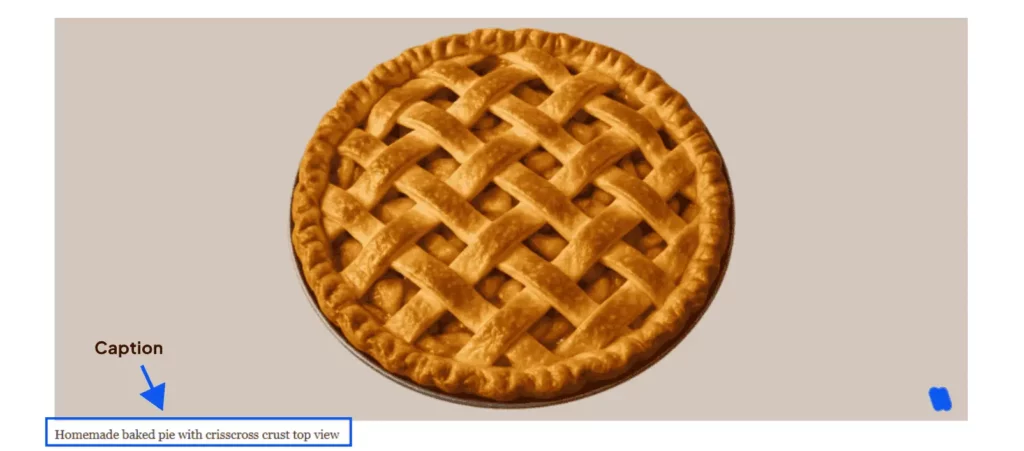
Place an image of “apple pie” directly under an H2 titled “Classic Apple Pie Recipe for Beginners”, and add a caption like:
“Homemade baked pie with crisscross crust top view”
Why it works:
Google uses the surrounding content to interpret the image. By placing the image near relevant text and headings, you increase the chances that it will rank for the intended keywords in both regular and image search results.
9- Submit Images via an Image Sitemap (Using image sitemaps for SEO)
Even well-optimized images can go unnoticed if search engines don’t know they exist. That’s where an image sitemap comes in.
By submitting images through your XML sitemap, you help search engines discover and index them more efficiently—especially if they’re loaded dynamically via JavaScript or not directly linked in your page’s HTML.
How to Create an Image Sitemap for SEO
- Understand the Structure of an Image Sitemap
An image sitemap is an XML file that lists your website’s URLs along with the images contained on each page. This structure helps search engines locate and index images that might not be easily discoverable through standard crawling methods. You can either create a separate image sitemap or add image details to your existing sitemap. - Manually Creating an Image Sitemap
If you prefer a hands-on approach:
- Compile a List of URLs and Images: Gather your pages and their corresponding images.
- Format the XML File: For each <url>, include the page URL inside <loc>. Nest <image:image> tags for each image with its <image:loc>.
Example:
<?xml version=”1.0″ encoding=”UTF-8″?>
<urlset xmlns=”http://www.sitemaps.org/schemas/sitemap/0.9″
xmlns:image=”http://www.google.com/schemas/sitemap-image/1.1″>
<url>
<loc>https://example.com/page1.html</loc>
<image:image>
<image:loc>https://example.com/images/image1.jpg</image:loc>
</image:image>
</url>
<url>
<loc>https://example.com/page2.html</loc>
<image:image>
<image:loc>https://example.com/images/image2.jpg</image:loc>
</image:image>
</url>
</urlset>
- Save and Upload the Sitemap: Save as image_sitemap.xml and upload it to your site’s root directory.
- Using Automated Tools
For larger sites or convenience:
- WordPress Plugins (e.g., Rank Math, Yoast) can auto-generate and update image sitemaps.
- Online Generators can crawl your site and create sitemaps for you.
- SEO Crawlers like Screaming Frog can export sitemap-ready image data.
- Best Practices for Image Sitemaps
- Use descriptive file names and alt text.
- Compress images to improve load speed.
- Update sitemaps regularly as you add or remove images.
- Keep files under 50MB or 50,000 URLs (split into multiple sitemaps if necessary).
- Submitting the Sitemap to Search Engines
- In Google Search Console, go to Sitemaps and submit your sitemap URL.
- In your robots.txt file, add:
10- Regularly Audit Your Image SEO
Even with the best practices in place, your image SEO can drift over time due to site updates, new uploads, or overlooked errors. That’s why it’s important to regularly audit your images to ensure they remain optimized, accessible, and effective.
Look for issues like:
- Broken image links
- Missing or weak alt text
- Oversized or uncompressed files
Use reliable tools to identify and fix problems:
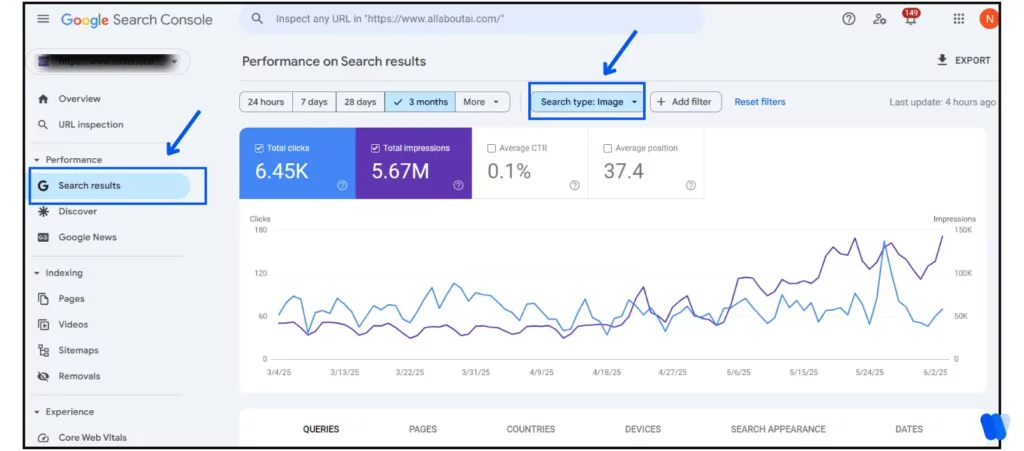
- Google Search Console (monitor impressions, clicks, indexing)
- Lighthouse (Core Web Vitals and performance audits)
- Screaming Frog SEO Spider (detailed crawl reports for missing attributes and large files)
Example:
In Google Search Console, go to Performance > Search Type: Image to track how your images are performing in search.
Use Screaming Frog to find images missing alt text or exceeding recommended file sizes.
Why it works:
Ongoing audits help you catch issues early, maintain strong SEO signals, and improve user experience. They also allow you to adapt to algorithm changes and keep your visual content competitive.
To bring this into a full-scale SEO plan—covering everything from keyword mapping to analytics—visit our complete SEO resource guide.
Best Tools for Image SEO Optimization
Optimizing images is crucial for enhancing website performance and improving search engine rankings. Here are some of the top tools to assist with image SEO optimization in 2026:
TinyPNG
Utilizes smart lossy compression techniques to reduce PNG and JPEG file sizes without compromising quality. It supports bulk uploads and offers a WordPress plugin for seamless integration.
SEMrush Site Audit
Provides detailed reports on image-related SEO issues such as missing alt tags, oversized files, and CDN suggestions. It helps you spot and fix technical image SEO problems quickly.
Squoosh
An open-source, browser-based tool developed by Google that enables advanced image compression, resizing, and format conversion with real-time comparisons between original and optimized versions.
ShortPixel
Efficiently compresses JPEG, PNG, and WebP images while also generating automatic alt text to support accessibility and SEO. It integrates smoothly with WordPress to optimize images upon upload.
Google PageSpeed Insights
Analyzes your website performance and highlights image optimization opportunities, including compression and format recommendations, to boost load speed and SEO rankings.
Implementing these tools can significantly enhance your website’s image SEO, leading to faster load times, improved accessibility, better user experience, and higher search engine visibility.
Common Mistakes to Avoid in Image SEO
Optimizing images is vital for improving SEO, speed, and accessibility. However, many websites still make errors that weaken performance. Below are the most common mistakes to avoid — and how to fix them.
- Uploading Large Image Files
Large, uncompressed images slow down websites, hurt Core Web Vitals, and increase bounce rates.
How to Avoid:
- Compress images without noticeable quality loss using tools like TinyPNG, Squoosh, or ImageOptim.
- Prefer modern formats such as WebP or AVIF for smaller file sizes with high quality.
- Neglecting Alt Text
Alt text not only supports accessibility for visually impaired users but also gives search engines context about the image. Skipping it reduces SEO value.
How to Avoid:
- Add concise, descriptive alt text for every image.
- Avoid keyword stuffing — focus on natural, helpful descriptions.
- Using Generic File Names
Default file names like IMG_1234.jpg don’t help search engines understand content.
How to Avoid:
- Rename images with descriptive, keyword-rich names (e.g., red-hatchback-car.jpg).
- Keep names simple and relevant to the content.
- Ignoring Image Sitemaps
Without inclusion in sitemaps, images may not be indexed properly, limiting visibility in Google Images.
How to Avoid:
- Add image information to your XML sitemap or create a dedicated image sitemap.
- Submit it in Google Search Console to ensure proper indexing.
- Overlooking Responsive Images
Serving the same large image to all devices wastes bandwidth and slows mobile performance.
How to Avoid:
- Use the srcset and sizes attributes to deliver images tailored to screen size.
- Test across devices to ensure fast loading and visual consistency.
- Not Implementing Lazy Loading
Loading all images at once delays page rendering and increases data use, especially on mobile.
How to Avoid:
- Use the loading=”lazy” attribute so images load only when visible on screen.
- Combine with responsive techniques for maximum performance.
- Embedding Text Within Images
Search engines cannot read text embedded in graphics, which means important keywords and information are ignored.
- Use HTML or CSS for on-page text.
- Reserve images for visuals, not written content.
- Failing to Audit Image SEO Regularly
Over time, sites accumulate broken links, oversized images, and missing alt text, weakening SEO.
How to Avoid:
- Run regular audits with tools like Google Search Console, Lighthouse, or Screaming Frog.
- Fix issues promptly to maintain speed, accessibility, and rankings.
FAQs
Conclusion
Image SEO in 2026 is no longer just about adding alt text or shrinking file sizes—it’s about delivering fast, accessible, and visually engaging experiences that both users and search engines appreciate.
By following the best practices we’ve covered—like using descriptive file names, writing meaningful alt text, choosing the right image formats, and implementing features like lazy loading and responsive images—you’re setting your site up for better performance, higher rankings, and improved user satisfaction.
Remember, every image is an opportunity. Whether it’s a blog graphic, product photo, or background banner, optimizing it the right way can make a real difference. So take the time to audit your current visuals, apply these tips, and give your content the SEO boost it deserves—one image at a time.
If you’re ready to take the next step, start by optimizing just one image on your site today. Small changes can lead to big results.