One of the biggest mistakes I see in SEO?
Tracking everything… and understanding nothing. When I first got serious about SEO, I found myself staring at dashboards filled with numbers—bounce rates, pages per session, CTR, backlinks, crawl errors—and wondering, “Which of these actually tells me if I’m doing something right?”
If that sounds familiar, you’re not alone.
That’s why I created this guide. I wanted to simplify what so many overcomplicate: knowing how to measure SEO performance so you know what to improve. In other words, how to choose SEO KPIs and SEO performance indicators that actually reflect growth, not just noise. Strong digital marketing analytics ties these numbers to outcomes.
(And yes, that’s exactly why I included the visual below — because it’s true: you can’t improve what you don’t measure.)

So, if you’re tired of vanity stats and wondering, “What SEO metrics should I track for real business growth?”, this guide lays out the essential SEO metrics 2025 to track — the ones tied to traffic, rankings, and revenue that truly move the needle.
What are SEO Metrics?
Before jumping into which metrics matter most, let’s make one thing clear— SEO metrics are the key indicators that show how well your site performs in search. They become your working set of SEO KPIs.
Think of SEO metrics as your website’s search performance scorecard. These numbers tell you how well your site is doing in search engines. From how many people found you on Google (organic traffic), to how long they stayed (engagement), and whether they took action (conversions) — SEO metrics keep it all measurable.
They also show whether the work on each page is actually paying off, which is why using an on-page SEO checklist can make these performance shifts easier to diagnose and improve.
“SEO is so effective because you can track and measure everything.” (Terakeet, 2023)
Now let’s cut through the noise. Below I answer: What are the most important SEO metrics to track?, how to track them, and how to improve SEO metrics? with clear steps and SEO analytics best practices.
To understand how these metrics fit into the full SEO process, explore our complete SEO guide.
What are the Most Important SEO Metrics to Track?
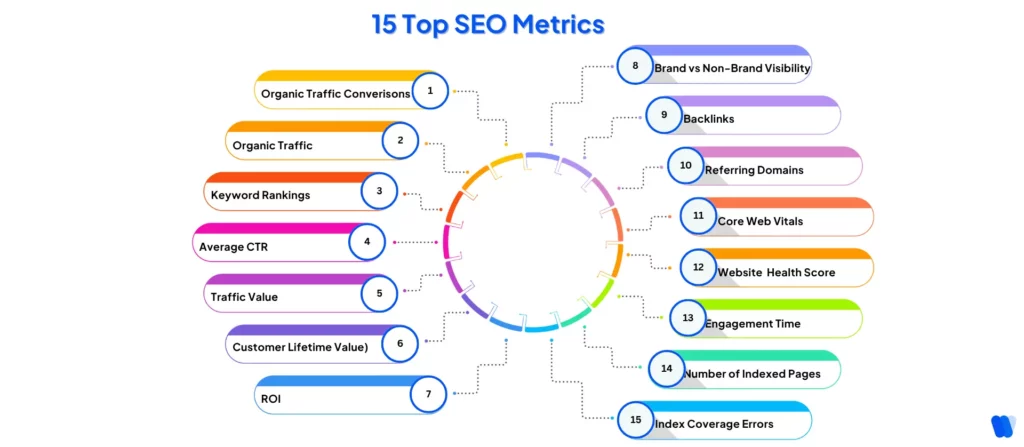
Not all SEO numbers are worth stressing over — but some really are. In 2025, these are the best metrics for website SEO that will actually help you understand what’s working, what’s not, and where to focus next.
Here are the 15 Top SEO Metrics that actually matter in 2025 (your core SEO KPIs):
- Organic Traffic Conversions – Conversions are your clearest indicator of actual value.
- Organic Traffic – A core visibility metric that fuels conversions and ROI.
- Keyword Rankings – Directly reflects visibility; important for strategic targeting.
- Average CTR – Indicates content relevance and SERP performance.
- Traffic Value – Quantifies what your organic traffic would cost via ads.
- Customer Lifetime Value (CLV) – Ties conversions to long-term profitability.
- ROI – Ultimately, SEO must drive measurable return; everything else feeds into this.
- Brand vs. Non-Brand Visibility – Measures reach beyond your current audience.
- Backlinks – Essential for authority, but indirect unless tied to outcomes.
- Referring Domains – Important for domain diversity and natural backlink profile.
- Core Web Vitals – Direct ranking factor and UX metric.
- Website Health Score – Impacts crawlability, indexing, and UX at scale.
- Engagement Time – Tells you whether your content is holding attention.
- Number of Indexed Pages – Basic but crucial for visibility.
- Index Coverage Errors – Important to fix, but often reactive vs. strategic.
1. Organic Traffic Conversions
Getting more visitors from search is great—but what really matters is what they do when they land on your site.
Organic conversions tell you how many of those visitors completed a meaningful action: signing up for a newsletter, making a purchase, booking a demo, etc. This is where SEO performance meets business impact.
Organic Conversion Rate Formula:
Organic Conversion Rate = (Conversions from Organic Traffic ÷ Total Organic Visitors) × 100
Example: If 1,000 people visit your site from Google and 50 of them buy a product, your organic conversion rate is:
(50 ÷ 1,000) × 100 = 5%
Tracking this helps you connect your SEO efforts to real business outcomes, not just traffic for traffic’s sake.
Why Organic Traffic Conversions Matter
Conversions turn traffic into tangible business results. They prove your SEO KPIs are not just generating clicks—they are aligned with business goals and driving measurable outcomes.
More conversions = higher impact. It proves your SEO is aligned with business goals—not just generating clicks, but driving outcomes.
How to Track Organic Traffic Conversions:
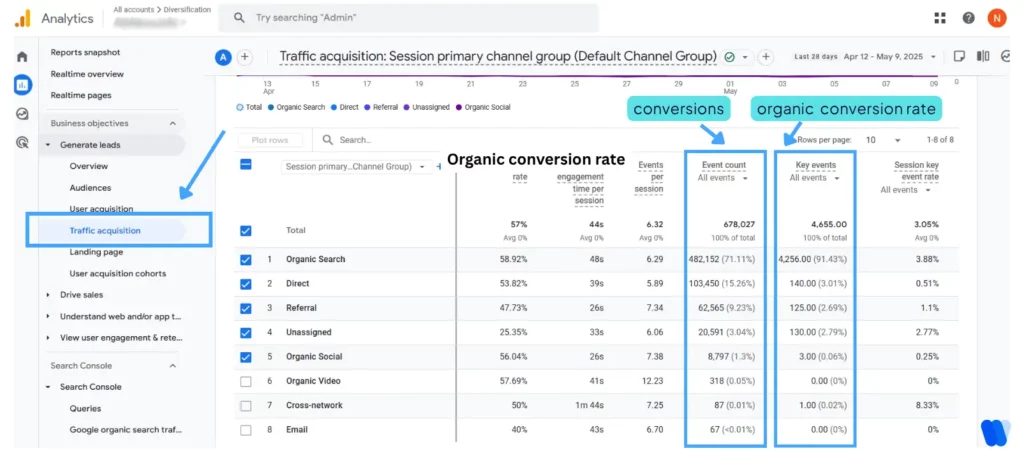
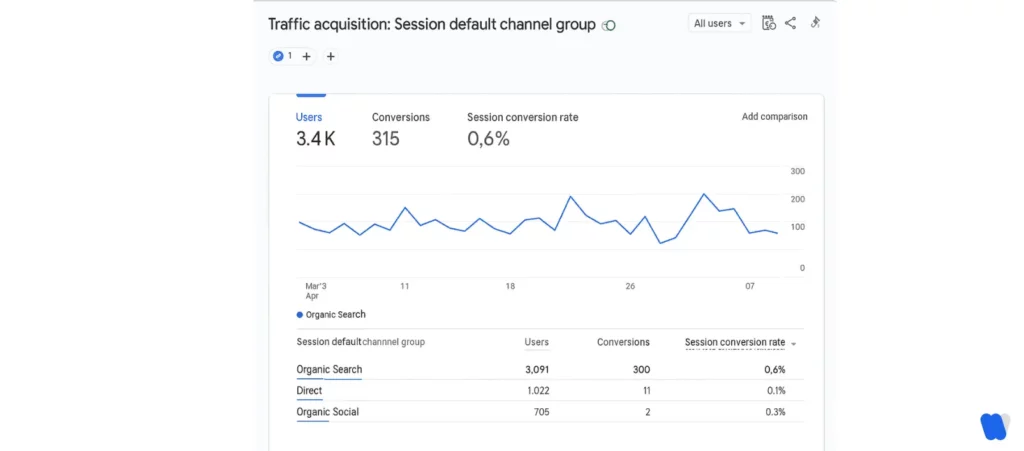
You can track organic conversions using Google Analytics 4 (GA4):
- Open your GA4 property.
- Navigate to Reports > Acquisition > Traffic acquisition. The Key Events column reflects completed conversions, and Session Key Event Rate reflects your organic conversion rate.
- Make sure your desired actions are marked as key events in the Admin > Events panel.
Aligning pages with user intent analysis ensures that your SEO content speaks to what people actually need—not just what they search.
Pro Tip: Set up conversion events in GA4 that match your goals (e.g., thank-you page views, form submissions). This way, GA4 can track when organic visitors complete those actions automatically.
2. Organic Traffic
Organic traffic is the backbone of SEO performance—but what exactly is organic traffic, and why should it matter to your strategy?
Organic traffic tells you how many people are visiting your website through unpaid search results (like Google). Unlike paid traffic, these visitors found you naturally—through relevant keywords, helpful content, or strong domain authority.
Tracking organic traffic has always been central to SEO performance. However, AI-driven tools such as an AI Search Visibility Platform for Startups are reshaping how marketers understand discoverability and growth in a rapidly changing search landscape.
Platforms like ChatGPT’s impact on Google search traffic are influencing how much traffic Google sends to websites, introducing a new layer of complexity.
Why Organic Traffic Matters
Organic traffic reflects how discoverable and relevant your website is to search engines. It’s not just about volume—it’s about qualified visitors who are actively searching for what you offer.
More organic traffic = more brand visibility, more trust, and more revenue potential without ad spend.
How to Track Organic Traffic:
The easiest way to track your organic traffic is through Google Search Console:
- Go to Google Search Console.
- Select your property (your website).
- Click on Performance > Search results.
- You’ll see total clicks, impressions, average CTR, and average position—all from organic search.
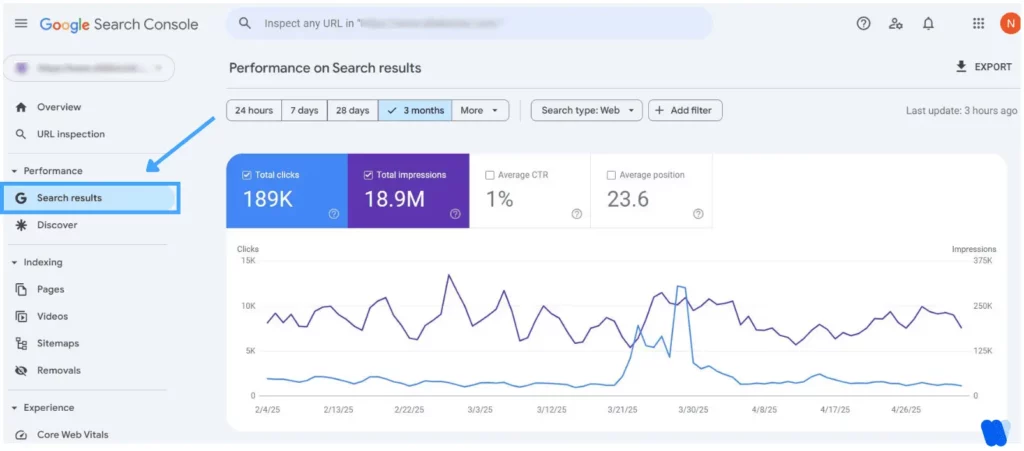
More organic traffic usually means your SEO efforts are paying off—and better yet, it often brings in higher-quality leads than paid ads. This is one of the key metrics you use to measure success for your SEO.
3. Keyword Rankings
Keyword rankings show where your website appears in search engine results for specific search terms. Your position in search results is directly tied to your SEO performance metrics. If your target keywords aren’t ranking, you’re not getting seen.
As Google shifts toward AI-powered summaries and zero-click results, ranking alone may no longer guarantee traffic.That shift is why AI SEO is now part of ranking analysis, focusing on visibility inside AI answers alongside classic position tracking.
Why Keyword Rankings Matter
High keyword rankings signal that your content aligns with user intent and is competitive in your niche—bringing more visibility, clicks, and business opportunities.
Focusing on low-competition keywords can help you achieve those rankings faster, especially if you’re building topical authority.
Top-ranking keywords = more clicks, more traffic, and more business opportunities from users already searching for what you offer.
How to Track Keyword Rankings:
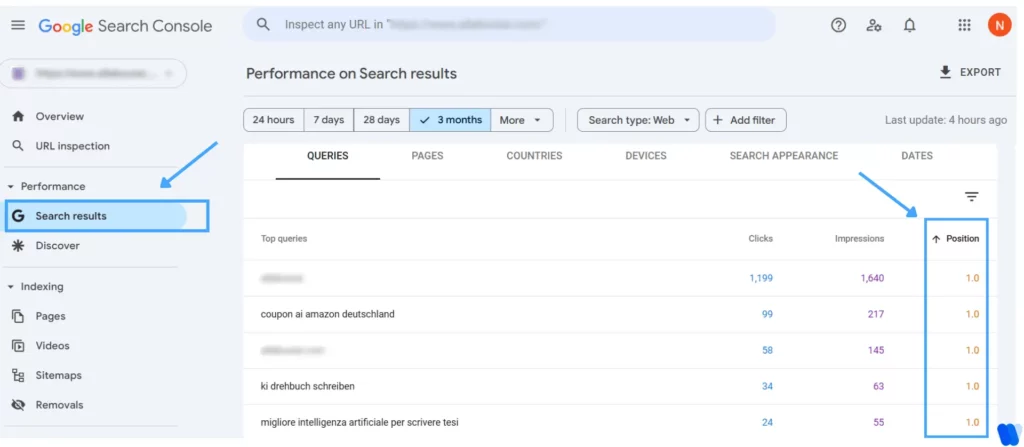
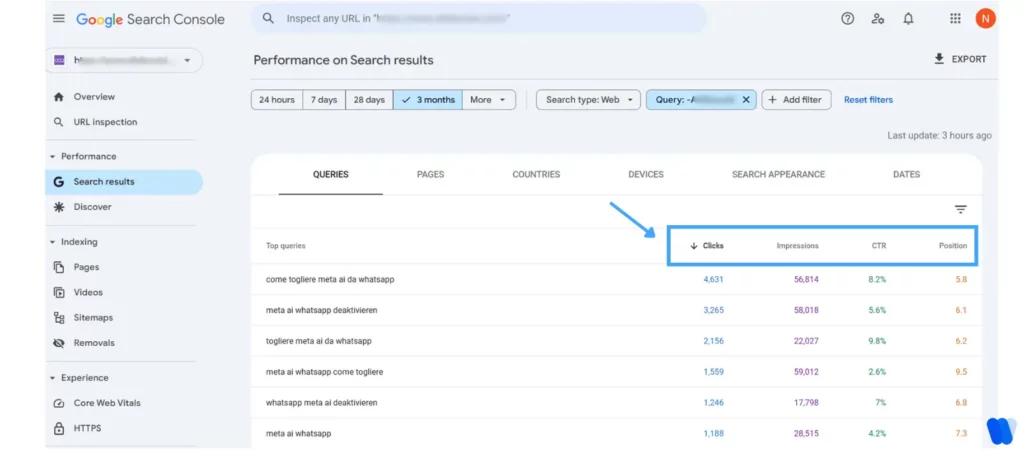
You can track keyword rankings using Google Search Console:
- Go to Google Search Console.
- Click on Performance > Search results.
- Scroll down to the Queries table.
- You’ll see the keywords your site ranks for, with columns like Clicks, Impressions, CTR, and Average Position. These are your top metrics to measure SEO ranking.
Don’t forget to include supporting keywords through the KIVA Keyword LSI feature, which automatically surfaces semantically related terms from Google and Bing to strengthen topical depth and semantic alignment in your content.
Pro Tip: Sort by “Average Position” to find which keywords are ranking on pages 2–3. These are great opportunities to update content and boost visibility.
4. Average CTR
Want to know if your headlines, meta tags, and overall on-page SEO are working? Average CTR (Click-Through Rate) tells you how often users click on your site when it appears in search.
CTR Formula:
CTR = (Clicks ÷ Impressions) × 100
Example: If your page showed up in Google 1,000 times (impressions) and 75 people clicked on it (clicks), your CTR would be:
(75 ÷ 1,000) × 100 = 7.5%
A high CTR means your title and meta description are doing their job and making people want to visit your site. A low CTR usually signals weak headlines or unappealing search snippets—even if your rankings are solid.
Improving CTR is one of the fastest ways to get more traffic without changing your rankings. But as AI-driven results reshape what users see (and sometimes reduce clicks), pairing Search Console data with an AI Overviews Tracker can help you understand whether visibility is shifting into AI-generated summaries—even when traditional CTR looks flat.
With the KIVA People Also Ask feature, you can target PAA boxes by generating succinct, query-aligned answers that boost visibility and click-through rates—even without holding the top spot.
Higher CTR = more clicks from existing impressions, better performance, and a stronger signal to search engines that your content is relevant.
Why Average CTR Matters in SEO
Average CTR reveals how compelling your content appears in search results. It bridges the gap between ranking and engagement—because what’s the point of ranking on page one if no one’s clicking? Tracking CTR helps you fine-tune titles and descriptions to boost real traffic, not just visibility.
How to Track Average CTR:
The easiest way to track average CTR is with Google Search Console (GSC):
- Go to Google Search Console.
- Click on Performance > Search Results.
- At the top, make sure “Average CTR” is checked.
- Scroll down to see CTR by query, page, country, or device.
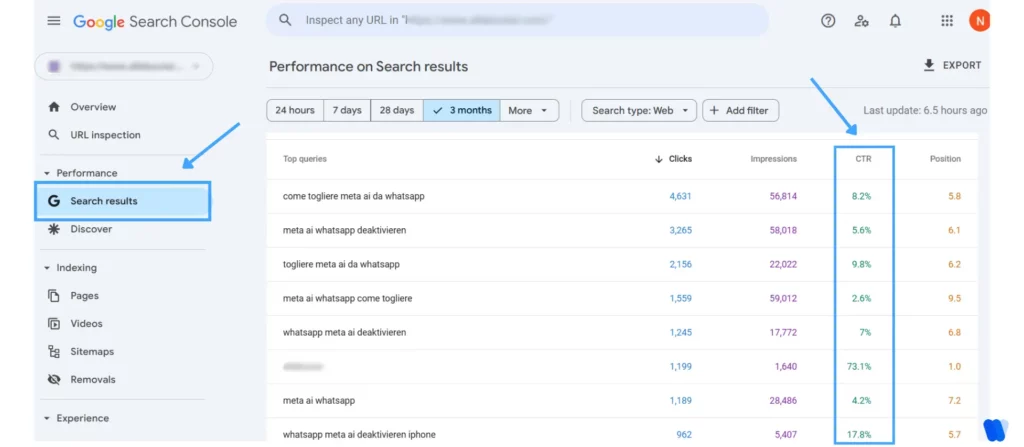
Pro Tip: Sort your results by impressions to find high-impression, low-CTR pages—these are your best opportunities for quick wins with title/meta tweaks.
However, with the rise of zero-click searches, users often find answers directly on the results page without clicking anything—making it even more important to optimize for visibility, not just rankings.
5. Traffic Value
Not all traffic is created equal. Traffic value helps you understand how much your organic traffic would cost if you had to pay for it through ads. In simple terms, it estimates the monetary worth of your rankings based on keyword CPC (cost per click) and search volume.
This metric reveals just how much value SEO is delivering to your business—especially compared to paid campaigns. A high traffic value indicates that your content is ranking for high-intent, high-CPC keywords that drive serious business results.
Why Traffic Value Matters
Traffic value puts a price tag on your rankings. It helps justify your SEO efforts and shows stakeholders how much money you’re saving by ranking organically instead of paying for ads.
Higher traffic value = stronger ROI, more justification for SEO investment, and a clearer business case for your content strategy.
It’s one of the clearest ways to quantify ROI from SEO without needing exact revenue figures.
How to Track Traffic Value:
Currently, Google Search Console doesn’t directly show traffic value, but here’s how you can calculate it manually:
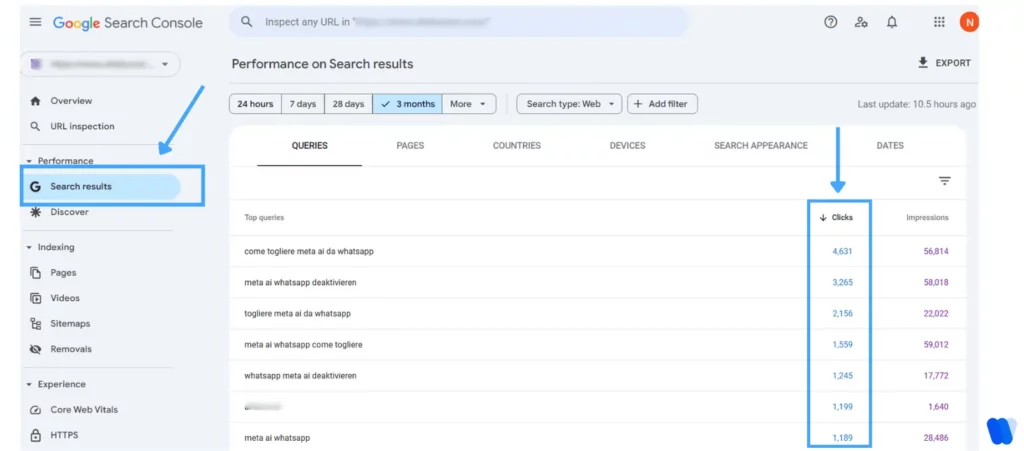
- Identify Top-Performing Pages
In GSC, go to Performance > Search Results, and export your top queries and pages.
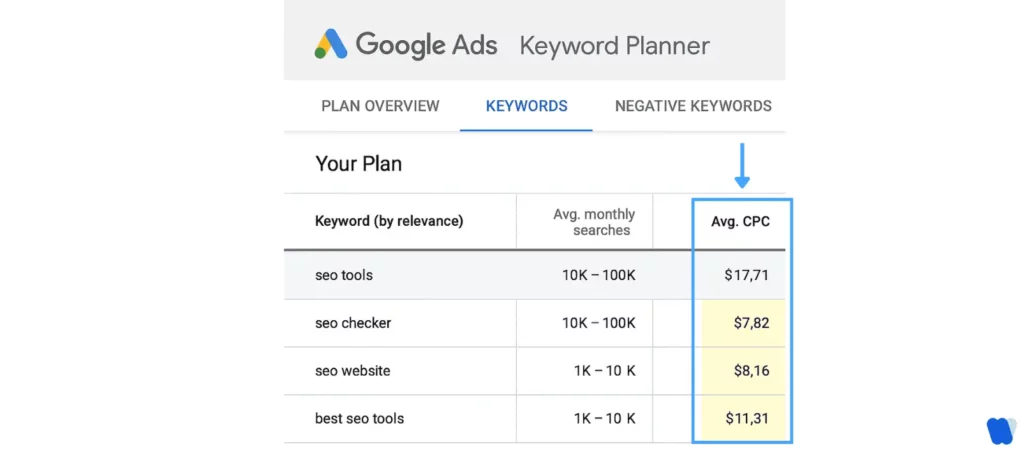
- Pull CPC Data
Use tools like Google Ads Keyword Planner to find the average CPC for each keyword.
- Estimate Traffic Value
Formula:
Traffic Value = (Estimated Monthly Organic Clicks) × (Average CPC)
Pro Tip: Even if your site doesn’t sell anything directly, traffic value gives you a way to benchmark the effectiveness of your SEO—especially when presenting results to stakeholders. It shows what you’re saving by not having to pay for that traffic.
6. Customer Lifetime Value (CLV)
SEO doesn’t just bring one-time clicks—it brings long-term relationships. Customer Lifetime Value (CLV) tells you how much revenue a single customer is expected to generate over their entire relationship with your business.
Why does CLV matter in SEO? Because not all conversions are equal. Someone who discovers you through a high-intent keyword and becomes a repeat buyer is way more valuable than someone who bounces after one visit. CLV gives context to your SEO performance—it connects traffic and leads to real, long-term revenue.
When paired with your acquisition cost (like what you spend on SEO tools or freelancers), CLV helps you calculate true SEO profitability.
Why CLV Matters in SEO
Not all conversions are created equal. A visitor who finds your site through high-intent search terms and becomes a repeat customer provides far more value. CLV connects your SEO traffic to long-term business impact—not just short-term clicks.
High CLV = long-term ROI. When SEO drives loyal customers, it pays off exponentially.
How to Track Customer Lifetime Value:
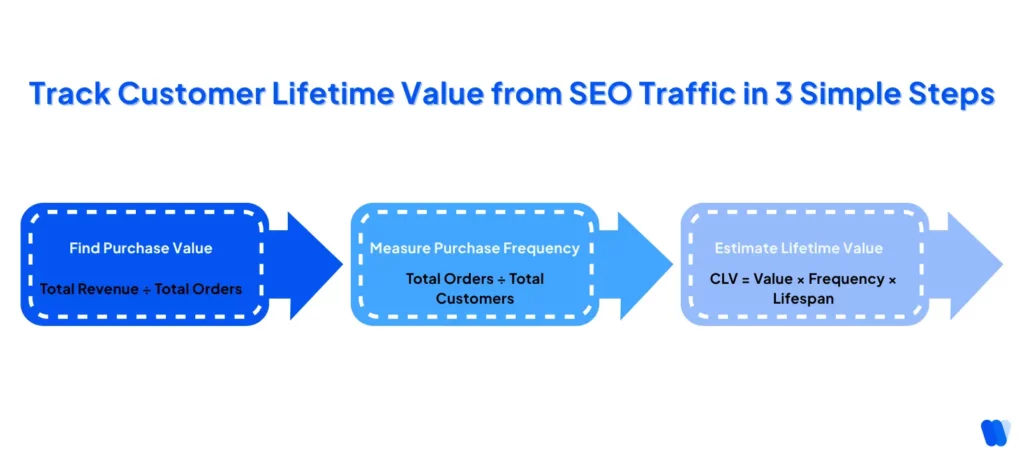
To get a basic view of CLV from your SEO traffic:
- Determine Average Purchase Value
Total revenue ÷ number of purchases. - Calculate Purchase Frequency
Total number of purchases ÷ number of customers. - Multiply for CLV
CLV = Average Purchase Value × Purchase Frequency × Average Customer Lifespan. - Segment by Channel (Optional)
In GA4, go to Reports > Acquisition > Traffic acquisition, and filter for Organic Search. Tie conversion data to customer records (using your CRM or eCommerce platform) to estimate CLV from SEO-driven customers.
Pro Tip: If SEO is driving leads that stick around, CLV gives you the clearest view of long-term return, not just short-term wins. It’s one of the most strategic SEO metrics you can track—especially if you want to justify ongoing investment.
7. ROI
All the rankings, traffic, and engagement in the world don’t matter if they’re not generating results. SEO ROI helps you understand the actual return you’re getting for the time, money, and effort spent on search optimization.
But traditional ROI metrics only tell half the story—GEO KPIs help you measure visibility and influence within AI-generated responses, not just rankings.
Here’s a deeper dive into how AI search engines surface content differently, and why adapting your ROI framework is key in 2025 and beyond.
It’s the ultimate proof of SEO success—showing whether your strategy is generating revenue, leads, or conversions that justify your investment.
SEO ROI Formula:
ROI = (SEO Revenue – SEO Cost) ÷ SEO Cost × 100
Example:
If you earned $10,000 in revenue from organic traffic and spent $2,000 on SEO efforts:
ROI = ($10,000 – $2,000) ÷ $2,000 × 100 = 400%
Why SEO ROI Matters
This is the metric that speaks to stakeholders, executives, and finance teams. It connects SEO performance directly to revenue and profit, making your case for continued investment in organic growth.
High ROI = SEO isn’t just working—it’s outperforming paid channels.
How to Track SEO ROI:
Yes, you can track SEO ROI—here’s how:
- Use GA4 to set up conversion events tied to revenue-generating actions.
- Pull cost data from your SEO tools, freelancer or consultant fees, and time investment.
- Compare revenue attributed to organic search vs. total cost.
Pro Tip: If you run an e-commerce site, enable Enhanced eCommerce in GA4 to automatically track product-level revenue from organic traffic.
With Google’s shift toward AI-powered search experiences, tracking traditional SEO metrics alone isn’t enough. Platforms now blend GA4 insights with AI search visibility platforms for agencies to measure visibility within AI-generated answers, LLM query associations, and zero-click results.
These tools help teams move beyond simple rankings—quantifying how often their content is cited, summarized, or surfaced in AI-driven search experiences, giving a clearer picture of true organic ROI in 2025 and beyond.
8. Brand vs. Non-Brand Visibility
When people search your brand name, that’s a win—but it’s also expected.
To go beyond traditional SEO metrics, many marketers now track Share of Search—an underrated metric that shows how often your brand is searched compared to competitors, offering deeper insights into brand demand and visibility.
What really shows SEO performance is how often your site appears for non-branded searches—the terms people use when they don’t know who you are yet.
Brand visibility tells you how well-known your name is in search, while non-brand visibility reveals how effectively you’re attracting new audiences through informational or product-related keywords.
A balanced SEO strategy grows both. If all your traffic comes from branded terms, you’re likely missing out on new customer acquisition. Monitoring both helps you align SEO efforts with brand awareness and demand generation.
Why Brand vs. Non-Brand Visibility Matters
A strong non-branded presence means you’re pulling in new users who’ve never heard of you before. That’s critical for expanding reach and scaling organic growth.
Balanced growth across both branded and non-branded keywords = brand authority + demand capture.
How to Track Brand vs. Non-Brand Visibility:
You can measure this in Google Search Console:
- Go to Performance > Search Results.
- Click + New filter → Query.
- Use “Queries containing” to filter branded searches, then repeat with “Queries not containing” to see non-branded performance.
Pro Tip: If branded clicks far outweigh non-branded ones, it may be time to optimize more top-of-funnel content targeting informational or problem-solving queries.
9. Backlinks
Backlinks are the digital “votes of confidence” from other websites. When another site links to yours, it’s like saying: “This content is trustworthy.”
The more quality backlinks you have, the more credible your site appears in the eyes of search engines. But not all backlinks are created equal. A few links from reputable, high-authority sites can do more for your SEO than dozens from random directories or spammy blogs.
Why Backlinks Matter
Backlinks are a crucial part of search engine ranking factors, signaling authority, trustworthiness, and content relevance.
As one of Google’s top ranking signals, they help your content get discovered more quickly and improve its chances of ranking higher.
Authoritative backlinks = better rankings, stronger domain authority, and long-term SEO gains.
If you’re trying to turn backlinks into measurable authority gains (not just “more links”), Domain Authority Tips walks through what quality + relevance actually mean.
How to Track Backlinks:
You can check backlinks in Google Search Console:
- Log in to GSC.
- Click Links in the sidebar.
- Check Top linked pages to see which content is earning backlinks.
- Review Top linking sites and Top linking text.
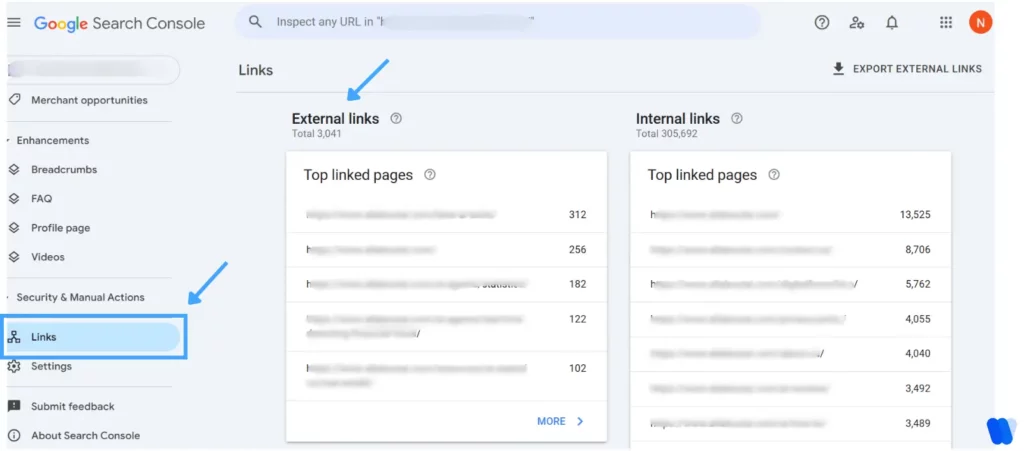
Pro Tip: Prioritize backlinks from pages that are topically relevant. Contextual in-content links carry much more weight than sidebar or footer links.
Which backlink analytics metrics actually matter when picking low-competition keywords for a startup site?
When targeting low-competition keywords for a startup website, it’s important to evaluate backlink-related metrics to understand the true level of difficulty. The following indicators help assess competitiveness:
Domain Authority (DA) or Domain Rating (DR):
These scores, provided by platforms like Moz (DA) and Ahrefs (DR), estimate how likely a site is to rank in search engines. Higher values point to stronger authority. If the top-ranking pages for a keyword have elevated DA/DR, the keyword is more competitive. Lower scores often highlight easier opportunities for newer websites.
Referring Domains:
This measures how many unique websites link back to a given site. More referring domains usually indicate a stronger backlink profile. Reviewing the referring domains of pages currently ranking for your target keyword gives insight into the level of effort required to compete.
Backlink Quality:
Quantity alone isn’t enough—link quality matters most. Assess whether competitors’ backlinks come from authoritative and relevant sources. A few high-quality links often outweigh many weak ones. Tools like SEMrush or Ahrefs can help assess backlink trustworthiness.
Anchor Text Distribution:
Look at the anchor texts used in competitors’ backlinks. A varied and natural anchor profile is a positive sign, while overly optimized anchors may suggest manipulative tactics—something search engines tend to penalize.
Link Growth Rate:
Track how quickly competitors are adding new backlinks. A fast growth rate may reflect aggressive link-building strategies. Knowing this helps you estimate how consistently you’ll need to earn links to stay competitive.
Relevance of Linking Domains:
Backlinks from industry-related sites carry far more weight than unrelated ones. Reviewing the topical relevance of domains linking to your competitors will reveal the overall quality of their backlink profile.
By carefully analyzing these backlink metrics, you can pinpoint low-competition keywords that represent realistic and valuable ranking opportunities for your startup site.
10. Referring Domains
While backlinks show how many times your site is linked, referring domains show how many unique websites link to you.
Getting 50 links from one site doesn’t equal 50 domains—it equals 1. But getting 1 link each from 50 sites is far more powerful. The broader your referring domain profile, the more natural and authoritative it looks.
Why Referring Domains Matter
Search engines weigh diversity heavily. A strong number of referring domains tells Google: “Many different sites trust this content.”
More referring domains = higher authority, better rankings, and improved chances to rank for competitive terms.
How to Track Referring Domains:
In Google Search Console:
- Go to Links.
- Scroll to Top linking sites.
- Click “More” to expand and export the full list.

Pro Tip: Don’t only chase big sites. A mix of mid-tier blogs, niche authorities, and relevant directories creates a more natural profile.
11. Core Web Vitals
Core Web Vitals measure page experience—how fast it loads, how interactive it feels, and whether it’s stable during load.
Google considers these metrics in rankings, meaning poor performance can directly hurt visibility.
Core Web Vitals include:
- LCP (Largest Contentful Paint): Main content load time (aim < 2.5s).
- FID (First Input Delay): Time before users can interact (aim < 100ms).
- CLS (Cumulative Layout Shift): Layout stability (aim < 0.1).
Why Core Web Vitals Matter
Google rewards sites that deliver smooth, fast, stable experiences. Strong Web Vitals can help you outrank competitors with weaker performance.
Better page experience = higher engagement and stronger SEO rankings.
How to Track Core Web Vitals:
In Google Search Console:
- Go to Experience > Core Web Vitals.
- Check separate reports for Mobile and Desktop.
- Review URLs rated as Good, Needs Improvement, or Poor.


12. Website Health Score
Your website health score is like a technical SEO report card. It summarizes crawlability, indexability, speed, broken links, duplicate content, and more.
A high score means search engines can access and rank your content easily. A low score signals issues that may block rankings, no matter how good your content is.
Why Website Health Score Matters
Even strong content underperforms if technical SEO issues are not resolved. A healthy score ensures search engines can crawl, index, and understand your pages.
High health score = better crawlability, fewer errors, stronger SEO performance.
How to Track Website Health Score:
GSC doesn’t provide a single health score, but SEO audit tools do. They check for:
- Crawl errors & broken links
- Slow load times
- Duplicate content
- Redirect issues
- Indexing problems
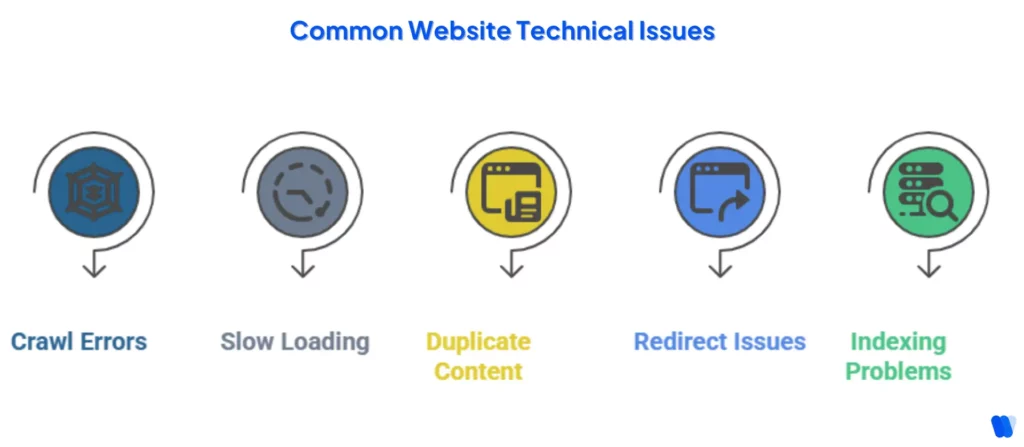
Most tools assign a score (0–100). Higher = strong SEO health, lower = critical issues.
13. Engagement Time
Engagement time measures how long users actively interact with your site—scrolling, clicking, or reading. Unlike “session duration,” GA4’s engagement time reflects true user interaction.
Strong engagement signals content quality to both you and search engines.
Why Engagement Time Matters
If users spend time engaging, your content is valuable. If they bounce quickly, it suggests weak relevance.
Higher engagement = better user signals = stronger SEO credibility.
How to Track Engagement Time:
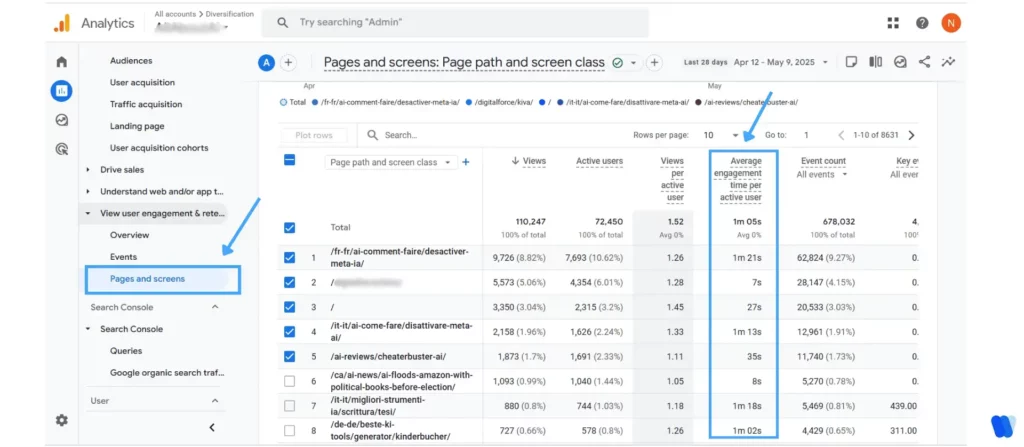
In GA4:
- Go to Reports > Engagement > Pages and Screens.
- Check the Average Engagement Time column.
- Review Engaged Sessions, Engagement Rate, and bounce alternatives.
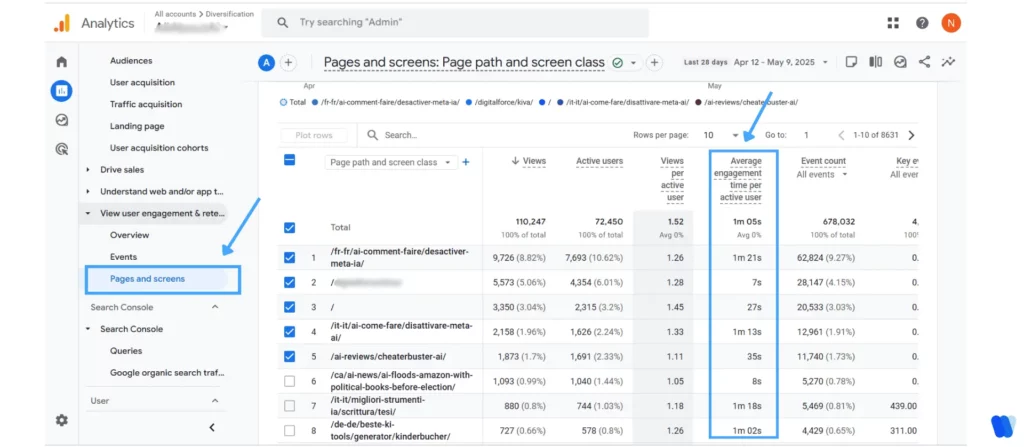
Pro Tip: Sort by lowest engagement time to spot weak content, or highest to identify what’s working best.
14. Number of Indexed Pages
Is your content even showing up on Google? Tracking the number of indexed pages tells you what’s visible to search engines—and what’s stuck in the dark.
Indexing is how Google stores your web pages in its database. If a page isn’t indexed, it won’t appear in search results—no matter how good your content is. That’s why this metric is crucial when learning how to measure SEO success.
Tracking the number of indexed pages helps you make sure important content is discoverable, and also alerts you to technical issues like crawl blocks or accidental noindex tags.
Why Indexed Pages Matter
Indexing is the first step toward search visibility. The more valuable pages you have indexed, the more opportunities you create for traffic and rankings.
More important pages indexed = higher chances of ranking and attracting organic traffic.
Fewer indexed pages may mean technical issues or low-value content.
How to Track Indexed Pages:
You can find out the number of indexed pages by following these steps:
- Open Google Search Console.
- Go to Indexing > Pages.
- You’ll see a breakdown like:
- Indexed
- Not indexed (with reasons like “Discovered – currently not indexed” or “Crawled – not indexed”)
- Excluded by ‘noindex’ tag
This falls under technical SEO tracking—don’t skip it. GSC gives detailed breakdowns about indexing pages.
15. Index Coverage Errors
Index Coverage Errors mean Google can’t access your content. That’s a major issue in your SEO performance metrics.
Even if your site has great content, index coverage errors can block it from showing up in search results. These errors happen when Google tries to crawl or index a page but runs into a problem—like broken links, redirect loops, or restricted access.
Tracking these issues helps you spot and fix technical problems before they start hurting your rankings and visibility. One common issue is duplicate content, which you can fix using a canonical tag.
Think of it like this: if Google can’t access or store a page properly, it’s almost like the page doesn’t exist to search engines.
Why Index Coverage Errors Matter
If a page isn’t indexable, it may as well not exist in Google’s eyes. Fixing coverage errors ensures that valuable content doesn’t stay hidden.
Indexability is a prerequisite for appearing in SERPs, making it essential to address these errors proactively.
Fewer errors = better crawlability, higher visibility, and stronger technical SEO health.
How to Track Index Coverage Errors:
You can find out index coverage errors by using Google Search Console:
- Log in to Google Search Console.
- In the left menu, click on Indexing > Pages.
- Scroll down to see a list of issues under “Why pages aren’t indexed”, including:
- Crawled – currently not indexed
- Alternate page with proper canonical tag
- Blocked by robots.txt
- Soft 404
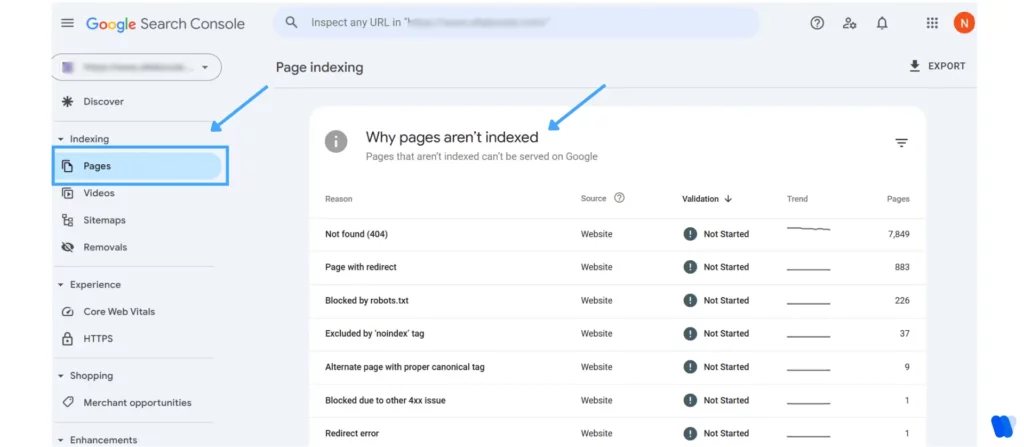
Pro Tip: Click on each error type to see which specific URLs are affected. Google also provides tips on how to fix them—super useful for troubleshooting quickly.
Quick Reminder:
Not all “Not Indexed” pages are bad. Some are intentionally excluded (e.g., thank-you pages or admin pages). The goal here is to fix errors on pages that should be indexed, not everything listed.
How Do Changes in SEO Metrics Affect Search Engine Rankings?
Changes in SEO metrics often correlate strongly with search engine rankings, though the relationship is typically correlational rather than directly causal. Understanding these correlations helps you identify which areas of your SEO strategy most influence visibility and performance.
Did you know?
1. Backlinks and Domain Authority
Backlinks remain one of the strongest indicators of ranking performance. Studies show that top-ranking pages on Google have 3.8 times more backlinks than pages in positions 2–10. A higher domain authority, built through quality backlinks, often correlates with better rankings across competitive keywords.
2. Content Relevance and Quality
Content depth and topical relevance play a key role in rankings. High “content-grade” pages that comprehensively cover topics tend to rank higher. Research indicates a 0.47 correlation coefficient between content relevance and ranking, showing its importance alongside other SEO factors.
3. User Engagement Metrics
Metrics such as click-through rate (CTR), bounce rate, and time on site reflect how users interact with your content. Higher engagement often aligns with higher rankings. For example, an increase of just 3 seconds in time on site can correlate with moving up one position in Google results.
4. Technical SEO Factors
Technical SEO ensures your site performs well for users and search engines. While page speed and mobile optimization are vital for user experience, studies suggest their direct correlation with rankings is modest. However, technical issues can prevent pages from being indexed, indirectly affecting rankings.
5. Keyword Usage
Keywords still matter, but their placement is less influential than before. Recent analyses reveal minimal correlation between including keywords in title tags and achieving first-page rankings, emphasizing the importance of context and relevance over exact keyword matching.
6. Traffic and Engagement
Higher website traffic can correlate with improved rankings, as it signals relevance and popularity. However, this relationship is cyclical—higher rankings attract more traffic, and greater traffic boosts engagement signals that reinforce SEO strength.
7. Correlation vs. Causation
It’s crucial to remember that correlation doesn’t imply causation. While improving metrics like backlinks or dwell time may align with higher rankings, search algorithms evaluate hundreds of factors. A balanced strategy that integrates technical SEO, content, and engagement signals yields the best results.
How Can I Measure the Effectiveness of My SEO Strategy?
To measure how well your SEO strategy is performing, it’s essential to track specific metrics that show your website’s visibility, engagement, and overall performance in search engines. Below are the key SEO metrics to monitor for accurate assessment.
1. Organic Traffic
Organic traffic measures the number of visitors coming to your site from unpaid search results. A consistent increase indicates that your SEO strategy is boosting visibility and attracting the right audience.
2. Keyword Rankings
Tracking keyword rankings helps you understand where your target terms stand in search results. Improved rankings signal effective optimization and content relevance for your audience.
3. Click-Through Rate (CTR)
CTR shows the percentage of people clicking on your site after seeing it in search results. A higher CTR means your titles and meta descriptions are compelling and relevant to user intent.
4. Bounce Rate
Measures how many visitors leave after viewing one page. A lower bounce rate suggests that users are finding what they need and engaging with more content on your site.
5. Conversion Rate
Tracks how many users complete desired actions—such as purchases, sign-ups, or downloads. High conversion rates indicate your content is effectively driving results and meeting business goals.
6. Backlink Profile
Evaluates the number and quality of websites linking to yours. Strong backlinks from reputable sites build authority and improve your overall search rankings.
7. Page Load Speed
Faster-loading pages lead to better user experience and improved SEO performance. Tools like Google PageSpeed Insights can help identify elements slowing down your site.
8. Mobile Usability
With most searches happening on mobile devices, ensuring your site is mobile-friendly is crucial. Regular mobile usability checks help you maintain accessibility and performance across devices.
In summary: Monitoring these SEO metrics helps you understand what’s working, where to improve, and how to refine your strategy for stronger search visibility, engagement, and conversions.
Tracking SEO metrics helps you measure progress, identify issues, and improve your website’s search performance. Here are some of the best tools to monitor and analyze your SEO metrics effectively:
1. Semrush
An all-in-one SEO platform that provides keyword research, site audits, backlink tracking, and competitor analysis. Semrush delivers detailed insights into your site’s performance and helps refine your SEO strategy.
2. Ahrefs
Renowned for its powerful backlink analysis and keyword tracking features, Ahrefs allows you to monitor rankings, identify content opportunities, and track competitors for a complete SEO overview.
3. Moz Pro
A comprehensive SEO suite offering keyword research, link analysis, and rank tracking. Moz Pro helps you monitor your site’s authority and discover optimization opportunities for better rankings.
4. SE Ranking
This all-in-one SEO platform includes rank tracking, keyword research, and website auditing tools. Its SEO monitoring feature allows you to track website changes and prevent optimization issues before they impact performance.
5. Google PageSpeed Insights
A free tool by Google that analyzes page performance on both mobile and desktop. It provides actionable recommendations to enhance speed, improve user experience, and boost search visibility.
In summary: Using these tools allows you to monitor critical SEO metrics, evaluate performance trends, and implement data-driven improvements to enhance your website’s ranking and visibility.
Vanity vs. Actionable Metrics: Do You Know the Difference?
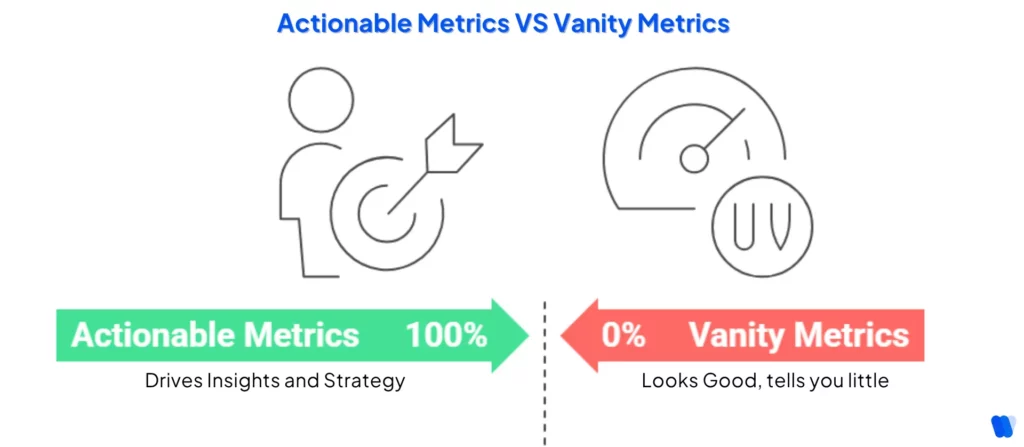
Not all metrics are created equal.
Some look flashy on reports and dashboards but offer little insight into what’s actually driving growth. These are vanity metrics—the kind that make things look good on the surface but don’t help you make smarter decisions.
On the flip side, actionable metrics are the SEO success metrics tied to user behavior and business goals. They tell you what’s working, what’s not, and what needs to change.
Metrics like engagement and conversion are easier to improve when you make AI-written content feel human—with tone, empathy, and real-world examples that AI often lacks by default.
In short:
• Vanity Metrics = Look good, tell you little
• Actionable Metrics = Drive insights and strategy
Next time you review your SEO report, ask: “Does this number help me take action?” If not, it might just be fluff.
Are You Obsessing Over These 2 Vanity SEO Metrics?
Some SEO metrics look useful but mislead more than they inform. Bounce rate and exit rate are two you might be overvaluing.
1. Bounce rate
Bounce rate often gets too much attention—but it doesn’t tell the full story. Just because someone leaves after viewing one page doesn’t mean they had a bad experience.
Without context like time on page or user intent, it’s just a surface-level stat that can easily mislead.
2. Exit rate
Exit rate tells you the percentage of users who leave your site from a specific page—but every session has to end somewhere. Obsessing over this number without considering page purpose (like thank-you or contact pages) can lead to wrong conclusions.
Every user exits eventually. Alone, it’s noise—not a useful SEO reporting metric.
Why Is Organic Traffic Important as an SEO Metric?
Organic traffic—visitors who arrive at your website through unpaid search results—is one of the most critical metrics in Search Engine Optimization (SEO). It reflects your site’s visibility, relevance, and ability to attract users actively searching for your content or services.
1. Indicator of SEO Success
A consistent rise in organic traffic shows that your SEO strategies are working effectively. It signals better visibility in search engine results and improved content alignment with user intent.
2. Cost-Effective Growth
Unlike paid campaigns, organic traffic is free and sustainable. Once your content ranks well, it continues to attract visitors without recurring advertising costs—offering a higher return on investment over time.
3. Quality Audience Engagement
Users who find your site through search are often intent-driven. They’re actively seeking information or solutions, which means organic traffic generally leads to higher engagement and stronger conversion potential.
4. Long-Term SEO Benefits
High-quality, optimized content can generate consistent organic traffic for months or even years. This longevity makes organic growth a foundation for sustainable Content Marketing Agency success.
How Should You Report SEO Metrics for Maximum Clarity?
Tracking the right SEO metrics is only half the battle—how you report them makes all the difference. Whether you’re sharing results with a client, your boss, or your own team, clear and focused reporting ensures that your data leads to better decisions, not just bigger dashboards.
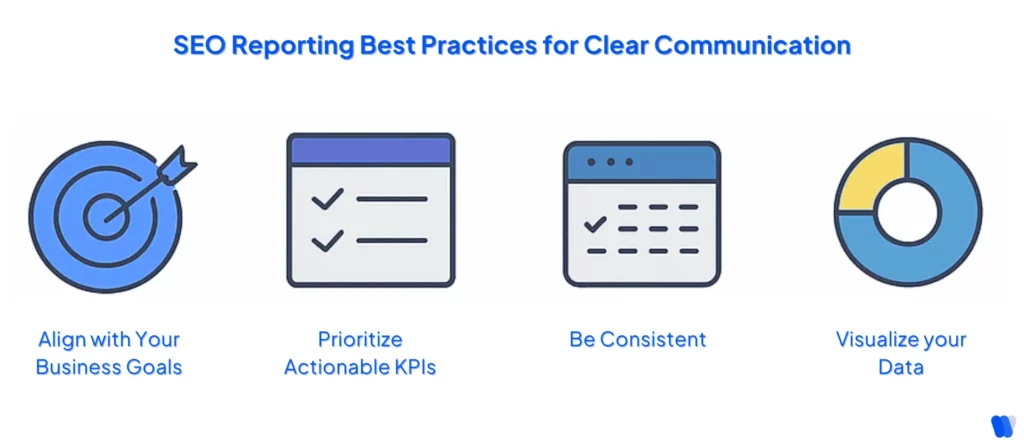
Here are the key best practices to follow:
- Focus on business goals, not just traffic: Tie your SEO metrics to conversions, revenue, or lead generation—whatever matters most to the business.
- Include only relevant, actionable metrics: Leave out vanity stats and highlight KPIs that clearly show progress or areas that need improvement.
- Report consistently: Choose a regular reporting schedule (weekly, monthly, or quarterly) and stick to it. Consistency builds trust.
- Use visualizations: Charts, graphs, and visuals make data easier to digest and help stakeholders spot trends quickly.
- Segment your data: Break down performance by channel, landing page, or location to uncover deeper insights and hidden opportunities.
- Compare against past performance: Show growth or decline over time by comparing metrics to previous periods or benchmarks—not just standalone numbers.
- Add context and narrative: Don’t just share numbers—explain what they mean, why they changed, and what actions should follow. Including metrics tied to your LLM content creation strategy adds depth and future-proofs your reporting.
- Highlight both wins and gaps: Celebrate what’s working, but also point out what needs fixing. A balanced report builds credibility.
- Include clear next steps: Finish each report with a short “what’s next” section to align your SEO insights with strategic actions.
How often should Startups review their SEO dashboard metrics?
The right frequency for reviewing SEO dashboard metrics varies based on a startup’s goals, available resources, and how fast the industry moves. Still, some best-practice timelines can help set a solid routine:
Daily Reviews (Optional):
Purpose: Catch urgent issues that may disrupt performance.
Metrics to Track:
- Website uptime and major site errors (e.g., DNS failures, 404s).
- Sharp changes in rankings for critical keywords or pages.
Considerations: Daily check-ins are most useful for large or complex websites and during aggressive SEO campaigns.
Weekly Reviews:
Purpose: Spot short-term shifts and make quick adjustments.
Metrics to Track:
- Keyword movement and visibility shifts.
- New and lost backlinks.
- Organic traffic segmented by landing page.
Considerations: Weekly monitoring offers agility without the noise of daily fluctuations.
Monthly Reviews:
Purpose: Gain a strategic overview and evaluate progress against goals.
Metrics to Track:
- Overall SEO performance (traffic, conversions, rankings, bounce rates).
- Technical audits (page speed, indexing status, mobile usability).
- ROI-focused metrics such as goal completions and revenue attribution.
Considerations: Monthly reports highlight long-term trends and show whether strategies are driving meaningful impact.
Tailoring the Review Schedule:
- Company Goals and Resources: Startups with robust SEO teams may prefer more frequent reviews, while leaner teams may benefit from focusing on monthly cycles.
- Industry Dynamics: Fast-changing or highly competitive markets may demand tighter monitoring to stay ahead.
- Stakeholder Needs: Different audiences require different cadences—executives may prefer quarterly summaries, while SEO teams might need weekly detail.
In summary: There’s no universal schedule that works for every startup, but adopting a layered approach—daily for urgent technical checks, weekly for tactical adjustments, and monthly for strategic insight—ensures SEO performance is tracked effectively and consistently.
Read More Articles
FAQs
Now You Know What to Track—Time to Put It to Work
Knowing which SEO metrics matter is only the beginning. The real impact comes when you track consistently, analyze smartly, and act decisively.
No more chasing vanity numbers. You’ve got a list of the most important SEO metrics 2025. You know how to track SEO, measure success, and report like a pro.
So stop guessing. Start tracking. Use these metrics for SEO to drive better rankings, results, and revenue.