Have you ever noticed the same page on your website showing up with different URLs? Or maybe you’ve copied content to more than one page, only to find that your rankings took a hit? I’ve been there and I’ve learned that duplicate content can quietly hurt your SEO without you even realizing it.
Search engines get confused when they see multiple pages with the same or very similar content, which is one of the most common Technical SEO Issues websites face at scale. They don’t know which one to show in search results. That confusion can lead to lower rankings, wasted link value, and less visibility for your site.
That’s where canonical tags come in as part of a strong on-page SEO strategy. A canonical tag is a small piece of code you add to your page that says, “This is the main version of this content, please focus on this one.” It helps search engines pick the right page to show, and it keeps your SEO on track.
In this blog, I’ll explain what a canonical tag is, why it matters for your website’s SEO, and how to use it the right way. I’ll also go over common mistakes to avoid, real examples, and tips you can follow to make sure your content gets the attention it deserves.
Let’s get started and clear up the confusion, for you and for search engines.
What is a Canonical Tag?
A canonical tag, sometimes referred to as a canonical URL tag, is a small piece of HTML code that helps search engines understand which version of a page is the main one when there are multiple pages with similar or duplicate content, which is crucial for Search Engine Optimization (SEO).
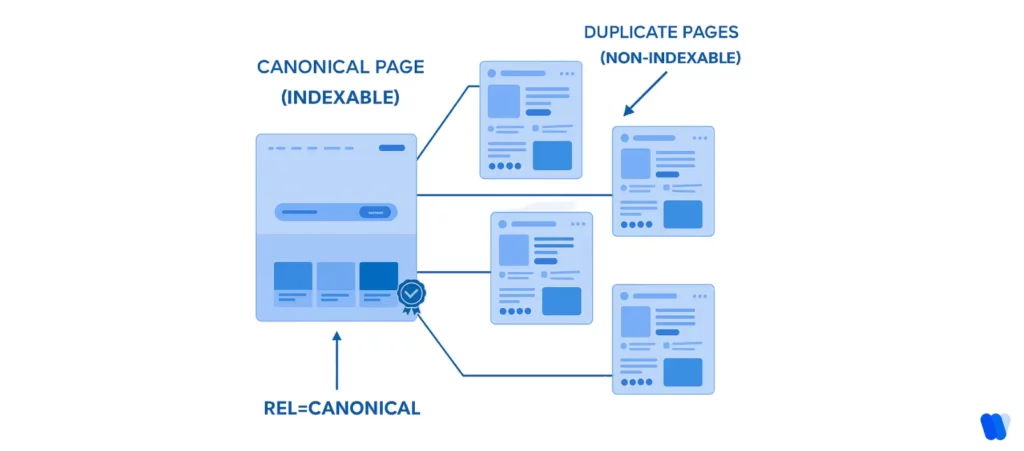
When I say “duplicate content,” I mean pages that look nearly the same but have different URLs. Like a product page with filters or blog posts that show up under different categories. Search engines don’t always know which one to rank, and that can hurt your SEO.
To fix that, you can use a canonical tag, often called a canonical link element, which looks like this:
<link rel=”canonical” href=”https://example.com/sample-page/” />
This tag tells search engines, “This is the page I want you to focus on. Treat this as the original.” It’s like pointing to the master copy of your content.
How Canonical Tag Works?
When a search engine like Google crawls your site and sees multiple versions of similar pages, it can get confused.
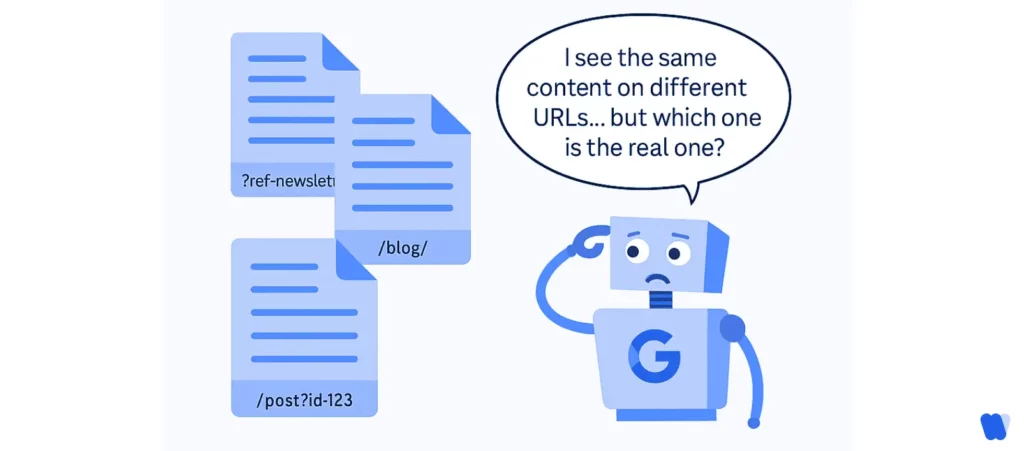
But if it finds a canonical tag, it will usually treat the page you link to as the preferred version, using it as a form of indexing control to ignore duplicates when crawling, indexing, and ranking.
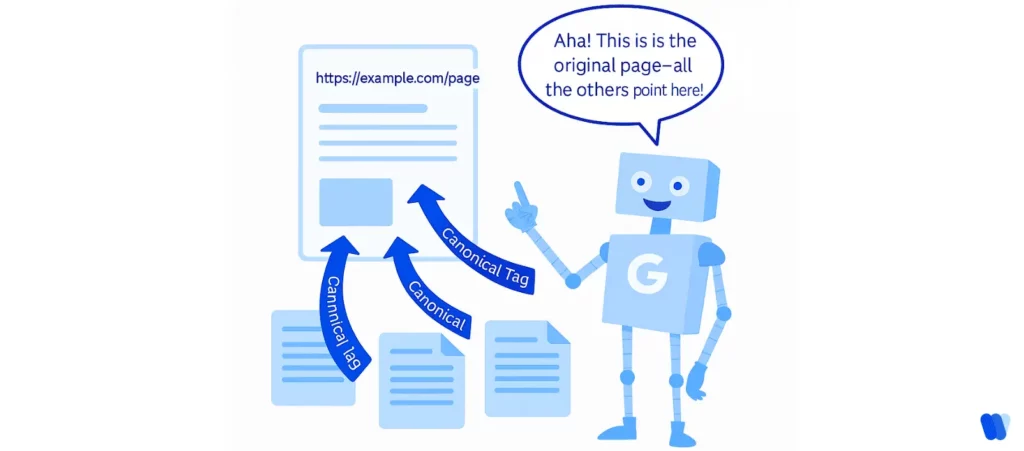
This helps you in three big ways:
- You keep all the ranking power in one place instead of spreading it across similar pages.
- You avoid being penalized for duplicate content.
- You make it easier for search engines to crawl and index your site correctly.
Canonical tags work best when they’re aligned with on page SEO factors, especially URL consistency and crawl signals.
In short, a canonical tag helps search engines stay focused on the content that matters most and makes sure your hard work doesn’t go unnoticed in search results.
Implementing canonicals is just one step in a larger SEO workflow—see the full playbook on our SEO hub page.
Why Canonical Tags are Important for SEO?
When I first learned about SEO, I didn’t realize how big of a problem duplicate content could be. It’s not always something obvious, sometimes it’s just a page that exists under a few different URLs. But to search engines, that creates confusion and can actually hurt your rankings.
Duplicate Content Can Confuse Search Engines
If you have the same or very similar content on multiple pages, search engines might not know which one to show in search results. This can lead to lower visibility, split ranking power, or even cause all versions to rank poorly.
That’s why canonical tags matter. They clear things up.
Canonical Tags Point to the Right Page
When I use a canonical tag, I’m basically telling Google, “This is the page I want you to index and show in search results.” It helps search engines skip over the duplicates and focus on the version I care about most.
This makes indexing more accurate and keeps your SEO strategy on track, especially when reviewed during a technical SEO audit.
They Help You Keep Your Link Power
Here’s something that many people miss: if different versions of your page get backlinks, search engines might spread the value across all of them. That waters down your authority.
By using a canonical tag, you combine all those signals into one place. That gives your main page more strength and aligns with important search engine ranking factors.
In short, canonical tags help protect your SEO by:
- Clearing up confusion around duplicate content
- Telling search engines exactly which page to index
- Pulling all link signals into one stronger version
It’s a small detail, but it makes a big difference.
Canonicalization vs. 301 Redirects – What’s the Difference?
Canonical tags and 301 redirects both help solve duplicate content problems, but they do it in different ways. Knowing which one to use and when can make a big difference in how search engines handle your pages.
Redirects Move Everything to a New Page
A 301 redirect is like forwarding your mail to a new address. When someone visits the old URL, they’re automatically taken to the new one. It tells both users and search engines, “This page has permanently moved.”
301 redirect is usually used when:
- Page is deleted or merged
- URLs are restructured or rebrand
- All visitors and SEO value needs to go to a new page

It’s a strong, clear signal and search engines will transfer most of the link authority to the new URL.
Canonical Tags Keep Pages Live but Guide Search Engines
A canonical tag works differently. It lets multiple similar pages stay live, but it tells search engines which one is the “main” version. This is one of the most common examples of canonical element usage.
I use canonical tags when:
- I have product pages with different URL parameters (like color or size)
- The same article appears under multiple categories
- I want to avoid duplicate content without changing the user experience
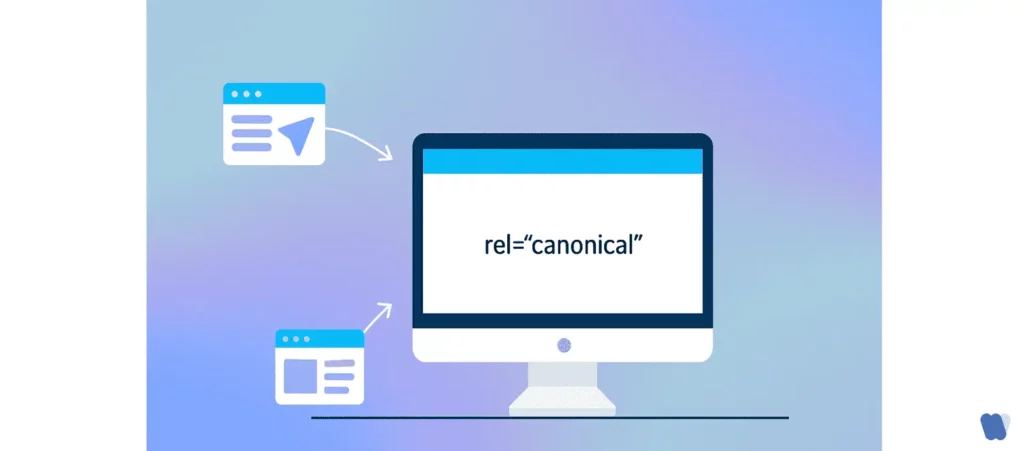
Unlike redirects, canonical tags don’t send users anywhere. They’re just a signal to search engines behind the scenes.
To sum it up:
- Use a 301 redirect when you want to send users and search engines to a new page.
- Use a canonical tag when you want to keep similar pages live but avoid SEO confusion.
Both tools are valuable, and choosing the right one can impact your SEO metrics significantly.
Common Scenarios Where Canonical Tags Are Essential
Canonical tags aren’t just for big, complex websites. They’re helpful in all kinds of everyday SEO situations. Over time, I’ve run into several cases where using a canonical tag made a real difference in how my content performed in search results.
Here are some of the most common places where canonical tags come in handy:
1. Duplicate Product Pages with Different Filters or Parameters
E-commerce sites often have multiple URLs that show the same product, just sorted or filtered differently. For example:
https://store.com/shoes?color=black
https://store.com/shoes?size=10
Even though the product is the same, these URLs create duplicate content. A canonical tag can point them all to the main product page, like:
<link rel=”canonical” href=”https://store.com/shoes” />
2. Blog Posts Listed Under Multiple Categories or Tags
When a blog post appears under several categories, it may end up with multiple URLs, such as:
https://site.com/marketing/seo-basics
https://site.com/blog/seo-basics
Without a canonical tag, search engines might treat them as separate pages in Search Engine Results Pages (SERPs), which can dilute visibility. To avoid this, one version should be selected as the primary URL and set as the canonical on the others.
3. Tracking URLs with UTM Parameters
Sometimes links are shared with tracking codes, like:
https://example.com/landing-page?utm_source=email&utm_campaign=spring
But the content is the same as:
https://example.com/landing-page
Using a canonical tag helps ensure that all the SEO value goes to the clean version of the URL.
4. Pagination
When blog posts or product listings are split into multiple pages (e.g., ?page=2, ?page=3), each one can appear to search engines as separate content. If the main content is on page 1, a canonical tag can be used on the paginated pages to point back to the original unless rel=”next” and rel=”prev” are being used to indicate a series.
5. Syndicated or Republished Content
If an article is published on one site and later republished on a partner site, search engines might not know which version is the original. In such cases, the republishing site should include a canonical tag pointing back to the original post to ensure proper SEO credit is given.
If your website creates different URLs that lead to similar or identical content, there’s a good chance canonical tags can help. They keep search engines focused on the right version of your content and prevent unnecessary SEO problems down the line.
How to Implement Canonical Tags Correctly
Adding a canonical tag isn’t complicated, but doing it the wrong way can create more problems than it solves. A little extra attention during setup, along with regular checks using a technical SEO checklist for agencies and an on-page SEO checklist, goes a long way toward ensuring search engines understand your content the way you want them to.
For larger sites with multiple templates, product variations, or syndicated content, technical SEO agency partners can standardize canonical rules before duplicate signals spread across the site.
Here’s how you can implement canonical tags the right way, whether you’re coding by hand or using a content management system (CMS).
1. Use the Proper HTML Format
The canonical tag, also known as a canonical HTML tag, goes in the <head> section of your page and looks like this:
<link rel=”canonical” href=”https://example.com/preferred-page/” />
This tells search engines that the current page should be treated as a copy of the URL in the href and that the linked page is the one that should be indexed.
Tip: Always use the full, absolute URL, including https:// or http://. Don’t use relative URLs like /page.
2. Add Canonical Tags in Your CMS
If you’re using WordPress, Shopify, Wix, or another platform, there are usually easier ways to manage canonical tags:
- WordPress (with SEO plugins):
Plugins like Yoast SEO or Rank Math automatically add self-referencing canonical tags to your pages and posts. You can also manually edit the canonical URL for each page if needed. - Shopify:
Shopify adds canonical tags by default to product and collection pages. You can customize them by editing your theme’s Liquid templates if necessary. - Other platforms:
Look for SEO settings or extensions that let you define the canonical URL for each page.
3. Set Canonicals in HTTP Headers (for PDFs or Non-HTML Content)
If you’re dealing with non-HTML files like PDFs, you can use the HTTP Link header to set the canonical version:
Link: <https://example.com/canonical-pdf-url.pdf>; rel=”canonical”
This tells search engines which file to prioritize, even if the user is downloading it directly.
4. Cross-Domain Canonical Tags
If your content is being republished on a partner website, ask them to include a canonical tag that points back to your original page:
<link rel=”canonical” href=”https://yourwebsite.com/original-article/” />
This ensures you get the SEO credit for the content.
5. Avoid Common Mistakes
To make sure your canonical tags actually help:
- Only use one canonical tag per page
- Don’t point the canonical tag to a non-related or irrelevant URL
- Avoid “canonical loops” where pages point to each other
- Don’t combine rel=canonical with noindex. It sends mixed signals
After adding canonical tags, it’s important to run a quick check using tools like Google Search Console to ensure they’re being picked up and applied correctly. A clean implementation helps keep the site organized, link equity focused, and SEO efforts on track.
Canonical Tag Mistakes to Avoid
Using canonical tags is a smart move for SEO but only if you use them correctly. I’ve made a few mistakes myself along the way, and I’ve seen others accidentally hurt their rankings just by misusing this one tag.
Here are some of the most common canonical tag mistakes and how to avoid them:
1. Pointing to the Wrong URL
This is one of the easiest (and most damaging) mistakes. If the canonical tag points to a different or unrelated page, search engines might index the wrong content or none at all.
What to do:
Double-check that your canonical tag links to the correct, intended version of the page. Don’t just copy and paste. Make sure the URL is accurate.
2. Missing Self-Referencing Canonical Tags
Even if your page is the only version, it’s still a good idea to include a self-referencing canonical tag. This tells search engines that the current page is the preferred one.
What to do:
Add a canonical tag on each page that points to itself, like:
<link rel=”canonical” href=”https://example.com/this-page/” />
It helps with consistency and prevents confusion later on if duplicates ever appear.
3. Using Multiple Canonical Tags on One Page
Sometimes, plugins, themes, or custom code can accidentally add more than one canonical tag. This sends mixed signals to search engines and may cause them to ignore all of them.
What not to do:
<link rel=”canonical” href=”https://example.com/page-1/” />
<link rel=”canonical” href=”https://example.com/page-2/” />
What to do:
Always make sure there’s only one canonical tag per page in the <head> section.
4. Creating Canonical Tag Loops or Chains
A canonical loop is when Page A points to Page B, but Page B points back to Page A. A canonical chain happens when Page A points to Page B, which points to Page C, and so on.
Both confuse search engines and dilute the signal.
What to do:
Avoid linking in circles or long chains. Point each canonical tag directly to the one preferred version of the content.
5. Combining Canonical Tags with “noindex”
Adding both a canonical tag and a noindex directive to the same page is like telling search engines, “This is the main version but also, don’t index it.” That sends mixed signals and could prevent important pages from being indexed.
What to do:
Use either a canonical tag or a noindex tag, depending on your goal but not both together on the same page, especially when managing what qualifies as AI-generated content.
6. Using Relative URLs Instead of Absolute URLs
While relative URLs might work in some cases, they can sometimes confuse search engines, especially across different domains or protocols.
What to do:
Always use full (absolute) URLs in your canonical tags:
<link rel=”canonical” href=”https://example.com/page/” />
Whenever changes are made to canonical tags, it’s a good practice to test everything using Google Search Console’s URL Inspection Tool or by running a crawl with Screaming Frog to ensure the setup is clean.
Avoiding these common mistakes helps ensure the full SEO benefits of canonical tags without accidentally sending the wrong signals to search engines.
How Canonical Tags Affect Crawl Budget and Link Equity
Canonical tags aren’t just about managing duplicate content. They also help search engines work more efficiently and ensure your most important pages get the SEO value they deserve.
Here’s how they impact crawl budget and link equity:
How Google Allocates Crawl Budget
Google uses something called a crawl budget basically, it decides how many pages on your site it will crawl within a given timeframe. The larger or more complex your website is, the more important this becomes.
Google takes into account factors like:
- How often your site updates
- How fast your server responds
- How many pages it thinks are important
If your site has hundreds or thousands of duplicate or similar pages, Google might waste its limited crawling time reviewing those instead of finding your newest or most valuable content.
Preventing Crawl Waste on Duplicates
This is where canonical tags play a key role. By using a canonical tag, you tell Google which version of a page is the one that matters. This helps prevent crawl waste by allowing search engines to skip crawling duplicates that don’t need to be indexed, one of the key visibility factors for generative engines.
Instead of wasting crawl budget on different versions of the same page (like ones with URL parameters, filtered views, or tracking tags), Google can focus on indexing your primary content.
Example:
You might have these three URLs showing the same content:
- example.com/shoes
- example.com/shoes?color=blue
- example.com/shoes?ref=email
A canonical tag on each variation pointing to example.com/shoes tells Google to focus on that version saving time and avoiding duplicate indexing.
Preserving Ranking Power with One Canonical Page
When people link to your website, those links carry ranking value (also called link equity). But if links are spread across multiple versions of the same page, that value gets split.
Canonical tags help fix this by telling search engines where all the credit should go. So instead of dividing authority between several duplicates, Google combines it and gives full SEO credit to the canonical (preferred) page.
Why it matters:
This consolidation strengthens your main page’s ability to rank higher, because it’s not competing against diluted versions of itself.
In short:
- Canonical tags help Google crawl smarter, not harder.
- They reduce unnecessary crawling of duplicate content.
- And they preserve your ranking power by combining link value in one place.
It’s a small step with a big SEO payoff.
What Are The SEO Best Practices for Canonical Tags?
Adding a canonical tag is one thing; doing it correctly and consistently is another.If you want to get the full SEO benefit, it’s important to follow the best practices for canonical tags in SEO that help search engines clearly understand your content.
Here are the tips I always follow when working with canonical tags:
Use Absolute URLs, Not Relative Ones
Always use the full URL in your canonical tag, including the https:// or http:// part.
Incorrect:
<link rel=”canonical” href=”/page/” />
Correct:
<link rel=”canonical” href=”https://example.com/page/” />
Absolute URLs are more reliable and easier for search engines to understand especially when dealing with different protocols or subdomains.
Add a Self-Referencing Canonical on Every Page
Even if your page doesn’t have any duplicates (yet), it’s good practice to add a self-referencing canonical tag. This ensures that if duplicates ever appear, Google already knows which version you prefer.
This should be treated as a standard part of publishing just like writing a meta description or title tag.
Only One Canonical Tag Per Page
Having more than one canonical tag on the same page can confuse search engines and cancel out the signal completely. This often happens when plugins or themes add a tag automatically and you manually add another.
Always double-check your code or use a crawler to spot duplicates.
Point to the Most Relevant, High-Quality Version
Don’t just point canonicals randomly. Make sure the page you’re referencing is the best, most complete version of the content. Ideally, it should be the version that:
- Attracts the most links
- Gets the most traffic
- Provides the best user experience
If the canonical page isn’t strong, search engines might ignore the tag lacking in structure, authority, or improving readability in AI content.
Pair Carefully with hreflang (If You Use It)
If your site targets multiple languages or regions, and you use hreflang tags, you need to be extra careful. Each version should have its own canonical tag pointing to itself not to another language or region version.
Example:
The English page should have a canonical tag pointing to the English version, and the Spanish version should point to itself as well.
Regularly Audit Your Canonical Tags
Things change, pages get moved, merged, or deleted. I recommend running regular SEO audits to check for:
- Canonical tags pointing to broken or redirected URLs
- Chains or loops
- Inconsistent implementations across similar pages
Tools like Google Search Console can help catch these issues before they hurt your rankings.
Test in Google Search Console
Use the URL Inspection Tool in Google Search Console to verify that your canonical tags are being picked up and applied correctly. This tool shows you which URL Google considers the canonical version and it’s not always the one you set.
If there’s a mismatch, it’s a sign you need to review your setup.
Canonical tags are simple but powerful. When used properly, they clean up your site structure, focus your SEO efforts, and help search engines deliver the right content to the right audience.
The key is consistency. Stick to these best practices, and you’ll avoid common mistakes while making the most of every page on your site.
FAQs
- Redesign your site
- Change URL structures
- Merge or move pages
Conclusion
Canonical tags may be small pieces of code, but they make a big difference in how search engines understand your website. They help prevent duplicate content issues, provide stronger indexing control, save crawl budget, and ensure your most important pages get the attention and rankings they deserve.
Whether you’re running a blog, an e-commerce store, or a large content site, using canonical tags correctly can strengthen your SEO and make your site easier to manage. Just remember:
- Always point to the correct, preferred version of your content.
- Use absolute URLs.
- Audit regularly to catch any mistakes early.
By following the tips and best practices in this guide, you’ll stay one step ahead of common SEO problems and give your content a better chance to shine in search results.