Technical SEO is no longer optional. It forms the foundation of search performance by ensuring search engines can crawl, index, and interpret your pages correctly. Running a proper technical SEO audit helps identify issues related to crawlability, indexation, site speed, Core Web Vitals, mobile usability, structured data, and secure site architecture, and turns findings into a clear website technical seo fix plan.
Did you know?
These signals matter more than ever. In 2026, even the best content can remain invisible if search engines can’t access, understand, or trust it. This blog explains 30 technical SEO issues and shows how to fix SEO issues so your site can compete and grow organically.
What is Technical SEO and Why it Matters for Search Rankings?
Technical SEO focuses on optimizing your website so search engines can crawl, render, and index pages efficiently. It includes site speed, crawlability, indexation control, mobile usability, structured data, and security.
If these elements are not implemented correctly, search engines may struggle to access or understand your content, regardless of how strong it is.
Technical SEO matters because:
- Search engines can discover and crawl your pages without obstacles
- Important pages get indexed instead of ignored or excluded
- Faster load times improve rankings and user experience
- Mobile and Core Web Vitals signals are properly met
- Technical errors stop holding back otherwise good content
What are the Core Technical SEO Issues and How to Fix Them?
Core technical SEO issues are problems that prevent search engines from properly crawling, indexing, and ranking your website. These issues often sit at the site-wide level and can impact multiple pages at once.
Below are the 30 technical SEO issues, along with practical fixes you can apply.
Poor URL Structure
Broken Internal Links
Excessive Internal Links on Pages
Pagination Issues
Core Web Vitals (LCP, CLS, INP)
Unoptimized Images
Render-Blocking Resources
Robots.txt Blocking Important Pages
Noindex Tags on Indexable Pages
JavaScript-Rendered Content Not Crawlable
Orphan Pages
Deep Crawl Depth (Pages Buried Too Deep)
Duplicate Pages Competing in the Index
Thin or Low-Value Pages Indexed
Incorrect Canonical Tags
Non-Mobile-Friendly Design
Mobile Content Mismatch
Intrusive Pop-Ups
Missing or Expired SSL Certificate
HTTP Pages Still Accessible
Missing Structured Data
Invalid Schema Markup
Incorrect Hreflang Implementation
Server Errors (5xx Responses)
Slow Server Response Time (TTFB)
Missing XML Sitemap
Crawl Budget Waste
Log File Ignorance
Faceted Navigation Problems
Metadata Issues (Title Tags and Meta Descriptions)
1. Poor URL Structure
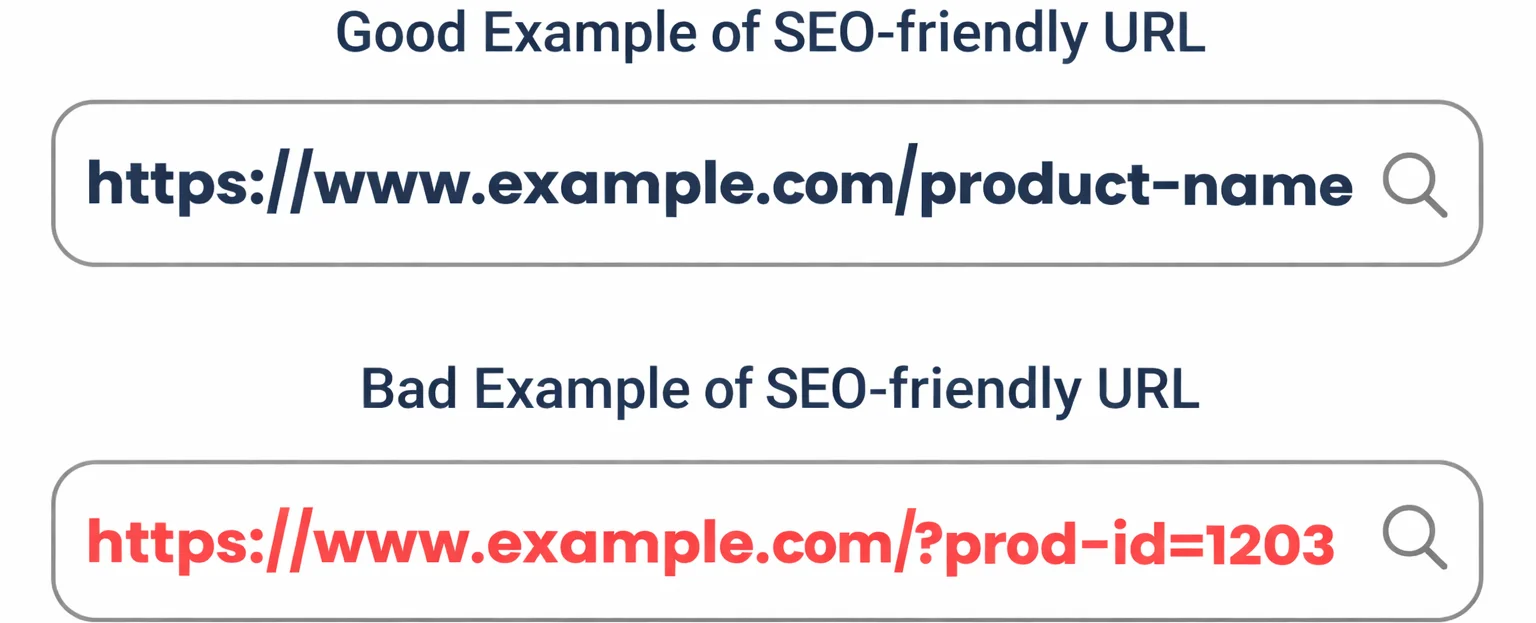
URLs that are long, cluttered, or filled with unnecessary parameters are harder for search engines and users to understand. Poor URL structures can also lead to duplication and weaker relevance signals.
Example: example.com/product?sku=98432&color=blue&ref=homepage makes it unclear which version of the product should be indexed.
How to fix it:
- Use short, readable URLs that reflect page intent

- Include relevant keywords naturally, without stuffing
- Avoid unnecessary parameters and dynamic strings
- Keep URL structures consistent across the site
2. Broken Internal Links
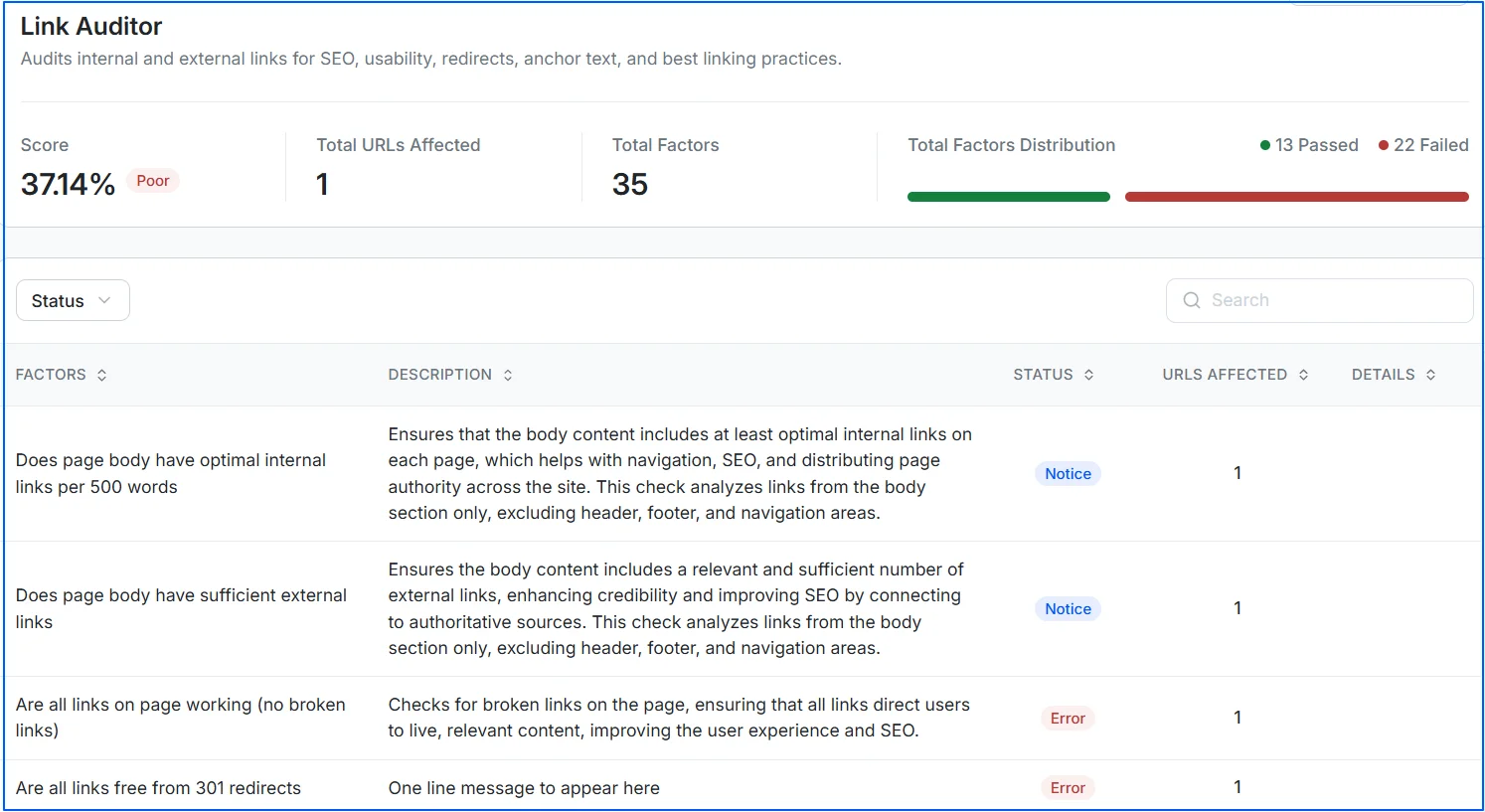
Broken internal links lead users and search engines to non-existent pages. These links waste crawl budget, harm user experience, and interrupt the flow of link equity across your site.
Example: Internal links pointing to URLs that return a 404 status code after content removal or URL changes.
How to fix it:
- Crawl your URL in Wellows to detect broken internal links
- Use 301 redirects when pages have permanently moved
- Update links to point to valid, relevant URLs
- Remove links to pages that no longer exist or serve a purpose
3. Excessive Internal Links on Pages
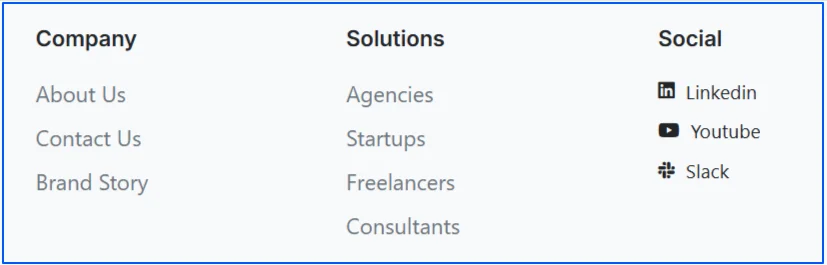
Adding too many internal links on a single page can dilute link equity and make it harder for search engines to determine which pages are most important. This often happens on category pages, footers, or auto-generated link blocks.
How to fix it:
- Prioritize contextual links within main content
- Remove unnecessary or repetitive links
- Focus internal links on high-value, relevant pages
- Keep navigation and footer links purposeful and limited.
Here is an example of footer links from Wellows site:
4. Pagination Issues
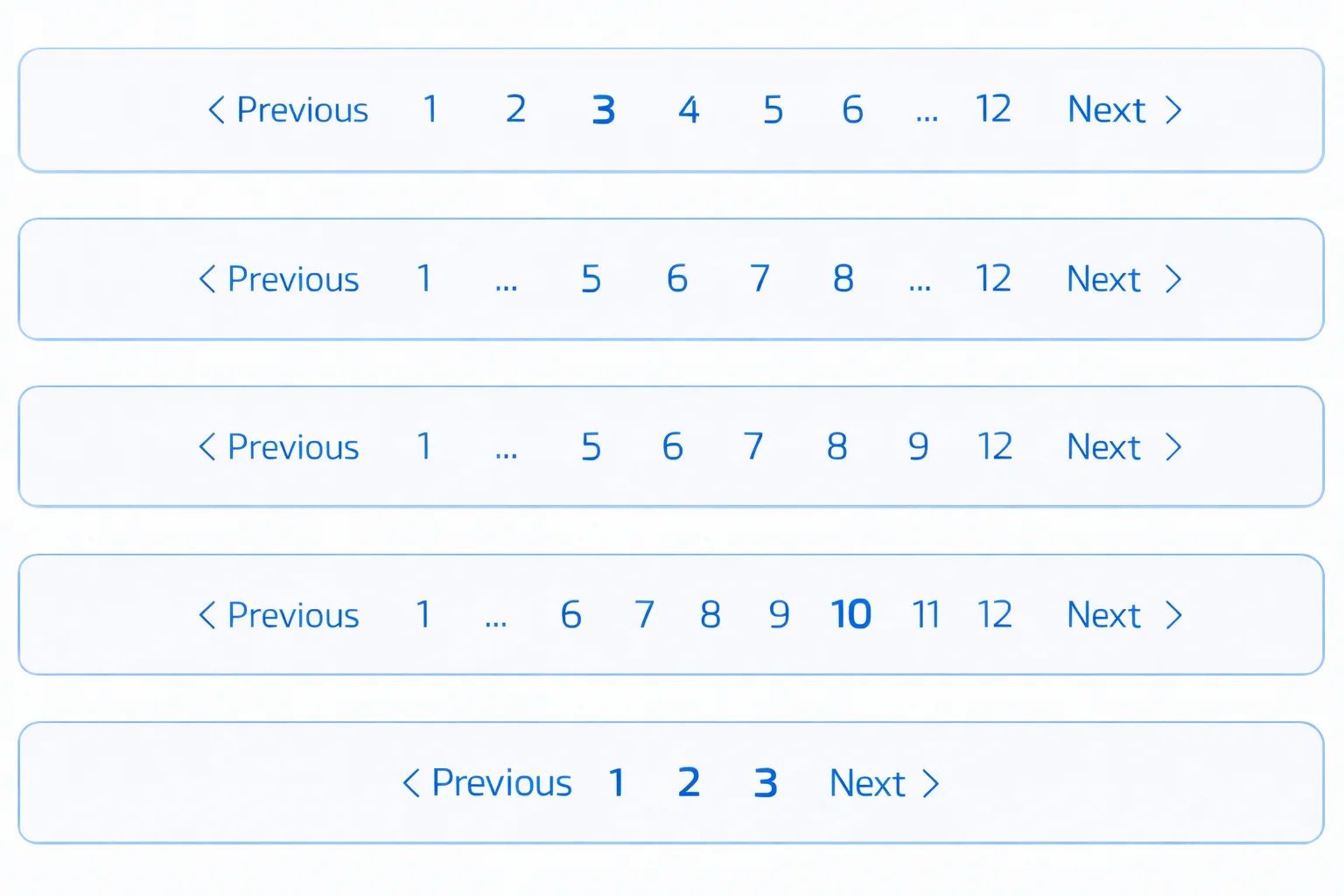
Pagination problems occur when multi-page content is not structured clearly for search engines. Poor pagination handling can lead to duplicate content, crawl inefficiencies, and misinterpreted page relationships.
Example: A category page creates multiple indexable URLs such as example.com/category?page=1, example.com/category?page=2, and example.com/category?page=3, causing duplication and crawl inefficiencies.
How to fix it:
- Use clean, logical pagination URLs
- Ensure paginated pages are internally linked correctly
- Avoid indexing paginated pages that add no search value
- Provide clear navigation between paginated sections
5. Core Web Vitals (LCP, CLS, INP)
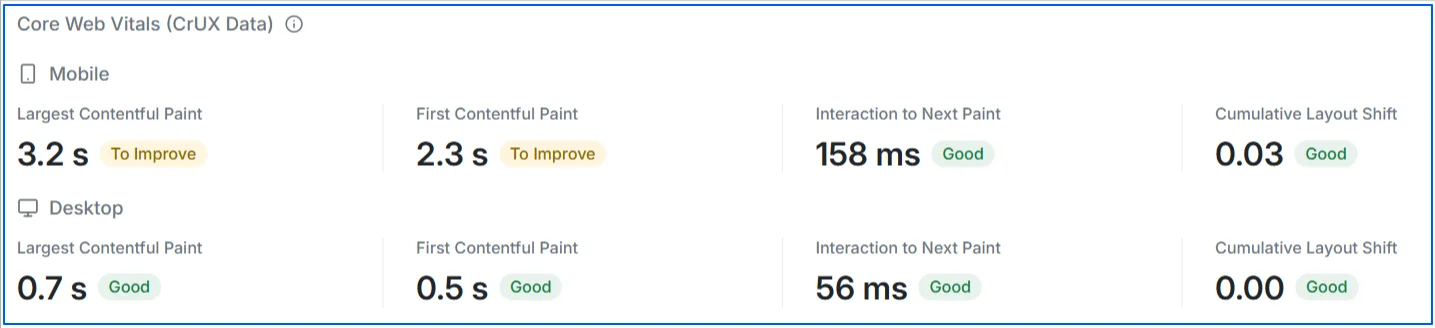
Core Web Vitals are a set of performance metrics used by Google to evaluate real user experience. Each metric focuses on a different aspect of how quickly and smoothly a page loads and responds.
Example: A page takes several seconds to load its main content, elements shift unexpectedly while loading, and buttons respond slowly when clicked. Together, these issues result in poor LCP, CLS, and INP scores. Over half of mobile visits are abandoned if a page takes longer than 3 seconds to load.
How to fix it:
- Optimize and compress large images and media files
- Serve assets through a CDN to reduce load time
- Reserve space for images, ads, and embeds to prevent layout shifts
- Reduce JavaScript execution and break up long tasks
- Defer non-critical scripts and optimize third-party code
- Prioritize loading of above-the-fold content
You can use Wellows to check the Core Web Vitals for your pages.
6. Unoptimized Images
Images are often the heaviest assets on a page and have a direct impact on load time and Core Web Vitals. When images are not compressed or sized correctly, they increase page weight and slow down rendering across all devices.
Example: A page loads several 3–5 MB JPEG images at full resolution, even though they are displayed as small thumbnails on mobile screens.
How to fix it:
- Convert images to WebP
- Compress images appropriately
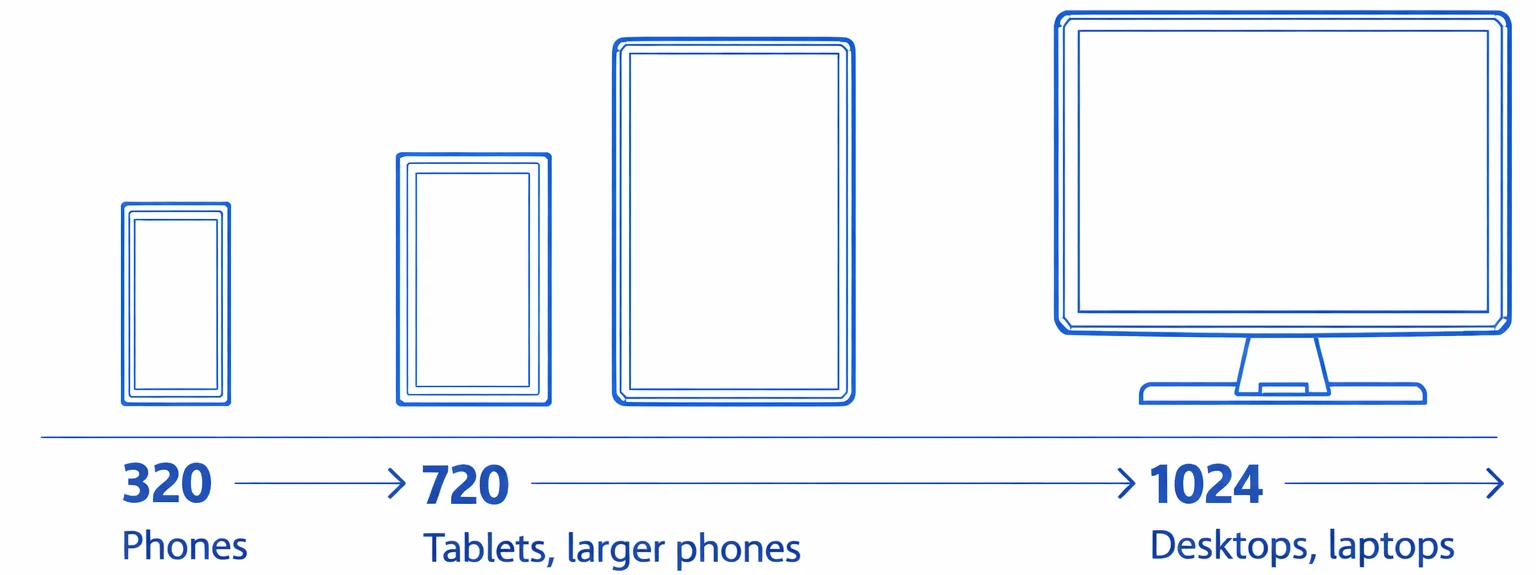
- Use responsive image sizes for desktops, mobiles, and tablets
- Enable lazy loading
7. Render-Blocking Resources
When CSS and JavaScript files are loaded before the main content, the browser must wait for them to finish processing before showing anything on the screen. This delays the first paint and creates a poor loading experience for users.
Example: A page includes large CSS files and JavaScript libraries in the <head> section, causing the screen to remain blank for several seconds before any content appears.
How to fix it:
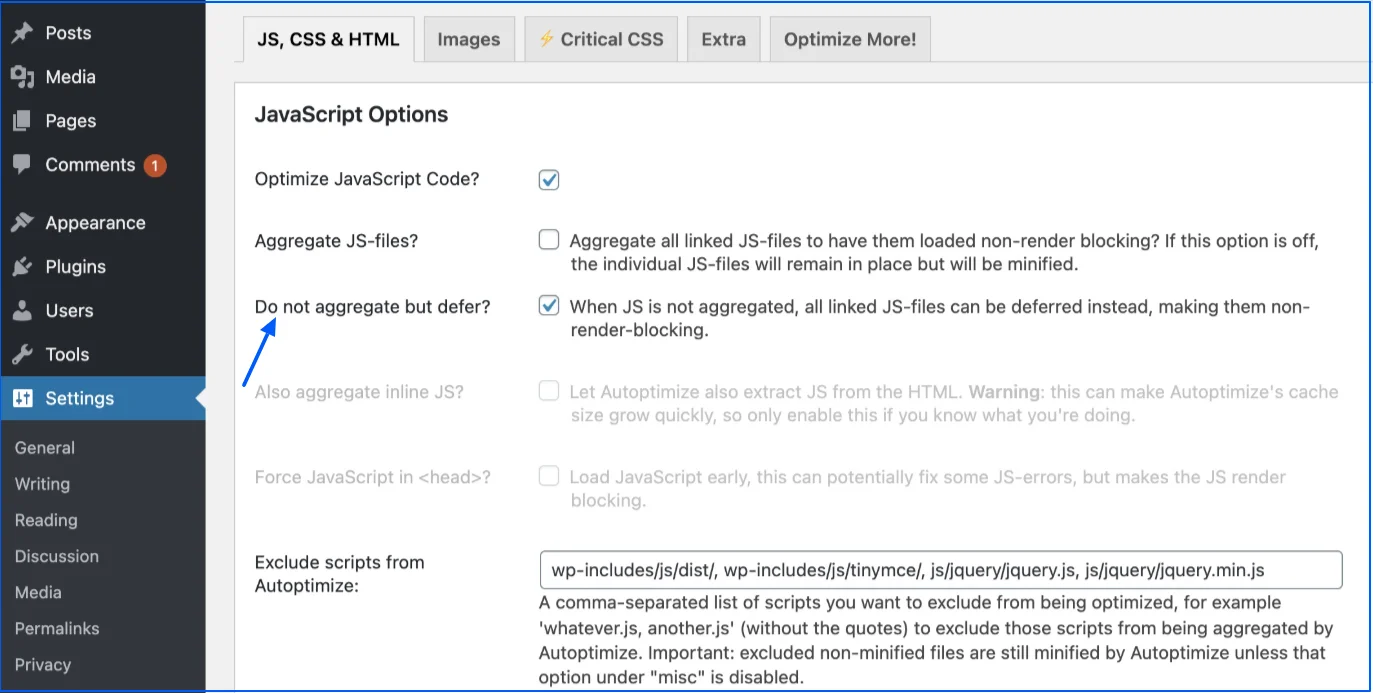
- Defer non-critical JavaScript so scripts load after the main content appears
- Inline critical CSS needed for above-the-fold content to render faster
- Remove unused CSS and JavaScript that are not required on the page
- Load non-essential scripts asynchronously so they don’t block rendering
8. Robots.txt Blocking Important Pages
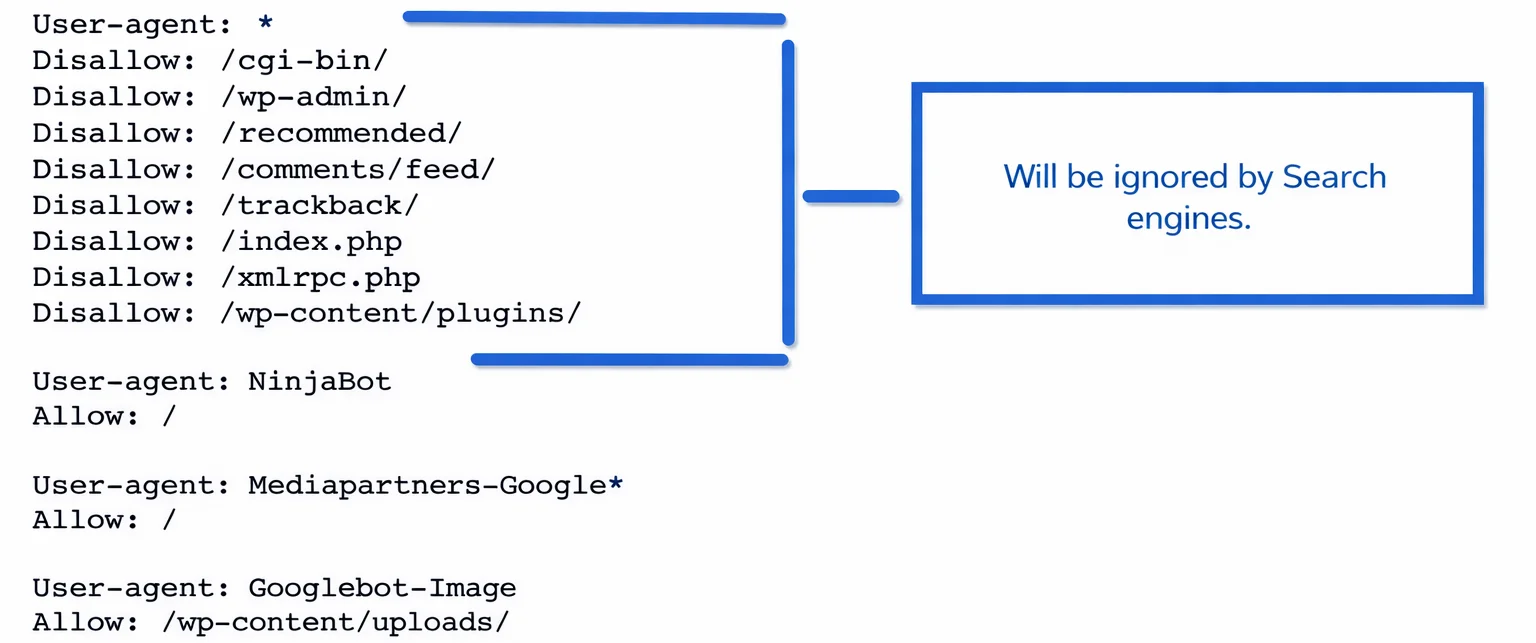
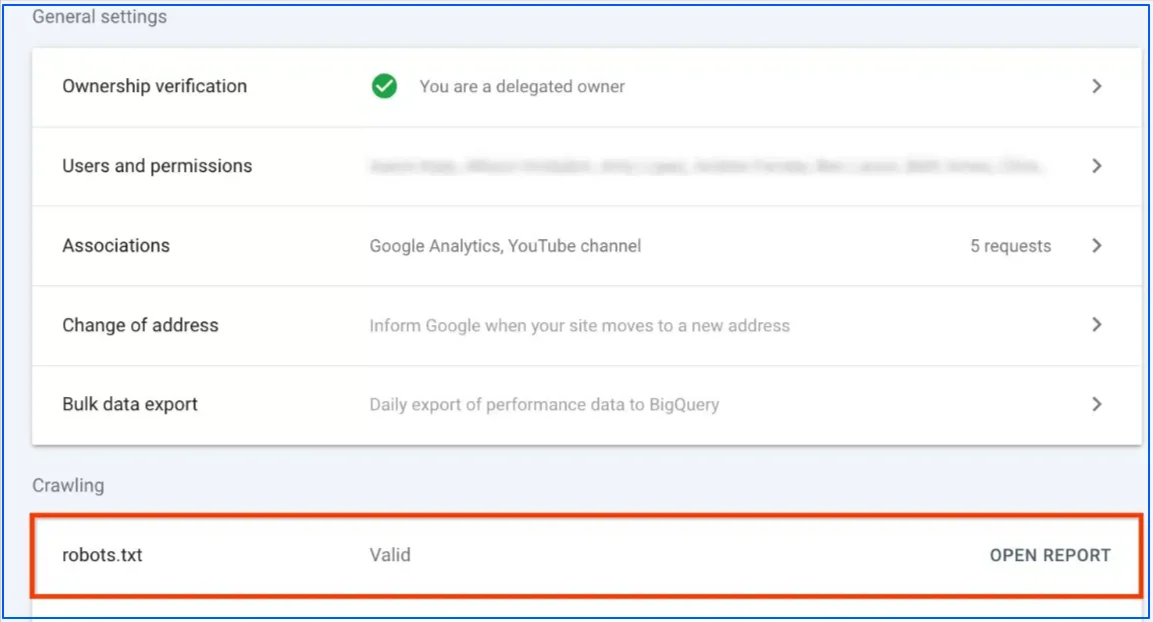
Robots.txt files control which parts of a website search engines are allowed to crawl. When important directories or URL patterns are blocked, search engines are unable to access those pages at all. This issue commonly occurs after site migrations, staging deployments, or CMS changes where temporary rules are left in place.
Data shows that 83.9% of mobile sites and 83.5% of desktop sites return a 200 status for /robots.txt, while 14.1% and 14.3% return a 404, meaning search engines assume no crawl restrictions exist. This highlights how often robots.txt handling is inconsistent, and why a single misconfiguration can unintentionally block critical pages from being crawled.
Example: Blocking /blog/ or /products/ in robots.txt prevents all blog posts or product pages from being crawled, even if they are internally linked.
How to fix it:
- Review the robots.txt file for unnecessary Disallow rules
- Ensure important pages, CSS, and JavaScript files are crawlable, it also helps improve your search engine visibility
- Test blocked URLs using Google Search Console’s robots.txt tester
- Remove or refine rules that restrict essential paths
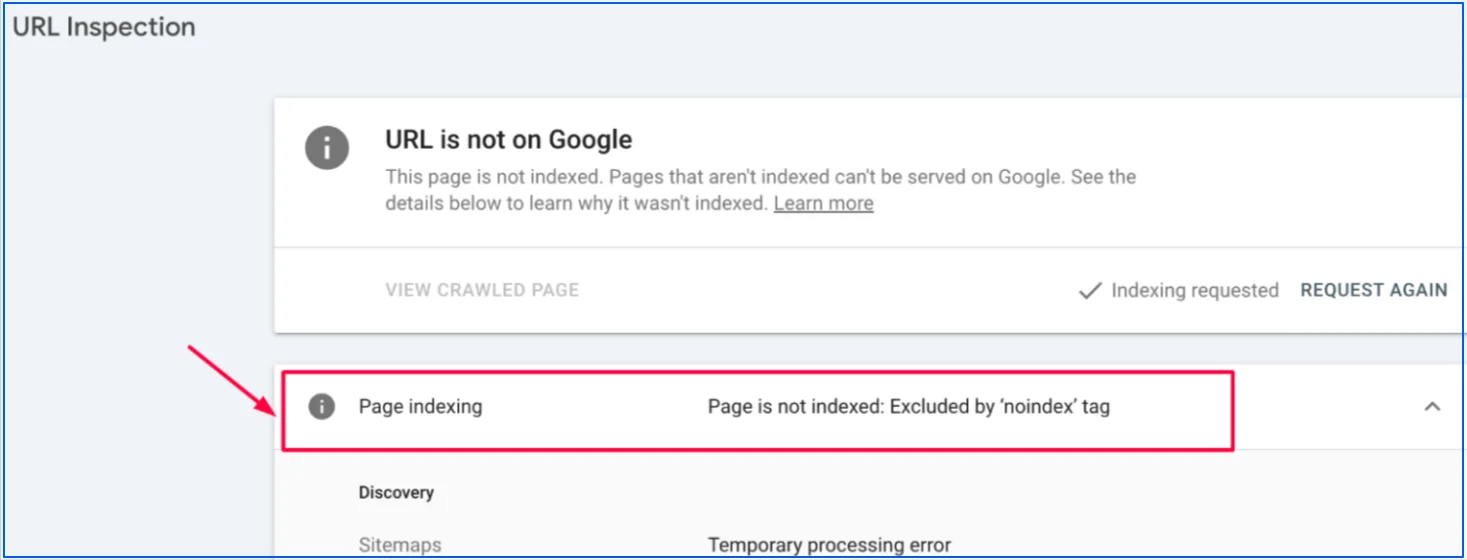
9. Noindex Tags on Indexable Pages
Noindex tags tell search engines not to include a page in search results. These tags are commonly added during development or content cleanup and then left behind on live pages.
Example: Page containing <meta name=”robots” content=”noindex”> will never appear in search results, even if it has strong backlinks.
How to fix it:
- Crawl your site to identify pages with noindex directives
- Remove noindex tags from pages that should rank
- Check HTTP headers for X-Robots-Tag: noindex
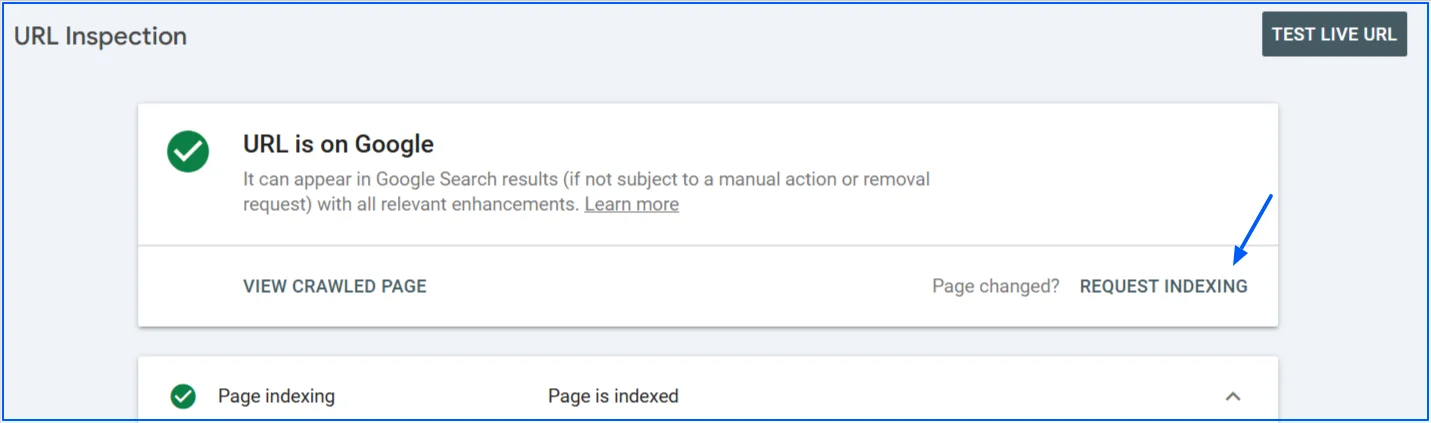
- Request reindexing for corrected pages in Google Search Console
10. JavaScript-Rendered Content Not Crawlable
When key content or internal links rely entirely on JavaScript, search engines may not render them correctly. This can lead to missing text, incomplete indexing, or broken internal linking signals.
Example: Content that appears in the browser but is missing from the page’s HTML source may not be fully processed by search engines.
How to fix it:
- Ensure critical content loads in the initial HTML response
- Use server-side rendering or dynamic rendering when needed
- Avoid hiding important links behind JavaScript-only interactions
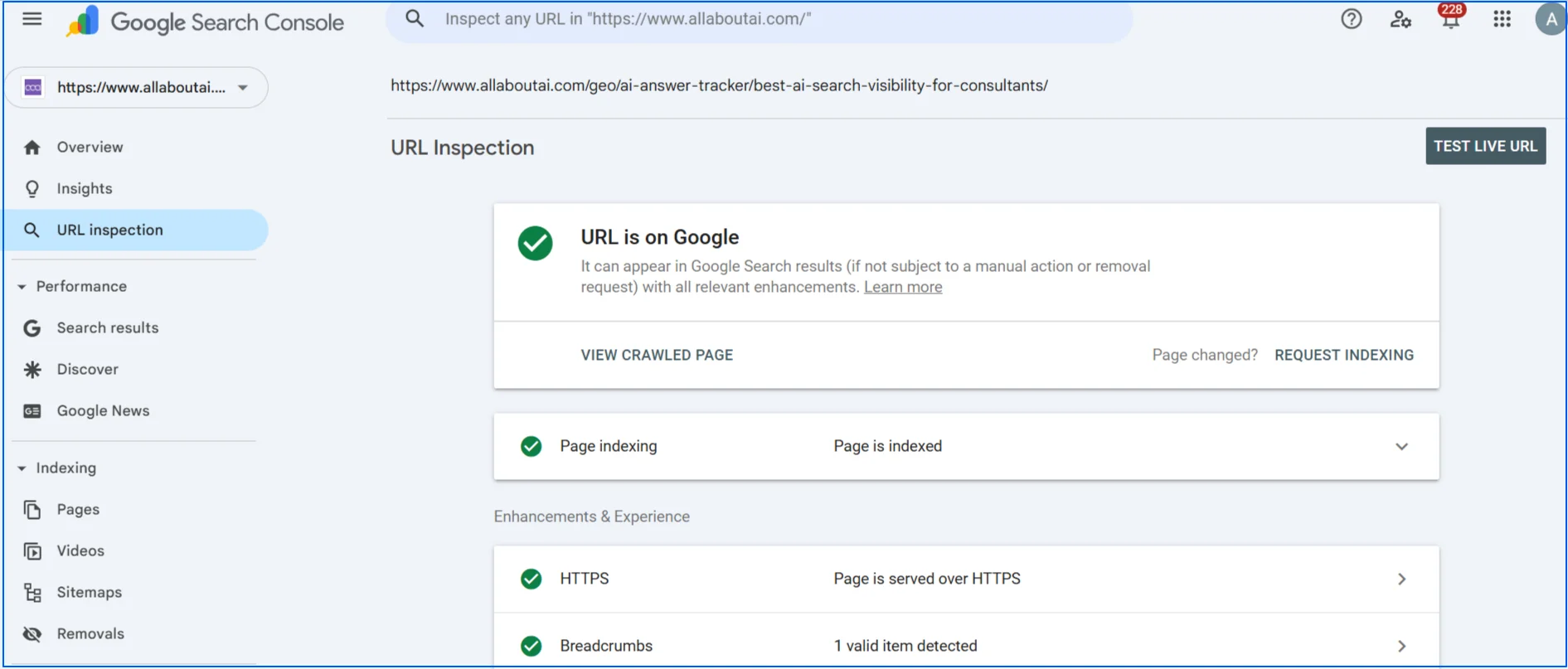
- Validate rendered output using the URL Inspection tool in Google Search Console
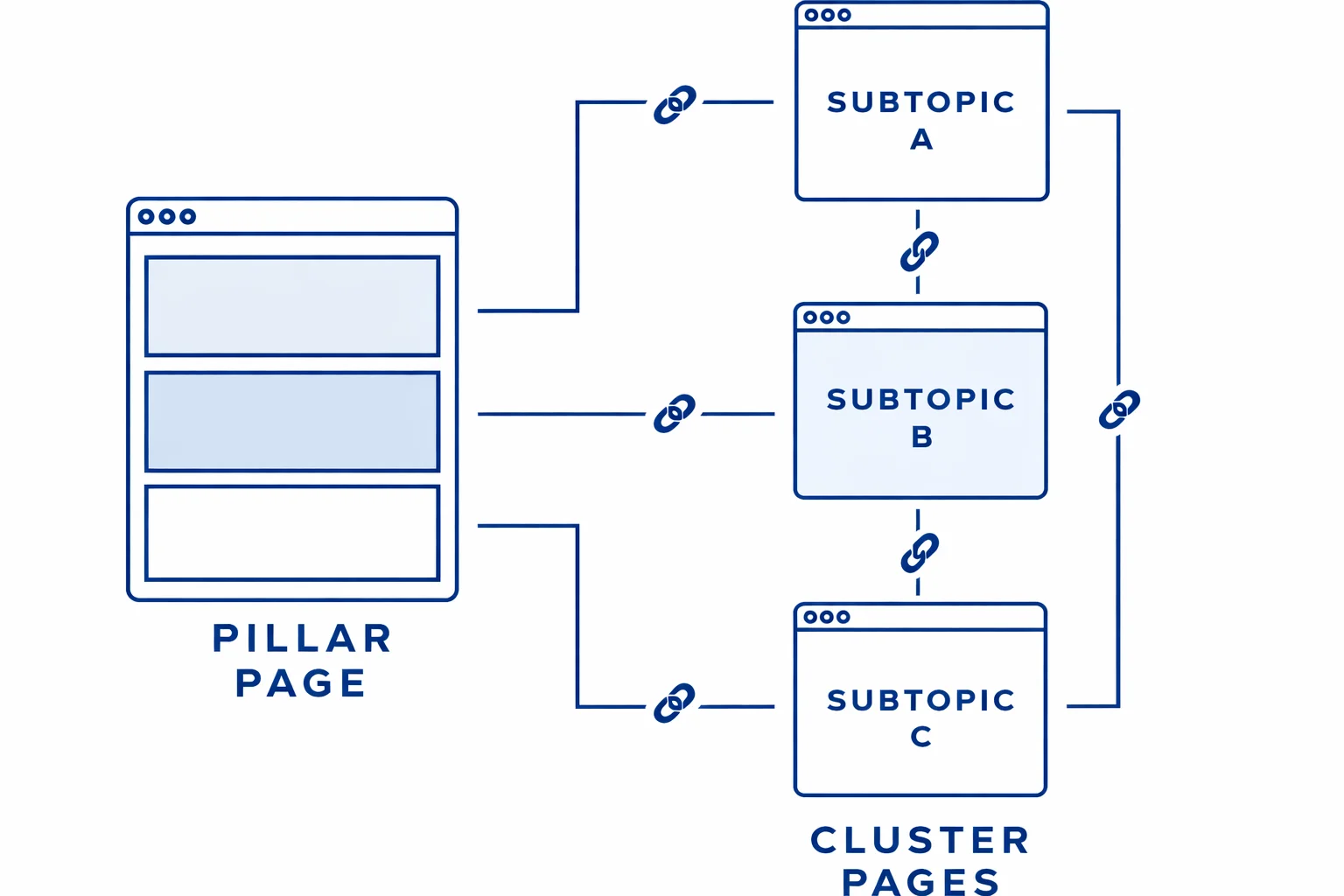
11. Orphan Pages
Orphan pages are URLs that exist on your site but have no internal links pointing to them. Without internal links, search engines struggle to discover and prioritize these pages.
Example: A landing page created for a campaign but is not linked from any category, blog post, or navigation menu.
How to fix it:
- Identify orphan pages using crawl and sitemap comparisons
- Add contextual internal links from relevant pages
- Include important pages in navigational structures
- Link new pages during the publishing process

12. Deep Crawl Depth (Pages Buried Too Deep)
Pages that require many clicks to reach from the homepage often receive less crawl attention. This reduces how frequently they are crawled and evaluated for rankings.
Example: A product or blog page that can only be reached by navigating through five or more category levels from the homepage.
How to fix it:
- Keep important pages within three clicks from the homepage
- Use category, hub, or pillar pages to surface key URLs
- Improve breadcrumb navigation
- Strengthen internal linking to reduce crawl depth
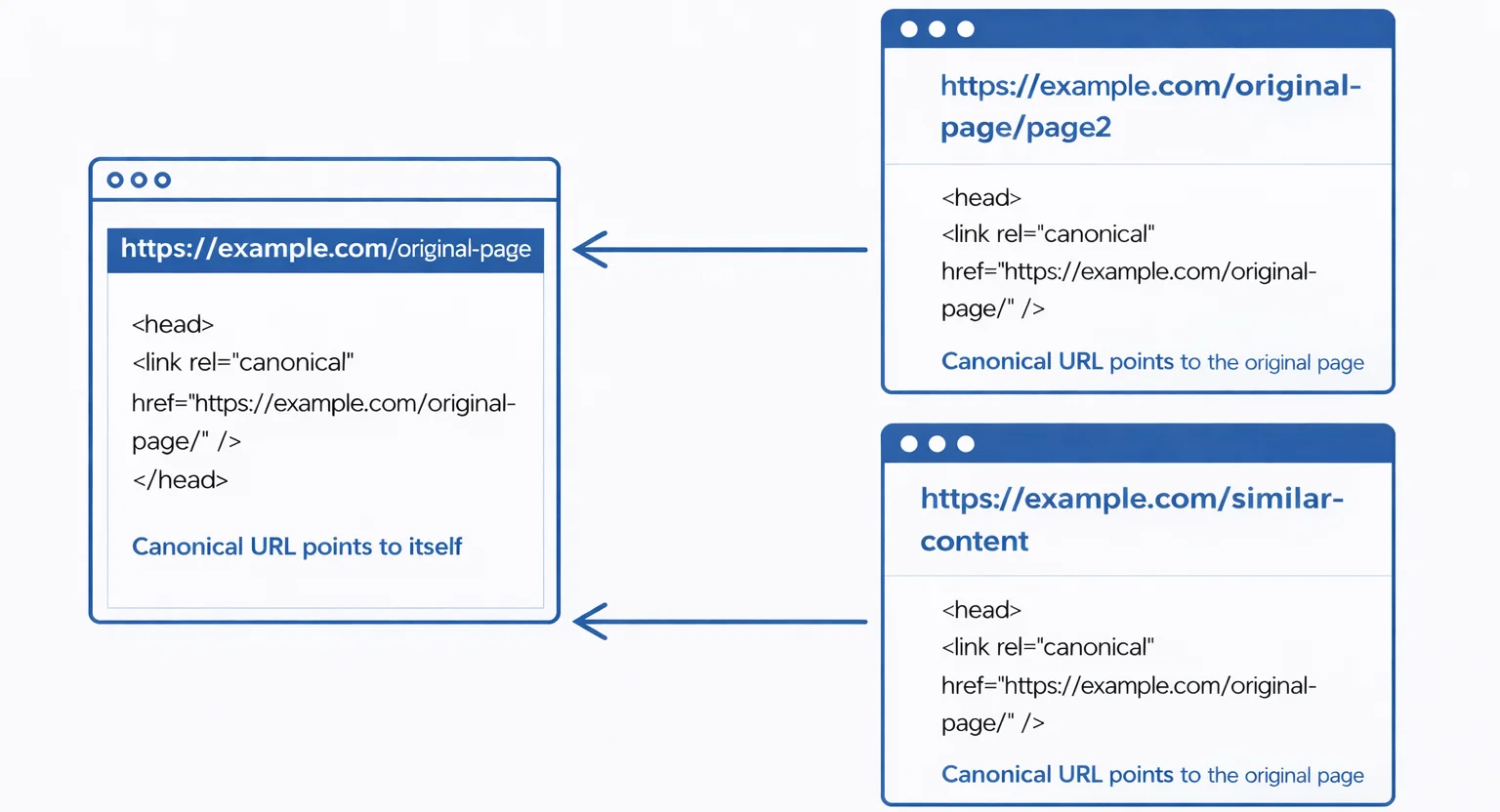
13. Duplicate Pages Competing in the Index
Duplicate pages occur when multiple URLs display the same or very similar content. This confuses search engines and forces them to choose which version to index, often resulting in the wrong page ranking or none at all.
Example: example.com/page and example.com/page/ both load the same content and compete with each other in search results.
How to fix it:
- Use canonical tags to indicate the preferred version of the page
- Redirect duplicate URLs to the canonical version where possible
- Ensure internal links consistently point to the canonical URL
- Avoid generating multiple URL variations unnecessarily
14. Thin or Low-Value Pages Indexed
Thin pages provide little or no meaningful value to users. These pages consume crawl budget and weaken the overall quality signals of your site, which can negatively affect indexation and rankings. Multiple content pages with same intent also causes cannibalization issues on your site.
Example: Pages with a few lines of text, empty category pages, or autogenerated content with no unique value.
How to fix it:
- Merge thin pages into stronger, more comprehensive pages
- Improve content depth, usefulness, and relevance
- Apply noindex to pages that do not need to appear in search results
- Remove outdated or unnecessary URLs entirely as it also hurts your domain authority
15. Incorrect Canonical Tags
Canonical tags help search engines understand which version of a page should be indexed. When implemented incorrectly, they can cause important pages to be ignored or replaced by the wrong URL.
Example: A page canonicals to a different URL unintentionally, causing the original page to disappear from search results.
How to fix it:
- Use self-referencing canonicals on indexable pages
- Ensure canonical URLs return a 200 status code
- Avoid pointing canonicals to redirected or non-indexable pages
- Keep canonical signals consistent with internal linking
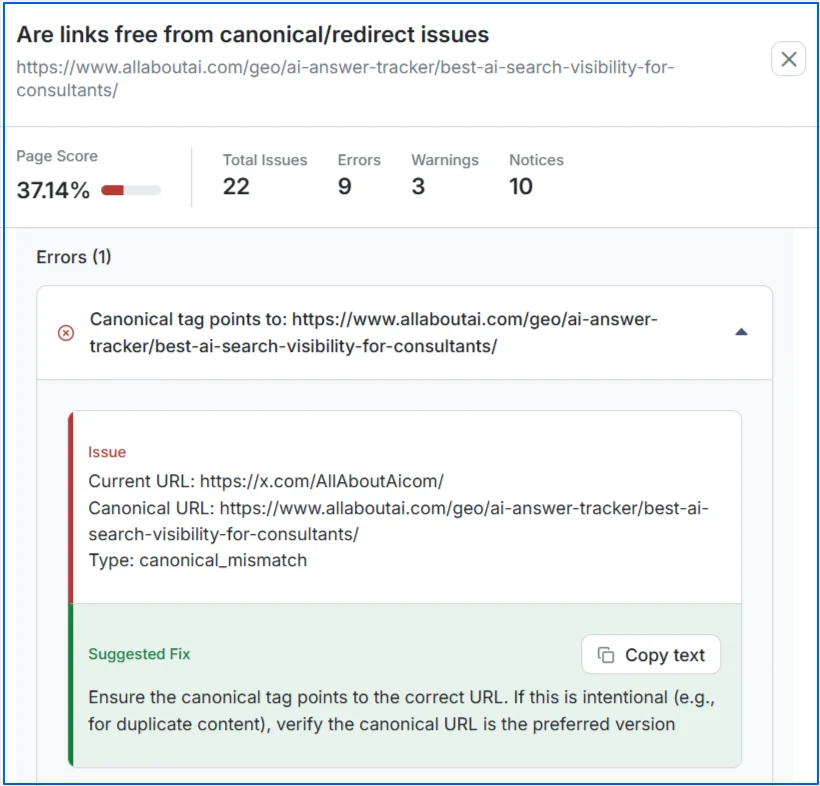
Wellows can help you detect if there are canonical tags issues on your pages and suggest ways to fix them.
16. Non-Mobile-Friendly Design
A non-mobile-friendly design occurs when layouts break, text becomes unreadable, or elements overlap on smaller screens. This usually happens when a site is built only for desktop viewing.
Example: Text appears too small to read on mobile, buttons are hard to tap, or users must scroll horizontally to view content.
How to fix it:
- Implement responsive design that adapts to all screen sizes
- Use flexible layouts, images, and CSS media queries
- Ensure buttons and links are easily tappable
17. Mobile Content Mismatch
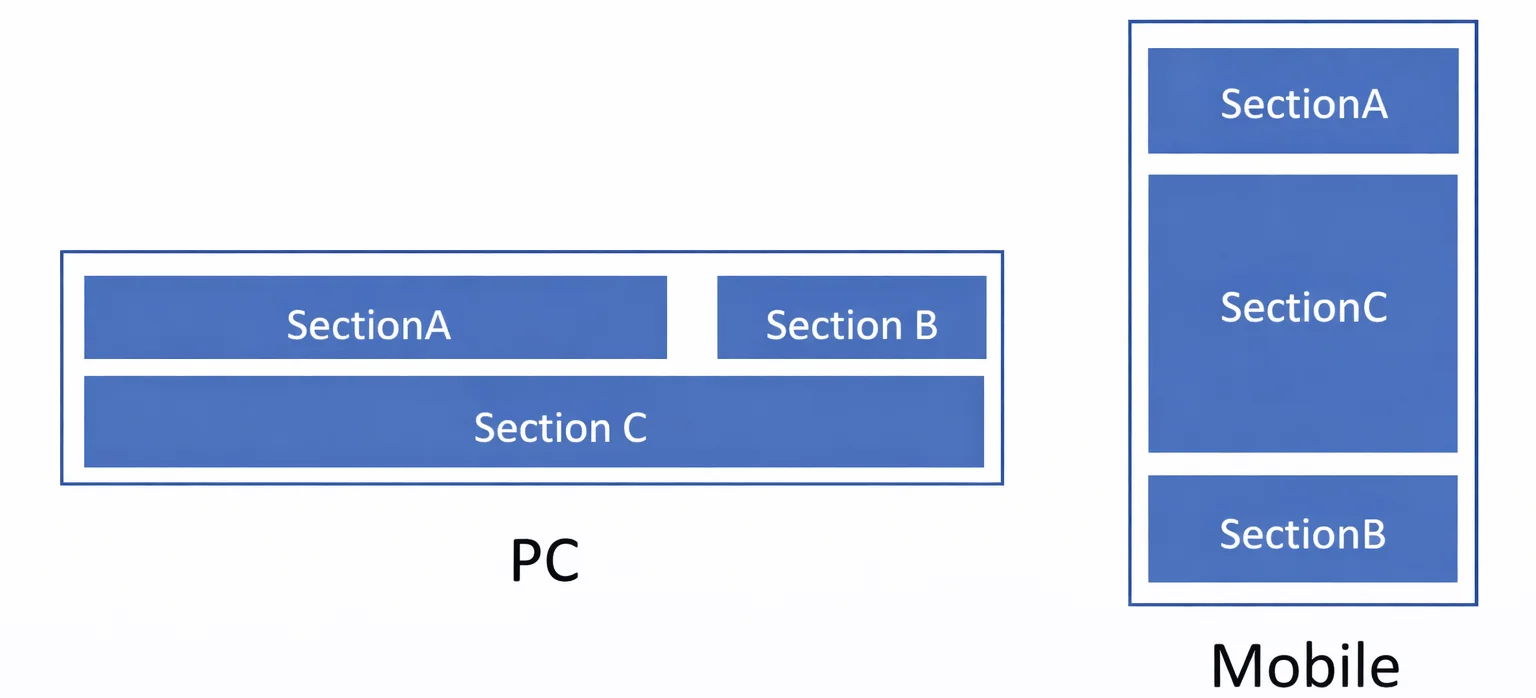
Mobile content mismatch happens when the mobile version of a page contains less content than the desktop version. This sends conflicting signals to search engines and can lead to ranking drops.
Example: Important text, internal links, or structured data are visible on desktop but missing on mobile.
How to fix it:
- Ensure content parity between mobile and desktop versions
- Include the same headings, text, links, and metadata
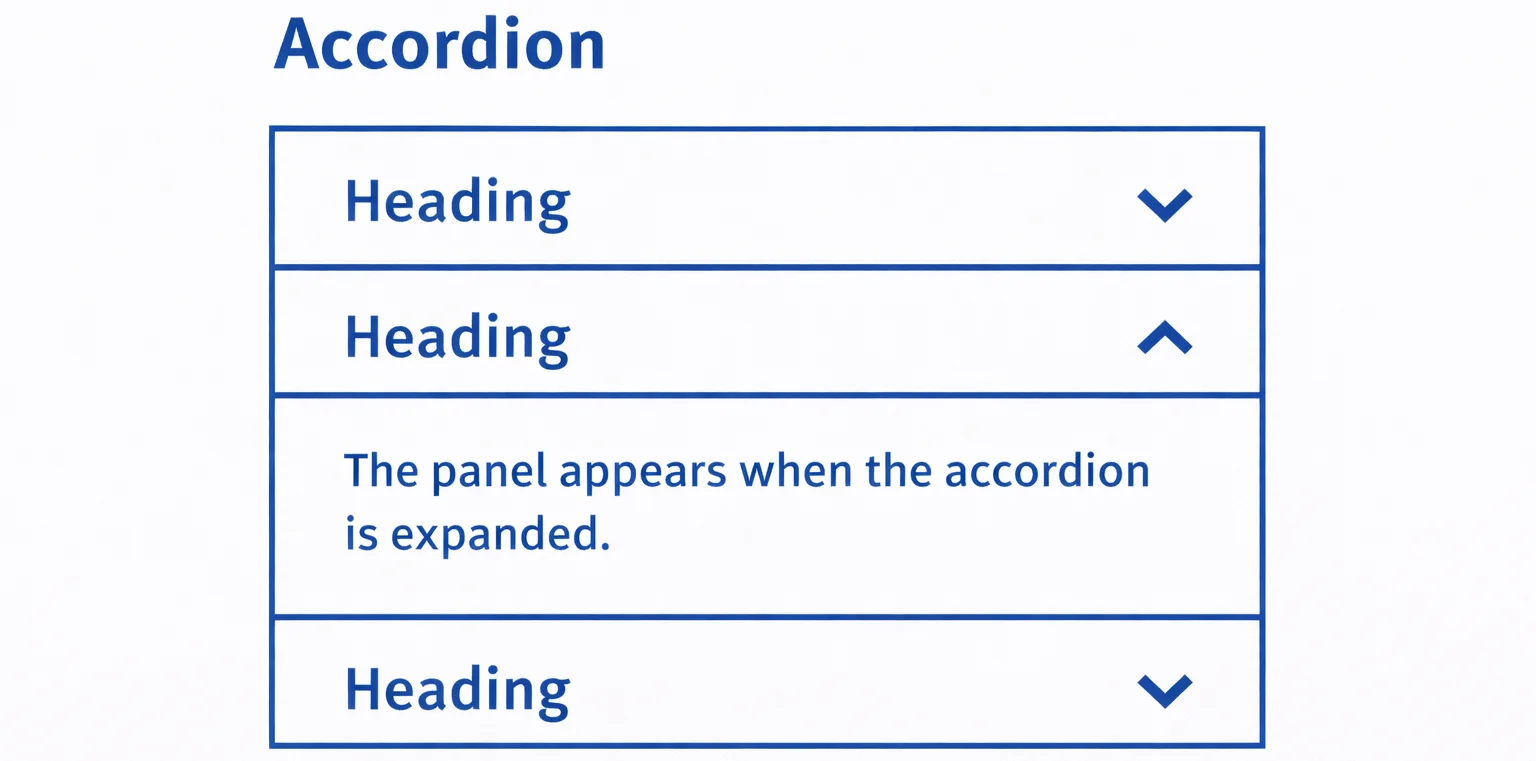
- Avoid hiding important content behind expandable elements
- Verify mobile rendering using URL Inspection
18. Intrusive Pop-Ups
Intrusive pop-ups are overlays that block access to content on mobile devices. They create a poor user experience and can negatively impact rankings.
Example: A full-screen pop-up appears immediately after landing on a page, covering most of the content.
How to fix it:
- Use compliant banners instead of full-screen overlays
- Delay pop-ups until after user interaction
- Ensure pop-ups do not cover main content
- Follow Google’s pop-up guidelines

19. Missing or Expired SSL Certificate
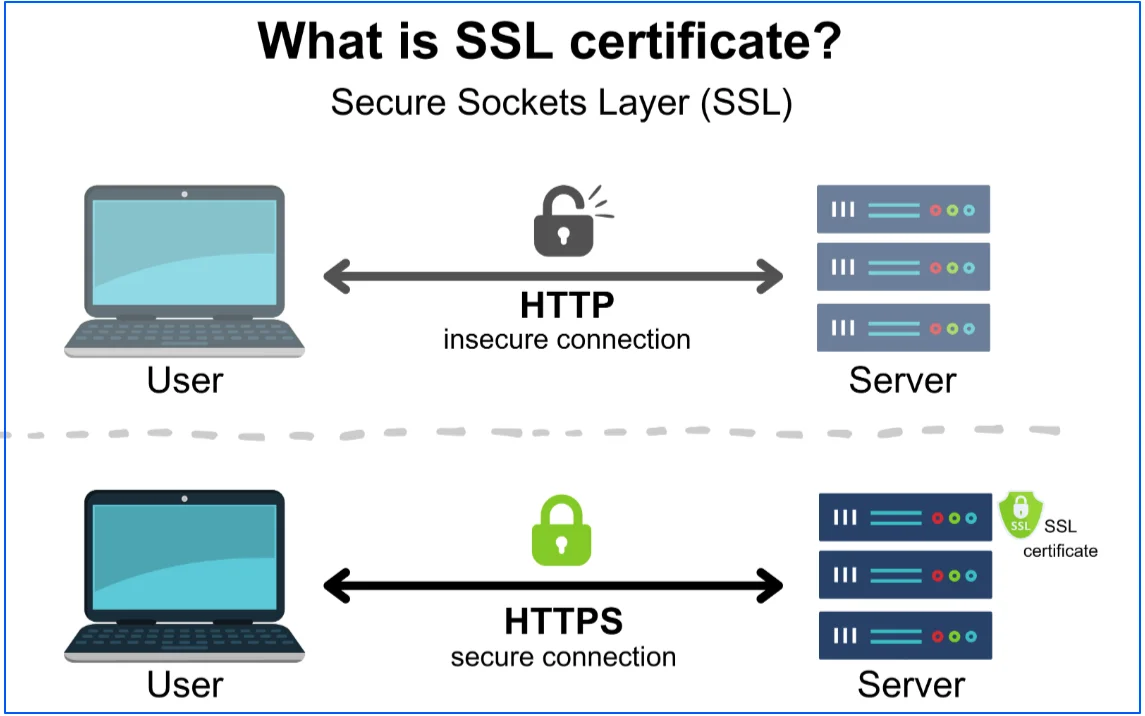
An SSL certificate encrypts data between the user and the server. If the certificate is missing or expired, browsers display security warnings, which reduce trust and can hurt conversions and rankings.
Example: Users see a “Not Secure” warning when visiting the site.
How to fix it:
- Renew the SSL certificate before it expires. Here is what a secure HTTPs connection looks like:
- Install the certificate correctly on the server
- Ensure all subdomains are covered
- Verify SSL status using online SSL testing tools
20. HTTP Pages Still Accessible
When both HTTP and HTTPS versions of a site are accessible, search engines see them as separate URLs. This creates duplicate content and weakens ranking signals.
Example: Both http://example.com/page and https://example.com/page load without considerately redirecting.
How to fix it:
- Force site-wide 301 redirects from HTTP to HTTPS
- Update internal links to use HTTPS only
- Set HTTPS as the preferred version in Search Console
- Ensure canonical tags point to HTTPS URLs
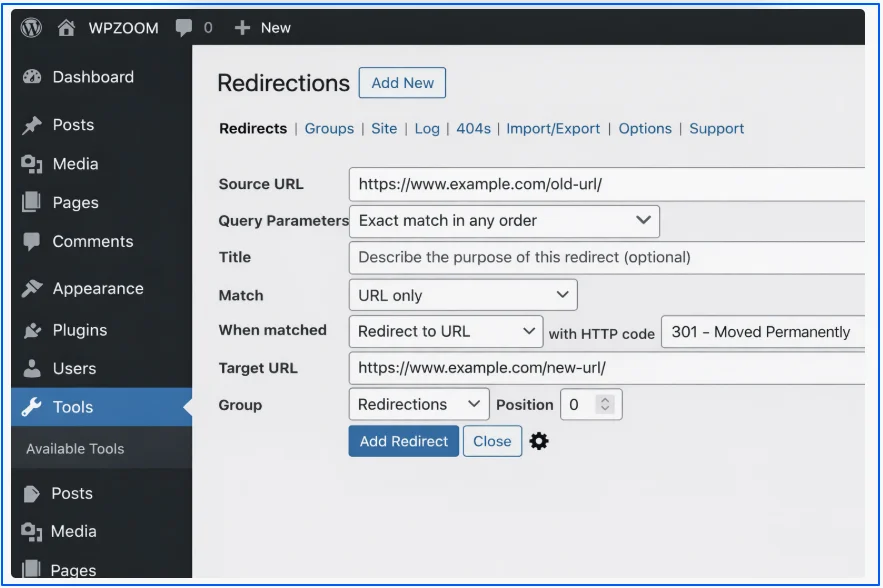
21. Missing Structured Data
Missing structured data means search engines lack clear context about your content, which can prevent eligible pages from appearing as rich results even when the content itself is relevant. Without explicit schema markup, search engines must rely on inference rather than clear signals.
Studies show that only around 2% of pages add structured data exclusively through JavaScript, while 5–6% of pages modify or inject schema after rendering. This highlights why relying on JavaScript for structured data can change what search engines actually process and increases the risk of inconsistent or missed markup.
Example: A product page without Product schema does not show price, availability, or ratings in search results.
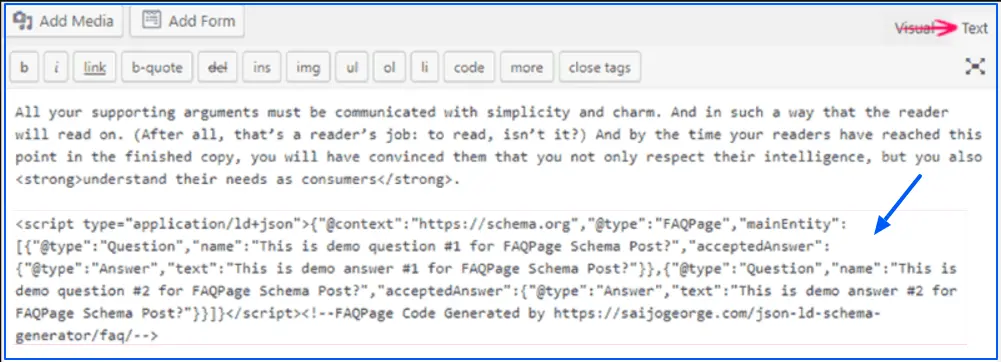
How to fix it:
- Identify pages eligible for structured data
- Add relevant schema types such as Article, Product, FAQ, or Breadcrumb
- Ensure schema reflects visible on-page content
- Implement schema using JSON-LD format
22. Invalid Schema Markup
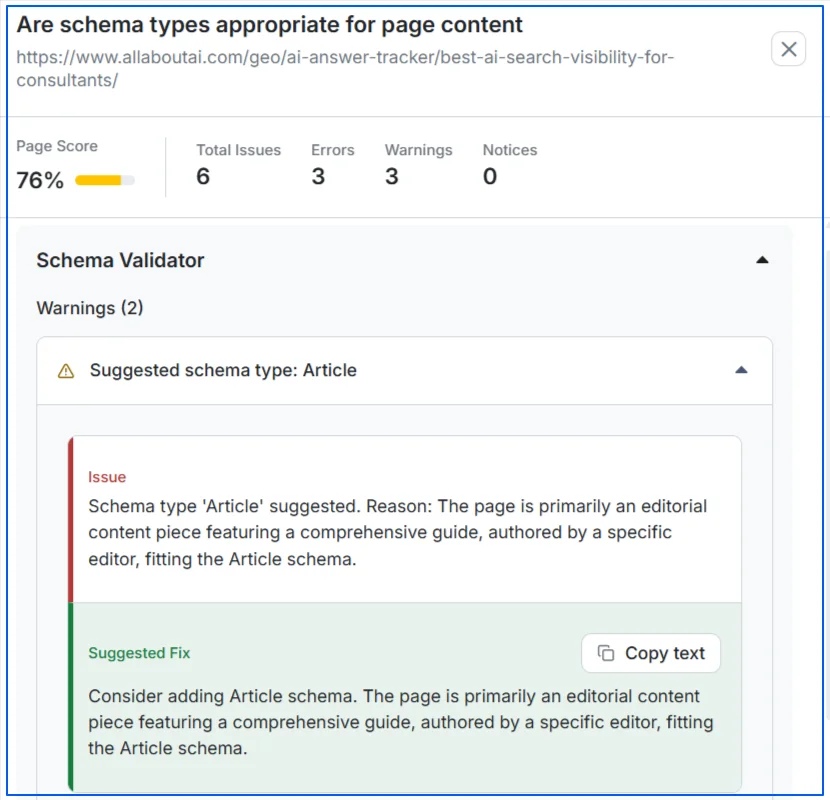
Invalid schema markup contains errors or warnings that prevent search engines from interpreting the data correctly. This often results in rich results being ignored or removed.
Example: Required schema properties are missing or values are formatted incorrectly.
How to fix it:
- Fix missing required fields and formatting issues
- Remove unsupported or outdated schema types
- Re-test pages after updates
23. Incorrect Hreflang Implementation
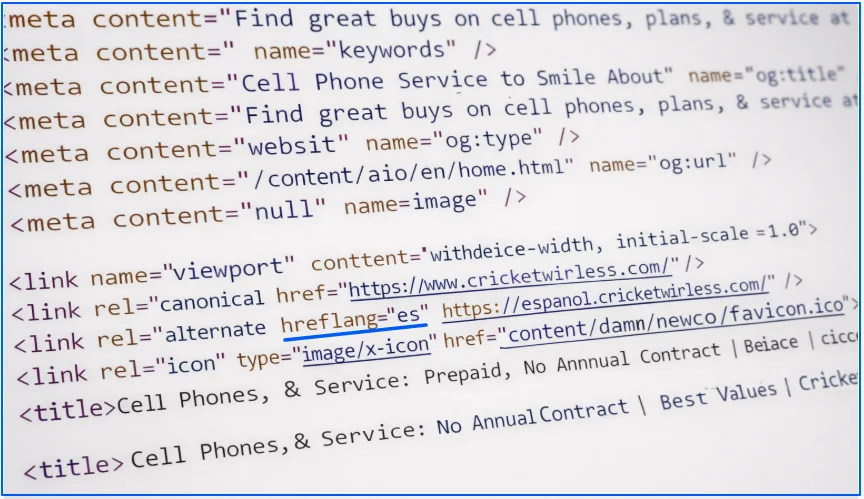
Incorrect hreflang tags send the wrong language or regional signals to search engines. This can result in users being shown the wrong version of a page.
Example: A UK page is tagged as en-us, causing it to appear for U.S. users instead of UK users.
How to fix it:
- Use correct language and country codes
- Add self-referencing hreflang tags
- Ensure hreflang URLs return a 200 status code
- Validate hreflang setup using Search Console
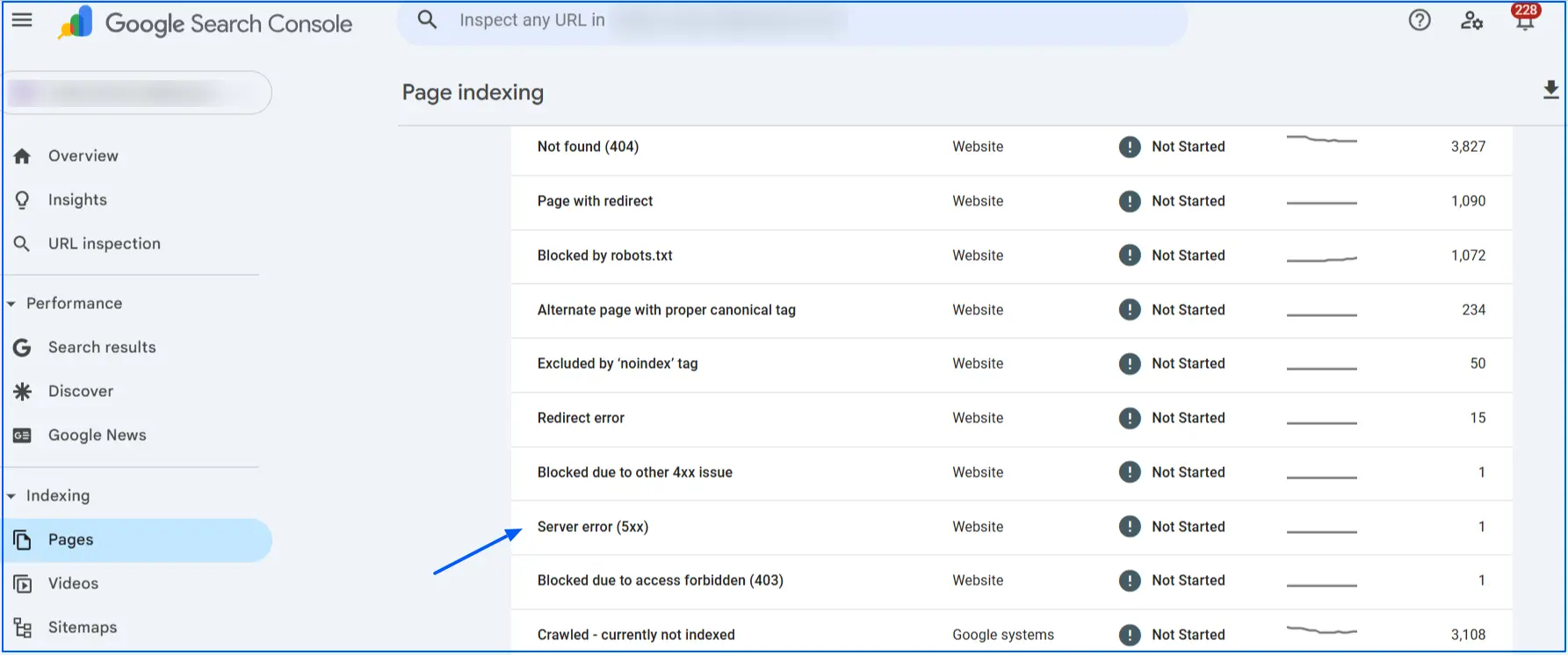
24. Server Errors (5xx Responses)
5xx errors indicate server-side failures that prevent pages from loading. When search engines encounter these errors, they may temporarily or permanently drop affected pages from the index.
Example: A page returns a 503 error during crawling because the server is overloaded or misconfigured.
How to fix it:
- Check server error logs to identify the exact cause (timeouts, memory limits, misconfigurations)
- Identify patterns in recurring 5xx errors in Google Search Console
- Monitor uptime and response errors using server or hosting dashboards
- Increase server resources or adjust limits if errors occur during peak traffic
- Fix misconfigured caching, PHP, or application settings
- Coordinate with your hosting provider to stabilize server performance and prevent repeat outages
25. Slow Server Response Time (TTFB)
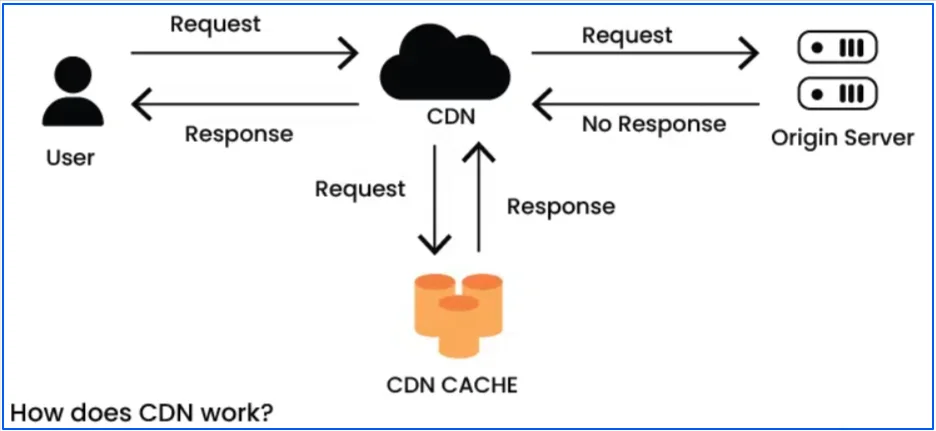
Time to First Byte measures how long the server takes to respond to a request. A slow TTFB delays page loading and negatively affects crawl efficiency and Core Web Vitals.
Example: A page takes over one second before any content begins loading.
How to fix it:
- Upgrade to faster or more reliable hosting
- Implement server-side caching
- Optimize database queries and backend processes
- Use a CDN to reduce server load
26. Missing XML Sitemap
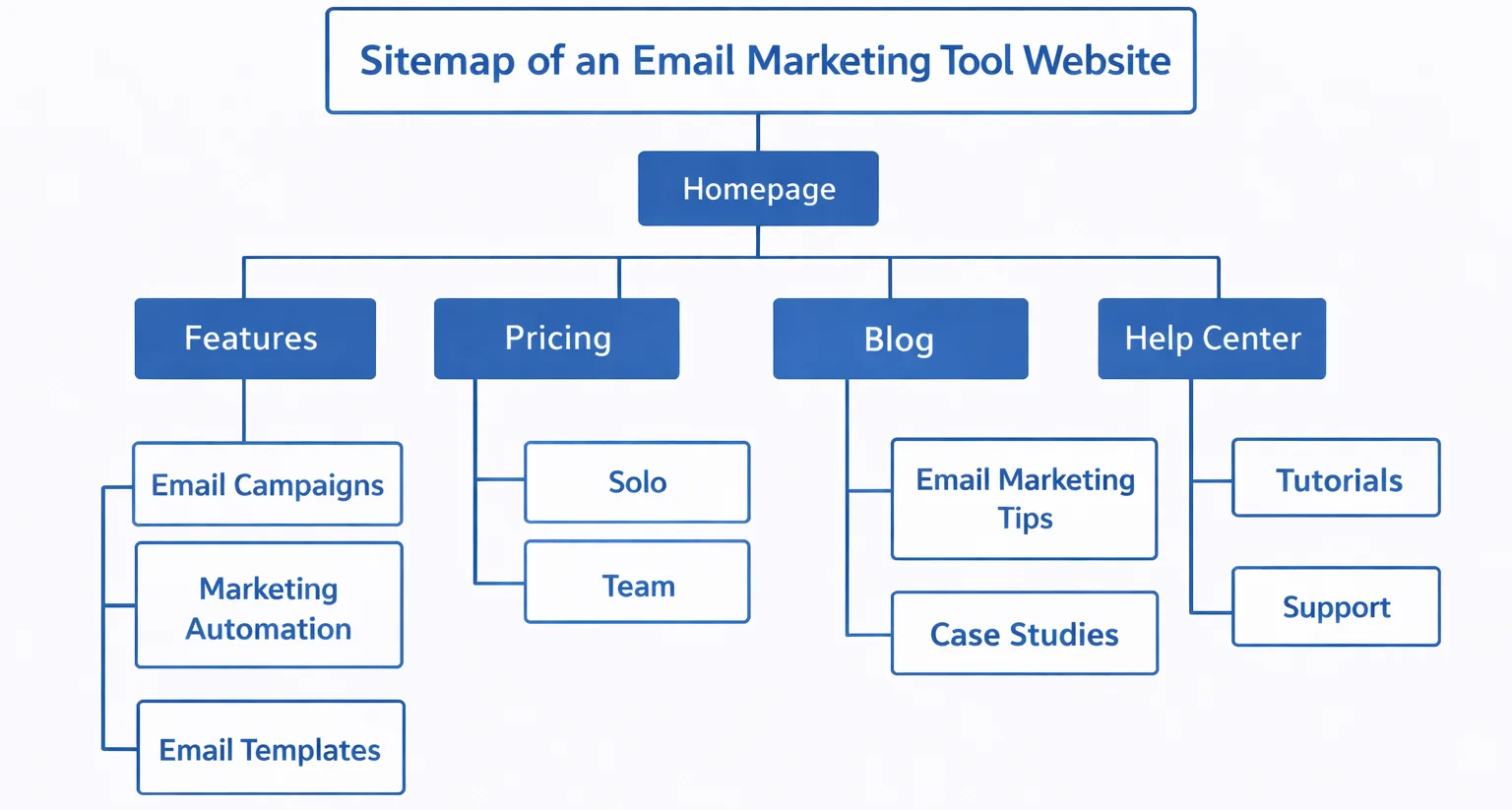
Sitemaps help search engines discover and prioritize URLs. Without an XML sitemap, search engines rely entirely on internal links to discover pages. This can slow down indexing, especially for large or new websites.
Example: New pages exist on the site but are never discovered because they are not internally linked yet.
How to fix it:
- Generate an XML sitemap covering all important URLs
- Ensure only indexable pages are included
- Submit the sitemap in Google Search Console
- Keep the sitemap accessible and updated
27. Crawl Budget Waste
Crawl budget waste happens when search engines spend time crawling low-value or unnecessary URLs instead of important pages.
Example: Bots repeatedly crawl filter URLs, internal search pages, or session-based URLs.
How to fix it:
- Block low-value pages using robots.txt or noindex
- Reduce duplicate URLs caused by parameters
- Strengthen internal linking to priority pages
- Simplify site structure where possible
28. Log File Ignorance
Without log file analysis, you have no visibility into how search engines actually crawl your site. This leads to assumptions instead of data-driven decisions.
Example: Important pages receive very few bot visits while unimportant pages are crawled repeatedly.
How to fix it:
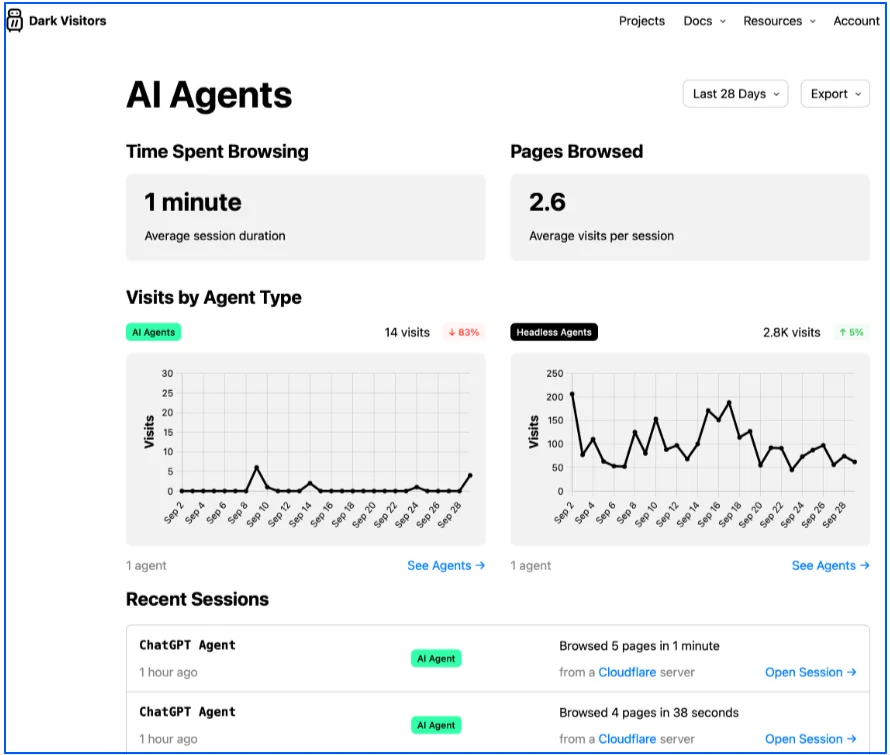
- Collect and store server log files regularly
- Analyze bot activity and crawl frequency on Dark Visitor
- Identify wasted crawl paths
- Adjust internal linking and crawl directives accordingly
29. Faceted Navigation Problems
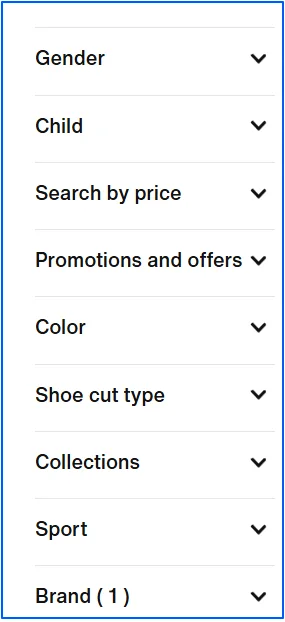
Faceted navigation can create thousands of URL variations, leading to infinite crawl paths and duplicate content.
How to fix it:
- Use noindex on non-search-worthy filter pages
- Apply canonical tags to preferred URLs
- Add proper filters for size, color, price, and brand for indexable URLs (especially for e-commerce sites)
- Control parameters in Google Search Console
- Limit internal links to valuable filtered pages
30. Metadata Issues (Title Tags and Meta Descriptions)
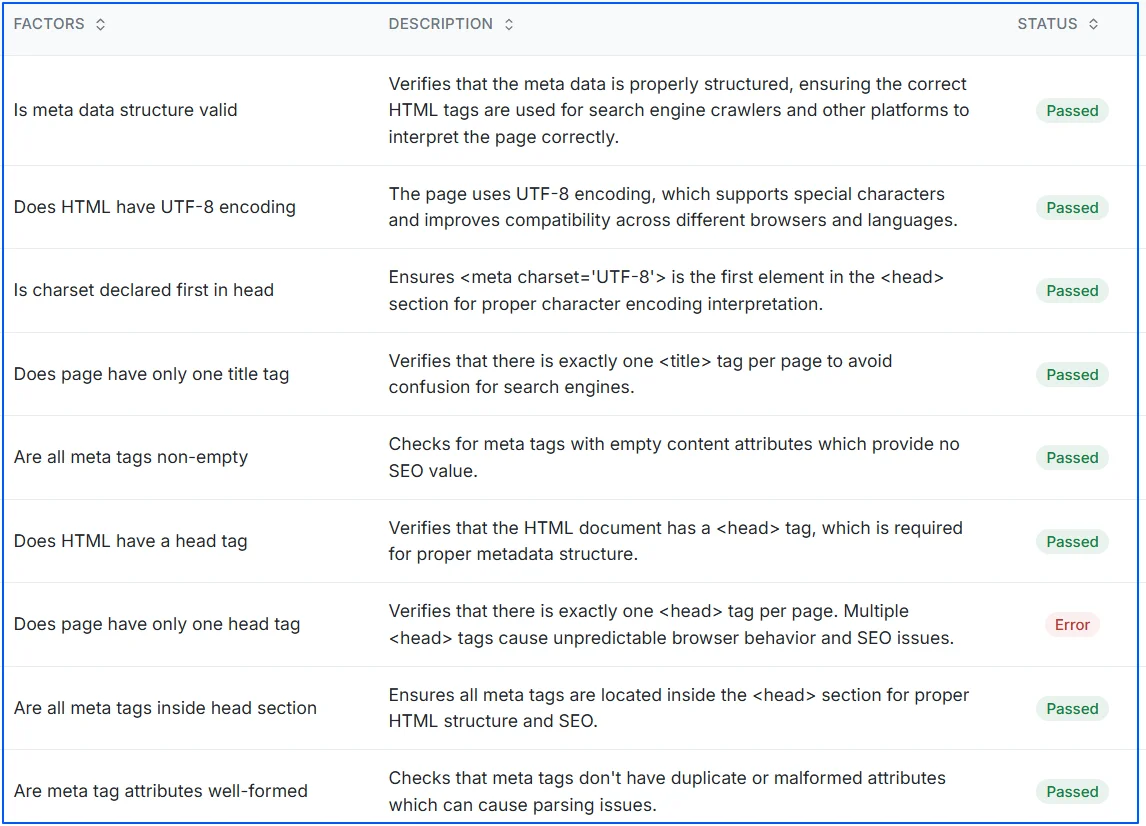
Metadata helps search engines understand what a page is about and influences how it appears in search results. Missing, duplicate, or poorly written metadata can reduce click-through rates and create confusion for search engines.
Example: A page has a missing title tag, duplicate titles across multiple pages, or an auto-generated meta description that doesn’t describe the content.
How to fix it:
- Write a unique title tag for each page that clearly describes its topic
- Keep title tags concise and relevant, avoiding unnecessary words
- Add a clear meta description that summarizes the page and encourages clicks
- Avoid duplicate metadata across multiple URLs
- Ensure metadata matches on-page content to prevent misleading signals
- Use SEO tools to analyze meta data issues and fix it on your page accordingly
Other Technical SEO Issues to Avoid on Your Website
After resolving the primary technical SEO issues outlined earlier, many websites still struggle with secondary technical problems that quietly limit performance. These issues occur less frequently and often go unnoticed, but when present, they can weaken crawl efficiency, slow down page rendering, dilute ranking signals, or create inconsistent experiences across devices and regions.
Fixing these additional technical SEO issues helps strengthen your site’s long-term stability and prevents small problems from compounding as your website grows.
Long-Term Use of Temporary Redirects (302, 303, 307)
Temporary redirects signal to search engines that a page move is not permanent. When used long-term, they prevent proper authority transfer and can slow down crawling.
Why it matters:
Search engines may continue treating the old URL as relevant, delaying full consolidation of ranking signals.
How to fix it:
- Replace long-standing temporary redirects with 301 redirects
- Audit redirects after migrations, redesigns, or content updates
- Use temporary redirects only for genuinely short-term changes
Missing Redirects Between WWW and Non-WWW Versions
When both www and non-www versions of a site remain accessible, search engines interpret them as separate entities. This creates duplicate content and splits link equity.
Why it matters:
Authority is diluted across multiple URL versions instead of being consolidated.
How to fix it:
- Choose a single preferred domain version
- Apply site-wide 301 redirects to enforce consistency
- Ensure canonical tags reflect the preferred version
Empty or Improperly Generated H1 Tags
The H1 tag is the primary on-page heading and a key signal for content relevance. Empty, generic, or auto-generated H1s reduce clarity for both users and search engines.
Why it matters:
Pages lose an important topical signal and become harder to interpret semantically.
How to fix it:
- Ensure every indexable page has a clear, descriptive H1
- Match the H1 to the page’s primary intent
- Avoid duplicating identical H1s across multiple URLs
Incorrect Viewport Configuration on Mobile
The viewport meta tag controls how pages scale on different screen sizes. When misconfigured, pages may appear zoomed out or require horizontal scrolling on mobile devices.
Why it matters:
Poor mobile rendering harms usability and mobile-first indexing signals.
How to fix it:
- Use a responsive viewport declaration
- Set the viewport to adapt dynamically to device width
- Test mobile rendering across multiple screen sizes
Unintentional Use of Global Nofollow Directives
A nofollow directive applied at the page or template level prevents search engines from following links. When used incorrectly, it disrupts internal link flow and crawling.
Why it matters:
Internal authority distribution is weakened, and important pages may receive less crawl attention.
How to fix it:
- Apply nofollow only where it is explicitly required
- Avoid global or template-level nofollow usage
- Control crawl behavior using robots.txt when appropriate
Uncompressed HTML, CSS, or JavaScript Files
Serving uncompressed files increases payload size and slows down page loading, directly impacting performance and Core Web Vitals.
Why it matters:
Larger file sizes increase load time, frustrate users, and reduce crawl efficiency.
How to fix it:
- Enable GZIP or Brotli compression at the server level
- Confirm compression applies to HTML, CSS, and JavaScript
- Validate compression using performance testing tools
High Total Blocking Time (TBT) From Heavy Scripts
Total Blocking Time measures how long a page remains unresponsive while JavaScript executes. High TBT leads to delayed interactions and poor user experience.
Why it matters:
Pages feel slow and unresponsive, even after visible content loads.
How to fix it:
- Break long JavaScript tasks into smaller chunks
- Defer non-critical scripts
- Remove unused or heavy third-party libraries
Missing x-default Hreflang for International Sites
The x-default hreflang attribute tells search engines which page to serve when no language or regional match exists. Without it, users may land on the wrong version of a page.
Why it matters:
International users may see irrelevant language versions, harming engagement and trust.
How to fix it:
- Add an x-default hreflang pointing to a global or language selector page
- Keep hreflang annotations consistent across all versions
- Validate hreflang implementation in Search Console
Why These Issues Still Matter
These technical SEO issues may not affect every website, but when they do occur, they quietly limit scalability and performance. Addressing them alongside core crawlability, indexation, and performance fixes ensures your site remains resilient, accessible, and competitive over time.
How to Audit a Page for Technical SEO Issues?
Auditing technical SEO at the page level works best when performing a technical SEO audit on URLs that already matter, such as pricing, landing, comparison, or pillar pages. The goal is to confirm that a specific URL is technically sound, well structured, and free from crawl, index, or interpretation issues.
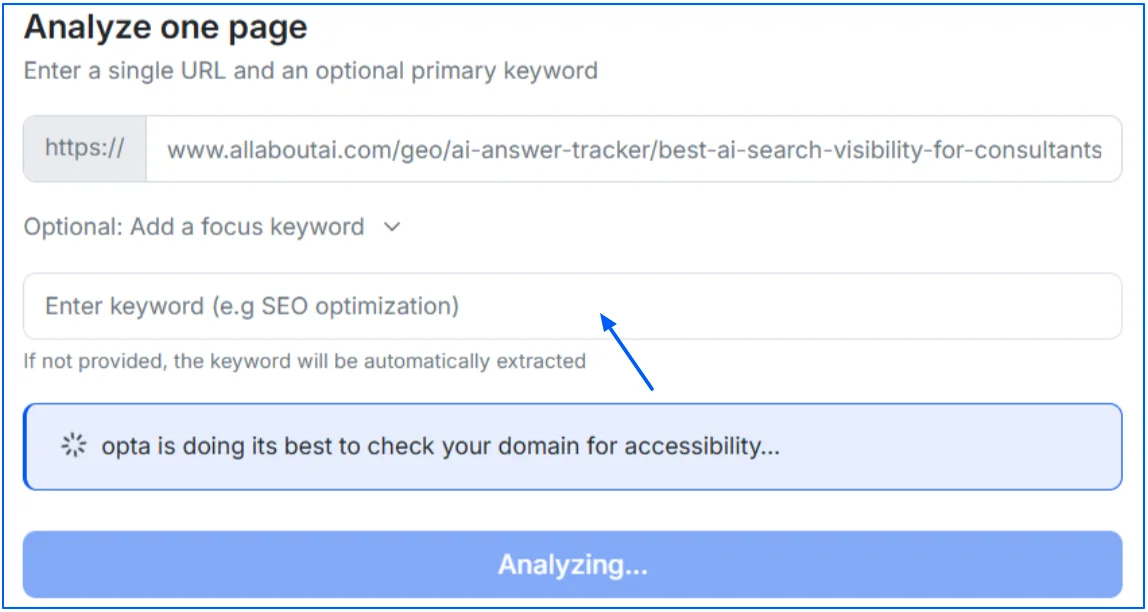
- You paste a URL, and Wellows audits that page against 100+ checks covering technical SEO, on-page signals, structure, and machine-readability indicators.
- For analysis, you can add a focused keyword of the specific page or Wellows will extract it from the page.
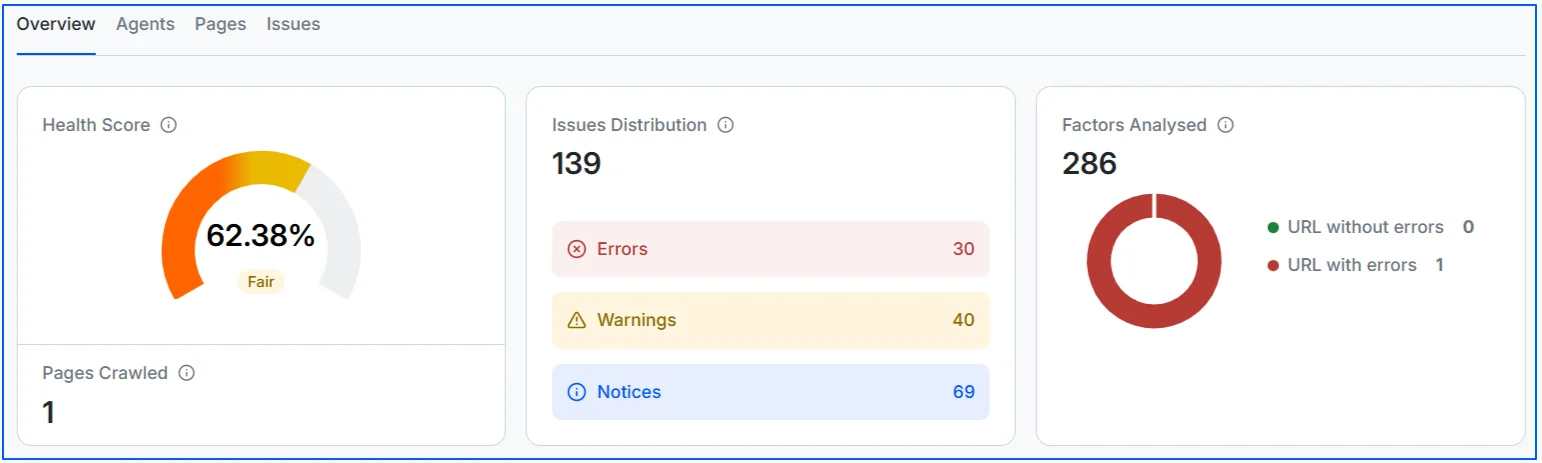
- In the overview, it gives you quick insights on page health score, issues distribution ( issues, errors, warnings, and notices), and total number of factors analyzed.
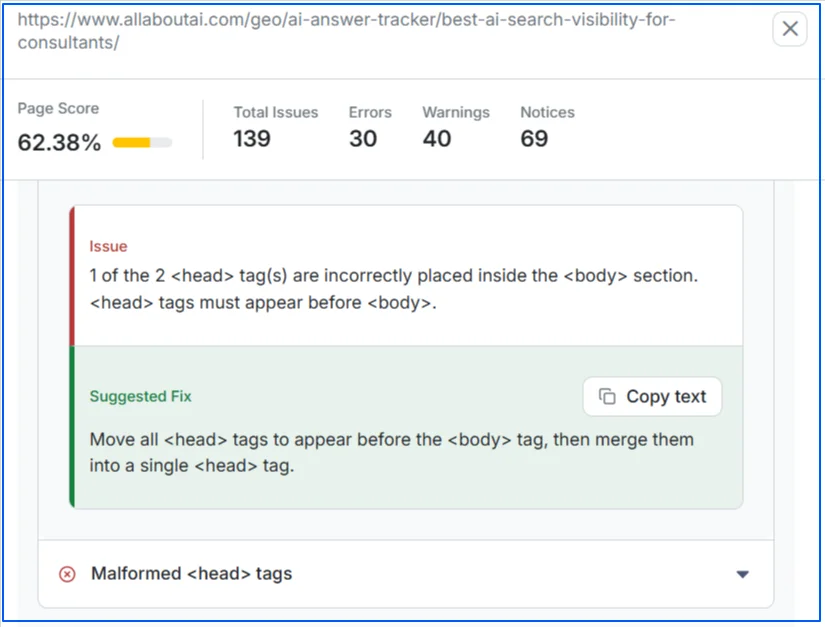
- Instead of generating a long generic report, it highlights prioritized issues, explains why each issue matters, and provides clear guidance on how to fix it, helping teams move from diagnosis to execution faster.
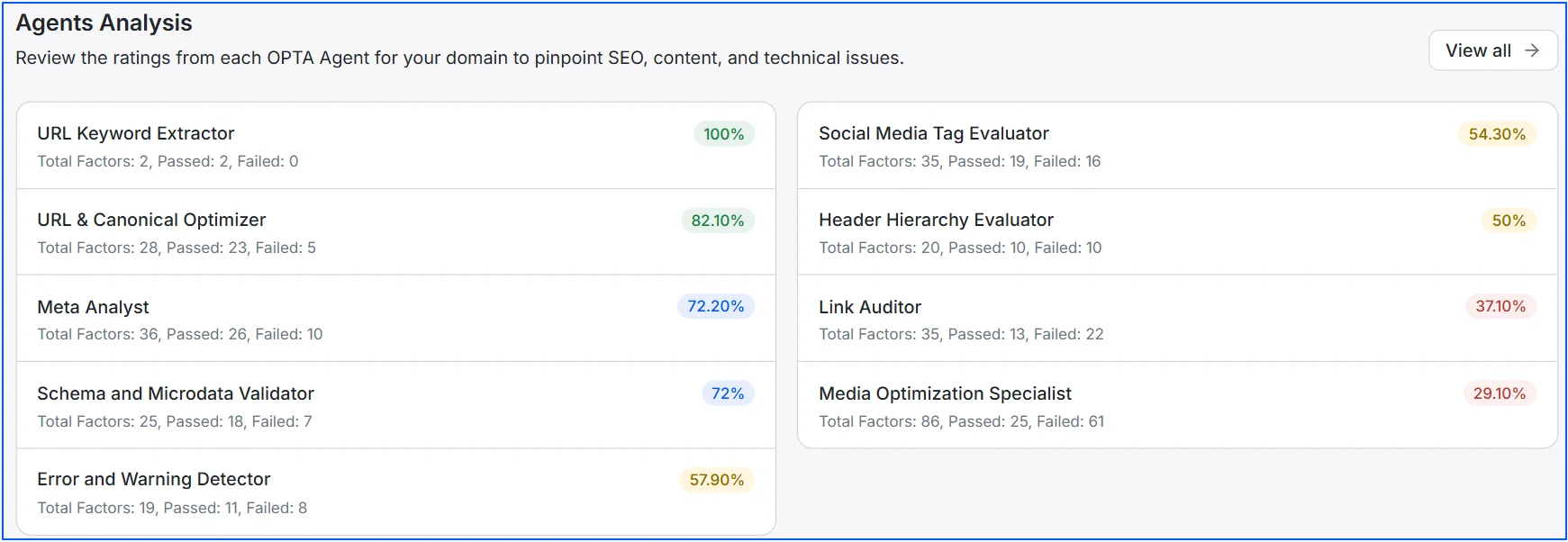
- You can explore these in more detail by navigating to the agent analysis section, where each category is broken down individually, making it easier to understand where SEO problems exist and why they matter.
- When you click on View All option, it gives you a complete analysis of all the technical SEO factors.
- Now, you can click on any factor for which you want deeper analysis, and you will see the problems and key fixes for that specific factor. You can make changes to your URL based on these suggestions.
- After changes are made, the page can be re-crawled to confirm whether issues are actually resolved.
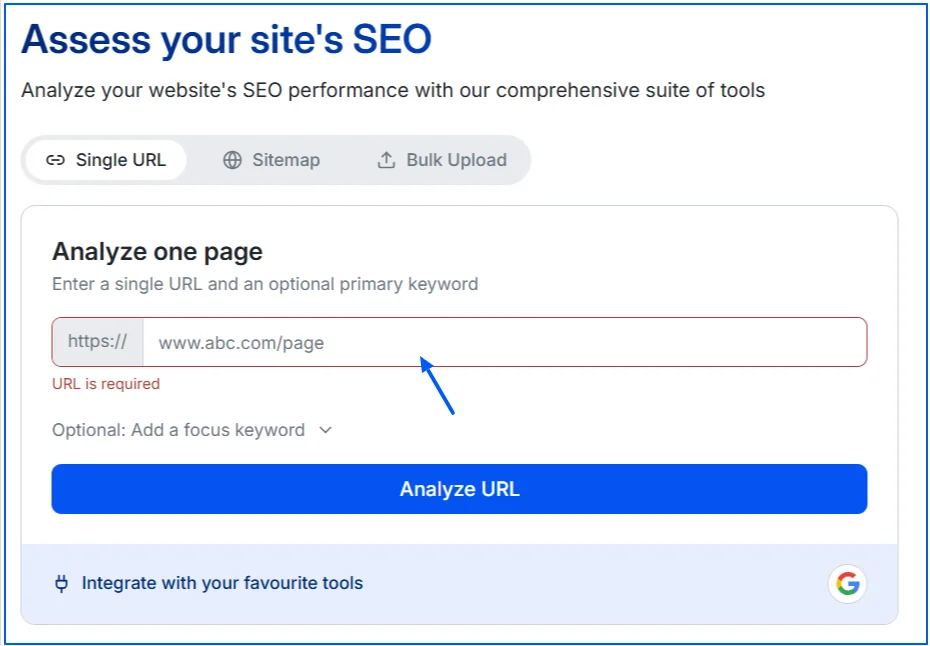
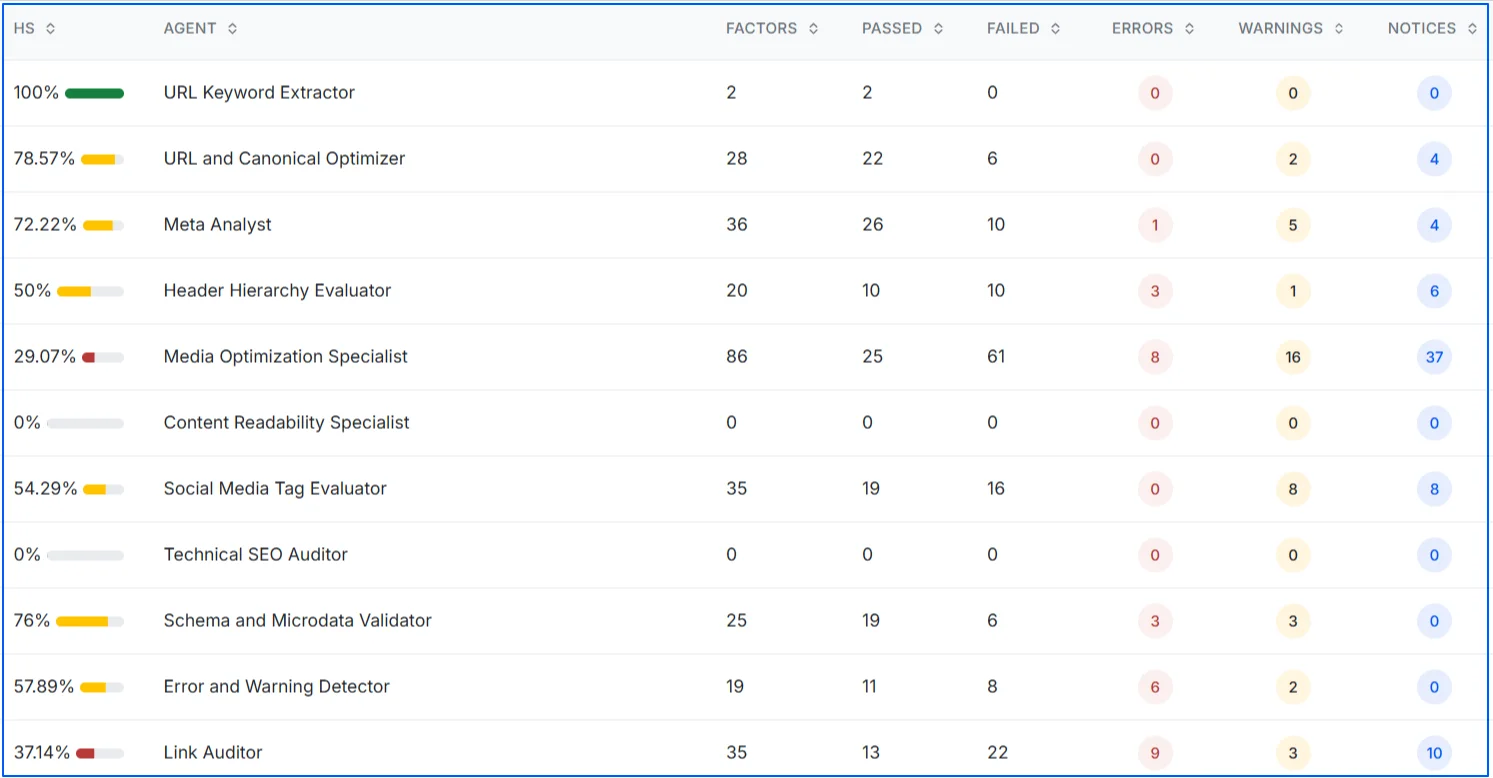
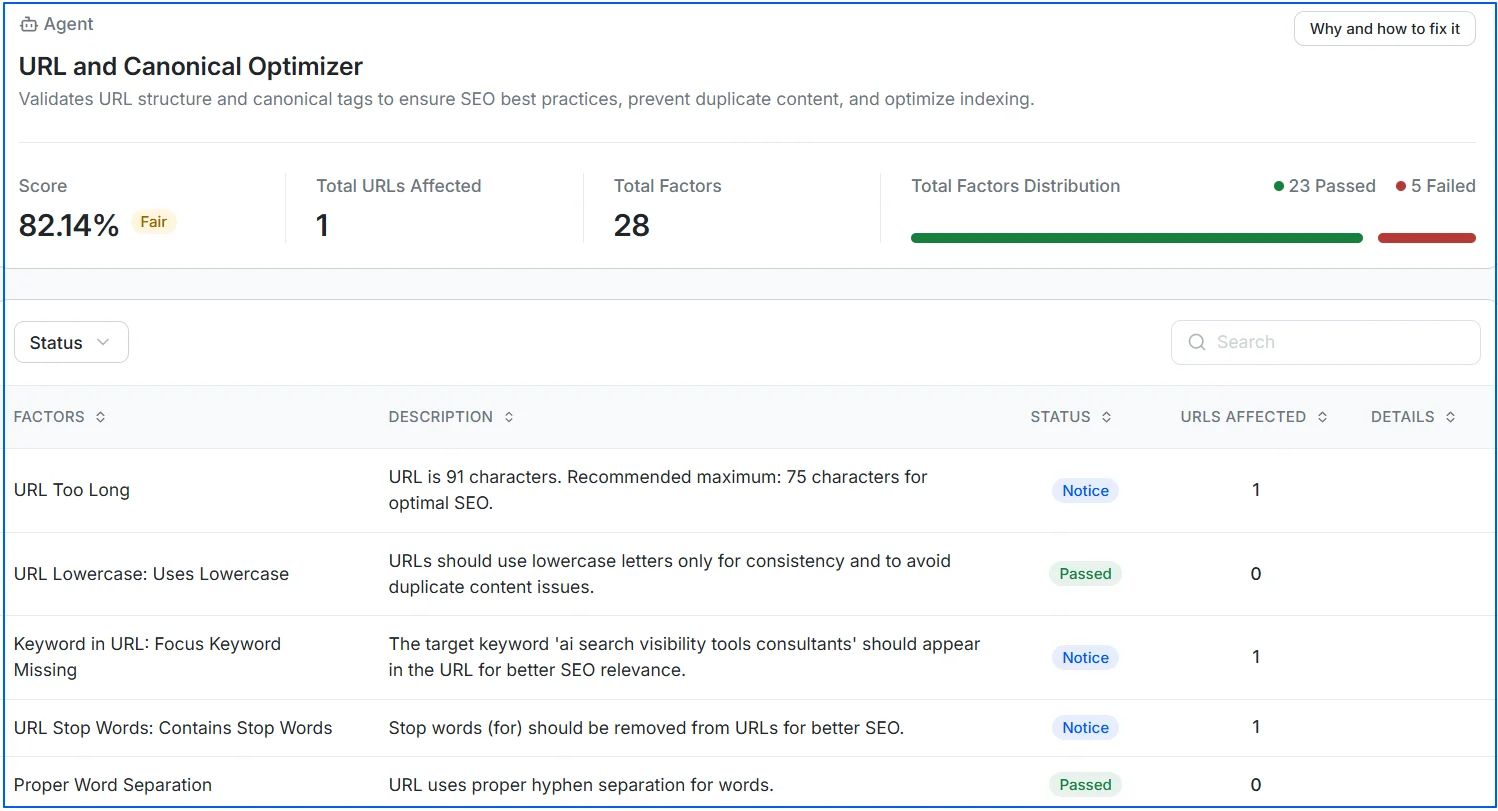

Wellows Site Audit is designed as a URL-level audit tool, not a full-site crawler. It helps SEO teams and AI SEO agencies answer four key questions for important pages:
- How healthy the page is?
- Which issues matter most?
- How to fix them correctly?
- Whether fixes are actually resolved after a re-crawl?
What are the Quickest Wins for Fixing Technical SEO Issues on My Site?
Quick technical SEO wins are fixes that deliver noticeable improvements without requiring major development changes. These actions typically resolve site-wide issues, clean up critical signals, and improve crawl efficiency quickly.
Did you know?
- Removing unintended noindex tags from important pages
- Fixing broken internal links pointing to 404 URLs
- Cleaning XML sitemaps to include only indexable, canonical pages
- Forcing HTTPS redirects and resolving mixed content errors
- Compressing large images and enabling lazy loading
- Improving internal linking to surface important pages
- Resolving crawl errors reported in Google Search Console
For startups prioritizing which technical issues to tackle first, it helps to think in terms of what actually moves citation and discovery outcomes — not just crawl scores. A startup-friendly AI visibility tool like Wellows can complement technical audits by showing which pages are being cited in ChatGPT, Gemini, and Perplexity, helping early-stage teams prioritize technical fixes on the pages that already have AI discovery momentum rather than spreading effort evenly across a site.
Focus first on issues that block crawling or indexing. Once those are fixed and you have verified them in your SEO audit, performance and architecture improvements tend to deliver compounding gains across the entire site.
How to Monitor Technical SEO Performance Over Time?
Monitoring technical SEO errors ensures that fixes remain effective and new issues are caught early. Regular checks help maintain crawlability, indexation, and performance as your site evolves.
- Track Crawl and Indexation Signals: Use Google Search Console to monitor crawl errors, indexing status, and excluded URLs. Sudden changes often indicate issues such as accidental noindex tags, broken links, or incorrect canonical settings introduced during updates or deployments.
- Monitor Page Speed and Core Web Vitals: Track Core Web Vitals, focusing on trends rather than one-time scores. Declines in LCP, CLS, or INP usually point to added scripts, heavier images, or server-side slowdowns.
- Validate Fixes With Re-Crawls and Audits: Re-crawl important pages in Wellows after making technical changes to confirm issues are resolved. Periodic audits of high-impact URLs help prevent regressions and keep technical SEO health consistent over time.
How Long Does It Take to See Results After Fixing Technical SEO Issues?
Technical SEO fixes don’t all produce results at the same speed. The timeline depends on the type of issue, how often your site is crawled, and how quickly search engines reprocess changes.
The table below shows typical timelines based on the six types of technical fixes:
| Technical SEO Fix Type | What Improves First | Expected Timeline |
|---|---|---|
| Crawlability fixes (robots.txt, noindex, broken links) | Crawling and indexation | 3–14 days |
| Indexation fixes (canonicals, soft 404s, sitemap cleanup) | Indexed URL stability | 1–4 weeks |
| Page speed and Core Web Vitals improvements | Performance signals and UX | 2–6 weeks |
| Structured data and schema fixes | Rich result eligibility | 1–4 weeks |
| Internal linking and architecture changes | Crawl efficiency and link distribution | 4–8 weeks |
| Large-scale cleanup (duplicate or thin pages) | Rankings and visibility | 6–12 weeks |
Read More Articles
- 8 Most Effective Strategies for AI Visibility Enhancement
- How SERP Visibility Analysis Uncovers Competitor Gaps in 2026
- AEO Vs GEO (2026): Differences, Use Cases & Which To Prioritize
- How Brand Signals Shape AI Search Visibility in 2025
- How Can Startups Use a GenAI Visibility Stack for Growth
- Reddit For GEO (2025): Boost AI Citations And Google SEO
- Save 50+ Hours: Automation for Agency Workflows in 2025
FAQs
Final Thoughts
Technical SEO issues don’t just affect individual pages, they influence how search engines crawl, index, and evaluate your entire site. Problems like crawl blocks, indexing conflicts, slow performance, weak internal linking, or misconfigured security can quietly hold back rankings, even when content and backlinks are strong.
The good news is that most common technical SEO issues are fixable once they’re clearly identified and prioritized. By focusing on crawlability problems, indexation, page speed, structure, and page-level audits, you create a stronger foundation for both search engines and users. When the technical basics are handled correctly, every other SEO effort becomes more effective and scalable.