Internal linking is a powerful yet often underrated SEO strategy. Many site owners focus on backlinks and page speed, but internal linking strategies in SEO are not secondary—they form the backbone of a well-structured website. Sites that use structured internal linking strategies can improve visibility by up to 40% within just a few months.
Even the best content may remain hidden without strong internal links. Internal linking acts as a guide, helping both users and search engines navigate your site. A clear linking strategy ensures that high-value pages— such as service pages, product listings, or cornerstone blog posts—are easily discovered, indexed, and ranked.
In 2025, competition for online visibility is tougher than ever. According to Chris’s data, websites that adopt strategic ianternal links can achieve up to a 40% boost in SEO performance within months. This is not a passing trend—it proves that internal linking for SEO is a critical search engine ranking factor.
What is Internal Linking in SEO?
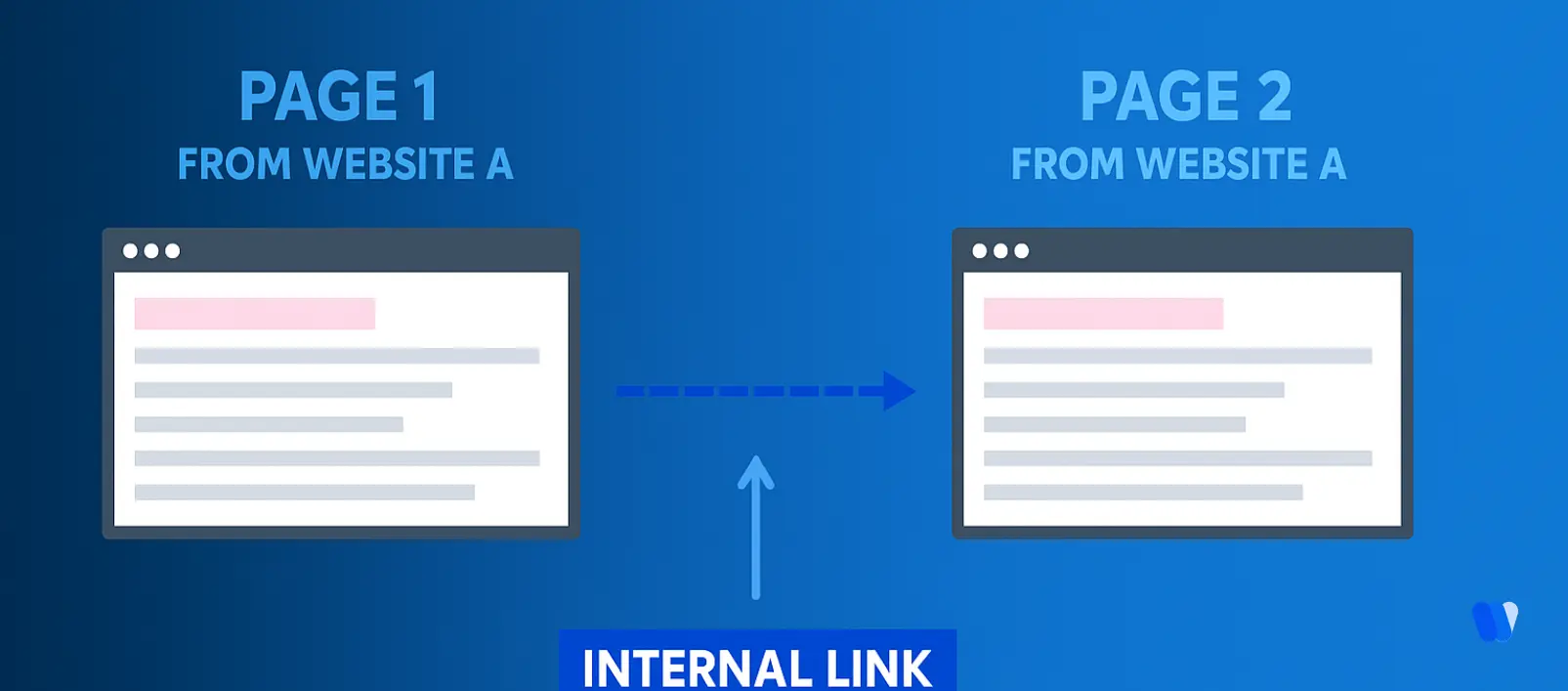
Internal linking in SEO refers to the practice of creating hyperlinks that connect different pages within the same website. These links help users navigate the site and assist search engines in understanding the site’s structure and hierarchy.
It goes beyond simple navigation. Internal links define your website’s architecture, help search engines understand relationships between pages, and distribute link equity across your site. This improves discoverability and ensures important pages don’t become orphaned or ignored.
What are the two ways to classify internal links?
Internal links connect pages within the same domain, and they can generally be grouped into two main classifications:
By Function
- Navigational Links: Found in menus, sidebars, and footers, these links form the backbone of site navigation. They guide visitors to the most important areas of your website, such as categories, service pages, or contact information.
- Contextual Links: Placed within the body of content, these links point to related resources or deeper explanations. They enrich the user experience by offering context and support search engines in understanding topical relevance.
By Hierarchical Relationship
- Upstream Links: Direct users to higher-level or more general pages, helping them step back to broader topics.
- Downstream Links: Lead to more detailed or specific subtopics, allowing users to dive deeper into your content.
- Horizontal Links: Connect to content on the same level, providing additional perspectives or related material without shifting up or down in hierarchy.
Recognizing these classifications helps build an internal linking framework that supports both smoother navigation for users and stronger SEO performance.
Why is Internal Links Important for SEO?
Internal links are hyperlinks that connect one page of your website to another within the same domain. They play a crucial role in search engine optimization (SEO) by improving navigation, distributing link equity, and helping both users and search engines discover your content more effectively.
Internal links make it easier for visitors to find related or important pages on your site. This improves user experience, reduces bounce rates, and encourages readers to explore more content. A well-planned linking structure helps users move naturally through your site without relying solely on the main navigation. Search engines use internal links to crawl and understand your site’s hierarchy. A strong internal linking strategy helps prevent common Technical SEO Issues by ensuring that every key page—especially new or deep ones—is indexed properly, making it easier for Google to discover and rank your content efficiently. Internal links pass authority from one page to another, spreading ranking strength across your site. When a high-authority page links to another, it shares its credibility and helps boost that page’s visibility in search results. This is especially useful for new or underperforming pages. Internal links help define how your content connects. By linking related topics, you create a clear content hierarchy that improves topical relevance. This structure helps search engines understand relationships between pages, supporting better rankings for topic clusters and keyword groups. When users find helpful internal links to additional content, they tend to stay longer and visit more pages. Longer sessions and higher engagement rates send positive signals to search engines, showing that your content is valuable and relevant. Internal links can guide visitors toward high-converting pages—like product listings, service pages, or CTAs. By connecting informational content to transactional pages, you can naturally move users through the sales funnel and improve conversions. A smart internal linking strategy keeps users from leaving after one page. When they find relevant links leading to more useful content, bounce rates drop, which helps strengthen your site’s overall SEO performance. Adding internal links from popular or high-traffic pages to newly published or deeper pages ensures they’re discovered faster. This boosts the visibility of fresh content and prevents pages from being overlooked by both users and search engines. Internal links provide search engines with context about your content through descriptive anchor text. Linking related topics reinforces your site’s topical authority and helps Google understand the depth and scope of your expertise.1. Enhancing Website Navigation and User Experience
2. Facilitating Search Engine Crawling and Indexing
3. Distributing Link Equity
4. Establishing Content Hierarchy and Structure
5. Increasing User Engagement and Session Duration
6. Boosting Conversion Rates
7. Reducing Bounce Rate
8. Promoting New or Hidden Content
9. Supporting Contextual Understanding
In summary: internal linking is one of the most powerful factors of on-page SEO. It improves navigation, distributes authority, enhances user engagement, and ensures that every page on your website contributes to your overall search performance.
The Benefits of Internal Linking in Search Engine Optimization
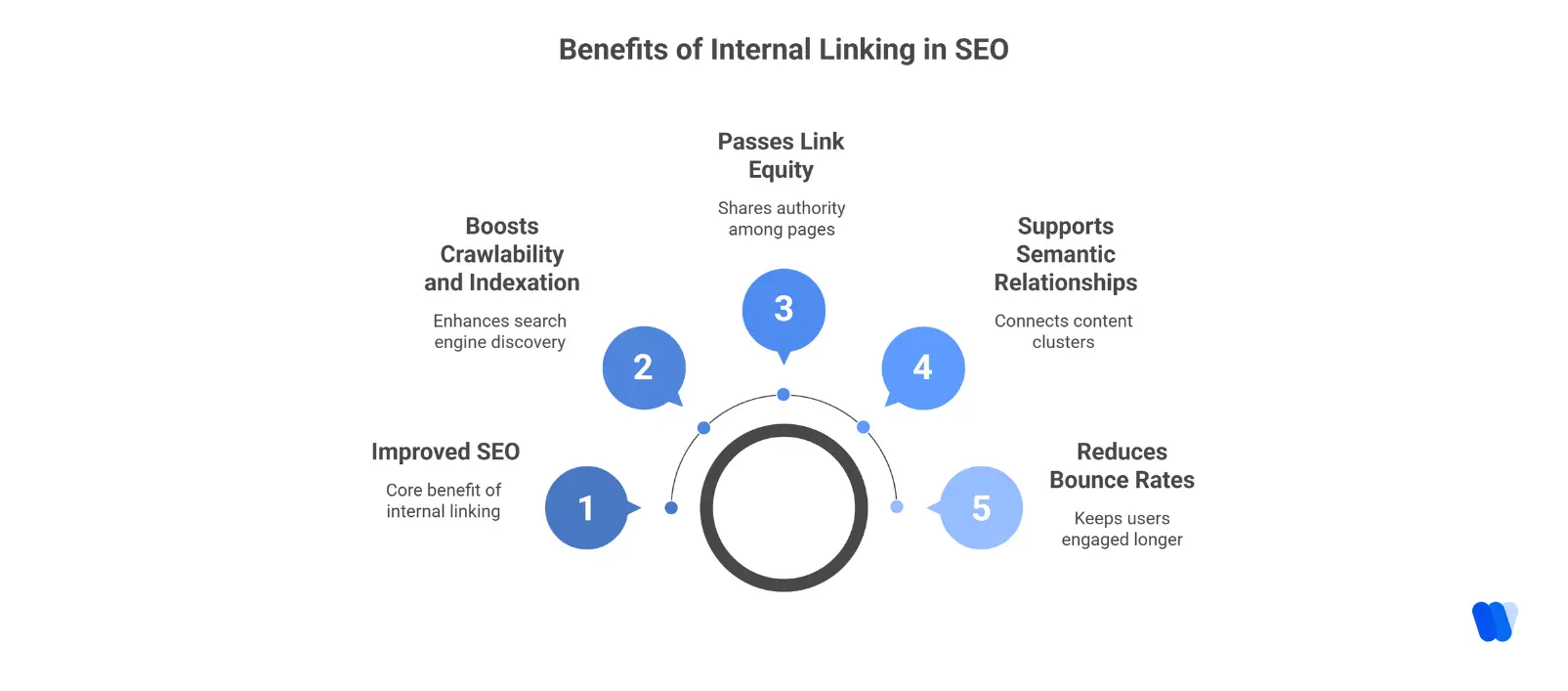
- Boosts crawlability and indexation: Search engine bots discover and process content through internal links.
- Passes link equity (“link juice”): High-authority pages share ranking power with related pages.
- Supports semantic relationships: Well-planned internal linking strategies connect related content clusters.
- Reduces bounce rates: Users quickly find relevant content and stay engaged longer.
- Improves topical relevance and ranking signals: Helps search engines identify the most important content on your site.
What Is the Difference Between Internal and External Links?
Internal and external links are both types of hyperlinks used to connect web pages, but they differ in purpose, control, and SEO impact. Understanding how each works is essential for building a strong linking strategy.
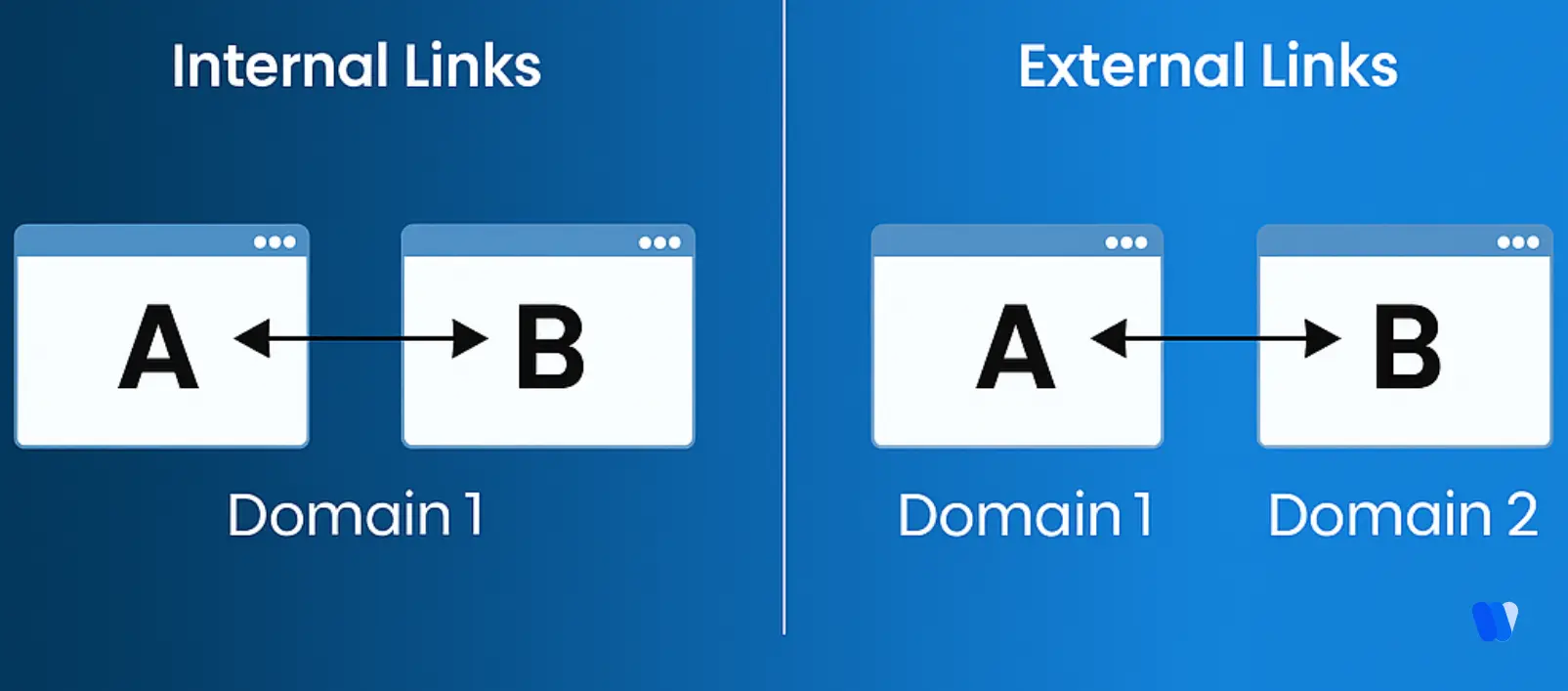
Internal Links
- Definition: Hyperlinks that connect one page to another within the same website or domain.
- Purpose: They help users navigate your site, distribute page authority, and assist search engines in understanding your site’s structure.
- Example: A link from your homepage to your services page or blog article.
External Links
- Definition: Hyperlinks that connect your website to a page on a different domain.
- Purpose: Used to provide additional resources, cite sources, or link to authoritative external content.
- Example: A blog post linking to an industry news article on another website.
Key Differences Between Internal and External Links
| Aspect | Internal Links | External Links |
|---|---|---|
| Destination | Direct users to another page within the same website or domain. | Direct users to a page on a different website or domain. |
| Control | Fully controlled by the website owner and easy to update or manage. | Not controlled by the website owner; external changes can affect link validity. |
| SEO Impact | Distributes link equity across your website, strengthening overall SEO performance. | Boosts credibility when linking to trusted sources, but too many can lead users away. |
| User Experience | Improves on-site navigation and encourages users to explore more pages. | Provides additional context and external references for deeper insights. |
In summary:
Internal links keep users engaged within your site and support SEO growth, while external links enhance credibility and user trust by connecting your content to authoritative sources. A balanced mix of both creates a more valuable and trustworthy user experience.
From structuring your site hierarchy to refining contextual anchors, a well-planned internal linking strategy strengthens every layer of SEO. But doing it manually can be time-consuming.
That’s why many marketers explore how solo consultants use an AI SEO Agent to automate relevance mapping, streamline linking, and ensure every page connects with purpose.
Platforms like an AI Search Visibility Platform for Startups can further enhance these efforts by integrating real-time data insights and intelligent linking recommendations for scalable growth.
How Internal Linking Affects Google Rankings
Internal linking is a proven search engine ranking factor. Here’s how it influences results:
- Page Discovery: Googlebot crawls through links—no link means limited visibility.
- Crawl Budget Optimization: A clear structure ensures efficient crawling. If crawl errors, blocked resources, or weak discovery are recurring, this Crawl Budget SEO guide shows how to remove crawl traps and prioritize key URLs.
- Link Equity Distribution: Pages with more internal links are treated as higher priority.
- Relevance Signaling: Contextual links reinforce topic clusters and semantic meaning.
In a recent Google Search Console keyword analysis, it was shown that sites with flat link structures often lose visibility due to page isolation, a risk typically surfaced during a technical SEO checklist when crawl paths and internal link depth are reviewed together.
A strong internal linking for SEO plan prevents these drops by giving every page a clear role in the overall site hierarchy and keeping authority flowing across key sections. Paired with an on-page SEO checklist, it also helps ensure those linked pages are properly optimized to benefit from the authority being passed through your site.
If your SEO strategy includes Bing, internal linking becomes even more critical. Bing’s algorithm places additional weight on structured linking and clear site architecture, making well-planned internal connections a direct ranking advantage.
How Does Internal Linking Affect Website Navigation and User Experience?
Internal linking plays a crucial role in shaping how users move through your website and how easily they find the information they need. A strong internal linking structure not only improves navigation but also enhances overall user satisfaction and engagement.
1. Improved Site Navigation
Strategic internal links connect related pages, helping visitors explore your website without relying solely on the main menu. This smooth flow between pages reduces friction and makes it easier for users to find what they’re looking for.
2. Enhanced Content Discoverability
Internal links make your hidden or new content more visible. Linking from popular pages to recently published or relevant posts increases their chances of being seen, driving more engagement and keeping your site dynamic.
3. Increased User Engagement and Lower Bounce Rates
By guiding users toward related articles or useful resources, internal links encourage them to stay longer and view multiple pages. This reduces bounce rates and signals to search engines that your content is valuable and engaging.
4. Clear Content Hierarchy
An organized internal linking structure shows users (and search engines) how your content connects. It helps define topic relationships and makes it easier for visitors to follow your content journey logically and intuitively.
5. Descriptive Anchor Text
Using clear and descriptive anchor text improves navigation clarity. Instead of generic phrases like “learn more,” use meaningful keywords that tell users exactly what to expect from the linked page.
6. Balanced Link Placement
Too many links on a page can overwhelm users. Keep your internal links relevant and natural to maintain an intuitive, clutter-free browsing experience.
How to Build an Internal Linking Strategy
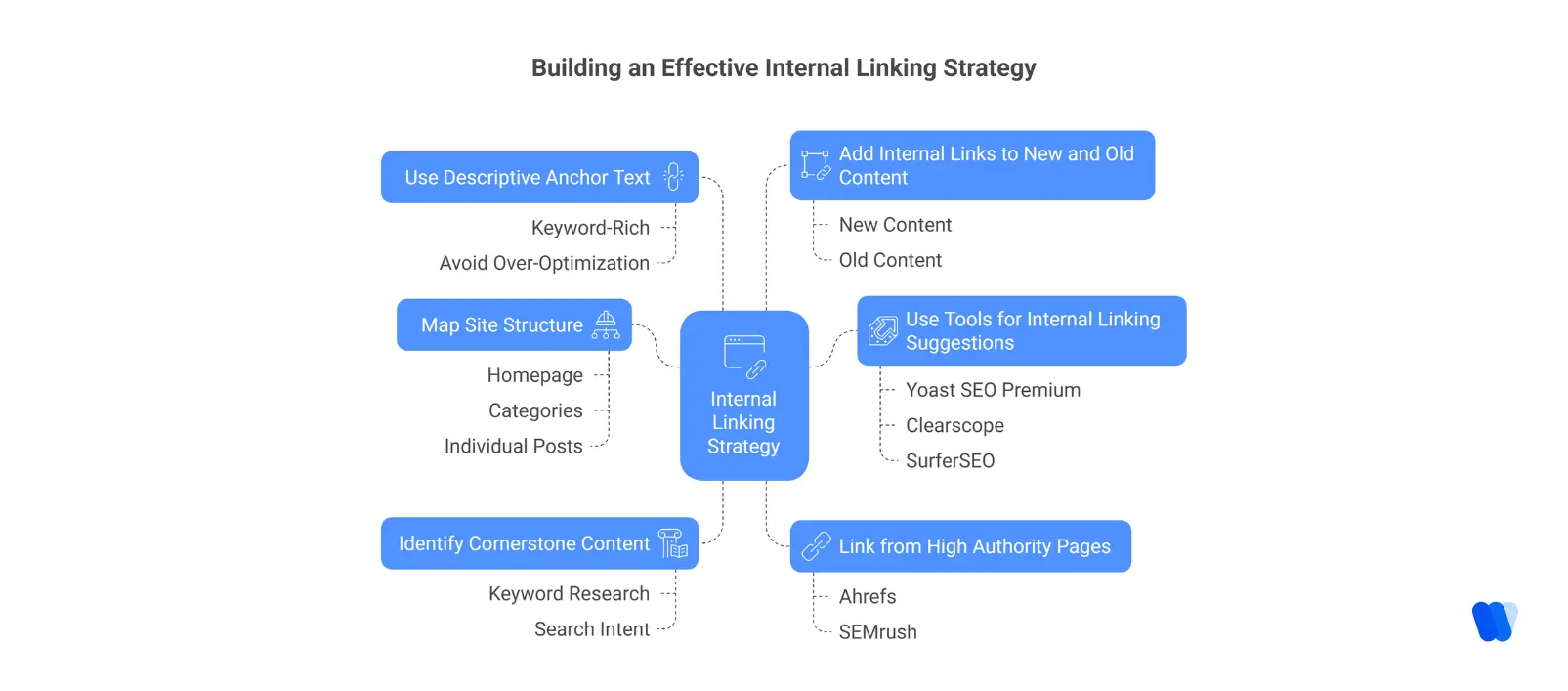
1. Map Your Site Structure
Visualize your site as a pyramid, using insights from Real-Time SEO Data to decide which sections deserve stronger connections.
- Top: Homepage
- Middle: Categories or core pages
- Bottom: Blog posts or product pages
This defines crawl depth and clarifies content priorities.
2. Identify Your Cornerstone Content
Your cornerstone pieces should:
- Cover your most valuable topics
- Be long-form and comprehensive
- Receive the most internal links
Use keyword research to identify content with strong search intent
and link it as central nodes in your
internal linking strategy.
3. Link From High Authority Pages
Use tools like Ahrefs or SEMrush to:
- Identify top-performing pages with backlinks
- Add links from them to newer or lower-traffic pages
This improves visibility and leverages existing authority, helping brands maximize results even with limited resources. For those working solo or with lean teams, it’s possible to boost SEO without a team by relying on smart internal linking and automated SEO agents.
4. Use Descriptive Anchor Text
Avoid generic anchors like “click here.” Instead, use keyword-rich anchor text that accurately describes the target page.
For example, when recommending vetted partners, link the phrase top AI SEO agencies instead of using a generic anchor like “learn more.”
To build deeper topical authority in SEO, group related search terms into thematic clusters instead of targeting them individually. This approach improves content depth, reduces overlap, and strengthens relevance signals. Learn more about keyword clustering strategies to apply this method effectively in your SEO workflow.
Mix up anchor variations to avoid over-optimization and spam signals.
5. Add Internal Links to New and Old Content
When publishing new content, link to:
- Older, related posts
- Category or hub pages
Then update older posts to link back to new content, creating two-way connections.
This strengthens site architecture and enhances discoverability.
6. Use Tools for Internal Linking Suggestions
SEO plugins like Yoast Premium provide real-time internal linking suggestions.
Tools such as Clearscope and SurferSEO also identify keyword gaps and content opportunities.
What are the best practices for internal linking with long-tail keywords in mind?
Implementing an effective internal linking strategy that leverages long-tail keywords can greatly improve both your site’s SEO strength and overall user experience. Here are some best practices worth following:
1- Develop Content Clusters Around Pillar Pages
Structure your content around comprehensive pillar pages that act as hubs for broad topics, while supporting articles focus on narrower, long-tail subtopics. For example, a pillar page on Sustainable Living could link to posts like Top Eco-Friendly Cleaning Products for Homes. This hierarchy signals clear topical relationships to search engines and distributes link equity more efficiently across your site.
2- Optimize Anchor Text with Long-Tail Keywords
Use anchors that naturally include long-tail search phrases rather than vague calls to action. For instance, instead of writing click here, a stronger option would be browse eco-friendly garden furniture. This makes the link more meaningful to readers and helps search engines better understand the relevance of the linked page.
3- Implement Contextual Internal Links
Place links within the body of your content that connect readers to closely related articles. If you’re writing about tree varieties, linking the phrase sycamore tree guide to a detailed article about sycamores creates a more useful path for readers and reinforces topical depth for crawlers.
4- Utilize Breadcrumb Navigation
Breadcrumbs provide a navigational trail that reflects site hierarchy while embedding keyword context. For example, a breadcrumb like Home > Furniture > Eco-Friendly Garden Furniture not only improves usability but also strengthens keyword signals, particularly when long-tail phrases are included.
5- Regularly Audit and Update Internal Links
Internal links should evolve alongside your content strategy. Perform regular audits to fix broken paths, replace outdated anchors, and connect older content with newly published pieces. Refreshing links with updated long-tail keywords ensures your site continues to align with user search intent and maintains SEO effectiveness.
By weaving long-tail keywords into your internal linking framework, you create a more intuitive navigation system, reinforce topical authority, and deliver a better user journey—all of which lead to stronger visibility in search results.
How to Run an Internal Linking Audit
To ensure you’re not missing opportunities, conduct an internal linking audit every quarter:
Use tools like:
- Screaming Frog or Sitebulb to map your site’s link structure
- Google Search Console to view top-linked internal pages
- Ahrefs Site Audit to find broken or orphaned content
Look for:
- Orphaned pages with no links
- Overlinked low-priority pages
- Broken internal links or redirects
Fix these gaps to avoid common SEO visibility issues and improve overall user experience. Make it part of your ongoing internal linking for SEO routine.
What About Anchor Text and First Link Priority?
Use descriptive anchor text that tells Google and users what the linked page is about.
If you include multiple internal links to the same page, Google usually only counts the first anchor text it finds—so make that one count.
Be strategic in placement. For example, placing a contextual internal link in the first section increases its visibility and authority flow.
The Role of Internal Linking in Topic Clusters
Internal linking in Search Engine Optimization is the backbone of topic clusters —and it’s also a practical lever for how to optimize for Google AI Overviews, because clusters create the context Google uses to summarize and cite.”. If you’re building content hubs, each supporting article should:
- Link back to the main hub
- Receive a link from the hub page
- Link to other related subtopics
This forms a semantic “web” that search engines use to understand the depth and scope of your content. It’s a central piece of modern internal linking for SEO methodology.
Where to Place Internal Links
Strategic placement matters. Here are some tips:
- Top of the Page: Helps users click early and reduces bounce rate
- Middle of Content: Contextually supports deeper topics
- Bottom Section: Great for linking to related reads or product pages
Avoid placing too many in one section—spread them naturally. This spacing supports effective internal linking for SEO without overwhelming the reader.
What’s the relationship between content depth and internal link placement?
Strategic internal linking helps control how deep key pages sit within your site’s hierarchy, keeping them closer to the homepage and within an optimal click distance. When important content isn’t buried too deep, search engines can crawl and index it more efficiently, improving its chances of ranking higher.
At the same time, distributing links across long-form content ensures that link equity flows naturally, strengthening the authority of pages that would otherwise remain hidden.
In short, aligning internal link placement with content depth not only improves discoverability but also ensures that your most valuable pages gain visibility and authority—directly contributing to stronger SEO outcomes.
Internal Linking Case Study: What Works
A case study published by LinkLeaps Digital demonstrates the significant benefits of implementing a strategic internal linking approach. In this study, a mid-sized blog that had been experiencing stagnant traffic implemented a well-thought-out internal linking strategy.
By adding three or more contextual links per article, utilizing varied anchor text, and linking to and from cornerstone content, the blog observed a 30% increase in organic traffic.
Key Takeaways:
- Contextual Linking: According to Rich Niches, integrating at least three contextual internal links within each blog post helped distribute link equity effectively across the site.
- Anchor Text Variation: Using diverse and descriptive anchor texts improved the relevance and clarity of the links for both users and search engines.
- Cornerstone Content Integration: Linking to and from cornerstone content established a robust content hierarchy, enhancing the site’s topical authority.
This case study underscores the importance of a deliberate internal linking strategy in boosting a website’s visibility and performance in search engine results.
Read More Articles
FAQs
Final Thoughts: Your Action Plan for Stronger SEO
Internal linking is one of the most powerful and low-effort ways to improve your website’s performance. When applied with intent, it strengthens SEO visibility issues, builds logical content relationships, and improves your chances of ranking better in the what is SERP.
If you’re short on resources or time, prioritizing internal linking for SEO offers a scalable edge—especially when supported by an AI SEO Agent for startups that can automate relevance mapping and optimize according to SERP trends.
Start small: run a quick internal linking audit, connect orphaned content, and update anchor text as part of your ongoing internal linking strategy. These simple shifts make a compounding difference across every search engine ranking factor.