Wondering why your site isn’t climbing search rankings in 2025? The answer could lie in technical and on-page issues that an SEO audit can reveal.
Today’s search algorithms prioritize user experience, speed, and site health, and even small errors can result in major visibility losses.
That’s where a comprehensive SEO audit becomes your best defense, combining SEO site analysis with actionable insights from a structured technical SEO audit to fix both technical and on-page issues.
An audit gives you a full picture of how well your site aligns with current SEO standards. It points out hidden issues, slow speeds, broken links, duplicate content, and crawl errors that silently hurt your visibility.
With digital competition tightening, staying audit-ready is no longer optional.
What Is an SEO Site Audit?
An SEO site audit is a complete evaluation of your website’s health, designed to uncover both technical and content-related issues that may be holding back your search rankings. Think of it as a health checkup for your site — it reviews everything from performance and crawlability to content quality and backlinks.
In 2025, audits are more critical than ever because search algorithms now prioritize user experience, speed, and overall site health. Even small errors like broken links, duplicate content, or crawl issues can quietly damage visibility. A structured audit highlights these issues and provides a roadmap for fixes that directly improve rankings and conversions.
Key Components of an SEO Site Audit
SEO Audit Report Examples
For a practical example, EB Content Creation offers a sample SEO audit report showcasing how these elements come together. Similarly, SEOptimer provides a free sample SEO audit report PDF to demonstrate real-world reporting formats.
These resources can serve as templates or inspiration when preparing your own SEO audit reports, ensuring your findings are detailed, clear, and actionable.
Regular SEO audits aren’t just about fixing problems — they’re about staying proactive. They ensure your site keeps pace with Google’s evolving ranking factors, reduces risks from algorithm updates, and positions your brand for stronger long-term growth. Whether you’re a startup, agency, or freelancer, running audits quarterly or bi-annually keeps your SEO strategy future-proof.
Why Is an SEO Audit Important in 2025?
SEO is no longer just about keyword research and backlinks it’s about delivering a seamless experience that meets both user expectations and search engine standards.
That’s why SEO audits are so important. They give you an inside look at how your website performs and where it falls short. This shift also highlights how AI SEO agents vs tools play different roles in supporting audits.
A thorough audit identifies missed opportunities and hidden problems that could be silently hurting your search engine visibility. Whether it’s a slow-loading page, improper indexing, or outdated metadata, these issues compound over time.
Think of it as your roadmap to relevance, visibility, and trust guided by AI SEO agent SERP visibility so fixes align with rich results, PAA, and AI summaries. Without regular SEO audits, even well-designed websites can fall behind in the rankings.
Following best practices for SEO site audits approach ensures you maintain both technical health and search visibility.
When to Perform an SEO Audit?
The frequency of a site audit depends on how fast your website evolves. If you’re regularly publishing content, adding new pages, or updating technical elements, a quarterly audit is smart. For static sites, twice a year may suffice.
You should also perform an audit:
Did you know?
- After a major website redesign
- Following a Google algorithm update
- If your rankings suddenly drop
- Before launching a big campaign or migration
These audits aren’t just about fixing things; they’re about staying proactive and aligned with a structured SEO site audit checklist that keeps your site competitive year-round, a discipline embedded in AI-led SEO workflows for solo consultants. The faster you catch issues, the less damage they do to your rankings and traffic.
An SEO audit for websites is a comprehensive evaluation of your site’s performance in relation to search engine optimization, often documented in an SEO website audit report.
An SEO audit functions like a comprehensive health assessment for your website, uncovering both visible and hidden issues that affect performance and rankings.
The audit investigates both visible and invisible factors that affect your site’s visibility on search engines.
At its core, it reviews how well your website aligns with current ranking algorithms. This includes assessing technical errors, broken links, keyword research, content structure, backlink quality, and mobile responsiveness. It also pinpoints weaknesses that may be blocking growth.
In 2025, Google’s ranking factors have evolved to prioritize experience, relevance, and authority. A site that loads slowly, lacks mobile usability, or shows thin content risks losing its ranking even with good backlinks or keywords.
An SEO comprehensive site audit is not only diagnostic but strategic. It provides a data-driven plan for improvement. When combined with action, it becomes your roadmap to higher visibility, stronger authority, and better user engagement.
For startups, handling these checks manually can be overwhelming.
That’s where the AI Search Visibility Platform for Startups comes in, automating strategy, keyword clustering, LLM-optimized content creation, and reporting, so lean teams can scale growth without getting stuck in spreadsheets.
Core Components of an SEO Site Audit
SEO audits aren’t one-size-fits-all, but most include these major categories:
Did you know?
- Technical SEO Site Audit: Is your site fast, secure, and easy for search bots to crawl?
- On-Page SEO Audit for Site: Do your pages use the right keywords, tags, and headings?
- Off-Page SEO Site Audit: Are other reputable sites linking back to you?
- User Experience: Does your design work well across devices, and is it easy to navigate?
Let’s explore each one in more detail.
1. Technical SEO Checks
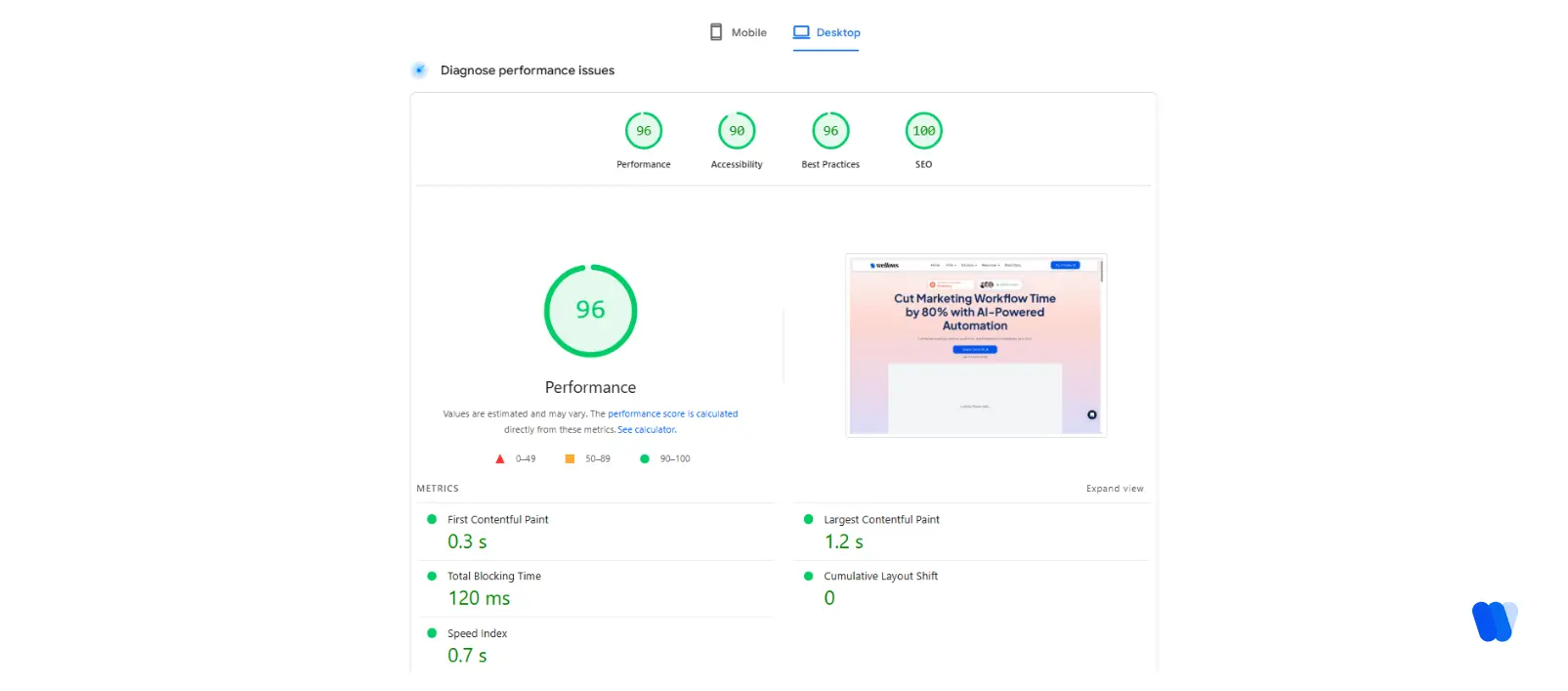
SEO audits uncover hidden technical problems that quietly hurt rankings—like slow load speeds, broken links, improper redirects, and mobile usability gaps. By fixing these, you ensure search engines can crawl and index your site efficiently, which directly boosts performance.
This part of the audit looks at:
Did you know?
Crawlability:
- Ensure search engine bots can access all important pages.
- Check for blocked resources in robots.txt.
- Fix crawl errors reported in Google Search Console.
If crawl errors, blocked resources, or weak discovery are recurring, this Crawl Budget SEO guide shows how to remove crawl traps and prioritize key URLs.
Site Speed and Performance:
- Check Core Web Vitals: Largest Contentful Paint (LCP), First Input Delay (FID), and Cumulative Layout Shift (CLS).
- Enable browser caching so repeat visitors experience faster load times.
- Minimize HTTP requests by consolidating CSS, scripts, and images.
- Optimize images with proper sizing and compression.
SEO Site Audit for Mobile Optimization:
- Confirm your site uses responsive design for all screen sizes.
- Test with Google’s Mobile-Friendly Test to catch usability issues.
- Ensure buttons, menus, and text are easy to use on mobile devices.
Security and HTTPS:
- Ensure no page mixes secure (HTTPS) and insecure (HTTP) content.
- Confirm SSL certificates are valid, renewed, and redirect HTTP to HTTPS properly.
- Fix any “Not Secure” warnings flagged by browsers.
XML Sitemap and Robots.txt:
- Verify your XML sitemap is up to date and submitted to Google Search Console.
- Check that robots.txt is not blocking critical pages or resources.
- Remove outdated or incorrect sitemap entries.
Even a misplaced noindex tag can quietly pull a page out of Google’s index. That’s why every audit should start here.
Technical Geo Audits
Another emerging practice in 2025 is the technical geo audit—a process that ensures your website complies with regional regulations and effectively targets users by geography.
Technical geo audits help you:
Did you know?
-
Verify compliance with data regulations (like GDPR in Europe).
-
Ensure local SEO elements (like hreflang tags, localized metadata, and structured data) are implemented correctly.
-
Analyze site performance across different regions for speed and accessibility.
While specialized platforms like EUPEG are developing to evaluate geographic data, most audits combine tools like Google Search Console, local crawlers, and IP-based performance testing. For global businesses, these checks are essential to maintain visibility and avoid compliance risks.
If your traffic includes desktop or enterprise users, it’s also worth considering how optimize for Bing relies heavily on technical clarity and exact-match structuring issues a site audit can directly uncover.
Beyond these technical foundations, the structure of your website also plays a critical role in how both users and search engines interact with your content. A clear site architecture and strong internal linking help search engines crawl more efficiently and ensure link equity flows to the right pages.
Site Architecture and Internal Linking
Did you know?
- URL Structure: Keep URLs short, descriptive, and free of unnecessary parameters. Use hyphens (-) instead of underscores (_), and avoid long query strings or duplicate URL versions.
- Internal Linking: Ensure every page is connected to at least one other page with relevant anchor text. Add links to orphaned pages so they are discoverable.
- Navigation Clarity: Use logical menus and breadcrumbs to guide users and crawlers through the site. Keep navigation consistent and simple.
Redirects and Error Pages
Did you know?
- Redirect Chains: Eliminate unnecessary redirect hops by pointing old URLs directly to the final destination. Replace multiple 302s with a single 301 for permanent moves.
- 404 Monitoring: Regularly crawl for broken links and fix or redirect them. Update backlinks (where possible) that still point to removed pages.
- Proper Redirects: Use 301 redirects for permanent changes and 302 only for temporary moves. Avoid redirect loops that can trap both users and search engines.
2. On-Page SEO Evaluation
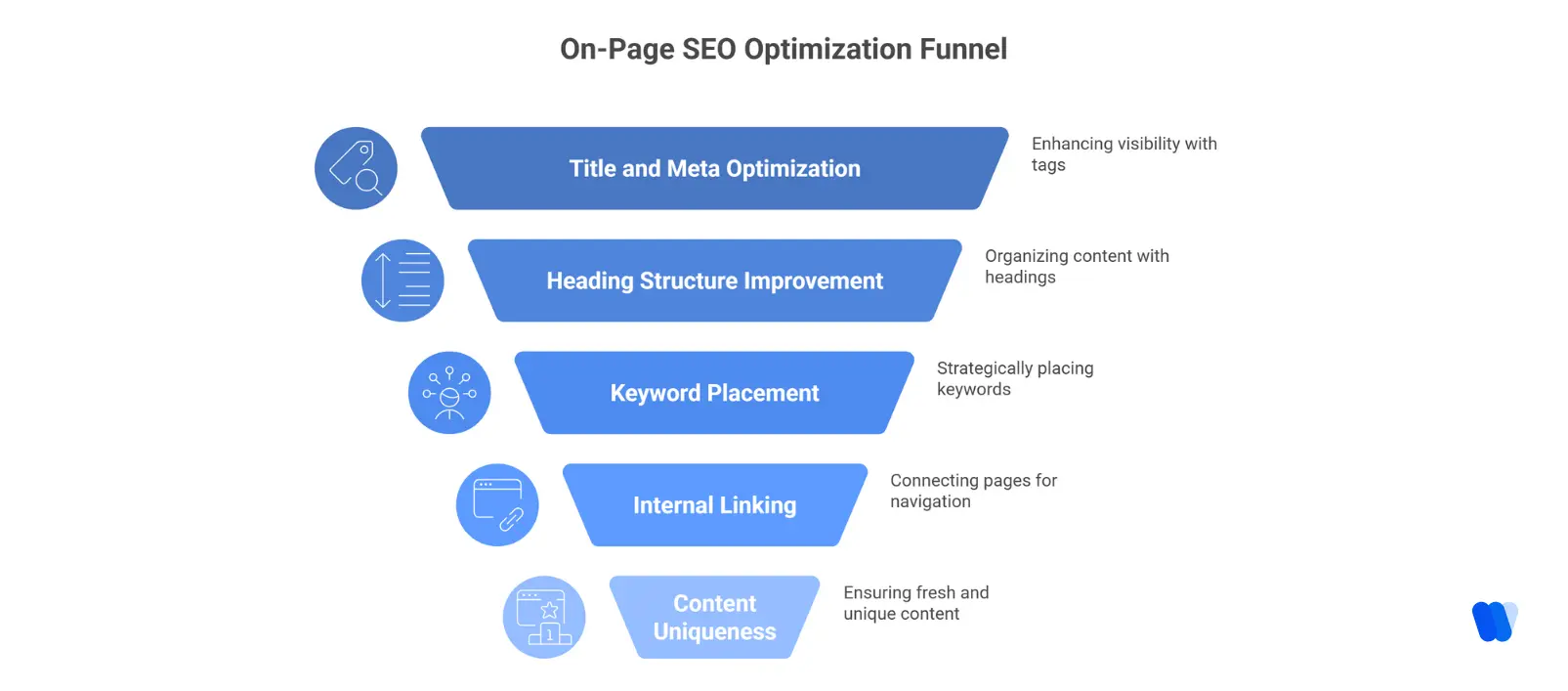
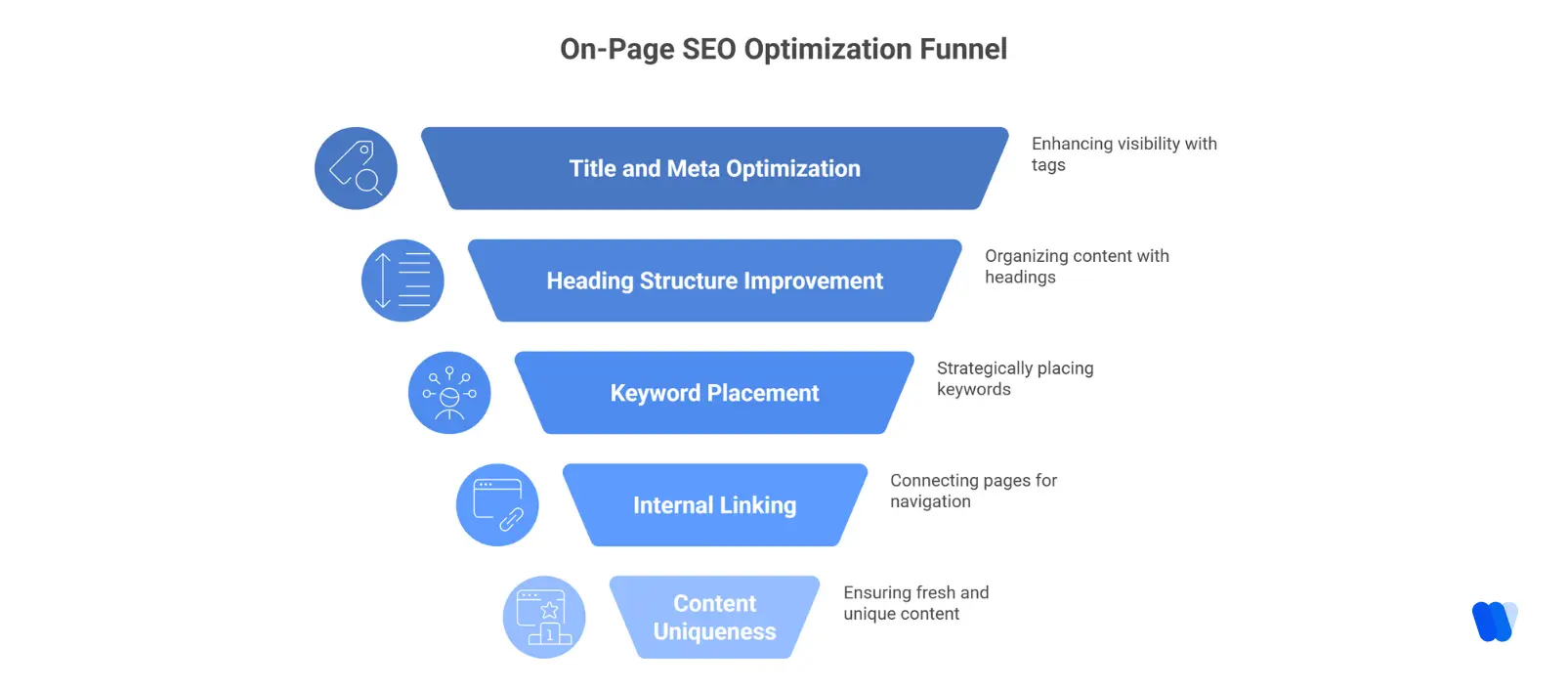
Audits ensure every on-page element—from title tags and meta descriptions to header tags and image alt texts—is fully optimized with relevant keywords. This boosts both visibility and click-through rates while reinforcing a consistent brand voice.
Use on page SEO factors as your checklist here to confirm intent, structure, metadata, links, and UX.
Audits examine:
Did you know?
- Title tags and meta descriptions
- Heading structure (H1, H2, H3)
- Keyword placement and density
- Internal linking
- Content uniqueness and freshness
Instead of stuffing keywords, use the KIVA keyword clustering feature to build semantic groupings that improve topical depth. As Google moves toward topic-based indexing, clustered context beats repetition.
But on-page SEO isn’t just about keywords and content structure — search engines also rely on additional signals like structured data to better understand context and enhance your visibility in results.
Structured Data and Schema Markup
- Relevant Types: Apply schema for articles, products, services, events, FAQs, or local businesses depending on your site’s focus.
- Validation: Test markup with Google’s Rich Results Test and resolve warnings or errors flagged in Search Console.
- Content Consistency: Ensure structured data matches the actual page content to avoid penalties. Do not use misleading markup.
- Benefits: Schema improves eligibility for rich snippets, PAA boxes, and AI-generated results. It increases click-through rates by enhancing how your site appears in search.
3. Off-Page SEO and Backlink Review
Backlinks remain critical in 2025, but quality outweighs quantity. An SEO audit highlights toxic or spammy links that damage your authority and helps you strengthen link-building strategies with reputable sites.
Automatic Backlink Exchange Solutions
In addition to manual outreach and natural link acquisition, modern SEOs are exploring automated backlink exchange platforms. These tools streamline link-building by connecting you with relevant sites in your niche, monitoring exchanges, and filtering out low-quality opportunities.
- AutomaticBacklinks.com – A free network where members can exchange contextual links based on niche, language, and authority.
- Linkee.ai – An AI-powered platform that automates outreach, verifies contact details, and pre-qualifies websites for quality.
- BacklinkExchange.io – A partner-matching platform that uses domain authority filters, automated tracking, and a pay-per-success model.
While automation can speed up backlink acquisition, quality control is essential. Any exchange must align with Google’s link guidelines to avoid penalties. A balanced approach—combining automation with manual oversight—ensures both scalability and safety.
During the audit, you’ll assess:
Did you know?
- Domain authority of referring sites
- Toxic or spammy links
- Anchor text distribution
- Lost or broken backlinks
Removing bad links and reclaiming good ones can give you a fast boost. A well-maintained backlink profile signals trust to search engine ranking factors.
4. UX and Site Performance Analysis
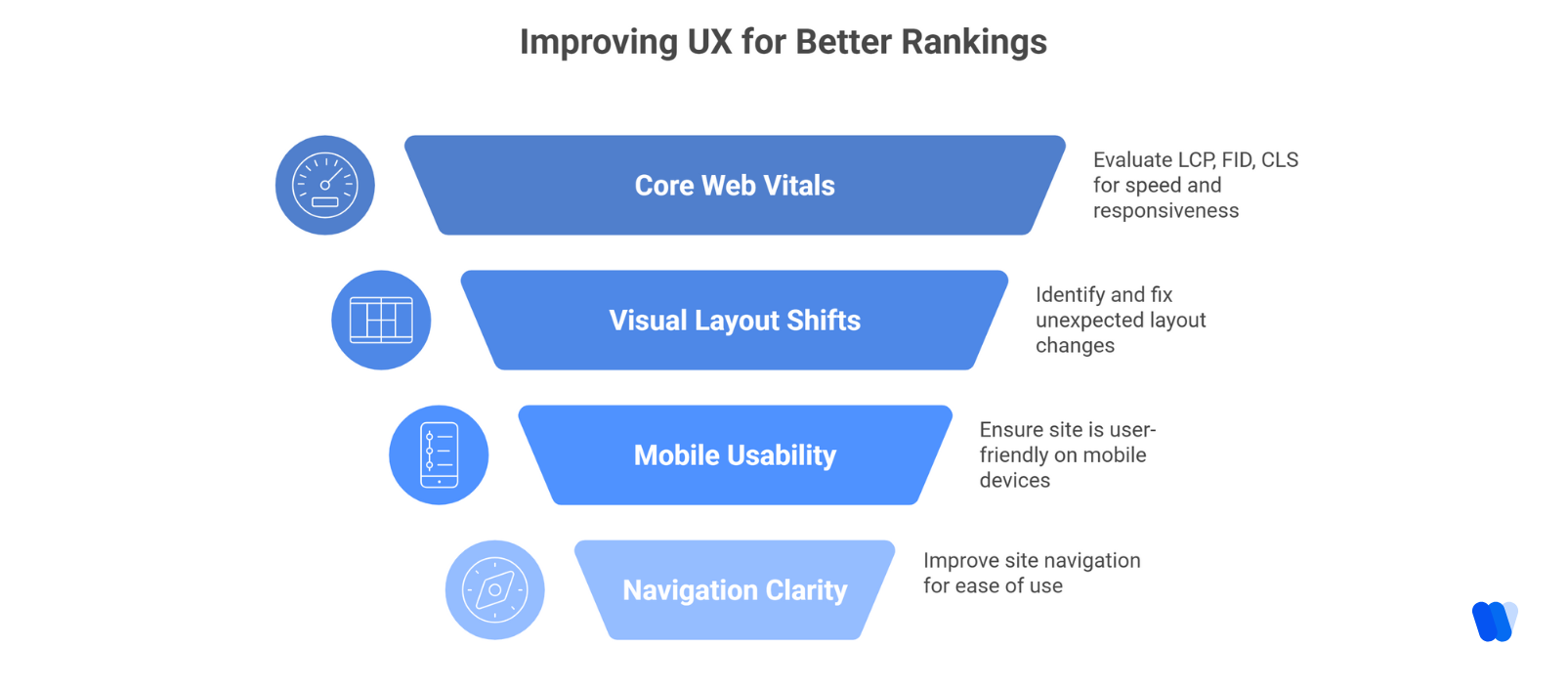
A site audit reviews more than just numbers—it looks at how users actually interact with your website. By assessing navigation clarity, mobile responsiveness, and readability, you can create seamless experiences that keep visitors engaged and improve conversions.
Audit your site for:
Did you know?
- Core Web Vitals (LCP, FID, CLS)
- Visual layout shifts
- Mobile usability errors
- Navigation clarity
If users bounce quickly or struggle to engage, it doesn’t matter how great your content is. A good audit connects UX insights to real search visibility improvements.
What is an SEO Site Audit Checklist?
Conducting a comprehensive SEO site audit is essential for identifying areas of improvement and boosting your website’s performance in search results. Below is a structured checklist to guide you through each step of the process:
SEO Site Audit Checklist
1. Technical SEO Audit
- Crawlability and Indexability: Make sure search engines can access and index your site. Check that your `robots.txt` file isn’t blocking important pages and that your XML sitemap is updated and submitted. (SEO Strategist)
- Site Speed and Performance: Use tools like Google PageSpeed Insights to evaluate loading times and optimize scripts, images, and hosting.
- Mobile-Friendliness: Confirm your site is responsive and offers a smooth experience across devices.
– Secure Connection (HTTPS): Ensure your entire website runs on HTTPS for security and trust.
2. On-Page SEO Audit
- Title Tags and Meta Descriptions: Each page should have unique, keyword-rich, and compelling metadata.
- Header Tags: Proper use of H1, H2, and H3 tags helps structure content and highlight keywords.
- Content Quality: Check for originality, depth, and alignment with user intent.
- Keyword Optimization: Keywords should be naturally integrated without overstuffing.
- Internal Linking: Build a logical internal linking structure to improve crawlability and link equity.
3. Off-Page SEO Audit
- Backlink Profile: Evaluate inbound links for quality and relevance. Disavow toxic or spammy backlinks.
- Social Media Integration: Make sure your site is connected to active social profiles and content is shareable.
4. User Experience (UX) Audit
- Navigation and Site Structure: Keep navigation intuitive and site hierarchy clear.
- Mobile Usability: Ensure mobile users can browse and interact easily.
- Page Layout and Design: Use clean, engaging design elements that enhance usability and trust.
5. Content Audit
- Duplicate Content: Identify and fix duplicate pages to avoid ranking issues.
- Content Gaps: Add missing topics and keywords to strengthen coverage.
- Content Freshness: Update outdated articles to maintain authority and relevance.
6. Analytics and Conversion Tracking
- Google Analytics Setup: Ensure GA is properly installed to track user behavior and traffic.
- Goal Tracking: Define and monitor conversions, sign-ups, or other key actions.
- Data Accuracy: Double-check your tracking setup for reliable data collection.
By following this checklist regularly, you’ll maintain strong SEO health, improve user experience, and ensure your site remains competitive in search engine rankings.
How SEO Audits Improve Rankings?
Fixing audit findings has a measurable impact. “After resolving crawl errors and speeding up its site, one e-commerce brand saw a 50% increase in organic sessions within 30 days” – Marketing Scoop.
Audits help you:
Did you know?
- Rank for more keywords — expand topical coverage by targeting related terms and semantic variations, so your content appears for a wider range of searches.
- Improve click-through rates — optimize meta titles, descriptions, and schema to make your results more compelling, driving higher engagement from searchers.
- Earn better placements in SERP features — understanding what are SERPs helps you target featured snippets, People Also Ask boxes, and AI summaries for maximum visibility.
More importantly, they give you clarity. You stop guessing and start acting based on data.
Common Issues Found in Audits (and Fixes)
Most audits reveal a handful of repeat offenders:
Did you know?
- Duplicate content: Use canonical tags and consolidate pages.
- 404 errors: Set up redirects for broken links.
- Missing metadata: Fill in all title tags and meta descriptions.
- Unoptimized images: Compress and use descriptive alt tags.
- Thin content: Add depth and internal links.
The trick isn’t just identifying issues it’s creating a prioritized action plan.
Staying Competitive with SEO Audits
SEO is a moving target. Competitors refine their strategies constantly, and search algorithms evolve just as fast. Regular audits give you the insight to stay ahead. Here’s how they help you remain competitive:
Did you know?
- Benchmark against competitors: Understand what others in your industry are doing and adapt faster.
- Spot emerging trends: Identify new SEO opportunities before your competitors act.
- Adapt proactively: Implement fixes and optimizations early to maintain your edge.
- Sustain relevance: Keep your site aligned with evolving industry standards.
What Are the Common Issues Found in SEO Site Audits?
Conducting an SEO site audit often uncovers recurring problems that can reduce your website’s visibility and performance in search engines. Fixing these issues is key to improving user experience and rankings. Below are some of the most frequent challenges identified during SEO audits:
- Unoptimized Crawl Budget: Wasting crawl budget on low-value pages can prevent search engines from indexing high-priority content. Optimizing ensures crawlers focus on your most relevant pages.
- Page Speed and Core Web Vitals: Slow sites hurt user experience and rankings. Poor Core Web Vitals scores can lead to traffic drops and fewer conversions.
- Duplicate Content: Identical content across pages confuses search engines and dilutes rankings. Resolving duplicates ensures the right pages are indexed.
- Thin Content: Low-value pages provide little user benefit and are considered low-quality, leading to poor rankings.
- Broken Links and 404 Errors: Dead links harm user trust and SEO crawlability. Regular checks and fixes are essential.
- Keyword Stuffing: Overusing keywords unnaturally can trigger penalties. Content should use keywords contextually.
- Missing or Poorly Optimized Meta Tags: Duplicate or irrelevant tags reduce visibility. Each page should have unique, keyword-targeted metadata.
- Poor Mobile Experience: With mobile-first indexing, unresponsive sites risk losing rankings. A seamless mobile experience is vital.
- Improper Use of Robots.txt and Noindex Tags: Misconfigured settings can block important pages from indexing. Regular reviews prevent indexing errors.
- Weak Internal Linking: Poor internal links weaken crawlability and dilute authority. Strategic linking improves navigation and rankings.
By tackling these common issues through regular audits, your website can achieve better visibility, stronger rankings, and a more user-friendly experience.
How Often Should You Run an SEO Audit?
If there’s one thing I’ve learned after years in SEO, it’s this: issues don’t wait. They quietly stack up while your rankings slip. That’s why the frequency of your SEO audits should never be treated as a checkbox—it needs to match your site’s size, complexity, and pace of change.
General Recommendations:
- Small Websites (under 100 pages): Perform comprehensive audits quarterly to ensure technical health and content quality.
- Medium-Sized Websites (100–1,000 pages): Conduct bi-monthly comprehensive audits, supplemented with monthly mini-audits focusing on content or backlinks.
- Large Websites (1,000+ pages): Implement monthly comprehensive audits along with weekly mini-audits to handle frequent updates and complexity.
Additional Considerations:
- After Major Changes: Run an audit immediately after redesigns, migrations, or large content pushes to catch technical errors early.
- Following Algorithm Updates: Search engines roll out updates regularly—audits post-update ensure compliance with the latest SEO rules.
- In Response to Performance Drops: A sudden traffic or ranking drop is a signal to run an immediate audit for diagnostics.
For stable, brochure-style websites, a deep audit every six months is usually enough. But if you’re publishing content often, testing plugins, or changing designs, quarterly audits should be your minimum. Many teams now rely on a GenAI visibility stack for startups to automate auditing, surface technical issues faster, and adapt to algorithm changes without adding manual workload.
Regular audits keep your meta tags present, internal links healthy, redirects working, and prevent orphaned pages. I’ve seen businesses lose visibility simply because outdated XML sitemaps went unchecked for months.
Beyond fixing problems, audits often unlock new strategies—like spotting a page stuck on page two that only needs a faster load time or a stronger H1 to climb higher. You won’t catch these wins unless you’re auditing consistently.
Bottom line: audit frequency should scale with complexity. The more moving parts your site has, the more often you should audit. Treat audits as a regular health habit, not a crisis reaction, and you’ll stay ahead of issues, unlock growth opportunities faster, and create a search presence designed to last.
Expert Insight #1
Why it matters in 2025: Technical SEO directly affects crawlability, speed, and indexation, core metrics Google now weighs heavily.
Expert Insight #2
How to Perform an SEO Site Audit?
Conducting a comprehensive SEO site audit is essential for identifying areas of improvement and enhancing your website’s performance in search engine results. Here’s a step-by-step framework to follow:
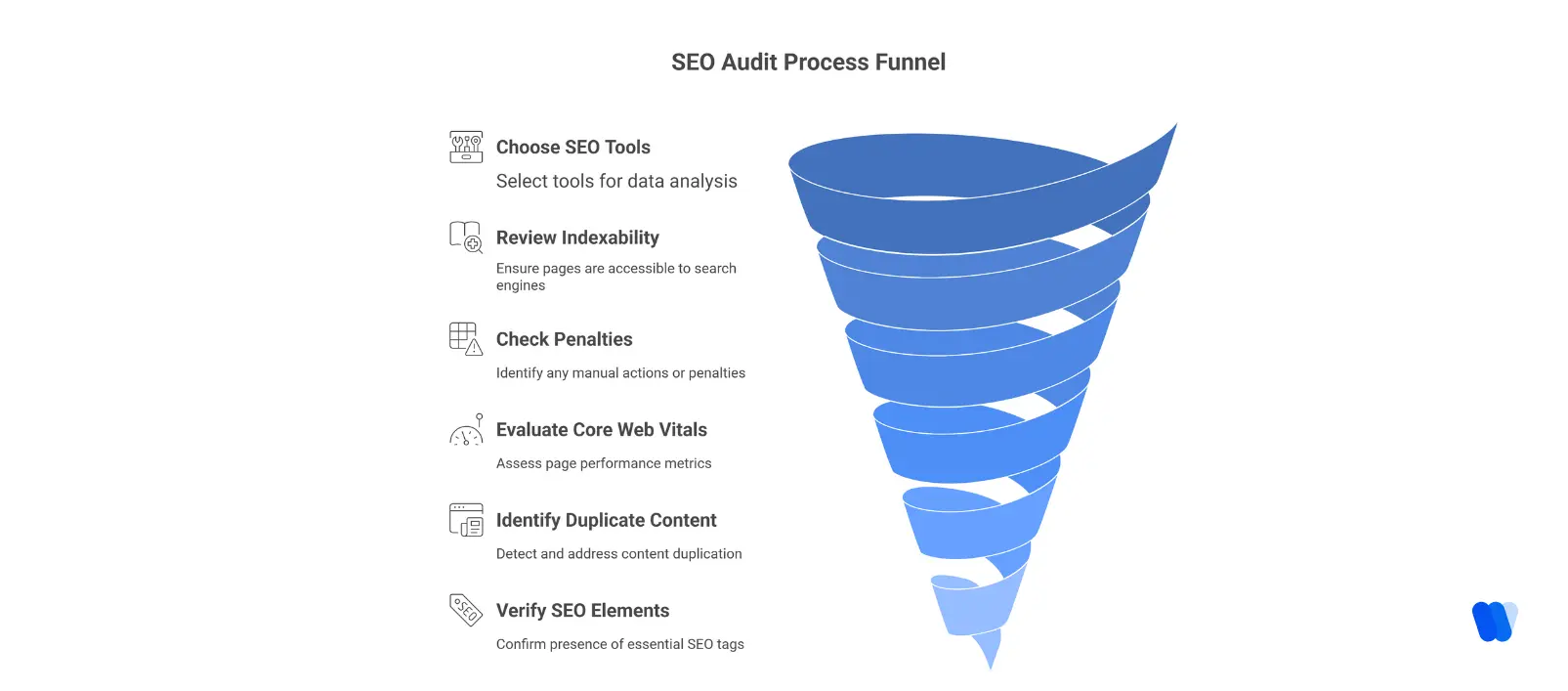
Crawl Your Website:
Use tools like Screaming Frog or Google Search Console to scan for broken links, duplicate content, missing tags, and crawl errors. This ensures search engines can properly access and index your site.
Analyze Site Speed and Core Web Vitals:
Tools such as Google PageSpeed Insights measure load times and user experience metrics like LCP, FID, and CLS. Optimize images, minimize scripts, and improve hosting speed to boost performance.
Evaluate Site Structure and Navigation:
Create a logical hierarchy with consistent URL structures and clear navigation. Use elements like breadcrumbs to help both users and search engines understand your site flow.
Review On-Page SEO Elements:
- Title Tags & Meta Descriptions: Each page should have unique, descriptive, keyword-rich titles and meta descriptions.
- Header Tags: Organize content with clear H1, H2, and H3 structures.
- Content Quality: Keep content fresh, relevant, and optimized for intent without keyword stuffing.
Assess Mobile Responsiveness:
Confirm your site is mobile-friendly using Google’s Mobile-Friendly Test. Navigation, text, and buttons should be seamless across all devices.
Audit Backlink Profile:
With tools like Ahrefs or Moz, check for high-quality backlinks and identify toxic links that may harm your site’s authority.
Check for Duplicate and Thin Content:
Remove or consolidate duplicate pages and expand thin content to strengthen topical authority.
Implement Structured Data and Schema Markup:
Add schema markup for articles, products, services, or FAQs. This helps search engines understand your content and can unlock rich results like snippets and PAA boxes.
Review Robots.txt and XML Sitemap:
Ensure robots.txt doesn’t block important pages and keep your XML sitemap up-to-date for better indexation.
Set Up Analytics and Conversion Tracking:
Verify Google Analytics and Google Search Console are properly configured to monitor traffic, user behavior, and conversions. You can also integrate insights into your SEO workflow using the Wellows AI SEO Agent for Startups to generate prioritized audit-based action plans.
By repeating these steps regularly, you’ll maintain your site’s SEO health, improve rankings, and ensure a stronger flow of organic traffic over time.
What Are The Best Tools for SEO Site Audits?
Running a thorough SEO site audit requires the right toolkit to uncover and resolve technical, on-page, and off-page issues that may be holding back your rankings. Below are some of the most effective tools professionals use, along with additional methods to ensure a complete audit:
Did you know?
- Semrush – A comprehensive SEO suite offering detailed site audits, keyword tracking, and competitor analysis. Its Site Audit feature identifies technical issues and provides actionable recommendations. Pricing starts at $129.95/month.
- Ahrefs – Known for its robust backlink analysis, Ahrefs also includes a Site Audit tool that detects crawl issues, slow load times, duplicate content, and more. Pricing begins at $99/month.
- Screaming Frog SEO Spider – A desktop crawler that digs into your site to reveal broken links, missing tags, duplicate content, and redirects. Free for up to 500 URLs, or $259/year for unlimited audits.
- Google Search Console – A free tool by Google that provides insights into indexing, performance, Core Web Vitals, and potential visibility issues. Essential for monitoring how Google sees your site.
- Moz Pro – Offers a Site Crawl feature that flags technical and on-page SEO issues and provides actionable fixes. Pricing starts at $99/month.
- Other Specialized Tools –
- Sitebulb & JetOctopus: Visualize site structure, uncover crawl errors, and run advanced technical audits.
- Google PageSpeed Insights & WebPageTest: Evaluate speed and Core Web Vitals metrics (LCP, CLS, FID).
- Manual Review: Browsing your site in incognito mode, testing mobile layouts, and inspecting code snippets can reveal issues automated crawlers may miss.
Free SEO Site Audit Tools
Not every audit requires a paid tool. These free SEO site audit tools are perfect for startups, freelancers, and businesses on a budget:
Did you know?
- Google Search Console – 100% free and shows indexing issues, Core Web Vitals, and search performance directly from Google.
- Google PageSpeed Insights – Evaluates page load speed and Core Web Vitals with optimization suggestions.
- Screaming Frog (Free Version) – Audits up to 500 URLs, enough for smaller sites to identify broken links, duplicate content, and metadata gaps.
- Ubersuggest (Free Tier) – Provides limited daily audits and keyword insights, helpful for basic SEO checks.
- SEOquake (Browser Extension) – A quick audit tool that gives on-page SEO metrics, backlinks, and keyword density right in your browser.
Adapting to Algorithm Updates
Search engines update their algorithms regularly to improve user experience. Without frequent audits, these changes can quietly erode your traffic and rankings. Regular SEO audits safeguard your visibility by:
Did you know?
- Catching issues early: Spot problems triggered by sudden updates before traffic loss compounds.
- Maintaining compliance: Ensure your site stays aligned with evolving algorithm requirements.
- Reducing risks: Avoid penalties from outdated practices like duplicate metadata or blocked pages.
- Preserving growth: Stay agile so rankings and traffic remain stable during algorithm shifts.
When selecting an SEO audit tool, factor in your website’s size, feature needs, and budget. Combining free tools like Google Search Console with advanced suites like Semrush or Ahrefs ensures both affordability and depth in your SEO audits.
What Are SEO Site Audit Services?
An SEO site audit is a comprehensive evaluation of your website’s performance in search engines, identifying opportunities to improve visibility, UX, and rankings. Professional audit services typically include:
- Technical SEO Analysis: Structure, crawlability, indexing, speed, mobile, and security.
- On-Page SEO Review: Content quality, keyword use, meta data, internal linking, engagement.
- Off-Page SEO Assessment: Backlink profile, domain authority, link-building opportunities.
- Competitive Analysis: Benchmarking, keyword gaps, and content opportunities.
Did you know?
- SEO.com – 360° audit with a prioritized action plan and optional implementation.
- Loganix – Mini and Full audits with actionable insights for all business sizes.
- Victorious – Identifies ranking barriers and delivers tailored recommendations.
- SEO Direct – Deep Tissue, Transition, Recovery, and Competitive audits.
- Menford Agency – In-depth analysis of technical issues and content gaps with custom fixes.
Tip: If you prefer a guided in-house approach, pair these services with your existing audit checklist and tools section for a hybrid workflow.
Read More Articles
FAQs
A comprehensive SEO audit covers technical SEO, on-page elements, content quality, backlink profile, user experience, and analytics tracking. It identifies crawlability, indexing, speed, and keyword performance issues.
A technical audit focuses on site structure, crawlability, speed, and indexing issues. An SEO audit focusing on content quality evaluates keyword usage, relevance, and performance to make sure your site meets modern ranking standards. Together, they build a stronger SEO strategy.
Conclusion
SEO audits are no longer optional they’re essential for keeping up with algorithms, user expectations, and competitors. Regular audits uncover technical gaps, surface content opportunities, and ensure your site stays both user-friendly and search-ready.
By treating audits as routine checkpoints, you build a resilient search presence that drives qualified traffic, stronger rankings, sustainable growth, and lasting topical authority in SEO.
Start your next SEO and security audit today with tools like Google Lighthouse, Screaming Frog, and Sucuri — and turn hidden issues into growth opportunities before they cost you visibility.