Most teams don’t struggle with understanding technical SEO. They struggle with consistency. Ongoing site changes, developer updates, and tight timelines turn technical SEO into a performance risk.
A structured technical SEO checklist reduces that risk by standardizing decisions, not just tasks. It helps systematically identify and prevent technical SEO issues before they scale across a website through a clear audit process.
This matters because organic search still drives over 53% of all website traffic, making technical failures costly (BrightEdge, 2024).
Technical SEO now directly affects SERP and LLM visibility. Clean crawl paths, stable indexation, and predictable architecture shape how search engines and generative systems interpret brand entities. That’s why many teams rely on a structured SEO audit checklist for 2026 and align it with what an SEO site audit is and why it matters for rankings.
You’ll also find a free printable technical SEO checklist you can download and use during onboarding, routine maintenance, and after major site changes.
What is a Technical SEO Checklist and Why Do I Need One for My Website?
A technical SEO checklist is a structured list of tasks that ensures your website is crawlable, indexable, fast, and technically sound, making it a core operational tool for many Digital Marketing Agencies. It covers areas like site speed, mobile usability, internal linking, XML sitemaps, robots.txt, and Core Web Vitals. Instead of guessing what to fix, it gives you a clear framework to follow.
You need one because even strong content cannot rank if search engines struggle to access or interpret your site properly. Technical issues like broken links, blocked pages, duplicate URLs, or slow load times can quietly limit your visibility without obvious warnings.
A checklist helps you catch problems early, maintain consistent performance, and protect long-term rankings. It turns technical SEO from a reactive task into a proactive system that supports sustainable organic growth.
What Should Be Included in a Technical SEO Checklist?
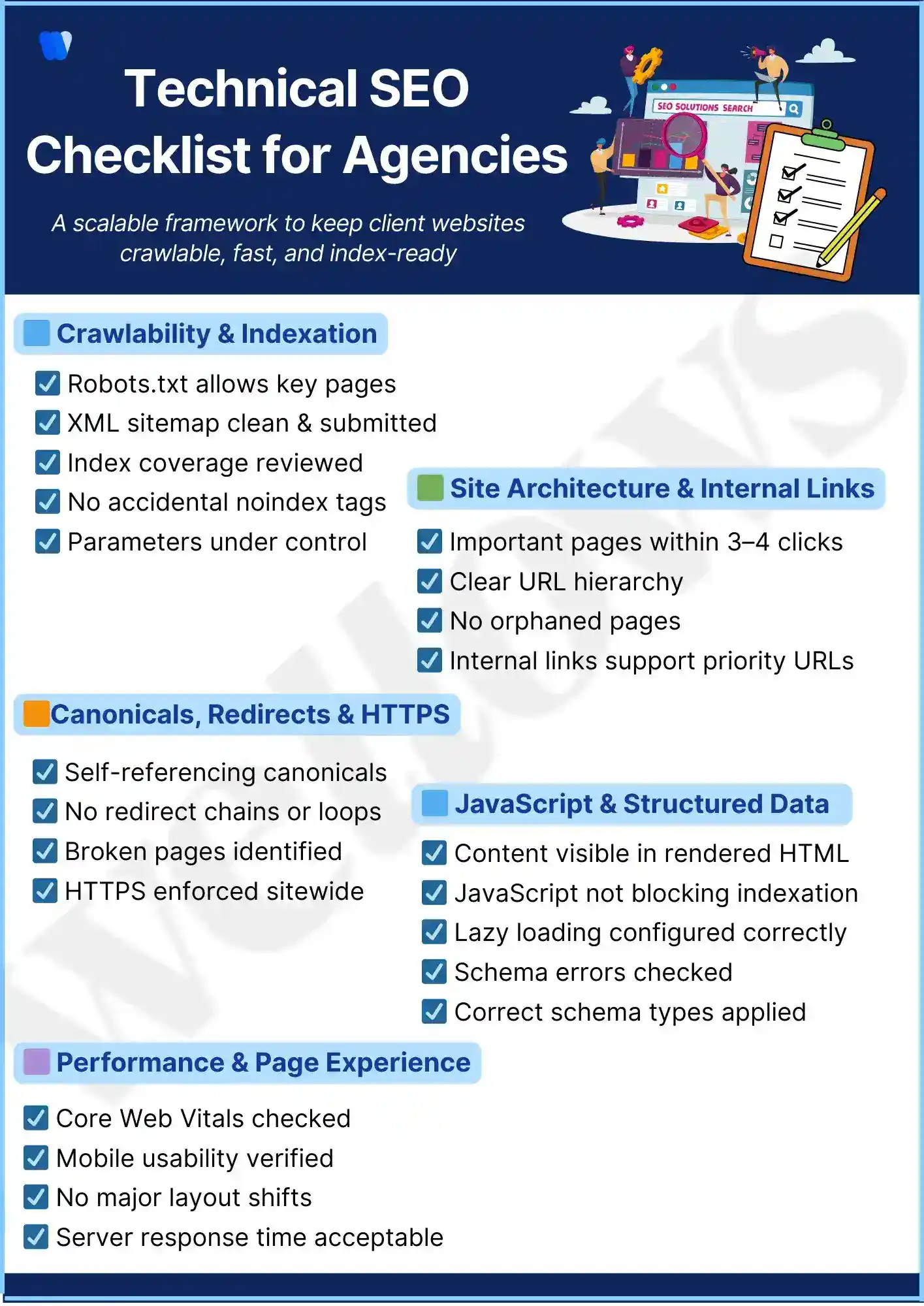
Crawlability and indexation control – robots.txt accuracy, XML sitemaps, index coverage signals, and parameter handling that determine whether pages can be discovered and indexed reliably.
Site architecture stability – URL depth, hierarchy consistency, and internal structure that influence how modern search engine ranking factors evaluate technical reliability at scale.
Performance and page experience – Core Web Vitals thresholds, mobile responsiveness, and server behavior that directly affect rankings and user retention.
Rendering behavior – JavaScript execution, rendered HTML parity, and blocked resources that determine whether search engines and AI systems can interpret content correctly.
Structured data integrity – schema validity, consistency, and coverage that support rich results, entity recognition, and AI interpretation.
Measurement alignment – every checklist category maps to observable signals such as index coverage health, crawl efficiency, or performance benchmarks tracked through SEO metrics that deliver real impact.
How Agencies Should Structure a Technical SEO Checklist to Manage Multiple Clients Efficiently?
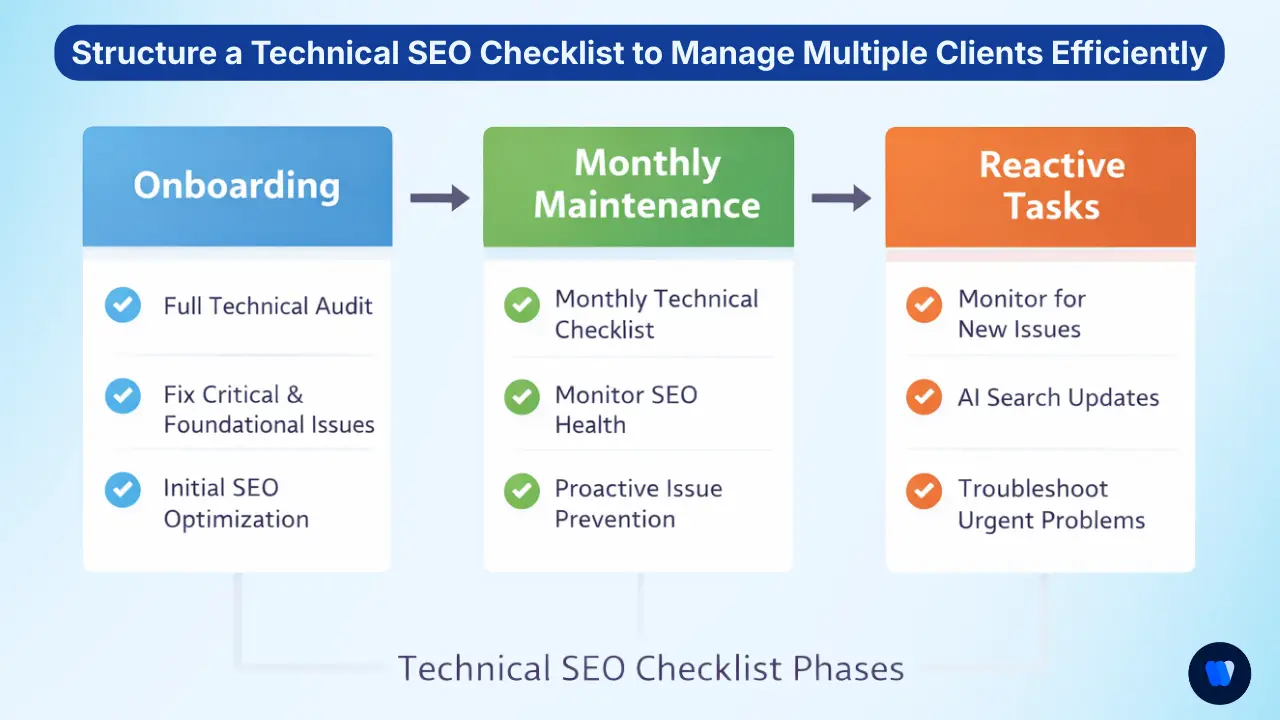
Onboarding execution phase – establishes baseline technical stability by validating crawl access, indexation status, analytics integrity, and critical templates. This prevents inherited technical debt from slowing delivery later and reduces early-stage risk tied to why fragmented workflows hold back SEO growth.
Recurring maintenance phase – protects performance over time through scheduled checks for index drift, Core Web Vitals regression, broken links, and CMS changes. This phase prioritizes consistency and early detection rather than repeated discovery.
Reactive response phase – activates when traffic drops, platform updates, migrations, or algorithm changes occur. Agencies use this layer to isolate high-impact issues quickly, improving delivery speed and quality control in the same way teams reduce operational drag when they save 50+ hours on SEO workflow through structured execution.
Scaling technical SEO across clients requires both a repeatable audit framework and a visibility layer that tells you whether fixes are translating into real discovery outcomes. Agencies that deliver AI search visibility for agencies alongside traditional technical services can show clients a more complete picture: not just whether pages are crawlable and indexed, but whether they’re being cited in the AI answers that now drive a growing share of purchase decisions. When choosing the platform to track that, most teams benchmark against Profound first, so our roundup of the tryprofound alternatives compares nine AI visibility trackers on citation depth and cross-engine coverage.
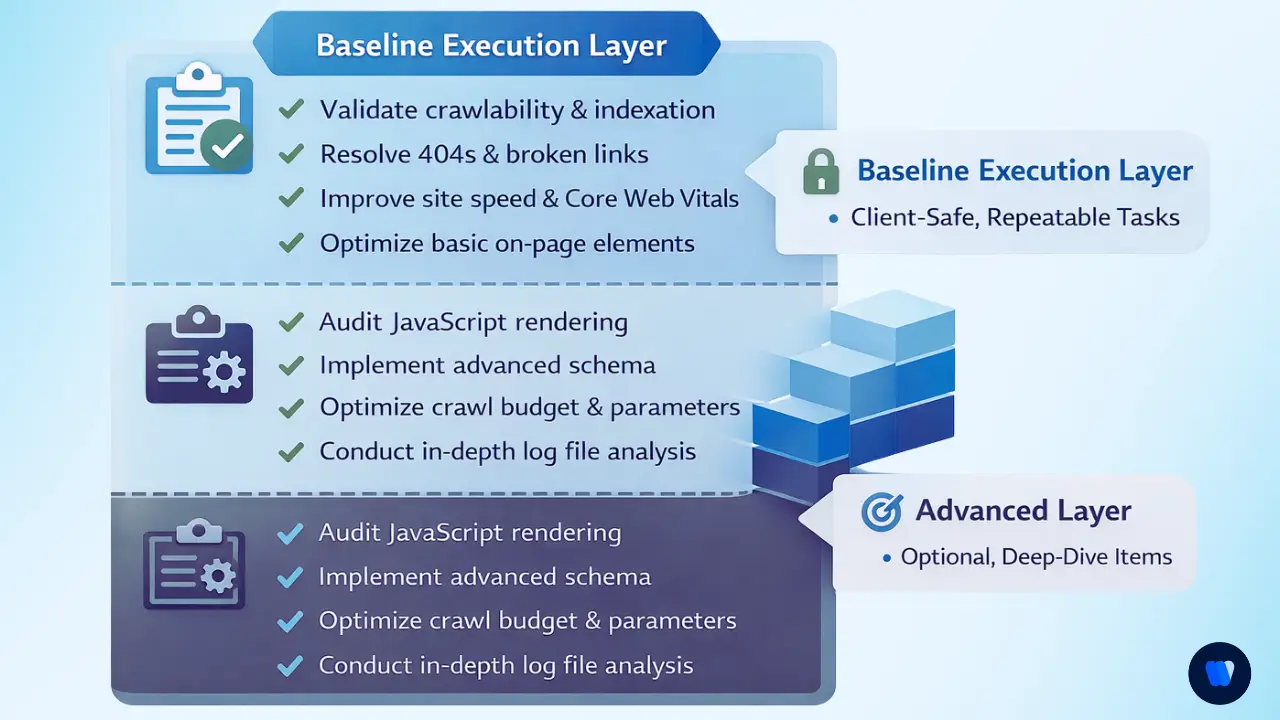
Core Technical SEO Checklist for Your Website (Baseline Execution Layer)
This baseline technical SEO checklist for SEO agencies exists to remove execution risk. It is designed for junior-safe delivery, repeatability across accounts, and low dependency on senior reviewers.
Agencies rely on this layer to keep sites crawlable, indexable, and stable before advanced optimization begins, while staying aligned with core ranking requirements and On-Page SEO Checklist for 2026 standards.
Agencies typically surface this layer as a technical health summary in client reporting, rather than exposing raw audit outputs or diagnostic data.
Crawlability and Indexation Controls
- Validate robots.txt rules to ensure critical sections are accessible to search engines.
- Confirm XML sitemaps accurately reflect indexable URLs and are free of errors.
- Monitor index coverage reports to detect exclusions, duplication, or crawl waste early.
- When index coverage reports show crawl waste or exclusions, use Crawl Budget SEO to diagnose the cause and improve crawl efficiency.
- Audit noindex directives and URL parameters to prevent accidental deindexation.
Site Architecture and Internal Linking
- Review URL depth and hierarchy to ensure important pages are reachable within logical crawl paths.
- Identify orphaned pages that receive no internal links and are at risk of being ignored with on page SEO analysis to ensure they are linked from relevant core content.
- Evaluate link distribution and anchor usage based on how internal linking affects SEO across key templates.
Canonicals, Redirects, and Status Codes
- Verify self-referencing canonicals are implemented consistently across indexable pages.
- Eliminate redirect chains and loops that dilute crawl efficiency and link equity.
- Audit 4xx and 5xx status codes using principles tied to why canonical tags matter for SEO at scale.
Core Web Vitals and Performance Signals
- Measure LCP, INP, and CLS against accepted thresholds for both mobile and desktop users.
- Check mobile responsiveness and layout stability across key templates.
- Investigate server response and delivery issues often associated with scenarios where website traffic is dropping unexpectedly.
JavaScript Rendering and Indexability
- Confirm critical content renders correctly in the initial HTML or during Google’s rendering phase.
- Review deferred scripts and blocked resources that may prevent content discovery.
- Compare rendered HTML with user-visible content to avoid indexing discrepancies.
Structured Data and Schema Readiness
- Validate schema markup for errors, warnings, and unsupported properties.
- Ensure schema types are applied consistently across templates and page categories.
- Prepare entity signals aligned with how structured data plays a role in LLM visibility for generative systems.
Download the Technical SEO Checklist
Get a clean, client-ready PDF version of this checklist you can use for onboarding, audits, and recurring technical reviews across multiple accounts.
✔ Crawlability, performance, rendering, and schema checks
✔ Designed for agency workflows and repeatable execution
✔ Simple, checkbox-based format (no tools or jargon)
Technical SEO Checklist for New Client Onboarding (First 30 Days)
The first 30 days demand prioritization under pressure. Teams focus on risk-first execution to surface issues that can block crawling, indexing, or revenue impact before deeper optimization begins. This phase sets expectations with clients and developers by clearly separating critical fixes from backlog items, aligned with what SEO tasks to prioritize when budget and time are tight.
- Indexation and Manual Action Validation: Confirm index coverage status, review excluded URLs, and check for manual actions or security issues that could immediately suppress visibility.
- Crawl Errors and Access Barriers: Identify crawl errors, blocked resources, incorrect robots.txt rules, and sitemap inconsistencies that prevent search engines from discovering key pages.
- Template and Page-Level Breakpoints: Audit critical templates for broken pagination, duplicate titles, missing canonicals, or parameter issues that can scale problems across the site.
- Analytics and Tracking Integrity: Validate analytics setup, conversion tracking, and data consistency to ensure performance baselines are accurate before optimization begins.
- Redirect Logic and Legacy URL Risks: Review redirects, legacy URLs, and migration remnants to prevent equity loss, crawl waste, and unexpected traffic drops.
Monthly Technical SEO Maintenance Checklist vs One-Time Audit Checklist
A one-time technical SEO audit is designed for discovery, while monthly maintenance protects site health. Teams separate these to avoid checklist bloat and ensure retainers focus on measurable stability rather than repeated diagnostics.
This distinction helps teams track progress against ongoing performance indicators tied to SEO metrics that deliver real impact.
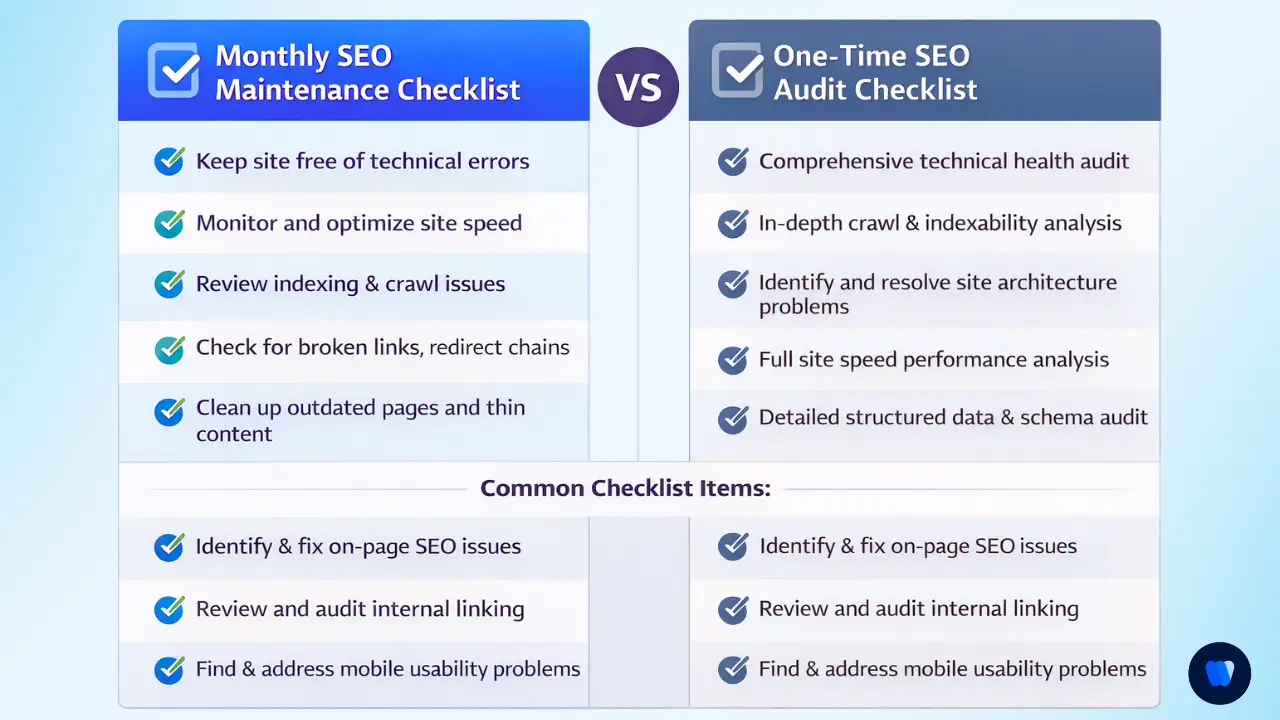
✔️ Monitor index drift, Core Web Vitals regression, broken links, schema errors, and CMS changes
✔️ Focus on early detection and prevention rather than deep diagnosis
✔️ Protect performance consistency across ongoing retainers
✔️ Reduce surprise regressions between major audits
✔️ Surface deeper structural risks, platform limitations, and scalability constraints
✔️ Identify root causes that do not require monthly repetition
✔️ Inform long-term roadmaps, migrations, and architectural decisions
✔️ Reset baselines after major site or algorithm changes
Advanced Technical SEO Checklist Items Use Beyond the Basics
Advanced checklist layers are reserved for senior execution and competitive differentiation. These items move beyond hygiene into AI search visibility, entity clarity, and machine interpretation, influencing how brands surface across SERPs and generative systems. This includes applying schema and NLP best practices for AI search to strengthen semantic signals.
Teams also assess log file patterns, crawl budget shaping, rendering efficiency, and AI-facing controls such as LLM.txt and LLM-full.txt files. These advanced checks improve how large language models interpret site authority, content boundaries, and brand entities compared to sites relying only on traditional technical SEO.
Log file analysis and crawl behavior modeling – examine how search engines actually crawl the site to identify wasted crawl budget, ignored templates, or over-prioritized low-value URLs.
Crawl budget shaping at scale – control crawl paths through internal linking, parameter handling, and sitemap segmentation to ensure critical pages receive consistent attention.
Rendering efficiency validation – evaluate how JavaScript frameworks, deferred scripts, and hydration affect indexing accuracy across devices and user agents.
AI-facing controls and boundaries – define how generative systems interpret and cite content using mechanisms like LLM.txt and structured entity signals.
Entity and semantic consistency checks – ensure brand entities, attributes, and relationships remain stable across templates to support SERP and LLM interpretation.
How to Use Wellows Site Audit for Technical SEO Execution?
Wellows Site Audit supports technical SEO execution by working at the URL level. It helps teams to validate whether a specific page is technically clean, structurally sound, and machine-readable before scaling improvements across the site.
1. Auditing High-Impact Pages Instead of Crawling Everything
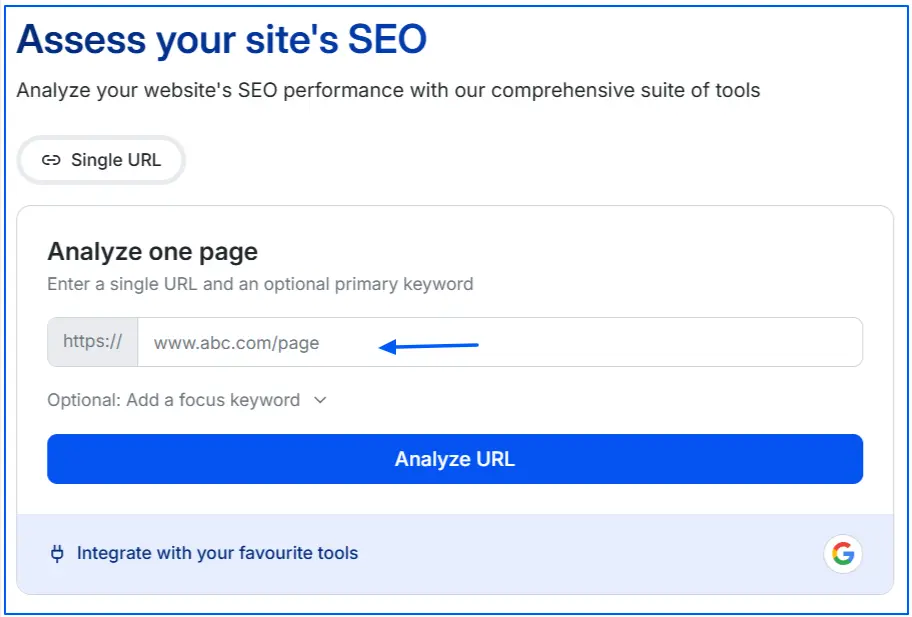
Rather than running website crawls, you paste a single URL into Wellows and audit it against 100+ technical checks. These checks cover crawlability, indexation signals, structural elements, and machine-readability factors.
2. Aligning Technical Health with Keyword Intent
You can manually add the focused keyword for the page, or let the system extract it automatically. This helps contextualize technical issues against search intent.
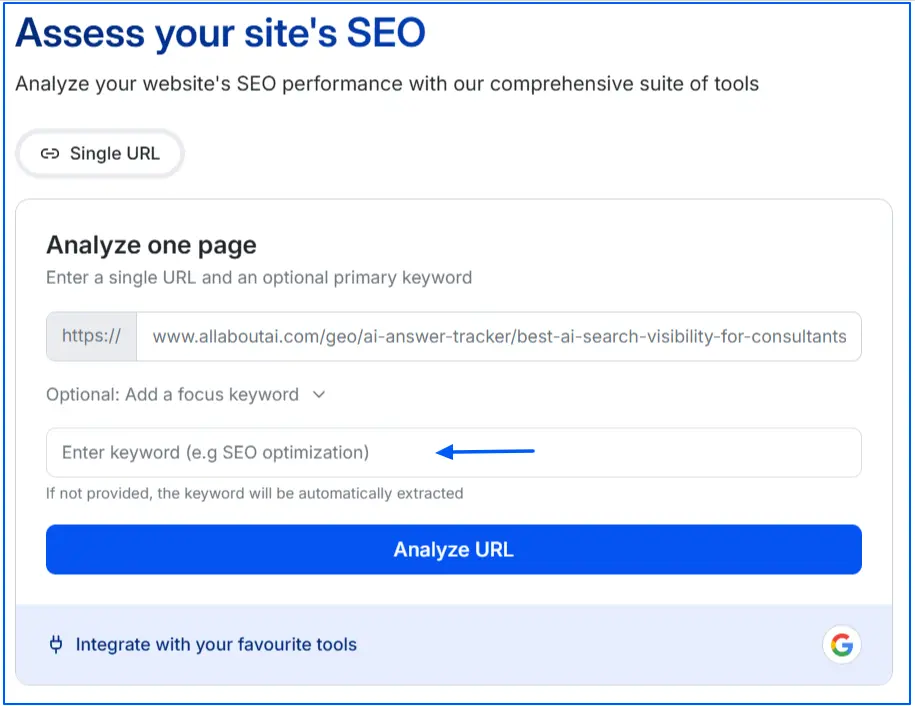
For example, if a comparison page targets a competitive query, even minor structural or canonical errors can reduce eligibility for rich results or AI summarization. By tying audits to a specific keyword, teams ensure that technical fixes directly support ranking goals rather than existing in isolation.
3. Using Page Health Scoring to Prioritize Work
In the overview panel, Wellows provides:
- A page health score
- Distribution of errors, warnings, and notices
- Total number of analyzed factors
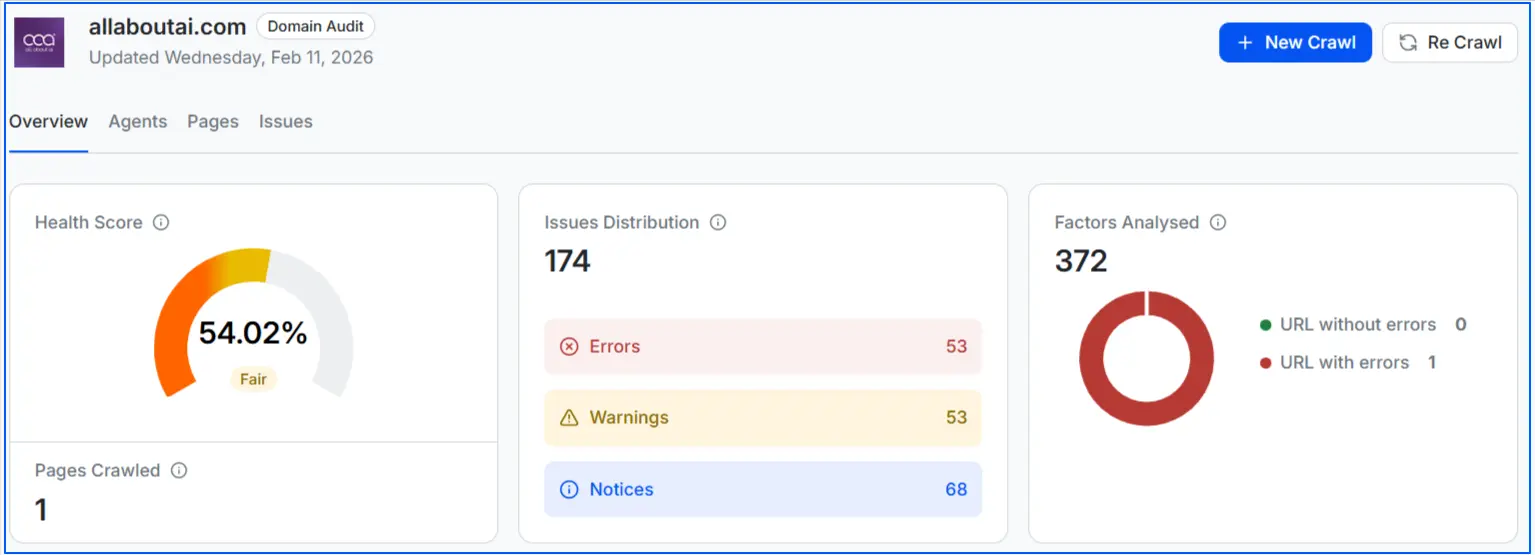
For teams managing multiple clients, this allows quick prioritization. A page with critical crawl errors requires immediate action, while minor warnings can be scheduled during monthly maintenance. This prevents teams from over-fixing low-impact issues while missing serious blockers.
4. Conducting Factor-Level Deep Analysis
When teams click “View All” in the Agent Analysis, they get a full breakdown of technical SEO factors. Each factor can then be expanded for deeper analysis.
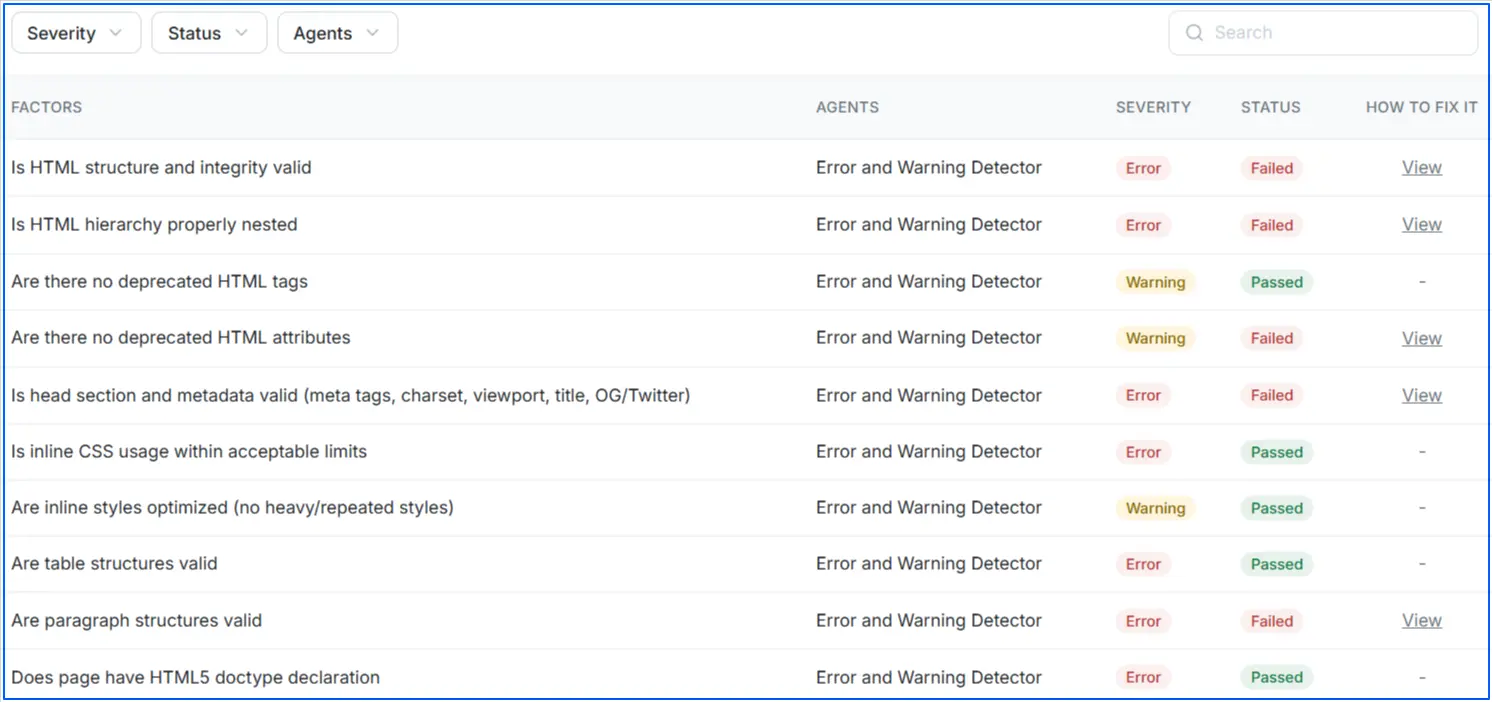
This granular view is useful when diagnosing complex issues, such as:
- Why a page is excluded from indexing
- Why structured data is not validating
- Why rendering affects content visibility
5. Moving from Diagnosis to Execution Faster
Many audit tools generate long, generic reports that slow down implementation. Wellows highlights prioritized issues, explains why each issue matters, and provides clear fix guidance.
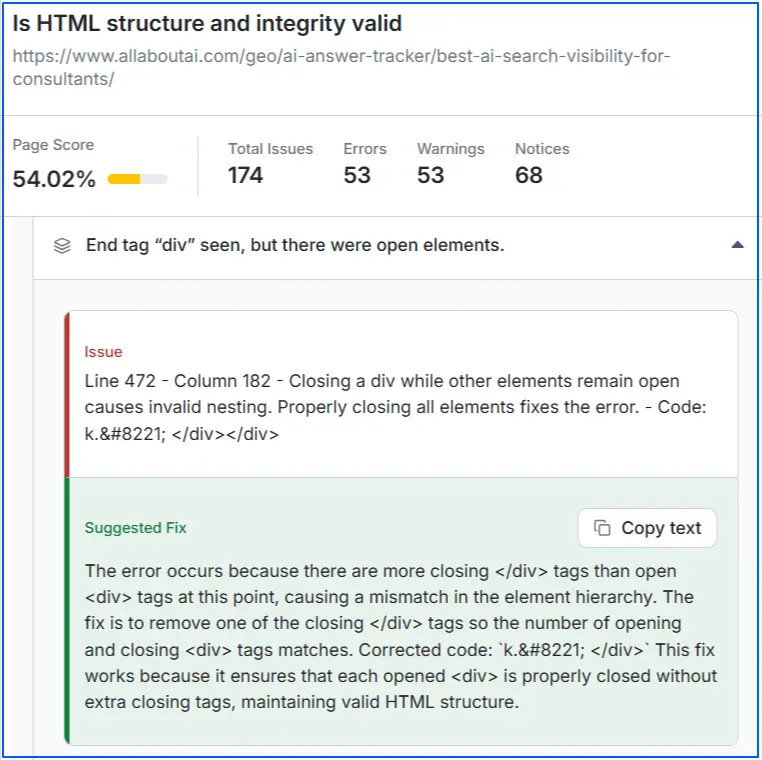
Instead of telling a client “there are technical problems,” you can say:
- This canonical tag is conflicting with indexation
- This structured data block is incomplete
- This internal link structure weakens crawl flow
Each issue is paired with corrective direction, reducing back-and-forth between SEO strategists and developers.
6. Validating Fixes Through Re-Crawling
After implementing changes, teams can re-crawl the page to confirm whether issues are resolved. This step is critical. Technical SEO execution should not rely on assumptions.

Re-crawling verifies whether:
- Errors are eliminated
- Health scores improve
- Structural issues are properly fixed
This closes the loop between audit, implementation, and validation.
How to Adapt Technical SEO Checklists by Website Type?
Avoid using the same technical SEO checklist for every project because risk profiles change with site purpose, scale, and monetization model. Architecture, crawl behavior, and index priorities differ sharply between ecommerce, B2B, and enterprise environments. Adapting the checklist by website type reduces blind spots and ensures technical effort aligns with actual business impact.
| Website Type | Primary Technical Risks | Checklist Focus Areas |
|---|---|---|
| Ecommerce & Marketplaces | Duplicate URLs Crawl waste Index bloat |
Canonical discipline Parameter handling Pagination control Performance consistency |
| B2B Lead-Gen & SaaS | Missed demand Rendering gaps Weak internal discovery |
Information architecture Internal linking depth JavaScript rendering Core Web Vitals |
| Enterprise & Large-Scale Sites | Systemic crawl failures Deployment regressions Governance gaps |
Log file analysis Crawl budget shaping Segmented sitemaps Pre-release QA validation |
What’s the Best Technical SEO Checklist for WordPress Sites?
WordPress is SEO-friendly, but it’s not technically optimized by default. Themes, plugins, hosting, and settings can either strengthen or weaken your site’s crawlability and performance. Here’s a focused technical SEO checklist specifically for WordPress websites.
1. Configure an SEO Plugin Correctly
Install a reliable SEO plugin such as Rank Math or Yoast. Then properly configure it.
Make sure XML sitemaps are enabled, canonical URLs are active, and low-value archives like thin tag pages are set to noindex. Also disable attachment page indexing if you’re not using them strategically.
Poor plugin configuration is one of the most common technical SEO mistakes in WordPress.
2. Check Search Engine Visibility Settings
In your WordPress dashboard, go to Settings → Reading and confirm that “Discourage search engines from indexing this site” is unchecked.
Many staging sites accidentally go live with this option enabled, blocking search engines completely.
3. Optimize Permalink Structure
Use a clean permalink structure such as:
/post-name/
Avoid default or parameter-based URLs. Clean URLs improve crawl efficiency and help maintain a logical site structure.
4. Improve Site Speed and Core Web Vitals
WordPress sites often become slow due to heavy themes and excessive plugins.
Use a lightweight theme, implement caching, compress images, and enable lazy loading. A CDN can further improve performance. Regularly test your site with PageSpeed Insights to monitor Core Web Vitals.
Speed directly affects both rankings and user experience.
5. Review XML Sitemap and Indexation
Your sitemap should include only important, indexable URLs.
Check that it is accessible, submitted in Google Search Console, and free of redirected or noindex pages. A clean sitemap ensures search engines crawl the right content.
6. Fix Crawl Errors and Broken Links
Use Google Search Console to monitor 404 errors, redirect issues, and mobile usability problems.
Resolve broken links quickly and avoid redirect chains. Technical SEO is ongoing maintenance, not a one-time setup.
7. Optimize Robots.txt and HTTPS Setup
Ensure your robots.txt file allows important pages and references your sitemap.
Also confirm your site runs fully on HTTPS, with proper redirects from HTTP and no mixed content warnings. Security and crawl control both influence search performance.
8. Control Duplicate Content
WordPress can create duplicate URLs through tags, categories, author archives, and pagination.
Limit unnecessary taxonomies, use canonical tags, and noindex thin or redundant archive pages. This prevents dilution of ranking signals.
9. Strengthen Internal Linking Structure
Use descriptive anchor text and maintain a logical category hierarchy.
Avoid orphan pages and ensure important content is reachable within a few clicks. Strong internal linking improves crawl depth and authority distribution.
10. Keep WordPress Clean and Updated
Remove unused plugins, delete inactive themes, and keep WordPress core updated.
A clean backend improves performance, reduces security risks, and prevents technical conflicts that could impact SEO.
FAQs: Technical SEO Checklist
Yes, especially if your site relies on dynamic content or modern JS frameworks. Important content, links, or metadata must be visible in the rendered HTML.
Use URL Inspection and compare raw source vs. rendered output to ensure search engines can properly access critical elements.
Focus on Largest Contentful Paint (LCP), Interaction to Next Paint (INP), and Cumulative Layout Shift (CLS). These measure loading speed, responsiveness, and visual stability.
Monitor them in PageSpeed Insights and Search Console to maintain strong performance and user experience.
Review your robots.txt file to ensure important pages are not accidentally blocked. Confirm CSS, JS, and key directories are accessible.
Test changes in Google Search Console and always include your sitemap reference for clear crawl guidance.
Run a full technical SEO audit at least quarterly. Larger or frequently updated sites should review monthly.
Also audit after redesigns, migrations, major updates, or significant ranking fluctuations.
Use Google Search Console’s URL Inspection and Pages report to verify crawl status and index coverage.
Compare submitted sitemap URLs with indexed pages and resolve noindex tags, redirects, or canonical conflicts.
Conclusion
A technical SEO checklist becomes a growth asset when it’s treated as a quality control system, not just a task list. It standardizes decisions, reduces technical risk, and protects performance as your website grows. This consistency prevents small issues from turning into ranking losses.
As search evolves, the checklist also supports AI visibility. Clean indexation, stable architecture, and clear entity signals improve how both search engines and generative systems interpret your brand. Technical clarity increasingly determines whether your content is trusted, cited, or overlooked.
Ultimately, a mature checklist strengthens credibility and builds a stable foundation for future SEO and GEO alignment. By maintaining technical integrity today, you position your website to adapt as ranking systems, AI models, and discovery methods continue to evolve.