Search behavior is changing. People now rely on tools like ChatGPT, Claude, and Perplexity to answer their questions — often without visiting a single webpage. These AI systems don’t operate like traditional search engines. They don’t build site-wide indexes. Instead, they access information on demand and only use what they can read and understand instantly.
This shift in how people search calls for rethinking what SEO really means in an AI-first environment, especially how on-page SEO structures content for machine readability.
That’s where LLM.txt files come in. Many readers ask what does LLM.txt refer to? It’s a lightweight Markdown guide (often named llms.txt) that lists a handful of your highest-value pages with one-line summaries so AI tools can grab the right content fast.
Unlike crawlers, LLMs don’t interact with page design, layout elements, or dynamic scripts. They work best with plain, structured input. These files provide exactly that — lightweight Markdown that gives models a clear, fast path to your most important content.
In this guide, I’ll explain how both file types work, how they differ, and how they can improve your visibility in AI-generated results.
What Is an LLM.txt File and How Does It Work? (Explain LLM.txt.)
Wondering what are LLM.txt files used for? LLM.txt is a simple Markdown file at your domain root that lists your highest-priority pages in a clean, machine-readable format for AI retrieval.
Its job is to list a curated set of high-priority pages ones you want AI tools to understand and possibly cite. Each link is paired with a short description, and the format avoids complexity. No JavaScript, no stylesheets just clean, structured references.
markdown
# MyWebsite
> A note-taking app built for teams who need fast, organized collaboration.
## Product
– [Pricing](https://example.com/pricing.md): Subscription plans and limits
– [Features](https://example.com/features.md): What the product can do
## Documentation
– [Quick Start](https://example.com/docs/start.md): Installation steps
– [API Reference](https://example.com/docs/api.md): Auth and endpoints
This format makes it easy for language models to scan, store, or retrieve key details with minimal token cost. It also reduces the risk of them misinterpreting your site or overlooking it completely.
How is LLM.txt structured?
- Title and a short tagline (single blockquote)
- Sections (##) such as Product and Documentation
- Bulleted links to clean content, each with a one-line summary
What specific data does LLM.txt hold? Pricing, features, onboarding, API/auth guides, troubleshooting, limits/quotas, licensing, security/compliance, and critical changelogs
Where can I find LLM.txt? `https://yourdomain.com/llms.txt` — it must be publicly accessible without authentication or geo blocks.
Standard Format of an LLM.txt File
While the example above shows how an LLM.txt works, here’s the standardized format you can follow to make it universally usable by AI tools:
- H1 Header (#): Project or site name
- Blockquote (>): One-line tagline or summary
- Sections (##): Grouped by Product, Docs, Support, etc.
- Bullet Lists (-): Links + short one-line descriptions
- Optional Section: Non-essential but useful resources
Placement: Save it at the domain root (https://yourdomain.com/llms.txt) so it’s always accessible.
Best Practices:
– Keep it updated
– Focus on top 5–10 high-value pages
– Don’t include sensitive or gated content
How Is LLM.txt Different from Robots.txt?
At first glance, llms.txt may look similar to robots.txt, but their roles are very different. Robots.txt tells search engine crawlers which pages they can or cannot access, while llms.txt guides large language models (LLMs) to the most important content on your site.
An llms.txt file is placed at the root of your domain (e.g., https://example.com/llms.txt) and uses Markdown formatting. Instead of crawling every page, LLMs can read this curated file to quickly find clean, high-signal resources.
By offering a structured content map, llms.txt reduces HTML noise, avoids confusion, and improves how AI tools interpret your site. This makes it especially valuable for documentation, help centers, and other information-heavy websites.
What Is LLM-full.txt and How Is It Different from LLM.txt?
If llms.txt is a map, llms-full.txt is the full terrain. It includes the actual content often the entire documentation set or key product pages in one flat, Markdown file.
Located at https://yourdomain.com/llms-full.txt, the file serves your entire content surface in a single pass.
This is especially useful for AI systems that rely on embeddings and support large context windows. GPT-4-turbo, for instance, can handle up to 128,000 tokens, making full-text input not just possible but preferable in many cases.
Instead of pulling data from multiple endpoints, a model can read one complete document and embed it immediately—a useful approach when scaling AI-first SEO as a solo consultant.
LLM-full.txt was designed to provide a complete, high-signal content surface for AI tools reducing fragmentation and improving response quality.
This structure also reduces latency. Once embedded, models don’t need to fetch documents again. They simply work from the cached context.
In practice:
- llms.txt is about guidance and entry.
- llms-full.txt is about depth and precision.
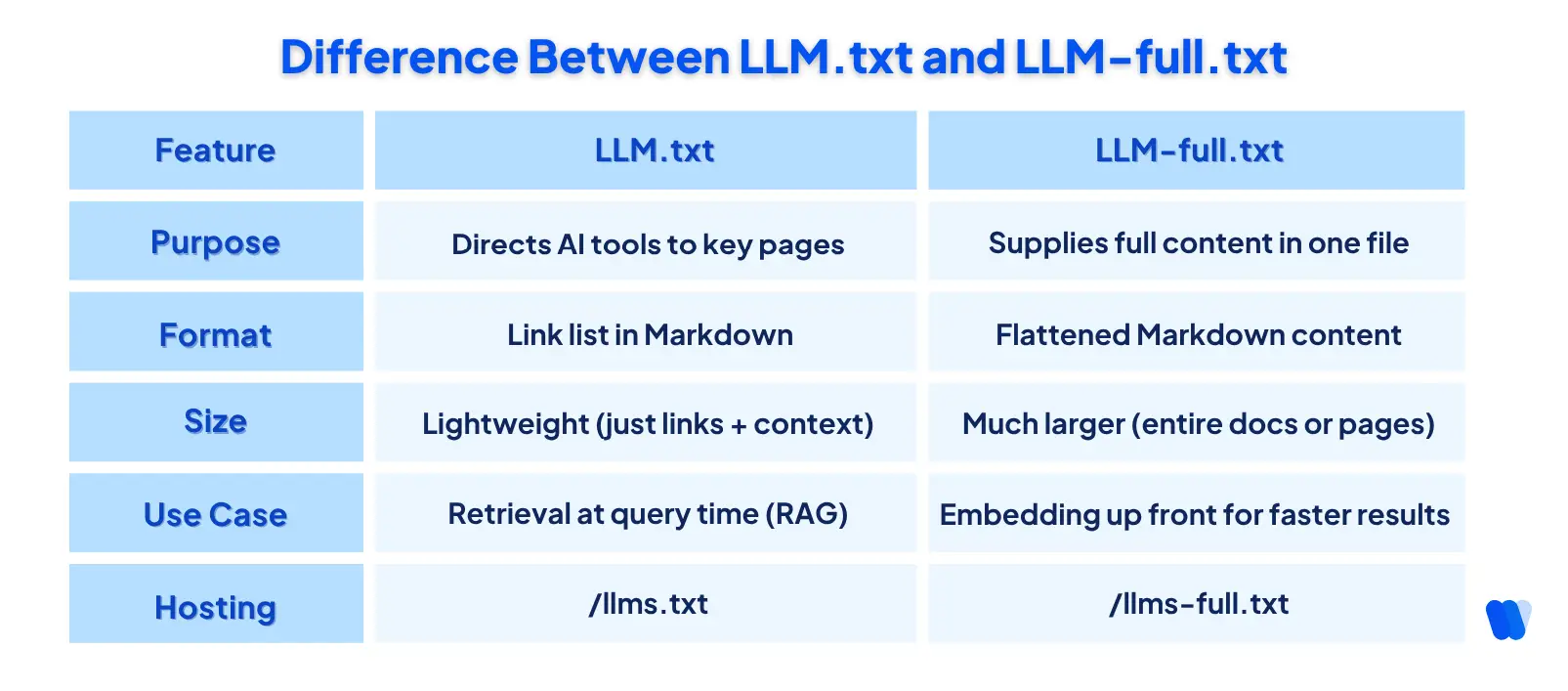
Used together, these files give AI models both direction and depth helping them find your most important pages and process them in full.
How Are LLMs Using These Files to Read and Represent Your Website?
Language models don’t behave like search crawlers. They don’t scan your entire site or build long-term indexes. Instead, they operate on-demand pulling content only when a user submits a query. This makes it critical for them to access clean, structured input the moment it’s needed.
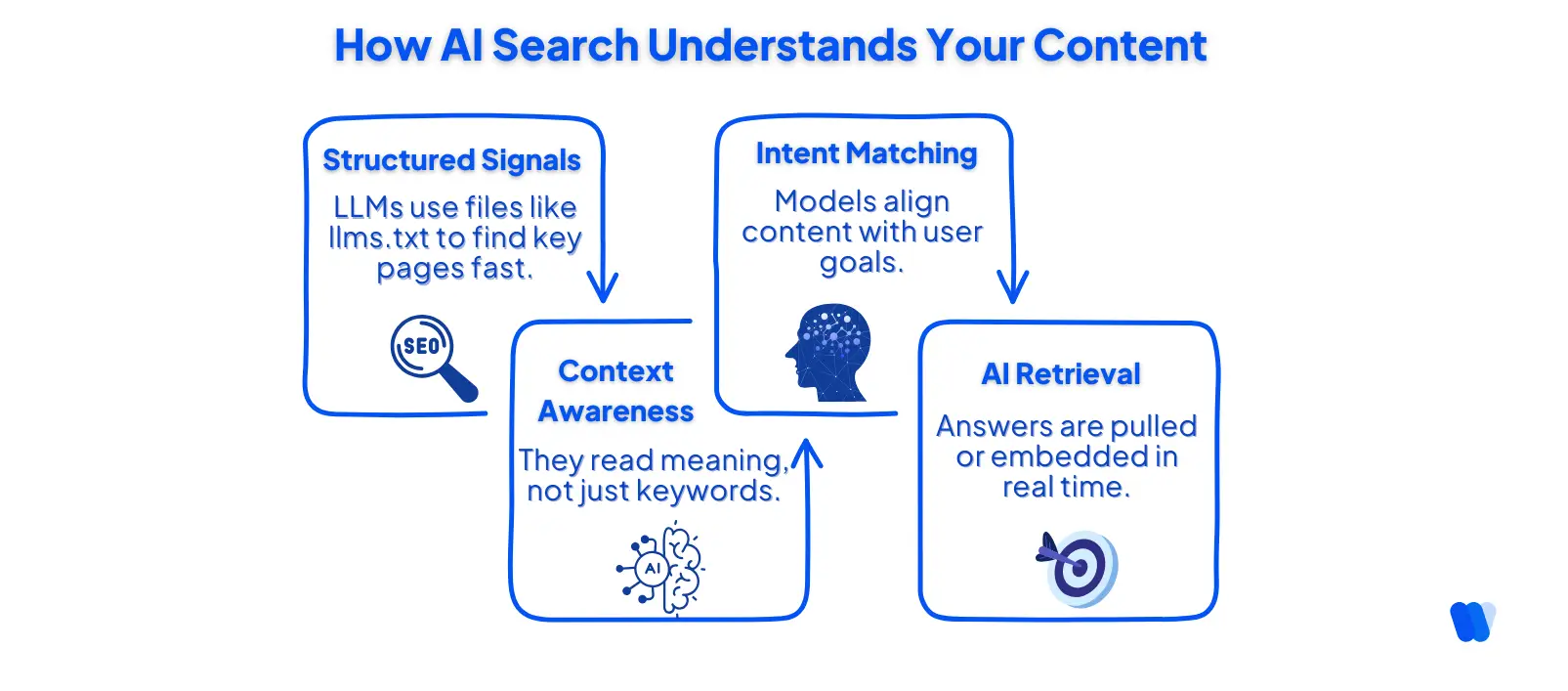
Unlike search bots, LLMs aren’t optimized for navigating menus or processing layout-heavy pages. They’re designed to work efficiently within token limits, so they prioritize sources that deliver information without distractions.
This is exactly what llms.txt and llms-full.txt provide: simplified access to high-signal content, presented in a way that supports fast retrieval or direct embedding.
Without structured inputs, your site may face LLM.txt visibility challenges similar to those seen in traditional SEO — missing context, lost content, and misrepresentation.
Files like llms.txt make it easier for AI agents to bypass layout noise and extract content with high token efficiency.
- LLM.txt helps the model identify key links to retrieve at query time (RAG-based behavior).
- LLM-full.txt enables upfront embedding of your full documentation, so the model doesn’t need to make follow-up requests.
The result? Quicker access, more accurate responses, and fewer chances of hallucinating or misrepresenting your content.
How Can These Files Improve Your SEO for AI Search Engines?
Traditional SEO was built for search engine crawlers. But AI tools like ChatGPT, Claude, and Perplexity don’t crawl they retrieve.
While traditional ranking factors still apply for web results, AI search depends more on structure, clarity, and a clean technical foundation often validated through a structured technical SEO audit than backlinks or metadata.
This shift is why so many teams are now asking what are LLM.txt and llms-full.txt files because they’re becoming key to discoverability in AI-generated answers.
Faster retrieval, fewer hallucinations, better brand accuracy in zero-click answers, higher chance of citation, and clearer guidance so models prioritize your best pages.
Here’s how they support SEO in the AI era:
1. Guide AI Models to Your Most Valuable Content
Unlike crawlers, language models don’t explore your site deeply. They fetch only what they’re told or what’s easy to find. A well-structured llms.txt file tells them exactly which pages matter pricing, features, documentation, and more.
2. Reduce Hallucinations with Clean, Embedded Input
When content is fragmented across pages, AI systems can misrepresent it or fill in gaps with false assumptions. The llms-full.txt file offers a dense, complete content surface that models can embed all at once, reducing the need for guesswork.
This directly improves the accuracy of model responses, especially in tools that use long-context inputs like GPT-4-turbo.
3. Improve Brand Representation in Zero-Click Answers
If an AI tool uses your outdated help page or an old blog post, it may misstate product details, pricing, or positioning. With llms.txt, you control what gets seen first. With llms-full.txt, you control what gets embedded.
That structure helps you shape your brand’s appearance in zero-click search experiences, where answers appear without users ever clicking through, especially in zero-click experiences where the AI shows answers but not links.
Many solo marketers use autonomous marketing platform to automate and structure this layer of discoverability, ensuring their most relevant content is picked up by AI tools instead of overlooked.
It’s no surprise that startups use a GenAI visibility stack for growth to optimize this layer of discoverability — ensuring their brand shows up accurately when AI search generate summaries, not just links.
4. Future-Proof Your Content for AI Interfaces
AI search is expanding beyond chatbots. From internal copilots to third-party interfaces like Claude’s tool protocol and LangChain-powered apps, many systems now prefer structured Markdown inputs.
A 2025 research summary by Luo et al. shows structured inputs aligned to the Model Context Protocol (MCP) improve retrieval accuracy by providing a single-point content source AI can trust.
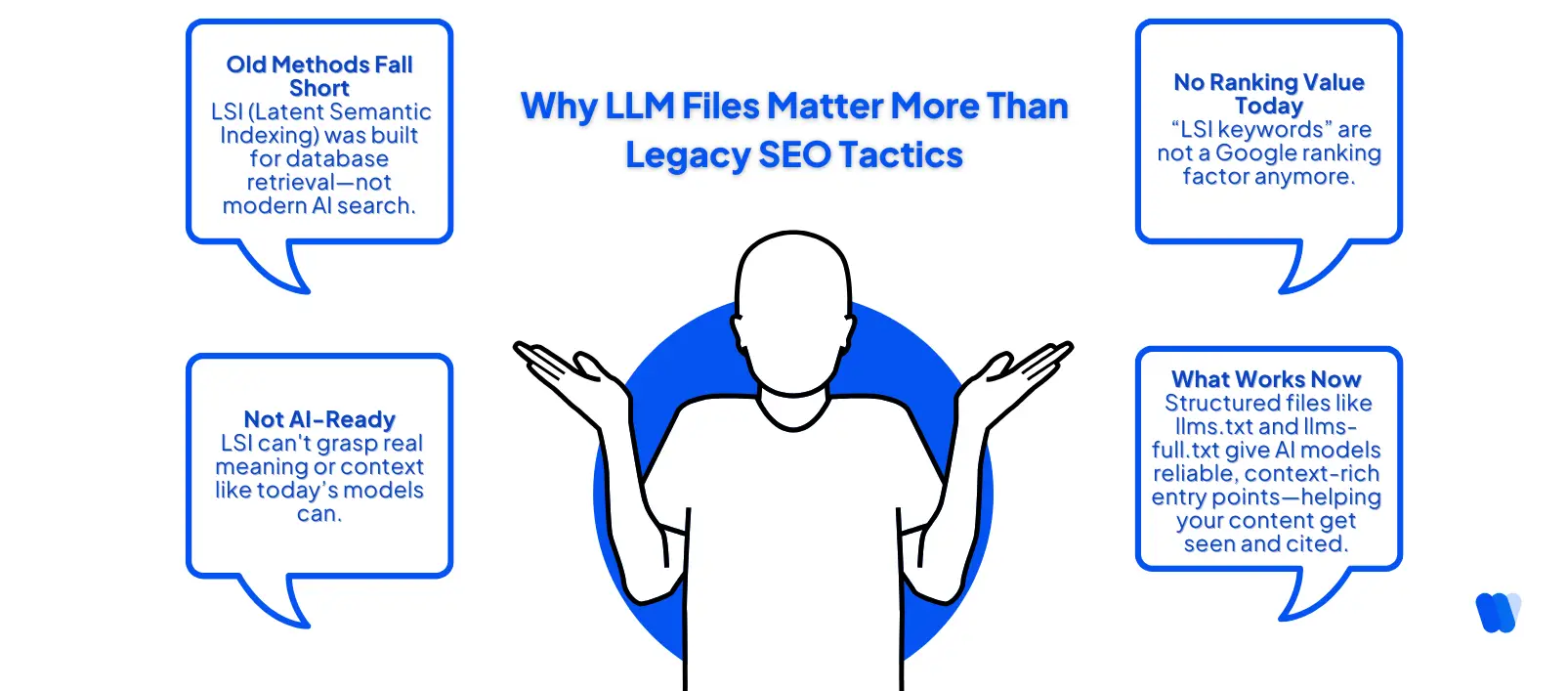
If you want your content to be cited, quoted, and shown in AI tools, don’t rely on HTML pages alone. Structure your most important information with llms.txt and llms-full.txt and make your site ready for where search is heading.
How Do You Create an Effective LLM.txt and LLM-full.txt File?
You don’t need complex infrastructure to make your content LLM-friendly. A simple text editor and a bit of structure go a long way. Here’s how to build both files the right way:
Creating llms.txt: A Structured Content Map
This file acts like a guidepost pointing AI models to your key pages in a clean, token-efficient way.
- Identify your most valuable content
Choose pages like pricing, feature overviews, API docs, and onboarding guides. - Convert page summaries to Markdown
Keep it simple use headings, short descriptions, and clean links. - Structure it clearly
Use # for your site title, > for a brief tagline, ## for sections, and bullet lists for links. - Host it at your domain root
Save the file as llms.txt and serve it at:
https://yourdomain.com/llms.txt
💡Tip: Avoid linking to pages with popups, dynamic layouts, or heavy HTML they confuse models.
Creating llms-full.txt: One File, All Context
This file holds the full content of your documentation or key site pages, all flattened into a single Markdown file.
- Export or copy your docs
Include important guides, tutorials, feature pages, and product walkthroughs. - Remove navigation elements, headers, or footers
Strip everything that isn’t core content. - Use consistent Markdown structure
Headings, bullet points, and code blocks should all follow standard formatting. Avoid HTML or inline scripts. - Save and host the file
Host it at:
https://yourdomain.com/llms-full.txt
💡Tip: Use a static link with version control (e.g., llms-full.v1.txt) so you can track updates over time.
You can generate both files manually, or use tools like:
- Mintlify (auto-generates both files for hosted docs)
- Yoast SEO (WordPress plugin with LLMs.txt support)
- Custom scripts (use Python or Node to flatten Markdown files)
What Are the Most Common Mistakes When Setting Up LLM.txt?
Creating llms.txt is simple but easy to mess up. A poorly structured file can confuse AI models or get ignored entirely. Here are the most common pitfalls to avoid:
1. Mixing Up File Roles
Don’t confuse llms.txt with robots.txt or sitemap.xml. They serve different purposes:
- robots.txt controls what bots can crawl.
- sitemap.xml helps search engines index pages.
- llms.txt guides LLMs to structured, relevant content.
To improve what bots crawl first (and avoid wasted crawling), use this Crawl Budget SEO guide alongside robots.txt and your sitemap.
2. Using HTML Instead of Markdown
AI systems process plain, structured text far more efficiently than complex HTML. Markdown keeps things lightweight, making it easier for models to extract meaning without dealing with noisy tags or layout instructions.
HTML, while flexible for visual design, can clutter LLM SEO inputs with unnecessary structure leading to misinterpretation or token bloat.
“Markdown has a simpler syntax that’s easier to maintain and more readable for both humans and machines.”
Speak Louder on Dev.to Markdown vs HTML: Choosing the Right Format
💡Tip: Before uploading, convert your rich content to Markdown using tools like Pandoc, Dillinger, or Markdownlint to clean out unnecessary HTML residue.
3. Overloading the File with Low-Quality Links
Keep your list curated. Adding every page bloats the file and reduces the chance of key pages getting picked up. Focus on your top 5–10 content assets.
4. Forgetting to Update After Site Changes
A stale llms.txt file can do more harm than good. If it links to removed or outdated pages, AI tools may use inaccurate information.
Set a regular schedule monthly or quarterly to review and refresh the file.
5. Blocking Access Unintentionally
Ensure the file is publicly accessible without login requirements or geo restrictions. If a model can’t access it directly, it can’t use the content inside.
curl https://yourdomain.com/llms.txt
If the response is blocked or empty, fix your server permissions.
Should You Add LLM.txt and LLM-full.txt to Your SEO Strategy Today?
If AI tools are already summarizing your content but not citing your website it’s time to take control.
According to Wellows ChatGPT Citations Report, the majority of AI answers still lack proper attribution — reinforcing the need to guide models with structured context files like llms.txt.
These files also help improve your share of search by ensuring your brand surfaces in conversational tools and AI snippets.
- AI tools are already accessing your content, with or without permission.
- Structured files like llms.txt and llms-full.txt provide the context AI models use to decide what to show.
- Mintlify’s data gathered from 25 companies over a week showed AI models accessed llms-full.txt much more frequently:
- Median visits per company: llms.txt = 14, llms-full.txt = 79
- Mintlify site traffic: llms.txt = 436 visits, llms-full.txt = 967 visits
That means models were reading the full content file over twice as often a clear signal they prefer full data when available.
FAQs
The llms.txt format was introduced by Jeremy Howard (co-founder of Answer.AI) to help large language models access documentation without wasting tokens or navigating complex HTML structures. It’s part of a broader shift toward AI-readable content design.
Not by default. Unlike robots.txt, which is automatically fetched by search engines, most AI tools only access llms.txt when it’s explicitly linked, referenced in a prompt, or included via a toolchain like Claude’s Model Context Protocol (MCP).
AI models can only access public content. If your llms.txt file includes links behind a login or returns broken pages, models may skip them or worse, embed incorrect or outdated information. Always validate links before publishing.
As of mid-2025, over 2,000 domains have implemented a llms.txt or llms-full.txt file. Major adopters include Mintlify, Fast.ai, Cloudflare, and Anthropic. WordPress plugin Yoast has also begun offering support for this format natively.
Yes. While these tools don’t guarantee citation, a well-structured llms.txt improves how they retrieve and interpret your content. This reduces errors, highlights your key pages, and increases the chances of your brand being quoted accurately in AI-generated answers.
Use Google Search Console keyword analysis to monitor branded queries, click trends, and impressions. Pair it with traffic logs from llms.txt for clearer attribution.
As of mid-2025, LLM.txt is not a formal web standard, but adoption is steadily growing. While platforms like Google or OpenAI have not officially announced native support, several ecosystems already leverage it. Tools such as FireCrawl, Claude’s Model Context Protocol (MCP), and Mintlify actively use llms.txt or llms-full.txt for structured retrieval.
More than 2,000 domains — including Fast.ai, Cloudflare, and Anthropic — have implemented these files, and WordPress plugin Yoast has added support. This shows LLM.txt is becoming an important visibility layer for AI-driven search and assistant tools, even if it isn’t yet universally recognized.
Final Takeaway
There’s no formal standard yet for structuring content for AI tools much like the early days of robots.txt. But waiting may cost you visibility in a world where ChatGPT, Claude, and other LLMs are already shaping how users discover content.
If you’ve been wondering what are LLM.txt and how they help the answer is simple: they give AI models the structured access they need to understand, quote, and present your content accurately.
By adopting both LLM.txt and LLM-full.txt today, you position your site to show up in AI-generated answers — not just search engine results.