Google Search Console keyword analysis is one of those rare SEO tools that gives you the truth straight from the source.
Most people use Google Search Console (GSC) to track performance or fix technical issues, but for keyword discovery, it’s just as powerful—because it shows what real users typed into Google before landing (or not landing) on your site.
And since Google still dominates global search with around 89% market share worldwide, the queries you see in GSC reflect where the internet’s attention actually is right now. (StatCounter, 2025)
Add to that the fact that Google handles trillions of searches every year, and you’re basically sitting on a live stream of demand data.
If you want to grow organic traffic without guessing, GSC is where you start—because every impression, click, and position is a signal from your audience that should directly shape your on-page SEO improvements.
TL;DR
- GSC shows real keywords users search to find your site.
- Use Performance data to spot quick-win and underperforming queries.
- Improve visibility by fixing CTR gaps, intent mismatches, and thin coverage.
- Find page-level opportunities and prevent keyword cannibalization.
- Track changes over time with Compare reports.
- Use Wellows to scale intent-led optimization and AI visibility.
Why Search Console Matters for Keyword Analysis in 2025?
That’s why marketers now invest more time in Google Search Console keyword analysis instead of relying on outdated projections.
Google Search Console is a vital tool for keyword analysis in 2025 because it provides direct insights into how users are actually searching for your website.
It helping you optimize content and improve search visibility—something that’s difficult to achieve with traditional spreadsheets and SOPs alone.
Those insights reveal demand, but they do not explain why some domains are repeatedly cited by AI while others disappear. That is why understanding how domain authority matters for AI citations is essential before assuming keyword data alone explains your visibility ceiling.
This is also where the benefits of AI SEO Agents become clear, since they transform raw GSC data into actionable SEO moves.
And if you want to go one step further and understand how your brand performs against competitors in search, analyzing your Share of Search can help you benchmark branded search demand and discover growth opportunities beyond basic keyword data.
It offers real-time GSC keyword data on which queries are driving traffic, which keywords are being searched but aren’t being used on your site, and how your site is performing in search results—insights that often surface issues best uncovered through a structured technical SEO audit.
Why use Google Search Console for Keyword Analysis 2025?
Google Search Console is a goldmine for keyword insights. Here’s why you should use it.
- Free and requires no subscriptions: Many SEO tools require costly subscriptions, but GSC is completely free, making it accessible easily.
- Provides real keyword performance data: Most keyword research tools provide estimated search volumes, but GSC shows actual data on searches that lead users to your site, ensuring accuracy with Real-Time SEO Data.
- Helps identify keywords with high optimization potential: Analyzing existing keyword rankings allows you to optimize content and improve visibility with small tweaks.
- Uncovers content gaps and new topic opportunities: GSC reveals queries that may not have been intentionally targeted but are already driving traffic, providing ideas for new content.
- Tracks keyword performance over time: You can monitor how rankings fluctuate, which keywords are growing in importance, and how search behavior is evolving.
- Helps understand search intent: By analyzing query data, you can refine content to better match user intent and increase engagement.
- Provides device-specific insights: Performance can vary between desktop and mobile users, and GSC helps fine-tune SEO strategies accordingly.
How to Use Google Search Console for Keyword Research (Step-by-Step)
Google Search Console shows the exact keywords people use to find your site. This step-by-step flow helps you spot quick wins, fix weak pages, and grow traffic with real data.
1. Find High-Value Keywords to Keep in Your Strategy
In the Performance tab, filter for the last 3 to 6 months and sort by clicks. This reveals the keywords driving the most traffic.
Target those with an average position between 4 and 10. These are close to the top and have potential to move higher with small optimizations.
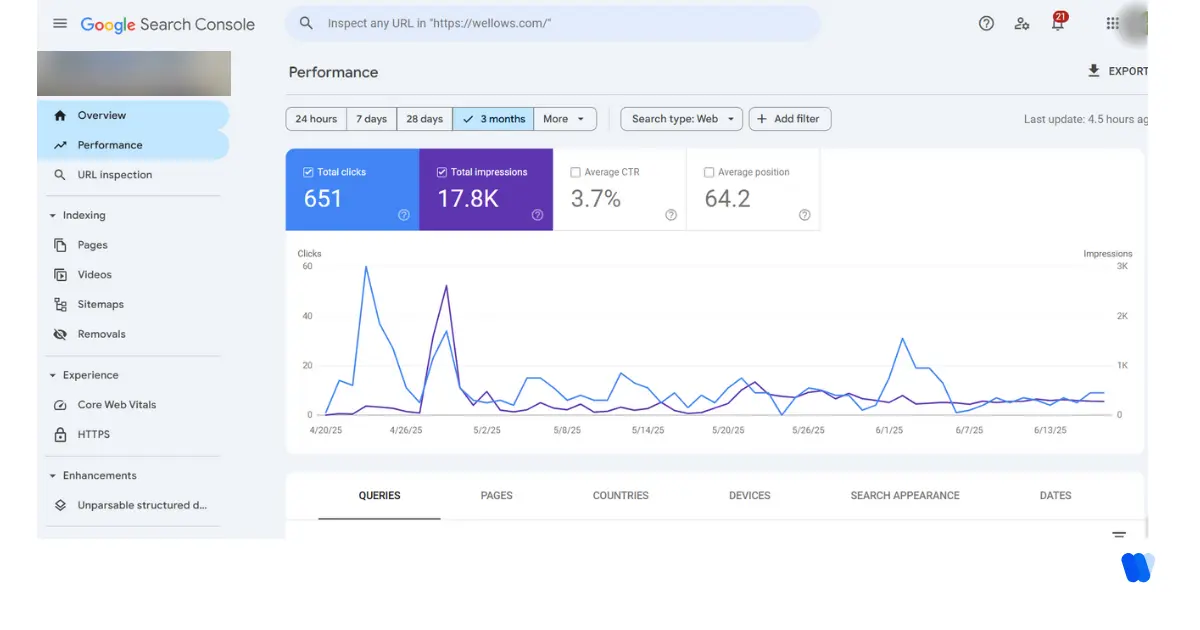
Google Search Console keyword analysis offers this clarity without needing premium tools.
For teams scaling SEO across multiple brands, combining GSC insights with automation for agency workflows streamlines research, clustering, and on-page optimization at scale.
“Reviewing high-performing queries helped refine two pages and increase their rankings by three positions within a month.” – Chloe Garcia, SEO Analyst
2. Identify Keywords With High Impressions, Low Clicks
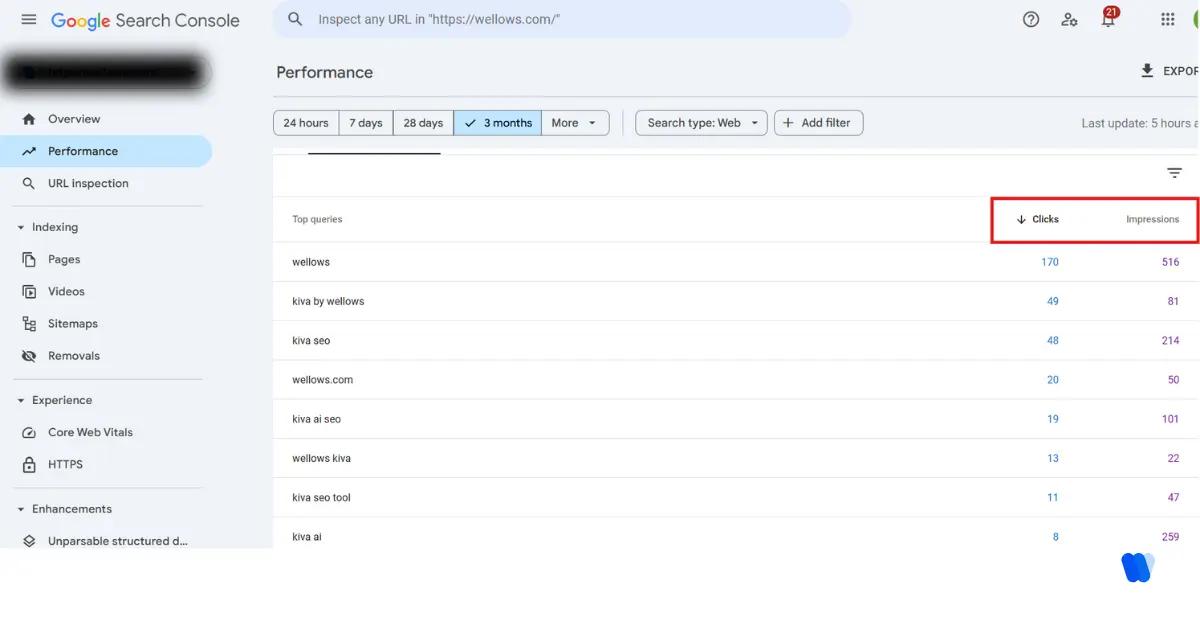
Some queries generate large impressions but low CTR. That usually points to a disconnect between the snippet and what users want.
Sort the query list by impressions. Compare CTR and average position. If a page is on page one but not getting clicks, revisit the meta title and description.
This optimization can lift visibility without new content creation.
3. Discover Page-Specific Keyword Opportunities
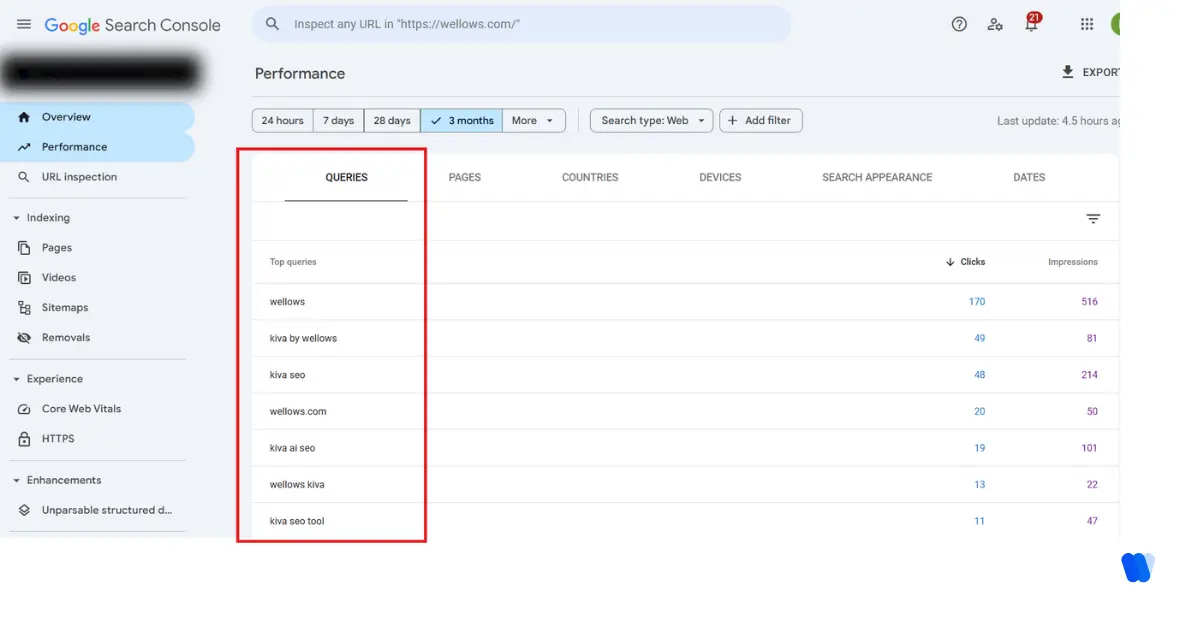
Go to Performance > Pages and select any URL. Then click the “Queries” tab to see which search terms are tied to that specific page.
Include relevant keywords in subheadings, image alt text, and FAQs. Keep the content natural. Even subtle on-page improvements help boost Google Search Console keyword analysis outcomes, especially when viewed through approaches like Tools vs Agents, which highlight how agents elevate optimization compared to traditional tools.
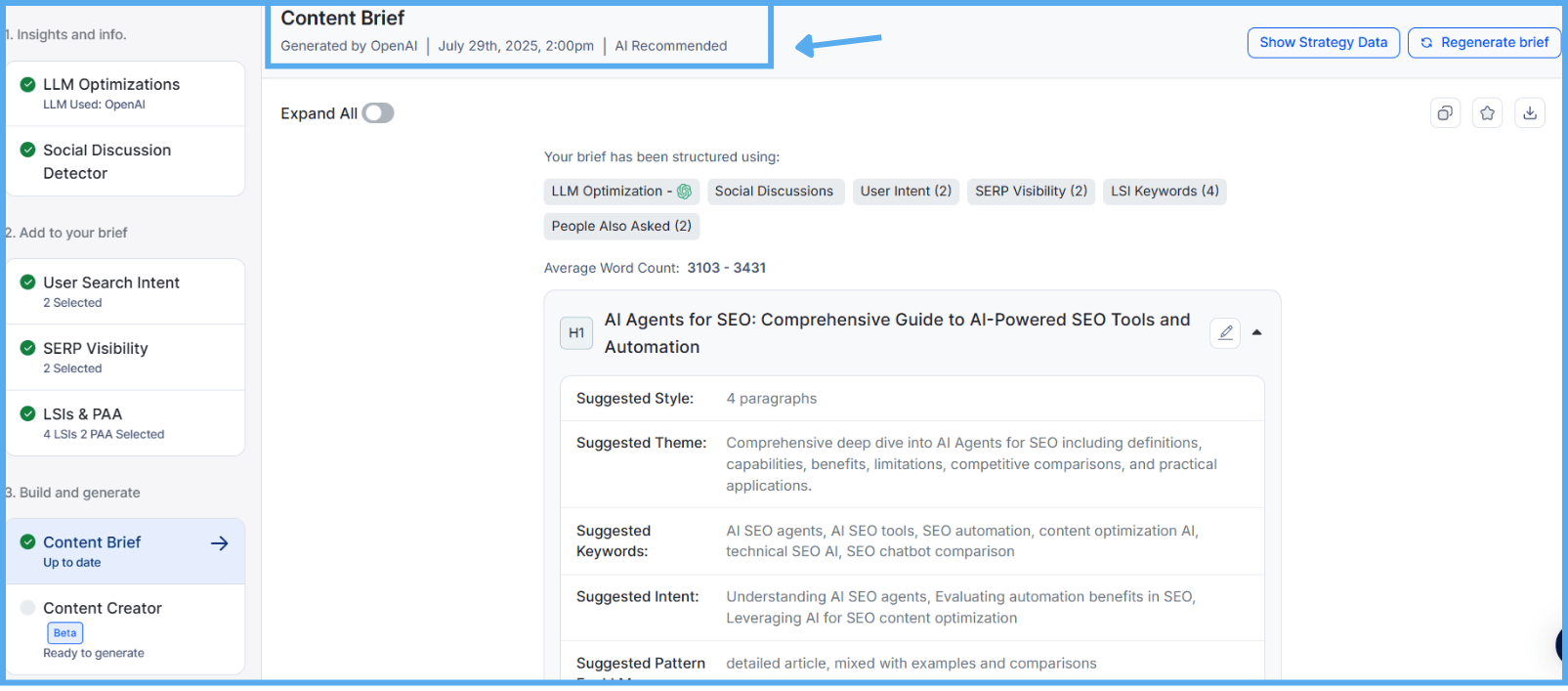
As an AI search visibility platform, Wellows strengthens this process with its legacy content-writing feature, content briefs, which turn Search Console query data into intent-aligned outlines matched to SERP structure and your brand voice—so every update lifts visibility and engagement with less guesswork.
Pages targeting multiple similar terms can conflict. Consolidate or rewrite when needed.
4. Track Keyword Movement After SEO Updates
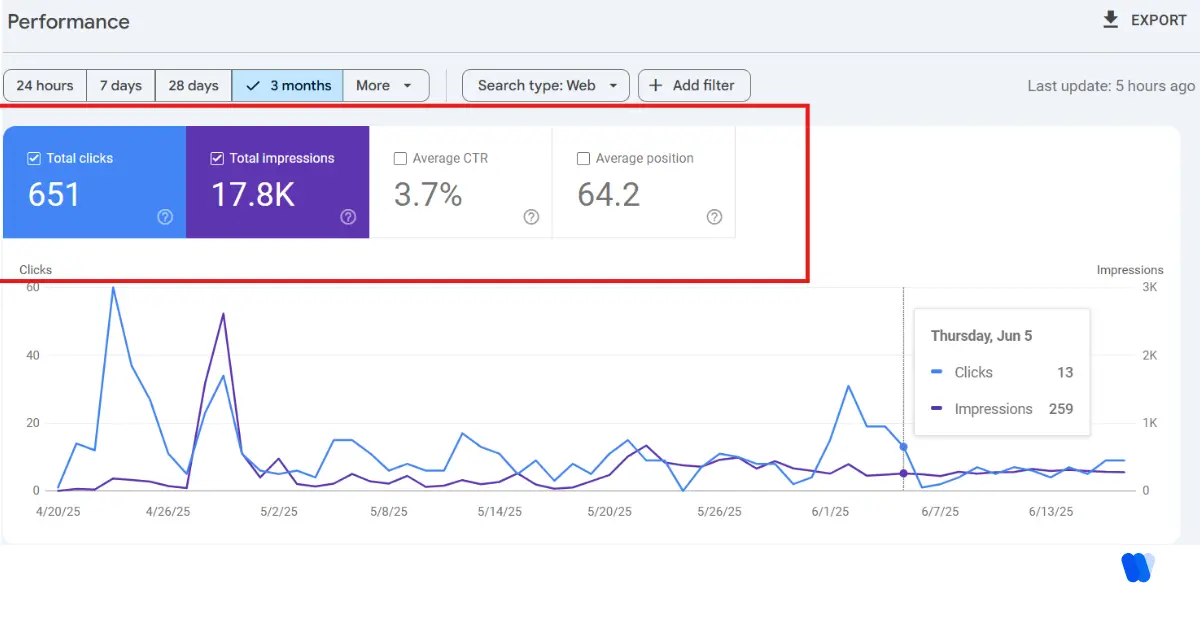
The “Compare” view in Search Console gives you search performance insights across time—revealing trends in rankings, CTR, and traffic behavior.
Compare metrics such as:
- Total Clicks
- Impressions
- CTR
- Average Position
Choose two timeframes and observe how rankings evolve. This creates a clear feedback loop between updates and actual performance.
To take this further—into implementation, link building, and tracking—head over to our complete SEO resource guide.
5. Discover Long-Tail Keywords and Build Topic Clusters
Google Search Console lists thousands of low-volume queries—these are long-tail opportunities.
Export the query data. Filter terms with fewer than 10 clicks but over 100 impressions. These often represent niche user intent or rising trends.
Creating content around these topics helps capture traffic early and build stronger topical authority in SEO within niche subject areas.
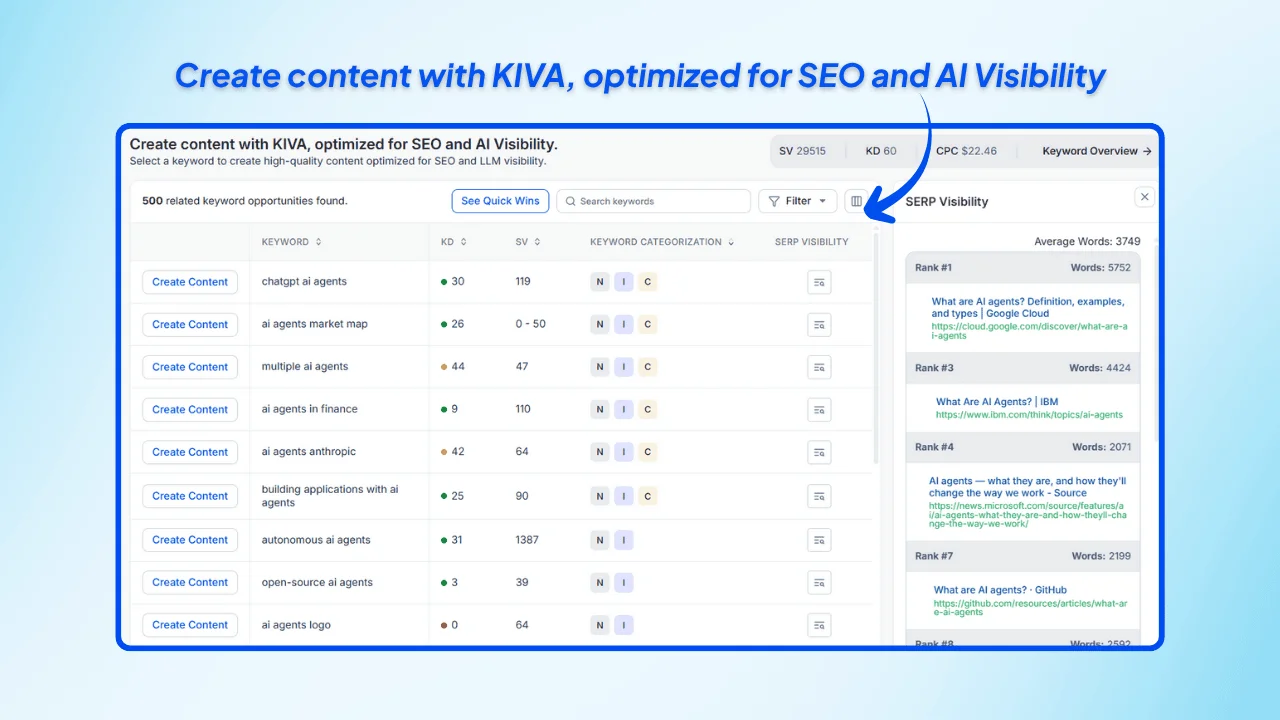
In Wellows, when you open KIVA after entering a keyword, you can see related keywords grouped into clear clusters. This long-tail clustering helps you build strategic topic hubs and target multiple low-competition phrases with fewer, more comprehensive content pieces.
6. Fix Keyword Cannibalization Using GSC Data
Multiple pages may rank for the same keyword. This can dilute rankings.
Google Search Console shows which URLs appear for each query. Focus on one strong page. Redirect, merge, or rework weaker ones to clarify relevance.
Search engines reward focused coverage. This ensures the correct content ranks better.
7. Set a Monthly Keyword Optimization Routine
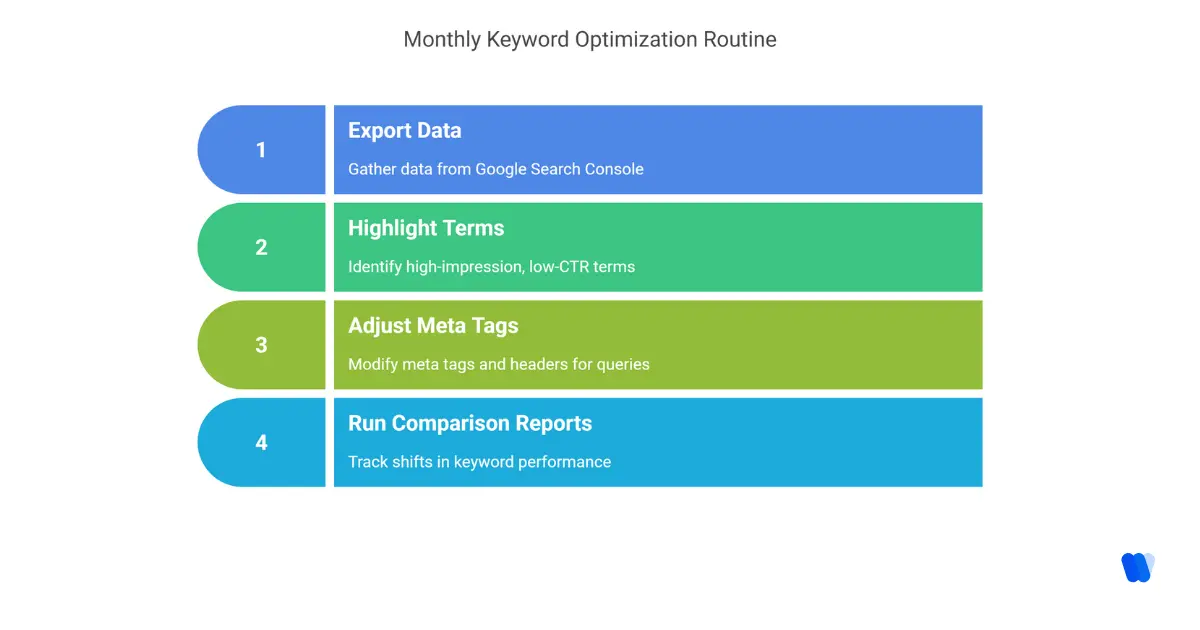
A routine helps maintain momentum:
- Week 1: Export data from Google Search Console
- Week 2: Highlight high-impression, low-CTR terms
- Week 3: Adjust meta tags and headers for those queries
- Week 4: Run comparison reports to track shifts
Repeat monthly to align keyword targeting with changing search behavior and improve long-term organic keyword tracking.
Many solo marketers use an SEO agent to automate these weekly keyword analysis routines, saving hours on data exports and optimizations.
These workflows directly help overcome the Challenges Freelancers Face Without AI Agents in SEO by cutting repetitive work and freeing up time for strategy.
8. Evaluate Individual Page Trends
Review how each URL performs. Are rankings improving? Is traffic declining or stagnant?
Pages slipping in average position may need refreshed content or stronger internal linking.
Google Search Console keyword analysis supports this level of granularity.
9. Avoid Common Optimization Mistakes
- Ignoring impressions—high visibility with low CTR signals an opportunity
- Letting pages overlap creates keyword confusion
- Updating without data
- Mismatched intent—keyword fit matters more than density
Avoiding these traps prevents wasted effort.
10. Visualize Keyword Insights with Dashboards
Native GSC visuals have limits. Connect the tool to Looker Studio or alternatives.
Visual dashboards help monitor trends across clusters, URLs, and topics. This aids decision-making, especially in collaborative teams.
Good visuals simplify spotting new SEO opportunities.
Boost Your Keyword Research with Wellows
Teams exploring smarter workflows use Wellows to streamline Google Search Console keyword analysis. As an AI search visibility platform, it helps you spot high-potential keywords, identify pages losing traction, and understand how your content is being interpreted across both Google and generative engines — all from one unified view.
By syncing real GSC signals into a broader visibility layer (citations, intent shifts, and competitive gaps), Wellows makes it easier to scale keyword decisions without losing detail.
You get clearer priorities for what to refresh, expand, or consolidate, while keeping your strategy aligned with real search demand. Pairing these insights with a regular SEO site audit ensures your content stays technically strong, intent-matched, and ready for both search and AI-driven discovery.
How to Discover Underperforming Keywords in Google Search Console?
Underperforming keywords are the ones getting seen, but not clicked or pushed into strong visibility. GSC already shows them — you just need the right filters.
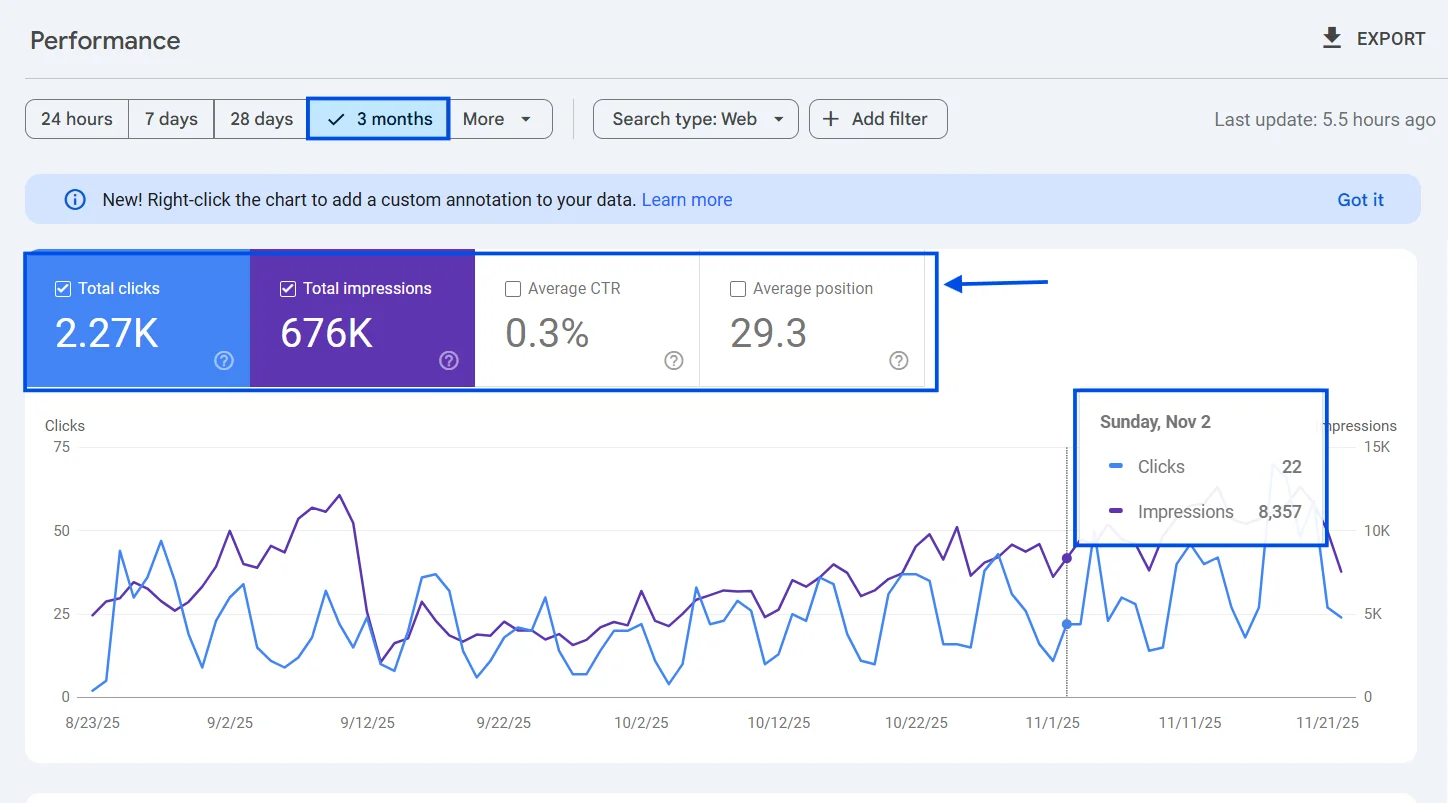
1. Open the Right Report: Go to Performance → Search results. This is where GSC lists every query your site is showing for.
2. Pick a Clean Time Window: Set the date to the last 3–6 months. This removes random spikes and shows stable patterns.
3. Turn On the Signals That Matter: Enable these metrics: Impressions (visibility), Clicks (traffic), CTR (snippet performance), and Average position (how close you are)
4. Find “Almost There” Queries: Filter by average position to spotlight keywords that are close but not breaking through. Positions 8–20 = high potential quick wins and Positions 20+ = content depth or intent gap issue.
5. Catch High-Impression, Low-Click Keywords: Sort queries by Impressions. Look for terms with strong impressions but weak CTR. These usually need better titles, descriptions, or clearer intent match inside the page.
6. Check Which Page Is Holding the Keyword: Click any query → switch to the Pages tab. This shows the exact URL tied to the keyword, so you know where to optimize.
7. Tag the Reason It’s Underperforming: Before fixing, label the problem:
- Low CTR on page-one positions → snippet mismatch
- Mid positions with good impressions → needs stronger structure, entities, or coverage
- Multiple URLs for same query → cannibalization
8. Prioritize by Effort vs Impact: Start with keywords that need the smallest lift: High impressions, Average position under 20, and Clear intent you can satisfy quickly.
That’s it. This flow keeps your keyword strategy focused on visibility gaps that are already proven by demand — so every update has a clear reason to exist.
How to Use Google Search Console to Monitor Keyword Cannibalization Issues?
Keyword cannibalization happens when two or more pages on your site compete for the same query. Instead of helping each other, they split clicks and confuse Google about which page is the best fit.
Here’s the clean way to spot it inside Google Search Console, without repeating what you’ve already covered above:
- Go to the right report.
Open Performance → Search results. This is where GSC shows every query your site appears for. - Pick one query to inspect.
In the Queries list, click any keyword you suspect is overlapping across pages. - Switch to the Pages tab.
After clicking the query, move to Pages.
If you see multiple URLs getting impressions for the same query, that’s a cannibalization signal. - Compare which page is winning.
Look at clicks, CTR, and average position for each URL.
Usually one page is stronger and the others are pulling it down. - Decide the fix.
Use a simple rule:- Same intent + similar content: merge into one stronger page.
- Same query but different intent: rewrite one page to target a different angle.
- One page is clearly the main one: add internal links pointing to it and reduce overlap elsewhere.
- Recheck after updates.
Come back in 2–4 weeks, use the same query → Pages view, and confirm that one page is now leading clearly.
If you want a quick visual walkthrough, here’s a short video you can follow along with:
What Are the Limitations of Google Search Console for Keyword Analysis?
Google Search Console is great for real search data, but it’s not a full keyword research suite. Here are the main gaps to keep in mind when you rely on it for keyword analysis.
- Short data history. GSC keeps performance data for a limited window, so long-term seasonality and year-over-year trends are harder to study.
- Not real-time. Reports usually lag by a couple of days, which slows down fast reaction to spikes, drops, or updates.
- Sampling + hidden queries. For big sites, query data can be sampled, and many low-volume terms are grouped or removed for privacy. That means you never see the full keyword set.
- Row limits in UI. The interface only shows a slice of results at a time, so deep digging often needs exports or API pulls.
- No built-in intent labeling. GSC won’t tell you whether a query is informational, commercial, or transactional. You have to infer intent yourself.
- No competitor view. Everything is only about your site. You can’t compare keyword footprints or gaps against other brands inside GSC.
- API extraction limits. If you automate reporting, API quotas can cap how much data you pull daily across properties.
- Average positions can mislead. Rankings are averaged across users, devices, and locations, so “position” doesn’t always reflect a clean SERP reality.
The takeaway: GSC is your truth source for how Google already sees you, but it won’t show the whole market or the full intent layer. Many teams pair GSC with a search visibility platform like Wellows to map intent, spot gaps faster, and turn GSC signals into clearer next actions.
Read More Articles
FAQs:
Go to Performance → Search results, find keywords with impressions, open the ranking page, and tighten the snippet + intent coverage. Then track the same keyword to confirm lifts in CTR and position.
Use the Performance report’s Compare view to measure clicks, impressions, CTR, and average position before vs. after your update for the same queries/pages. If the updated keyword gains position and CTR over the compared periods, the change worked; if not, revisit intent match, snippet, or cannibalization.
Conclusion
Google Search Console keyword analysis reveals what users search for before landing on a site.
Data-backed adjustments help content align with real demand. Every click signals intent. By spotting patterns, improving relevance, and iterating regularly, you build long-term SEO strength.
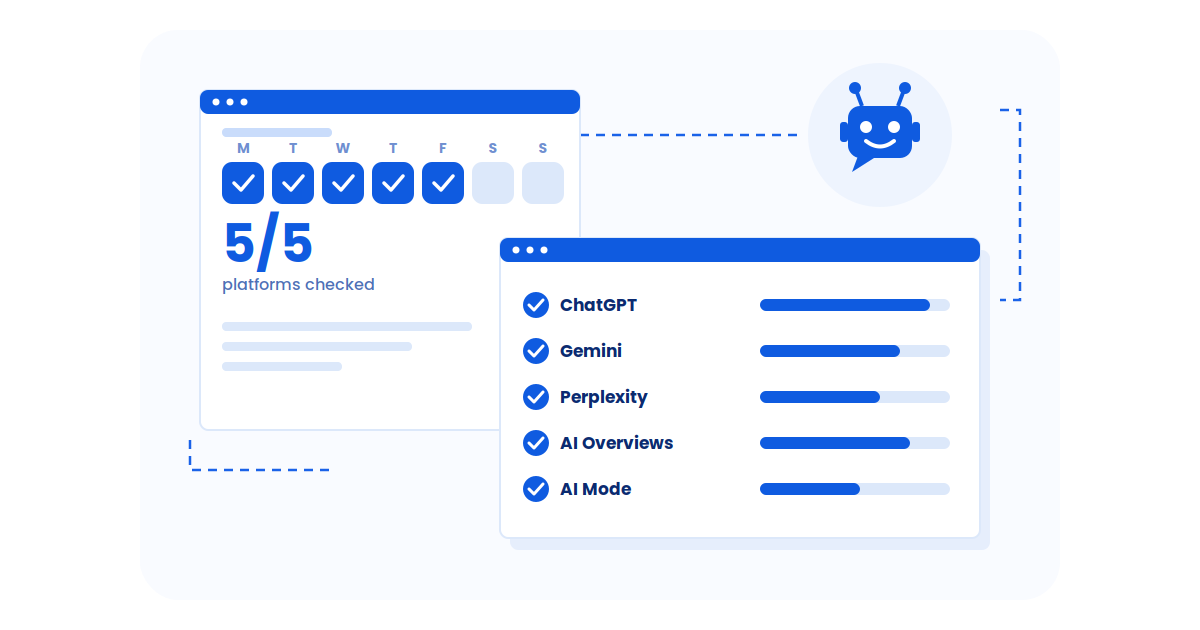
To go beyond raw GSC tables and understand how your brand is being interpreted inside AI search, Wellows gives marketers a single source of truth for visibility across ChatGPT, Gemini, Perplexity, Google AI Overviews, and AI Mode.
It unifies citations, sentiment, and visibility signals into one clear platform—so teams can strategize, monitor shifts, and optimize content for stronger AI-driven discovery.