Google Search Console (GSC) has been one of the most consistent tools for understanding search performance. From clicks and impressions to keyword rankings and coverage issues, it has helped SEOs monitor how content performs in traditional search environments.
Google Search Console (GSC) often referred to as one of the most essential SEO data tools—has been one of the most consistent ways to collect and analyze Google Search Console data, including clicks, impressions, and other website performance metrics.
However, with the rise of Generative Engine Optimization (GEO), the rules are shifting. Content isn’t just being discovered through blue links anymore.
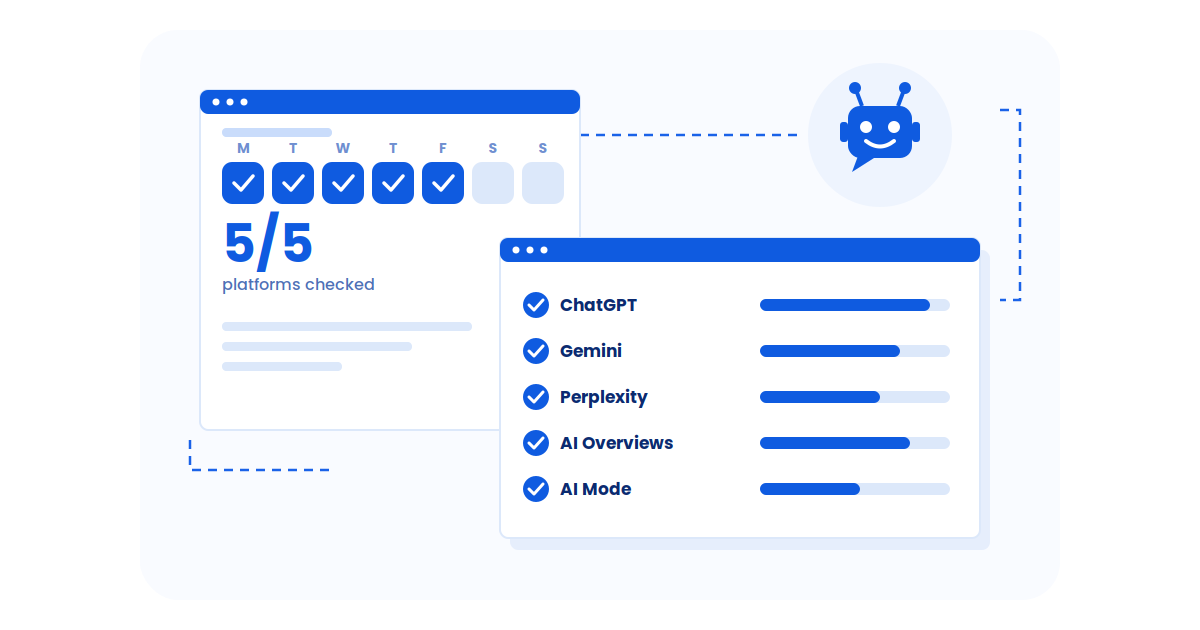
AI models like Gemini, ChatGPT, and Perplexity are pulling answers directly from content—and they don’t always reward ranking position or drive visible traffic. Instead, they surface what aligns best with user intent, semantic clarity, and contextual depth.
So where does that leave GSC? This blog explores how SEOs can use GSC for GEO by connecting traditional performance data with generative-first strategies. If applied with the right lens, GSC remains a powerful tool for understanding search signals in the age of AI.
How has GSC been Helping Traditional SEO Practices?
Before generative engines and AI-powered results came into play, Google Search Console (GSC) was one of the most reliable ways to understand how your website performed in organic search, reflecting how search engine optimization has evolved. And honestly? It still is.
This Google Search Console information includes query-level insights, traffic patterns, and technical health signals. includes query-level insights, traffic patterns, and technical health signals.
This reliability comes from the variety of GSC metrics and Search Console stats it provides—ranging from keyword queries to GSC click-through rate data and search impressions in GSC.
As search evolves, GEO is becoming just as essential as traditional analytics for AI-driven visibility. A How to Audit Brand Visibility on LLMs
helps bridge that gap, showing how your content is actually being cited or overlooked in AI answers.
GSC tells you what people are typing into Google before they land on your site, which pages they click, what countries they come from, and even whether they’re on a phone or desktop. It’s not just about fixing crawl errors or submitting sitemaps (though it does that too).
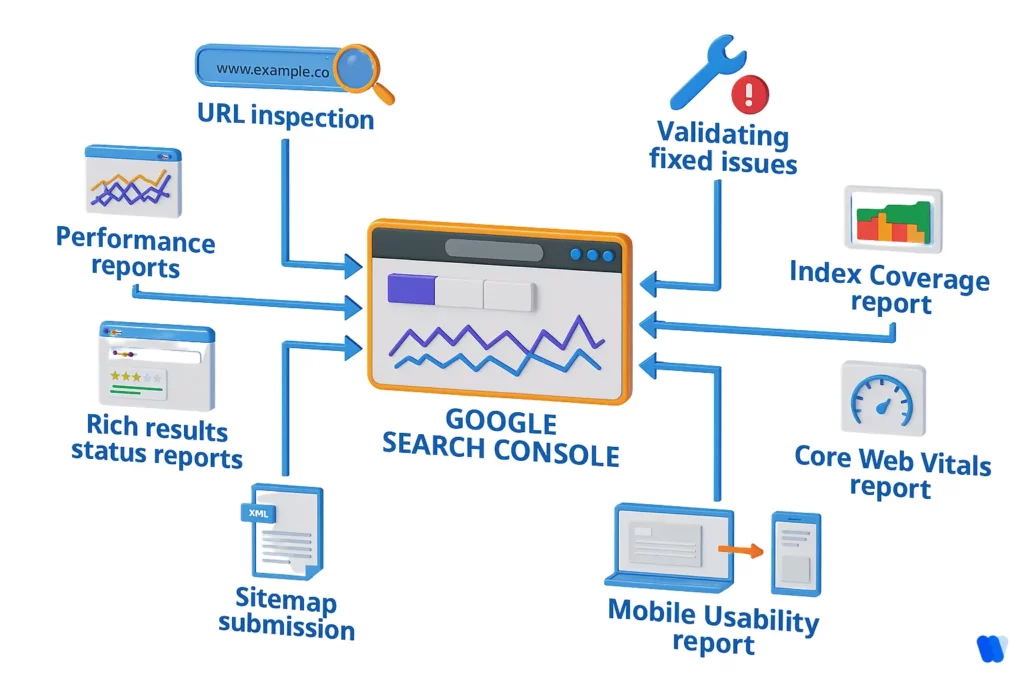
Even now, as AI tools start surfacing content differently, GSC remains a useful window into how your site is perceived by Google’s core search system.
And since traditional search data still feeds into the broader generative engine ecosystem, these signals remain relevant, if you know how to use them.
Whether you’re looking for GSC insights, wondering what metrics are in GSC, or searching for practical ways on how to analyze GSC data, the following breakdown highlights how each GSC performance report or feature can inform smarter SEO strategies.”
Here’s a breakdown of how GSC supports your SEO efforts and what you can do with that data:
| What GSC Feature Tells You | Why It Matters for SEO | How to Use It Strategically |
|---|---|---|
| Top Keywords | Reveals what people search before clicking your site | Optimize content around high-performing terms and discover new content opportunities |
| Search Rankings | Shows your average position for each keyword | Focus on improving content that’s on page 2–3 to push it up |
| Top-Performing Pages | Identifies which pages drive the most traffic | Replicate what’s working in format, topic, or keyword focus |
| Geographic Insights | Displays where your users are located | Tailor content and optimization strategies by region |
| Long-Term Performance (16-Month History) | Helps spot trends over time | Review high-performing months and replicate what worked |
| Time-Based Comparisons | Compares traffic and rankings across time periods | Track the impact of updates, campaigns, or technical changes |
| Device Breakdown | Shows performance across mobile, desktop, and tablet | Prioritize UX and speed optimizations where your users actually are |
| Image Search Data | Highlights which images are ranking | Add more visuals like the ones that already work, and optimize alt text |
| Title & Meta Description Feedback | Helps refine how your listings appear in Google Search | Rewrite with strong keywords to improve CTR and semantic clarity |
| Technical Error Reports | Alerts you to crawl, indexing, and mobile issues | Resolve these quickly to maintain (or regain) visibility |
What Types of Data Can You Access Through Google Search Console?
Google Search Console offers powerful insights to help you monitor, maintain, and optimize your website’s performance in Google Search. Here are the key types of data you can access through the platform:
1. Performance Data
This section shows metrics like clicks, impressions, click-through rate (CTR), and average position. You can filter this data by search queries, pages, countries, devices, or search appearance to understand how users find and interact with your content.
2. Index Coverage Reports
These reports reveal which of your pages are indexed by Google and highlight any errors or issues that might prevent other pages from appearing in search results.
3. Enhancements Reports
Enhancements data focuses on structured content, such as rich results and AMP pages, showing how your site’s structured data is performing and if it’s eligible for rich search features.
4. Security and Manual Actions
This section alerts you to any security problems (like malware or hacked content) or manual penalties imposed by Google for policy violations, helping you maintain a trustworthy website.
5. Links Reports
The Links report shows your internal and external linking structure, including top linking websites, most linked pages, and the anchor text used—crucial for improving site authority and navigation.
Note on Discontinued Reports
As of September 2025, Google has removed reporting for six structured data types: Course Info, Claim Review, Estimated Salary, Learning Video, Special Announcement, and Vehicle Listing. These are no longer available in Search Console reports, Rich Results Tests, or search appearance filters.
By understanding and using this data, website owners can make informed SEO decisions, improve visibility, and enhance user experience directly from Google’s trusted analytics source.
Integrating Google Search Console (GSC) with Google Analytics (GA) helps you connect search performance data with user behavior insights. This integration provides a full picture of how users find your website through Google Search and what they do once they arrive.
Here’s how to set it up:
Ensure Proper Permissions: Make sure you have administrative access to both your Google Analytics and Google Search Console accounts. The same Google account must have permissions for both to enable linking successfully.
Access Google Analytics Admin Settings:
- Sign in to your Google Analytics account.
- Click the Admin gear icon in the bottom-left corner.
- Under the Property column, choose Property Settings.
Link to Search Console:
- Scroll down to the Search Console section.
- Click Adjust Search Console or Link Search Console.
- Select the GSC property for your website. If it doesn’t appear, verify your site in GSC and ensure you’re using the same Google account.
- Click Save to complete the integration.
Verify the Connection:
- After linking, go to Acquisition → Search Console in GA. You’ll find reports such as:
- Landing Pages
- Countries
- Devices
- Queries
- Data typically starts appearing within 24–48 hours after linking.
Additional Tips:
- Data Retention: GSC data in GA is available for up to 16 months.
- Delay: Expect a 48-hour delay before new data shows up.
- Historical Data: You’ll only see data from the time both properties were active and linked.
By integrating GSC with GA, you can better understand which search queries drive traffic, how users interact with your pages, and where to optimize for higher performance and better user engagement.
How to Use GSC for GEO in the Age of Generative Engines?
Even as AI-driven answers begin to reshape how users find and consume information, Google Search Console (GSC) still holds a crucial role, just not in the way many SEOs have traditionally used it.
In other words, while many ask what does GSC data tell you or even is GSC data reliable, the real value now lies in using these Search Console data insights not only for rankings but for aligning with GEO.
In traditional SEO, GSC helped you measure how well your content ranked, what people searched for, and which pages attracted traffic.
In GEO (Generative Engine Optimization), its value shifts: instead of being just about rankings, GSC becomes a diagnostic tool for content readiness, helping you align better with the GEO visibility factors.
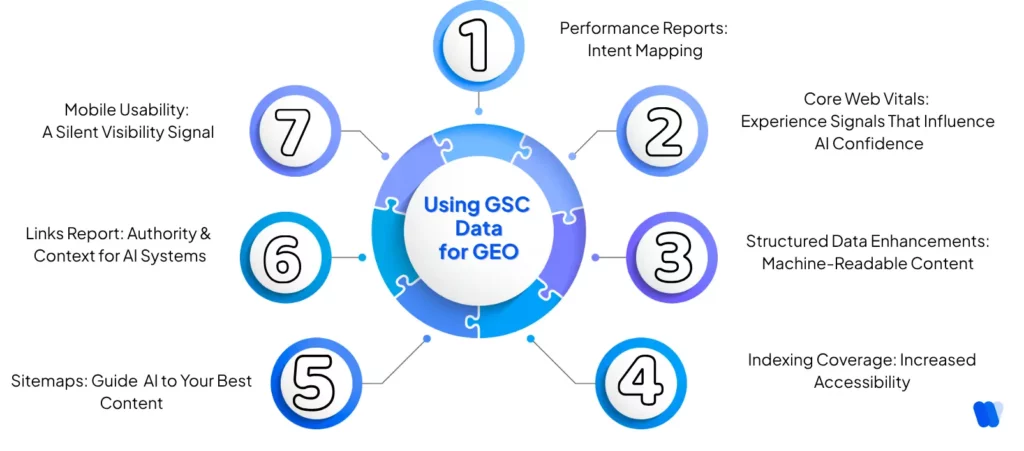
Let’s break down how key GSC features still guide your strategy in Generative engines.
Did you know?
Quick Fact
According to Search Engine Land Google has confirmed that AI Mode performance data will be included in the Search Console performance reports. However, you won’t be able to isolate or view that data separately to compare AI Mode with web search or other Google surfaces.
1. Performance Reports: From Keyword Rankings to Intent Mapping
In classic SEO, performance reports focused on impressions, clicks, and positions. In GEO, they evolve into intent-mapping tools into intent-mapping tools, showing SEOs exactly how to use GSC for GEO when restructuring content to match layered user intent. and positions.
These reports—often referred to as the GSC performance report—combine GSC query data, search impressions in GSC, and click-through rate into actionable SEO performance data.
Now? They tell a deeper story.
In a generative engine world, queries in the performance report help you reverse-engineer user intent—a key ranking factor for LLMs like ChatGPT or Google’s AI Overviews, and a core part of Answer Engine Optimization.
For example, a query like “best budget laptops for students” tells you this user isn’t just looking for product names—they want comparisons, pricing context, and recommendations. That’s your cue to restructure content to fully resolve that intent (and if Perplexity is a target channel, How to Rank in Perplexity shows how to format sections so they’re easier to cite).
Why it matters for GEO: LLMs select answers that reflect clear, complete solutions to nuanced prompts. These reports help you see where your content matches (or misses) the intent behind real searches, and that’s the foundation for increasing visibility on ChatGPT and other LLMs, where answers are pulled not just from keywords, but from content that aligns tightly with user goals.
2. Core Web Vitals: Experience Signals That Influence AI Confidence
Large Language Models don’t experience websites the way humans do—but they’re still trained to factor in signals of content quality, and many of those start with user experience.
Metrics like LCP (Largest Contentful Paint) or CLS (Cumulative Layout Shift) hint at whether a site is readable, stable, and fast. That affects how confidently an LLM might cite or summarize a source.
Why it matters for GEO:
Faster, cleaner sites are more likely to be viewed as trustworthy and usable—two invisible-but-important cues that help LLMs elevate your content.
And once those technical signals are solid, make sure the writing itself feels human and natural too—run your draft through the free AI Humanizer tool by Wellows to remove stiffness and keep your voice clear for both readers and AI summaries.
3. Structured Data Enhancements: Making Your Content Machine-Readable
Structured data (like Schema.org markup) used to help you win rich snippets. In the age of AI, it’s what makes your content readable by machines. Pair GSC insights with on page SEO factors to catch issues like metadata, internal linking, and schema.
Whether it’s Organization, Product, or FAQ markup, every layer of structure helps generative systems quickly understand what your page is about and whether it fits the user’s needs.
Why it matters for GEO: Clean, structured data increases the chance your content can be quoted or cited accurately in AI summaries, especially in knowledge-based queries.
4. Indexing Coverage: Visibility Starts with Accessibility
LLMs can’t retrieve or summarize what they can’t find. GSC’s Coverage Report ensures your pages are accessible to crawlers and don’t fall through the cracks. This is formally known as the GSC index coverage report, and it’s one of the most critical elements for ensuring visibility across both traditional and generative search
Missing sitemaps, noindex tags, or soft 404s can all block your best content from appearing in generative results—even if it’s perfectly optimized.
Why it matters for GEO: LLMs still rely on indexed content. If your content isn’t discoverable by Google, it’s essentially invisible in both classic and AI search.
5. Sitemaps: Guiding AI to Your Best Content
Sitemaps are like a map to your best assets. Submitting a comprehensive, updated sitemap through GSC helps Google prioritize what content to crawl and analyze—especially helpful as LLMs tap into more diverse pages and formats.
Why it matters for GEO: Without a clear sitemap, long-tail pages or deeper content hubs may get overlooked, limiting your footprint in LLM-generated responses.
6. Links Report: Authority and Context for AI Systems
While generative engines don’t rank content based on backlinks alone, authority and context still matter. GSC’s Links Report shows both external signals (how others refer to your site) and internal ones (how your own pages connect).
Many teams misread GSC data. They see queries, clicks, and indexing, but miss how domain authority matters for AI citations and influences which sites AI reuses. Without separating authority issues from content issues, they risk optimizing the wrong pages for months.
These linking patterns help LLMs understand topical clusters, whether your content is part of a coherent, valuable body of work.
Why it matters for GEO: Internal linking clarifies relationships between ideas, while external links act as credibility boosters. Both help engines determine if your page is worthy of inclusion.
7. Mobile Usability: Still a Silent Visibility Signal
LLMs are trained on vast web datasets, and that includes mobile-friendly content. Poor mobile experiences (text overlap, tap target errors) may reduce the likelihood that your site is interpreted as high quality.
Why it matters for GEO: If your site performs poorly on mobile, you may lose visibility—especially in LLMs that prioritize user-friendly sources across devices.
Beyond these reports, many SEOs also ask whether GSC’s geo-targeting has any role in AI optimization
Does GSC Geo-Targeting Apply to AI Optimization?
Google Search Console offers a geo-targeting feature that allows website owners to specify a target country for their site, enhancing visibility in search results for users in that region. This is particularly beneficial for businesses aiming to reach a specific geographic audience.
Regarding AI-driven search experiences, such as Google’s AI Overviews, Google has clarified that specialized optimization strategies, often referred to as Generative Engine Optimization (GEO) or Answer Engine Optimization (AEO), are not necessary. Standard SEO practices remain sufficient for ranking in both traditional and AI-powered search results. The focus should be on creating high-quality, helpful, and reliable content, regardless of whether it’s produced by humans or AI.
In summary, while geo-targeting in Google Search Console can improve regional search visibility, there is no need for distinct geo-targeting strategies specifically for AI optimization. Adhering to established SEO best practices and producing quality content are key to performing well across all search platforms.
How Frequently Is Data Updated in Google Search Console?
Google Search Console (GSC) data is updated regularly, though the frequency varies depending on the report type. Understanding these update intervals helps you interpret your SEO performance more accurately.
- Performance Data (Clicks, Impressions, CTR, Position): Updated daily with a delay of about 2–3 days. For example, data from October 5 usually appears by October 8.
- Index Coverage and Crawl Data: These reports refresh less frequently—typically every few days. It’s normal for indexing changes to take time before appearing in reports.
- Manual Actions, Security Issues, and Core Web Vitals: Updated only when Google performs new evaluations or when issues are resolved. These updates occur irregularly, based on Google’s review cycles.
While GSC provides valuable insights, it doesn’t offer real-time data. For more immediate analytics and performance tracking, consider pairing GSC with real-time tools like Google Analytics or BigQuery integrations.
How Do You Use GSC Data to Create Your GEO Content Strategy?
If you’re treating Google Search Console as just a ranking tracker, you’re missing half the story — especially in the age of Generative Engine Optimization (GEO).
The other half lives inside AI answers, prompt-level citations, and visibility signals GSC was never built to measure, which is exactly why so many teams are now evaluating the best Peec AI alternatives to see which platform actually closes that blind spot with real action, not just reporting.
Many SEOs still ask what is GSC in SEO or how is GSC data collected, but in practice, the platform is far more than a rank tracker—it’s a tool for interpreting digital marketing data and bridging it with GEO strategies.
Here’s how to bridge GSC data with the demands of generative engines:
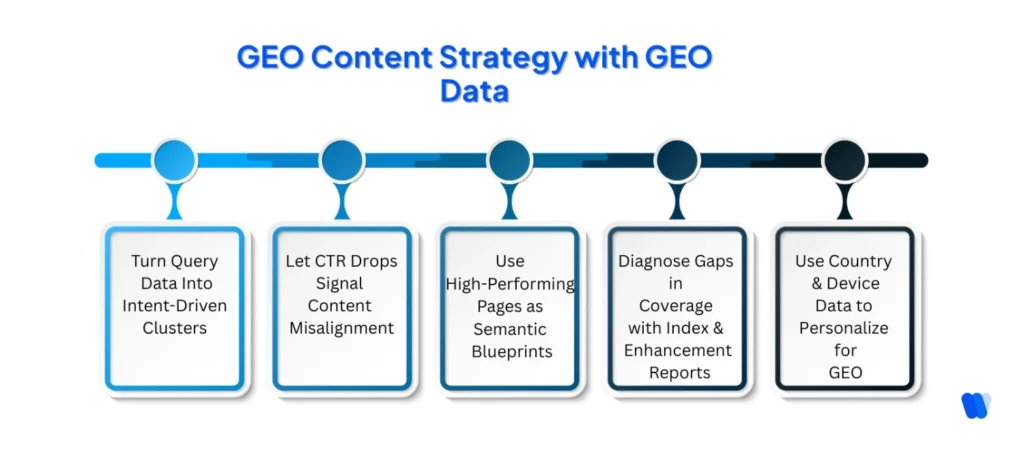
1. Turn Query Data Into Intent-Driven Clusters
Your top queries aren’t just search terms, they’re indicators of user intent. In a generative engine landscape, where LLMs break queries into sub-intents, your job is to preemptively structure content around those layers.
How to act on it:
Use the GSC performance report to spot high-impression but low-click queries. These are often informational in nature, prime material for building intent clusters (e.g., comparison sections, FAQs, use-case deep dives) that LLMs prefer when assembling answers.
2. Let CTR Drops Signal Content Misalignment
If GSC shows you’re ranking well but click-through rates are dropping, it’s not just a title problem—it’s often a signal of content decay, where pages that once aligned with user intent no longer reflect how questions are being asked or answered today.
How to act on it:
Use this signal to revise your content with answer-first phrasing, summaries, and mini-verdicts that clarify what the user will gain. These micro-adjustments can push your page closer to being selected in an AI-generated result.
3. Use High-Performing Pages as Semantic Blueprints
Your top-performing pages in GSC are already semantically aligned, users are clicking and engaging. Reverse-engineer why.
How to act on it:
Analyze these pages for formatting (lists, tables, headers), entity usage, and depth. Then, build adjacent content that follows the same structure but answers different, related intents. This supports GEO by creating a web of semantically linked content.
4. Diagnose Gaps in Coverage with Index and Enhancement Reports
LLMs can’t use what they can’t access—or understand. If pages aren’t indexed or lack structured enhancements, they’re less likely to be cited or surfaced by generative systems.
How to act on it:
Check the Coverage and Enhancements sections in GSC. Fix crawl issues. Add schema (especially FAQs, how-tos, product). Make sure every page you expect to show up in generative answers is both discoverable and machine-readable.
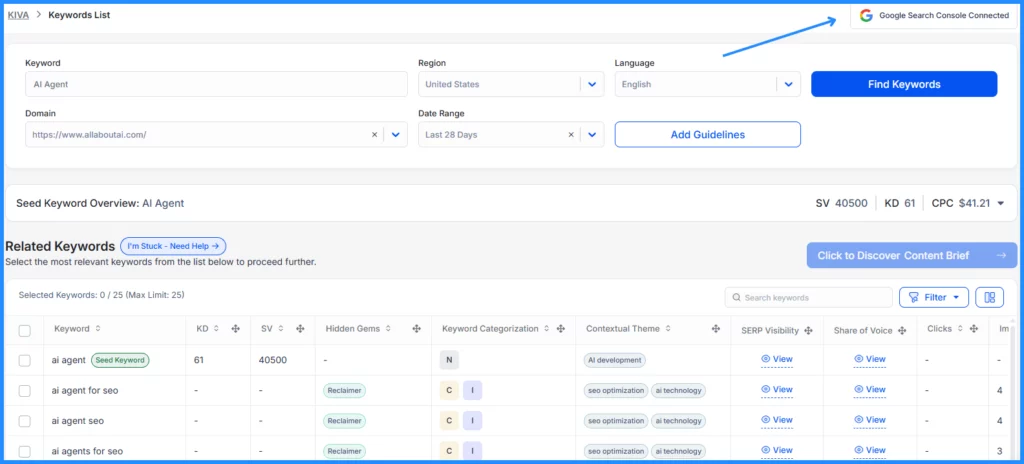
You can also use Wellows to enhance this process. When connected to Google Search Console, Wellows helps uncover hidden content opportunities and identify relevant keywords that are not yet performing, but can be optimized to improve AI search visibility and GEO outcomes.
5. Use Country & Device Data to Personalize for Generative Responses
If GSC tells you a page performs well in certain regions or on mobile, that’s not just a UX detail—it’s a signal for how LLMs might prioritize it based on user context.
How to act on it:
Adapt your tone, examples, and CTAs by region. Make sure mobile content loads fast and flows logically. Generative systems reward pages that align with both query intent and user environment.
Why GSC Still Matters in a GEO-First World
As search shifts toward generative engines, it’s easy to question whether traditional tools like Google Search Console still have a role. The answer is yes, and a critical one.
GSC offers real-time insights into how users find your content, what they expect, and where your current strategy may be falling short. These signals—keywords, click behavior, content performance—are the same ones large language models use to identify what’s relevant and helpful.
Rather than leaving GSC behind, it’s time to use it differently. Treat it as your feedback engine. Think of it this way: while some compare differences between GSC and Google Analytics, or wonder what does GSC stand for in web analytics, the real takeaway is that GSC remains one of the most actionable website performance metrics platforms.
You can even explore how often is GSC data updated or how to export data from GSC to refine long-term strategies.
Let it show you which topics resonate, where your content stands out, and where it needs work to match evolving intent. Use it to measure your progress against GEO KPIs like semantic depth, entity clarity, and structural readiness.
Hence, even in a world run by AI summaries and predictive answers, strong content still starts with understanding what users want—and GSC is still one of the best tools to help you do that.
How Can I Export Google Search Console Data for Further Analysis?
Exporting data from Google Search Console (GSC) is essential for deeper SEO analysis and integration with other tools. Here’s how you can do it:
- Direct Export from GSC: Go to the Performance Report, select a date range, and click Export to download data in Google Sheets, Excel, or CSV format. This includes queries, pages, devices, and countries.
- Bulk Data Export to Google BigQuery: Use GSC’s Bulk Data Export feature to send daily data to BigQuery for large-scale analysis. Go to Settings → Bulk Data Export, link your BigQuery project, and set permissions.
- Search Console API: Access detailed datasets beyond the 1,000-row limit. The GSC API lets you extract URLs, clicks, impressions, and positions for advanced analysis.
- Third-Party Tools: Tools like PowerSearchConsole and SEOTesting.com can export up to 25,000 rows, overcoming native GSC limits.
- Integration with Google Data Studio: Connect GSC with Google Data Studio (Looker Studio) to visualize performance trends and create dynamic SEO dashboards.
- Google Takeout: Use Google Takeout to export data from multiple Google services, including GSC, for secure long-term archiving.
Considerations:
- Data Retention: GSC only keeps data for 16 months, so export regularly.
- Data Privacy: Always verify that third-party tools meet security standards.
Exporting your GSC data ensures better control, historical tracking, and smarter SEO decisions.
What Are the Limitations of the Data Provided by Google Search Console?
Google Search Console (GSC) is one of the most powerful free tools for monitoring website performance in Google Search. However, it’s not without its constraints. Understanding these limitations helps ensure accurate analysis and better SEO decisions.
1. Data Retention Period
GSC only stores performance data for up to 16 months. While this allows for year-over-year comparisons, it limits the ability to analyze longer-term trends. Exporting and saving your data externally is essential for maintaining historical records.
2. Data Sampling and Anonymization
To protect user privacy, Google hides certain low-volume queries, labeling them as “anonymized queries.” This means the total number of clicks or impressions may not match between individual query and page-level reports.
3. Row Limits in Reports
The GSC interface caps report displays at 1,000 rows. Even when exporting, you can only retrieve up to 50,000 rows—often limiting for large websites. For more extensive analysis, use the Search Console API or connect data to BigQuery.
4. API Usage Quotas
GSC’s API enforces limits such as: – 20 queries per second (QPS) and 200 per minute (QPM) per user – 100 million queries per day (QPD) per project Hitting these limits can lead to temporary restrictions, requiring adjustments or quota increases.
5. Data Processing Delays
GSC data is not real-time. Reports are typically delayed by 2–3 days, which can make timely decision-making difficult for active SEO campaigns.
6. Limited Filtering and Segmentation
While GSC offers basic filters for queries, pages, and devices, it lacks advanced segmentation. Complex analyses, like evaluating by content category or user intent, require external tools or data exports.
7. Impression Data Inflation
If multiple URLs from your site appear as sitelinks in one search result, impressions can be overcounted. This inflation can distort CTR calculations and affect overall performance metrics.
8. Average Position Metric Variability
The Average Position metric fluctuates due to personalization and localization in search results. For queries with few impressions, it may not accurately reflect your real ranking visibility.
9. Geographical Data Granularity
GSC provides country-level data but lacks city or region-level reporting. For businesses relying on local SEO insights, this can limit actionable geographic targeting.
10. Single Data Source Limitation
GSC exclusively tracks data from Google Search. It does not include traffic insights from other search engines such as Bing, Yahoo, or DuckDuckGo—limiting the full visibility of your organic performance.
Read More Articles
- How Entity-Based Content Stands Out in LLMs & Why Does It Matter for SEO
- How to Understand User Intent in Generative Engines?
- How to Use Digital PR for Generative Engine Visibility for Your Brand?
- How Will Google’s AI Mode Transform Traditional SEO Practices?
- How to Design Content Briefs for GEO?
- My ChatGPT Visibility Experiment: Does It Use Google Snippets?
- How to Unlock Client Retention with AI-Powered SEO Workflows
- AI SEO Automation for Generative Search Visibility (2026)
- How to Rank High on ChatGPT (Complete 2025 Framework)
- How Does Google AI Visibility Tracking Fix the Search Console Blind Spot in AI Overviews
- How to Optimize for AI Query Fan-Out
- How to Use Question Keywords for SEO Growth
- Real-Time Alerts for Agency Clients
FAQs
Yes, but with a new lens. GSC isn’t just for tracking rankings anymore—it’s your signal board for user intent, content gaps, and visibility issues that affect how LLMs perceive and surface your content.
Focus on performance reports (queries and CTRs), indexing status, structured data coverage, and device breakdown. These tell you if your content is discoverable, relevant, and optimized for how AI engines interpret and rank results.
Google Search Console (GSC) includes a geo-targeting option that lets you specify a target country, improving visibility in that region’s search results. This helps businesses refine content for regional audiences.
However, for AI-driven experiences like Google’s AI Overviews, there is **no separate geo-targeting setting**. Google has clarified that following established SEO best practices—high-quality, intent-driven content—is sufficient for visibility in both traditional search and AI results.
In short: use GSC geo-targeting to guide regional performance, but focus on content quality and intent to align with AI optimization.
While GSC doesn’t directly tell you this, low CTR with high impressions or strong performance in mobile and region-specific metrics can indicate AI visibility. Combine this with tools like Perplexity or ChatGPT browsing feedback.
Absolutely. Your top and rising queries hint at intent clusters. Use them to build out content that directly answers layered user needs—this aligns better with how LLMs process and prioritize pages.
Yes. Fast-loading, stable, and mobile-friendly pages signal quality to both Google and AI engines. They may not guarantee better rankings, but they raise your chances of being selected, summarized, or cited.
Conclusion
GSC Data remains your living feedback loop in a GEO-first world. Instead of chasing ranks, use it to map intent, expose gaps, and structure content machines can read—fix index coverage and sitemaps, validate schema, improve Core Web Vitals and mobile UX, and adapt by country and device.
By learning how to use GSC for GEO, you’re not just tracking search performance—you’re future-proofing your content strategy for AI-driven visibility.