In agency work, the biggest losses don’t come from bad strategy; they come from late discovery.
When managing multiple client brands across paid media, analytics, and landing pages, problems don’t wait for weekly reporting; they appear in real-time.
That’s the everyday agency pain: a sudden tracking disruption, traffic anomaly, conversion decline, or budget mispacing can quietly drain performance before anyone notices.
And when the client spots the issue first, the conversation shifts from “optimization” to “damage control.”
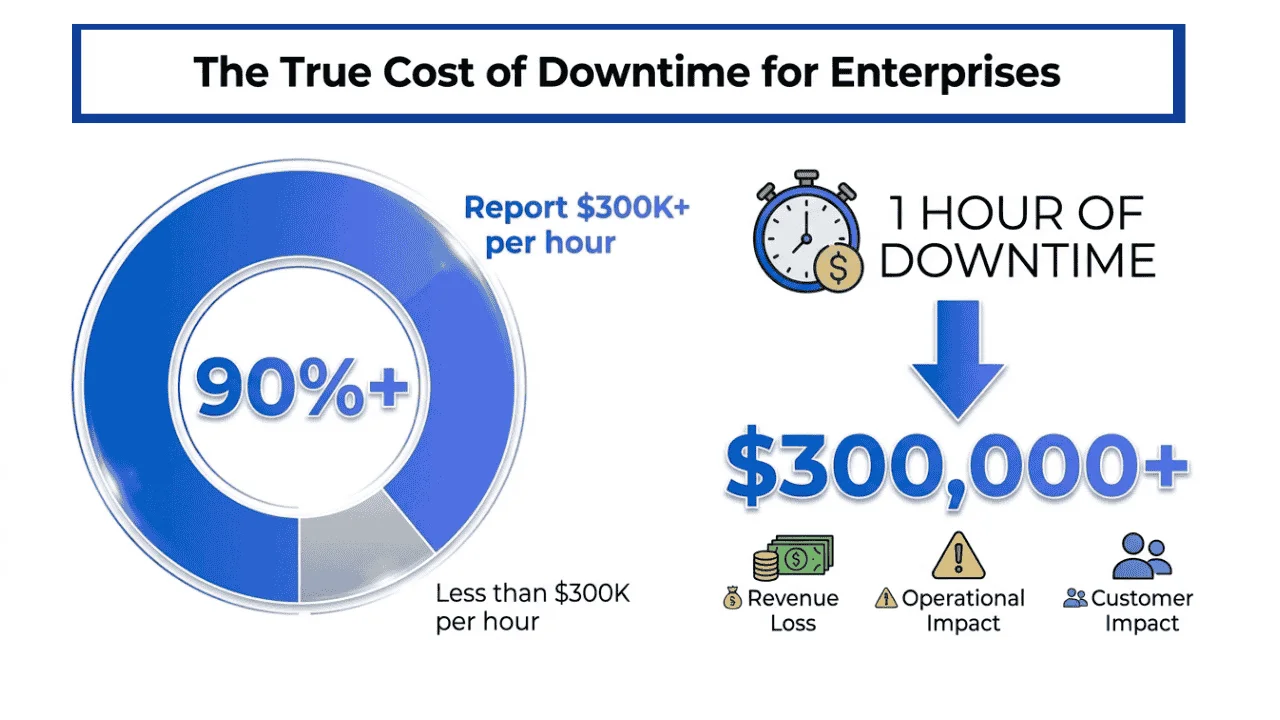
This is why Real Time Alerts for Agency Clients is now a core agency capability. Disruptions are expensive; ITIC’s 2024 survey of 1,000+ organizations found that for over 90% of mid-size and large enterprises, one hour of downtime exceeds $300,000 (ITIC, 2024). For agencies, even minor disruptions can result in wasted spend, lost leads, and eroded client trust.
But agencies now have another urgent risk to monitor: brand visibility in AI search. Clients can lose visibility even when rankings look stable because AI-driven results increasingly shape what people see, cite, and trust.
That’s where Wellows for AI Search Visibility for Agencies adds value by providing a real-time view of brand visibility, mentions, citations, and competitive shifts so agencies can act before impact.
For the full operating model behind that visibility work, the AI visibility for digital marketing agencies playbook shows how to turn these signals into a citation-first client deliverable.
In this blog, we’ll discuss why real-time alerts are critical for agencies, how to set them up properly, and how Wellows supports agencies with real-time brand visibility monitoring and clearer reporting, without overwhelm.
- Real-time alerts flag critical changes instantly (performance, tracking, site health, AI visibility).
- Agencies respond faster\u2014fix issues before results and spend are harmed.
- Use only high-signal metrics with sustained thresholds to avoid alert fatigue.
- Send alerts to the right channel (Slack/Teams → validate, email → clients, SMS → urgent).
- Clear, client-ready messaging + escalation rules makes every alert actionable.
What Are Real Time Alerts for Agency Clients
Real Time Alerts for Agency Clients are automated notifications that trigger immediately.
When something important changes in a client’s marketing performance, analytics, website health, or brand visibility, or GEO (Generative Engine Optimization) signals, such as shifts in AI search visibility, changes in how brand pages are cited, or sudden drops in generative referrals.
Some clients will want a specialist to handle that shift, so having a reference list of AI SEO agencies is useful when you need to compare capabilities and deliverables quickly.
Instead of discovering issues later through weekly reports or manual checks, agencies are notified the moment a defined condition is met so they can respond quickly.
These alerts are driven by rules, thresholds, or anomaly detection. When a GEO KPI moves outside the expected range, an alert is generated and delivered through the agency’s chosen channel such as email, SMS, Slack, Microsoft Teams, or a centralized dashboard.
Real life example: An agency managing Google Ads for an e-commerce client sets an alert when cost per conversion increases by more than 40 percent compared to the previous seven-day average. Midway through the day, bids become more competitive and CPC rises sharply.
The agency receives an alert in Slack, pauses underperforming keywords, adjusts bids, and prevents the client’s daily budget from being wasted. The client is informed with context before they notice any drop in performance. (Google Ads Help)
In another case, a brand visibility alert triggers when a client’s brand stops appearing in AI-generated search results for several high-intent queries.
The agency spots the visibility drop in real time, analyzes competitor mentions, and updates content and positioning before the loss impacts traffic or trust.
Why Real Time Alerts Matter for Agencies
In digital marketing, performance can change within hours, not weeks. For agencies managing multiple accounts and platforms, delayed discovery creates avoidable waste and reactive client communication.
Real-time alerts reduce that lag by notifying teams the moment important metrics or systems move outside expected ranges, so agencies can respond while there is still time to protect results.
Faster issue detection and shorter response time: Alerts surface drops in conversions, tracking failures, traffic anomalies, or cost spikes immediately so teams can troubleshoot without delay.
Protection of client budgets: Alerts identify overspend and pacing issues early, allowing agencies to adjust bids, budgets, or targeting before waste accumulates.
Better performance through faster optimization: Early signals enable timely changes to creative, targeting, landing pages, and bidding to prevent prolonged performance decline. These signals can also highlight when to reinforce visibility with tactics like LLM seeding to strengthen presence in AI-generated answers.
Proactive problem resolution: Alerts flag downtime, form failures, broken integrations, and tracking issues before they escalate into revenue loss or client complaints.
Stronger trust and transparency: Continuous monitoring and fast, contextual updates reduce surprises and reinforce a proactive agency–client relationship, especially when paired with an always-on publishing system guided by an LLM content creation strategy.
Beyond performance and ad metrics, AI search visibility now needs its own alerting layer — see the agency approach to monitoring AI search mentions for the citation-vs-mention split that determines which alerts are actually actionable and which are just daily noise.
Common Types of Real Time Alerts for Agencies
Agencies set up different alert types to catch critical changes across performance, reputation, and technical reliability before they impact results.
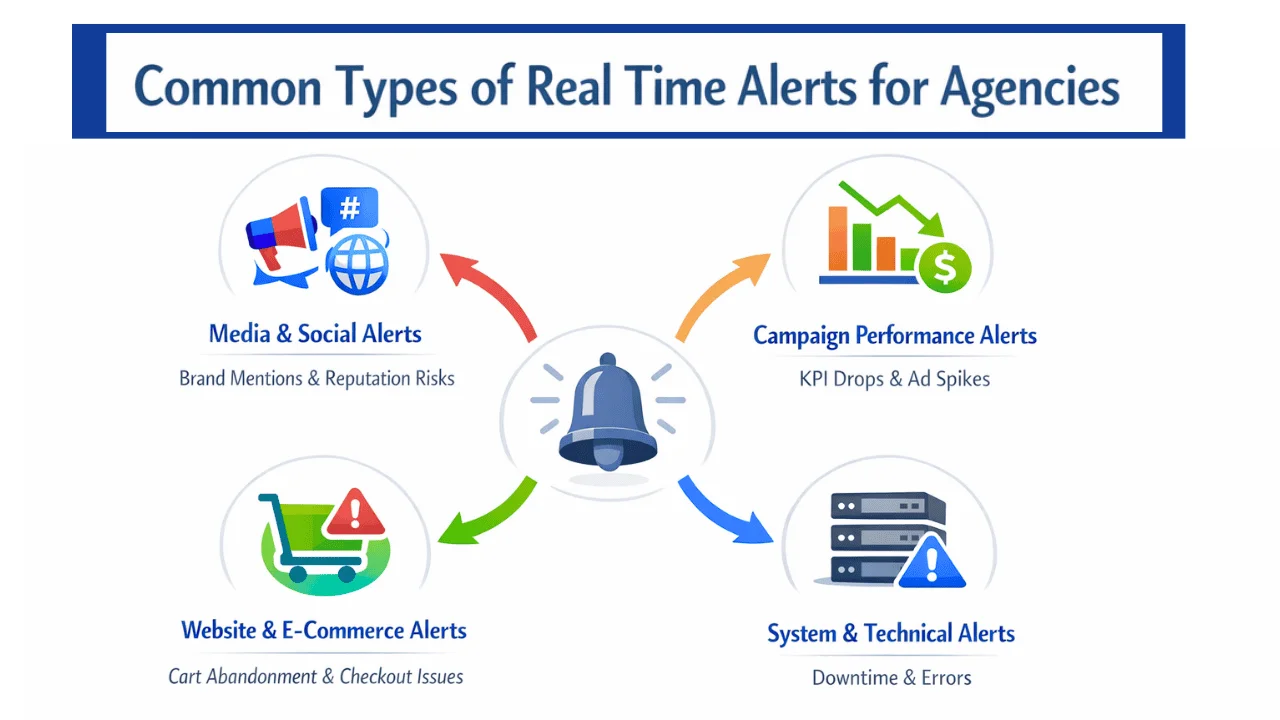
- Media and social monitoring alerts: Notifications when a client brand, competitor, executive, or priority keyword is mentioned across news outlets, social platforms, blogs, and forums so agencies can respond quickly to reputation risks and opportunities.
- Campaign performance alerts: Alerts triggered when KPIs cross defined thresholds, such as a drop in conversions, an increase in CPA, a spike in CPC, unusual impression shifts, or ROAS falling below target for a sustained period.
- Website and e-commerce activity alerts: Notifications tied to high-intent behavior and funnel issues, such as abandoned carts, checkout failure spikes, repeated form errors, high-value actions, or abnormal engagement changes that indicate conversion friction.
- Operational and system status alerts: Technical alerts for API errors, server downtime, integration failures, tag or pixel firing issues, and other system problems that break tracking or disrupt the customer journey.
How Agencies Handle Real-Time Alerts Today
Most agencies want real-time alerts, but day-to-day reality usually looks like a mix of manual monitoring, platform-native notifications, and internal triage.
These approaches can work at small scale, but they often break down when an agency manages multiple clients, channels, and stakeholders.
Did you know?
- Manual dashboards and frequent check-ins: Teams rely on manual dashboard reviews, creating gaps due to workload, time zones, and after-hours coverage.
- Platform native alerts and basic notifications: Built-in alerts from Google Ads, GA4, and Meta handle simple triggers but lack cross-channel consistency and client-ready context.
- Internal alerts first, client communication second: Alerts go to Slack or Teams for validation before clients are informed, reducing noise but depending on accurate prioritization.
Why these approaches often fail in practice
Alerts are too generic: Notifications often lack context such as what changed, why it matters, and what action is recommended.
Too many alerts create fatigue: When thresholds are too sensitive, teams start ignoring alerts, which defeats real-time monitoring.
Clients cannot interpret raw numbers: Alerts confuse clients when they do not include explanation, impact, or next steps.
No consolidated view across systems: Agencies manage separate alerts for ads, analytics, and web performance, which increases workload and slows response time.
This is where modern agencies deliverables checklist focused alerting becomes valuable.
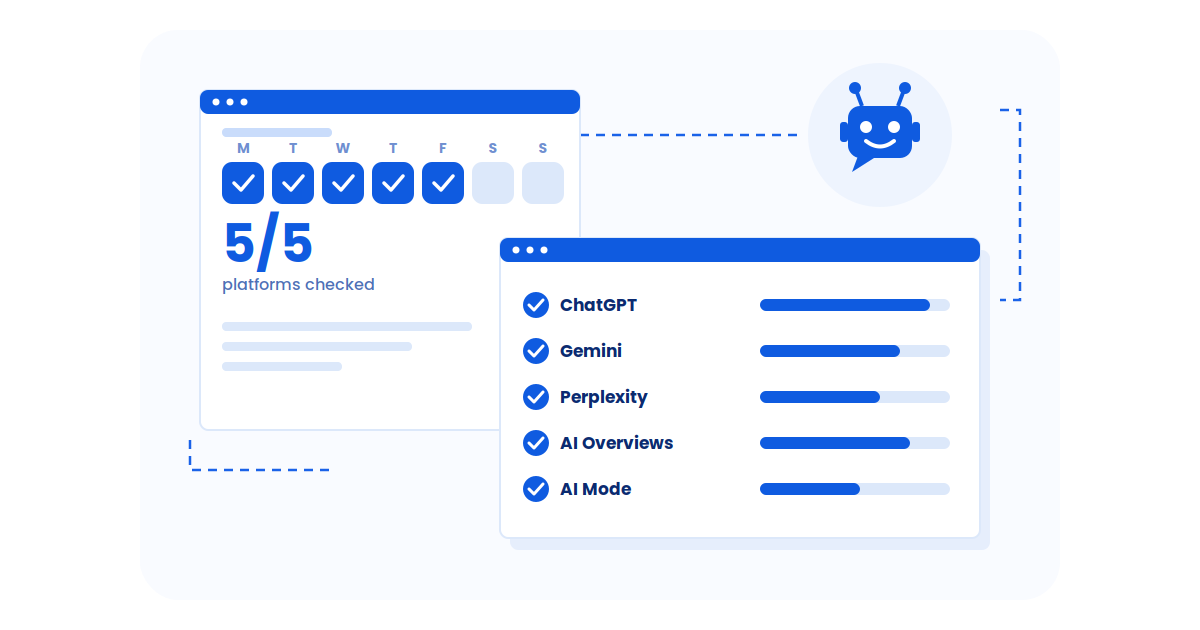
Wellows supports agencies by adding a real-time layer for brand visibility in AI search, giving teams a live dashboard that shows visibility trends, what is driving visibility through tracked queries, mentions, and citations, and how competitors are moving.
It also makes it easier to audit brand visibility on LLMs so teams can baseline performance and spot changes sooner.
This helps agencies detect visibility shifts early, triage internally, and communicate clear updates to clients without overwhelming them.
When visibility changes occur, teams can also explain them more clearly by mapping alerts back to user intent, so clients understand what audiences were trying to achieve and why the shift matters.
Because manual checks and basic alerts create gaps and noise, agencies need a setup process that prioritizes high-signal metrics, clear thresholds, and client-ready messaging, supported by a technical SEO checklist for agencies that catches tracking failures, indexation issues, and structural risks before alerts ever need to fire.
How Can I Set Up Real-Time Alerts for My Agency Clients?
To ensure your agency clients get notified immediately when campaign performance drops, real-time alerts must be focused, measurable, and action-driven.
The objective is to detect meaningful performance changes early and notify the right people without overwhelming teams or clients.
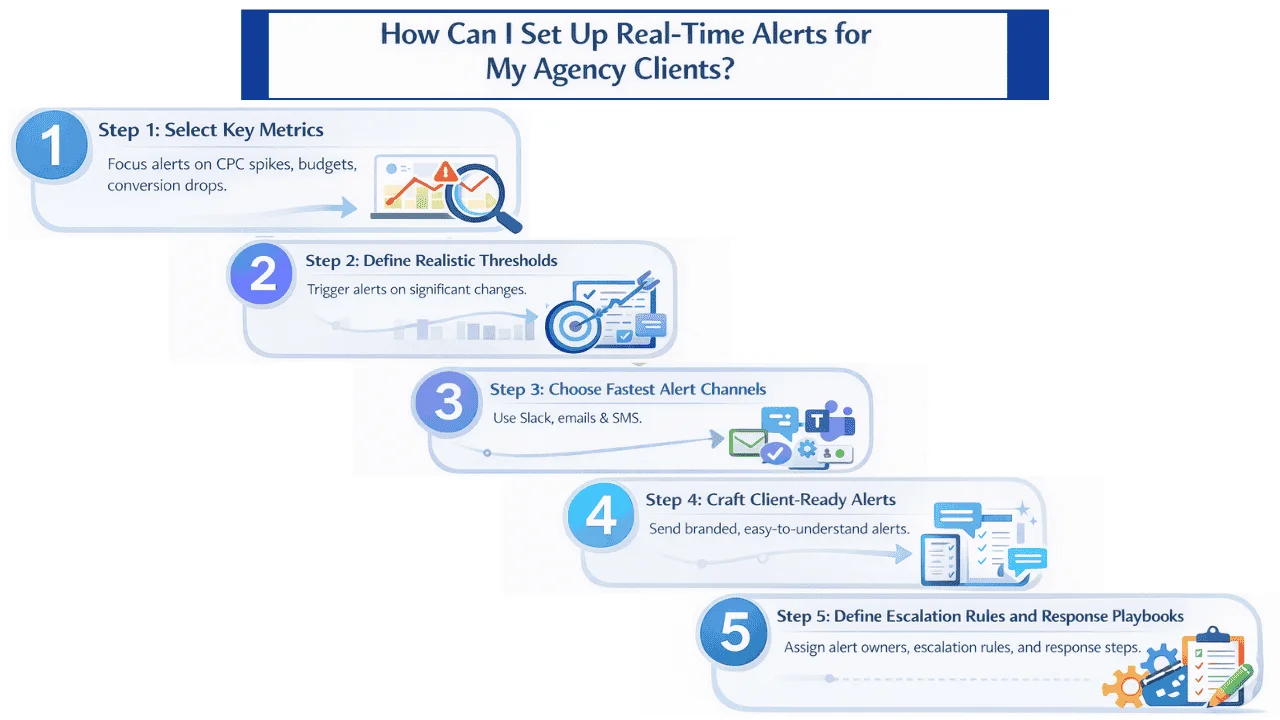
- Step 1: Select metrics that signal immediate performance risk: Avoid alerting on every data point. Focus on metrics that directly impact spend, leads, or revenue such as CPC spikes, abnormal budget pacing, conversion declines, lead volume falling below daily targets, and landing page availability. These metrics should align with a clear content governance framework so alerts stay tied to business priorities rather than noise.
- Step 2: Set thresholds that reflect real performance issues: Trigger alerts only when changes are significant and sustained. Notify when CPC rises well above the recent average, when traffic drops sharply over a defined time window, or when ROAS stays below target for several hours rather than reacting to a single fluctuation.
- Step 3: Deliver alerts through the fastest and most relevant channels: Route alerts to internal Slack or Microsoft Teams first for quick validation. Use email for client notifications and reserve SMS for urgent issues such as outages, tracking failures, or severe overspend risk.
- Step 4: Make alerts clear, branded, and client-ready: Ensure alerts explain what changed, why it matters, and what action is being taken. Use agency branding and simple language so clients do not need to interpret raw metrics, especially when alerts relate to shifts in search engine visibility.
- Step 5: Define escalation rules and response playbooks: Assign clear ownership for each alert, define when clients should be notified, and document response steps so every alert leads to consistent and timely action.
Which Tools Are Best for Agencies to Deliver Real-Time Alerts in One Place?
There is no single built-in solution that covers every alerting need for agencies. Most platforms work in isolation, which is why agencies managing multiple channels need tools that centralize monitoring, alerts, and context in one place.
Agencies typically evaluate tools across a few key categories.
Multi-platform alert dashboards
Some agency reporting platforms offer built-in alerts across multiple metrics with configurable thresholds and notifications. These tools help teams monitor performance consistently across client accounts.
Performance monitoring and analytics suites
Analytics and dashboard tools aggregate data from many sources to enable real-time KPI tracking. They are useful for monitoring spend, conversions, and revenue efficiency, especially when teams need one view across clients and channels.
Messaging and collaboration integrations
Slack and Microsoft Teams integrations help agencies route alerts to internal teams first. This enables quick validation, faster troubleshooting, and controlled escalation to clients with clear context.
SMS and email alert delivery
For high-impact issues such as outages, tracking failures, or severe spend anomalies, SMS and branded email ensure alerts are seen immediately by the right stakeholders.
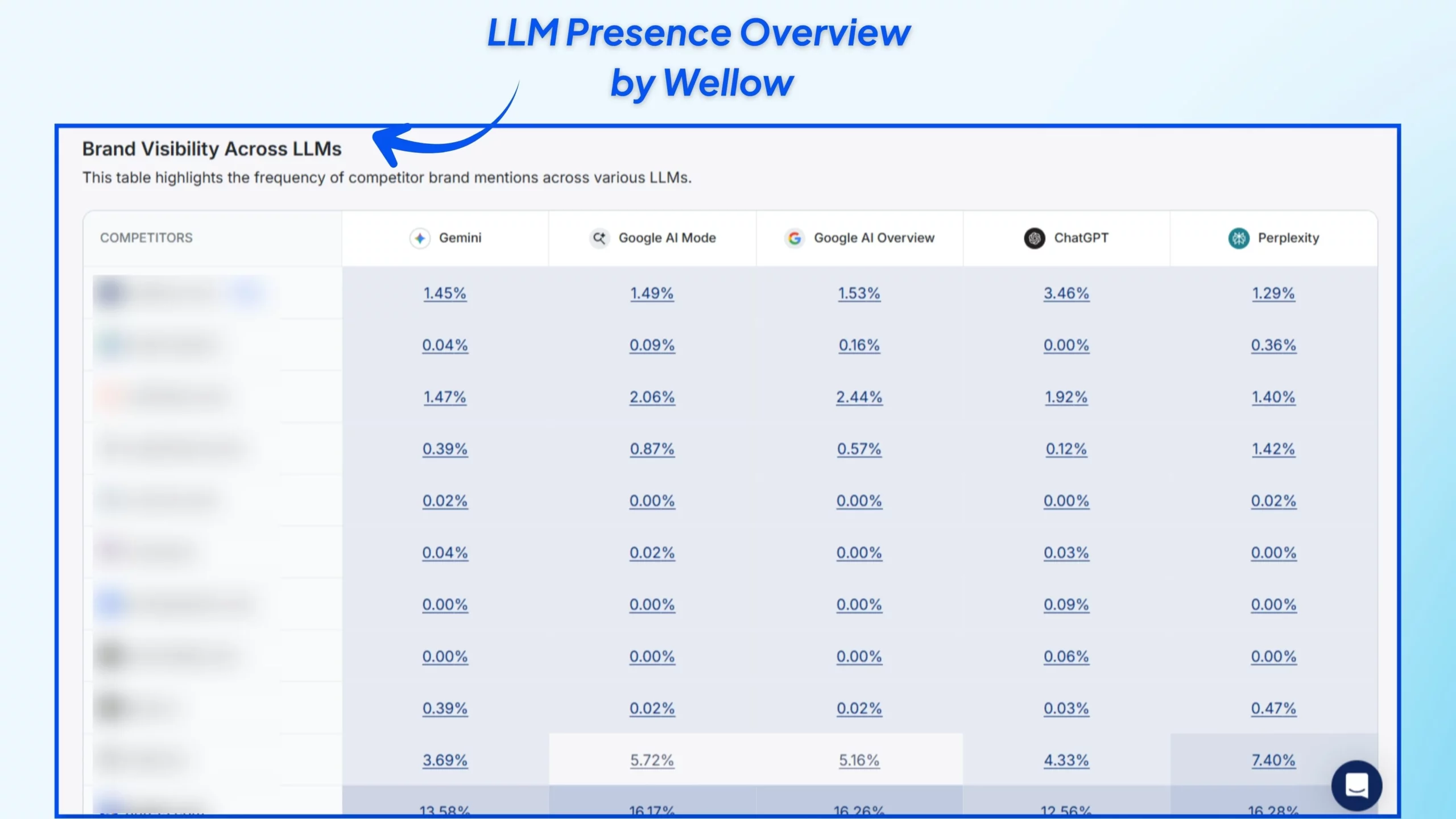
Wellows strengthens an agency alerting stack by adding real-time monitoring for brand visibility in AI and search environments.
Beyond performance metrics, it shows visibility trends, what is driving visibility through tracked queries, mentions, and citations, and how competitors are moving.
This gives agencies an early warning system for visibility drops and competitive shifts that standard reporting tools do not capture. It also supports clearer client communication by turning visibility changes into actionable insights.
For agencies that want a single place to monitor what matters and respond quickly, combining performance alerting tools with visibility monitoring through Wellows creates a more complete real-time alert system.
Best Way to Alert Clients on CPC Spikes and Budget Overspend
The most effective way to send automated real-time alerts is to focus on a small set of high-impact metrics that directly affect spend, leads, and revenue. Agencies that alert on the right metrics catch problems early without overwhelming teams or clients.
Did you know?
CPC and CPI spikes
Trigger alerts when cost per click or cost per install increases significantly above a daily or weekly benchmark, such as a 30 to 50 percent rise. This helps agencies react quickly to auction pressure, creative fatigue, or targeting issues.
Budget burn and pacing issues
Set alerts when daily spend exceeds forecasted pacing or when a large portion of the budget is consumed too early in the day. These alerts prevent uncontrolled overspend and protect client budgets.
Conversion and lead drops
Notify teams when conversions or leads fall below a defined threshold over a set time period. Sustained drops often indicate landing page issues, tracking problems, or audience mismatches.
Traffic or landing page downtime
Alerts should trigger when traffic suddenly drops or when landing pages fail to load. These issues can quietly block conversions while campaigns continue spending.
ROI and ROAS decline
Set alerts when ROAS or ROI remains below target for a defined time window rather than reacting to short-term fluctuations. This helps agencies prioritize optimization without unnecessary noise.
By centering automated alerts on these core metrics, agencies stay focused on events that require immediate action instead of reacting to routine data fluctuations.
How Wellows Solves Common Alert Challenges for Agencies
Most alert tools focus on isolated platforms, which makes it hard for agencies to monitor what clients care about across modern discovery channels.
Wellows is built for agencies to track brand visibility in AI and search environments and spot meaningful changes as they happen.
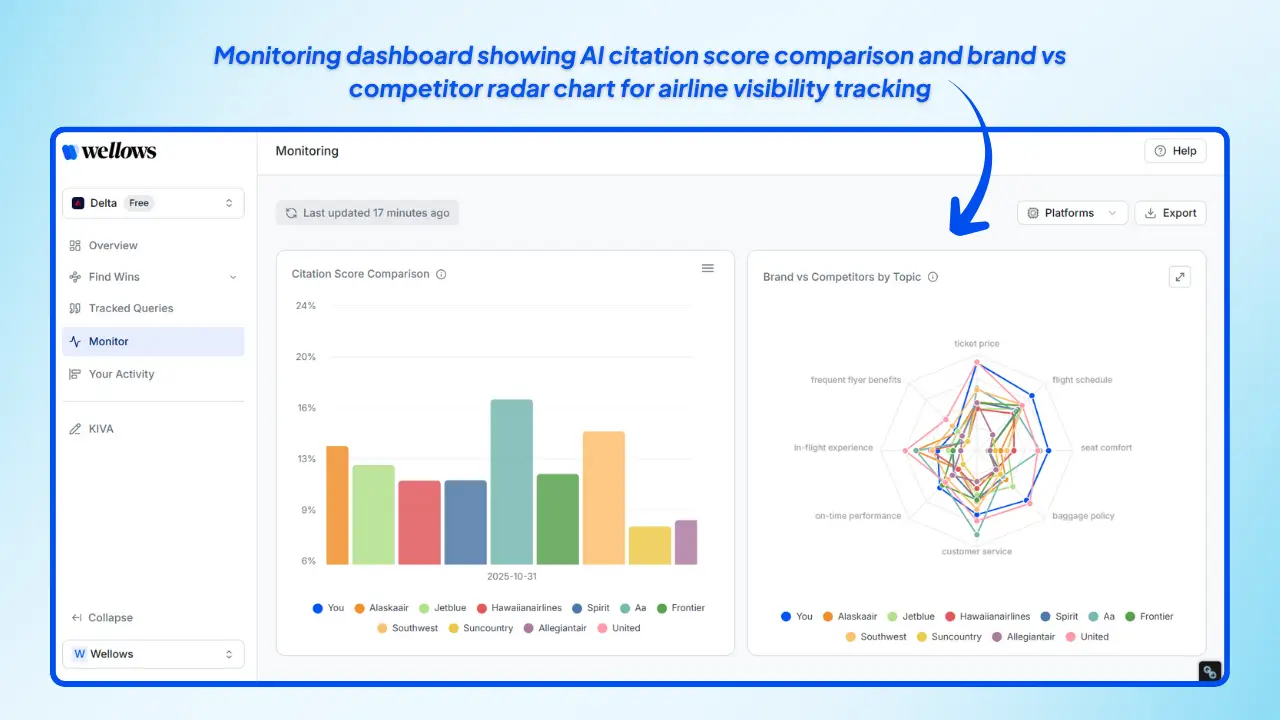
Real-time brand visibility monitoring
Wellows gives agencies a live dashboard of visibility trends, including tracked queries, brand mentions, citations, and competitor movement, so teams can detect shifts early instead of relying on delayed reporting.
Client-ready alerts and communication
Wellows helps agencies communicate visibility changes clearly by showing what changed, why it matters, and the competitive context. This supports professional client updates without sending raw data or confusing screenshots.
Internal-first workflow for agencies
Agencies can review visibility shifts internally first, investigate causes, and then notify clients with recommendations, which reduces unnecessary panic and improves trust.
By focusing on real-time visibility and competitive movement, Wellows helps agencies deliver faster, clearer alerts without overwhelming clients.
How to Alert Clients When ROAS Drops Below Target
The best way to alert clients on ROAS decline is to combine a clear ROAS target with a time condition, so alerts trigger only when the drop is real and sustained.
This avoids reacting to short-term volatility while still giving your team time to fix performance before more budget is spent.
Did you know?
Why it matters: Early warning that auction pressure, targeting, or creative fatigue is raising costs.
Did you know?
Why it matters: Flags landing page issues, offer mismatch, tracking errors, or traffic quality problems.
Did you know?
Why it matters: Prevents uncontrolled spend and keeps budget available for higher-performing hours.
Did you know?
Why it matters: Catches downtime, broken forms, tracking failures, or site issues while campaigns are still spending.
Did you know?
Why it matters: Confirms the drop is sustained, then prompts bid, budget, audience, or creative changes before the day ends.
These rules work best when alerts go to internal teams first for validation, and clients are notified only once the issue is confirmed and the next step is clear.
How Agencies Avoid Alert Fatigue While Keeping Clients Informed
Agencies avoid overwhelming clients by reducing noise at the rule level and controlling who receives which alerts.
The goal is simple: clients should only get alerts that require attention, while internal teams receive broader signals for monitoring and diagnosis.
Use tiered routing: Send critical alerts to clients and route informational alerts internally to keep notifications meaningful and protect trust.
Use time windows and confirmation rules: Trigger alerts only after sustained conditions, such as ROAS below target for several hours, to reduce false alarms.
Group low-priority alerts into digests: Send a daily summary for minor changes instead of immediate pings, highlighting patterns and recommended actions.
Include context in every alert: Explain what changed, why it matters, and what happens next to prevent confusion and reduce back-and-forth.
Let clients choose channels and urgency: Use email for standard alerts and reserve SMS for urgent incidents based on client preferences.
When agencies combine prioritization, time-based triggers, and client-ready context, real-time alerts stay useful instead of becoming noise.
Read More Articles
- Top Content Marketing Statistics to Know This Year
- What Are SERPs? A Simple Guide for Marketers
- Meta Tags Explained: Titles, Descriptions, and SEO Basics
- Reddit and AI Search Visibility: What Marketers Should Know
- AI Mistakes Marketers Should Avoid
- Can GSC Data Guide Your GEO Strategy?
- Readability Score in AI Content: Why It Matters
- How Agencies Find AI Visibility Gaps for Clients (2026)
FAQs
Conclusion
Real-time alerts are no longer optional for agencies delivering professional, proactive service. They are central to campaign monitoring, performance protection, and client communication.
When done well, with meaningful thresholds, branded messages, and playbooks for response, real-time alerts turn uncertainty into strategic advantage.
With solutions like Wellows, agencies can streamline real-time alerts across platforms, cut noise, and deliver alerts that empower action, all while strengthening trust and results with their clients.
Real Time Alerts for Agency Clients is not just about technology, it’s about responding faster, optimizing smarter, and keeping clients consistently informed in a digital world that never sleeps.