Readability score in AI content isn’t about whether the writing is right or wrong—it’s about whether it feels natural and easy to digest.
When I first started experimenting with AI writing tools, I was fascinated by how effortlessly they could generate paragraphs on any topic. But something always felt off, too stiff, too wordy, too… in short, unreadable.
It didn’t take long to realize that readability wasn’t just a checkbox. Readability shapes how AI-generated drafts are received, which is why AI content optimization plays such an important role in turning rough output into clearer, more effective content
So let’s talk about the readability score in AI content, what it is, why it matters, and how to make sure your content actually connects with readers. For a deeper dive into improving your AI writing workflow, explore our guide on AI content strategies.
This guide provides the Practical steps to:
- Measure your AI-generated draft’s readability score using top formulas (Flesch, FK, Fog, SMOG)
- Identify and fix common clarity issues (long sentences, jargon, weak transitions)
- Prompt and edit AI output for a target grade level (e.g., “write for 6th grade”)
- Implement formatting best practices (headings, lists, tables) for both readers and LLMs
- Track and iterate on readability benchmarks across different content types (blogs, landing pages, whitepapers)
- Audit the final copy against a simple checklist to ensure it hits your readability goals before publishing
What Is a Readability Score in AI Content?
A readability score is a numerical assessment that indicates how easy or difficult a text is to read and comprehend. In the context of AI-generated content, readability scores are crucial for ensuring that machine-written text is clear, accessible, and effective for diverse audiences.
These scores are calculated using various formulas that analyze factors such as sentence length, word complexity, and syllable count. Higher scores generally mean simpler, more accessible text; lower scores indicate denser, more complex writing.
For general audiences, a Flesch Reading Ease score of 60–70 or a Grade Level of 8 is considered optimal, as about 85% of readers can easily understand content at this level.
Common Readability Formulas
- Flesch Reading Ease: Rates text on a 0–100 scale, where higher scores mean easier reading (60–70 = “plain English,” suitable for ages 13–15).
- Flesch-Kincaid Grade Level: Converts the Reading Ease score into a U.S. grade level (e.g., 8.0 = 8th grade comprehension).
- Gunning Fog Index: Estimates years of formal education required to understand a text; considers sentence length and complex word use.
- Coleman-Liau Index: Bases readability on characters per word and words per sentence, without syllable counting.
- SMOG Index (Simple Measure of Gobbledygook): Estimates required education level by counting polysyllabic words, widely used in health communication.
- LIX (Läsbarhetsindex): Created by Carl-Hugo Björnsson, combines average sentence length with percentage of long words (6+ letters), ranging from 20 = “very easy” to 60 = “very difficult.”
- Automated Readability Index (ARI): Provides a grade-level score using characters per word and words per sentence.
How AI Generation Affects Readability
- Prompt Design: Ambiguous or overly technical prompts often result in lower readability scores.
- Model Tuning: Training AI on plain-language corpora improves clarity and accessibility.
- Post-Editing: Human review ensures AI content meets target readability levels and aligns with audience expectations.
By combining readability formulas with AI-driven optimization, writers and editors—including teams at Content Marketing Agencies producing AI content at scale—can ensure that content is not only technically accurate but also user-friendly, engaging, and discoverable in search engines.
Why Is Readability Important in AI-Generated Content?
Readability score in AI content is a key factor because it determines how clearly information is communicated and understood by the audience. When content is easy to read, it not only improves comprehension but also boosts engagement, accessibility, and trust. In simple terms, if readers can process your content quickly and accurately, they are far more likely to interact with it and take action.
Key Reasons Readability Matters
Why It Matters for AI Workflows
Readability also plays a major role in how AI-driven strategies are implemented. Firms increasingly rely on an AI SEO Agent to ensure readability aligns with discoverability at scale and to reduce content decay when older pages lose traffic due to outdated structure, bloated phrasing, or declining engagement signals.
Solutions like an AI Search Visibility Platform for Startups further enhance this approach by helping emerging brands measure clarity, optimize performance, and improve their competitive reach online.
By optimizing text for clarity, these tools improve both user satisfaction and SEO performance, ensuring that AI-generated content integrates smoothly into broader content workflows.
In summary: Prioritizing readability in AI-generated content is essential for effective communication, sustained engagement, and measurable results across SEO, accessibility, and brand credibility. For businesses, it’s not just about writing well—it’s about aligning clarity with strategy to maximize long-term digital impact.
What are the Key Readability Metrics for Evaluating AI Content?
Key readability metrics for evaluating AI-generated content quantify text complexity and clarity by analyzing sentence and word characteristics. Here are the principal measures:
| Metric | Definition | Calculation | Interpretation |
|---|---|---|---|
| Flesch Reading Ease | Rates text on a 0–100 scale based on average sentence length and syllables per word. | 206.835 – (1.015 × ASL) – (84.6 × ASW) • ASL = average sentence length (words/sentence) • ASW = average syllables per word |
|
| Flesch–Kincaid Grade Level | Converts the Reading Ease score into a U.S. school grade level. | (0.39 × ASL) + (11.8 × ASW) – 15.59 |
|
| Gunning Fog Index | Estimates the years of formal education needed to understand the text on first reading. | 0.4 × [(words/sentences) + 100 × (complex words/words)] • Complex words = ≥3 syllables |
|
| SMOG Index | Predicts U.S. grade level by focusing on polysyllabic (3+ syllables) words. | 1.0430 × √(polysyllable count × (30/sentence count)) + 3.1291 | Yields a grade level; higher values indicate more complex text. |
| Coleman–Liau Index | Assesses readability based on characters per word and sentences per word, avoiding syllable counts. | 0.0588 × L – 0.296 × S – 15.8 • L = average letters per 100 words • S = average sentences per 100 words |
Provides a grade level; easier to compute programmatically. |
| Automated Readability Index (ARI) | Estimates U.S. grade level using characters and words, optimized for speed. | 4.71 × (characters/words) + 0.5 × (words/sentences) – 21.43 | Similar to Coleman–Liau, trades syllable counts for character counts for faster computation. |
How Do AI Tools Calculate Readability Scores?
Calculating readability scores for AI-generated text involves feeding your copy into established formulas such as Flesch Reading Ease, Flesch–Kincaid Grade Level, Gunning Fog Index, or alternatives like Coleman-Liau Index, Automated Readability Index (ARI), and Dale-Chall Formula.
You can calculate the readability score in AI content either manually with spreadsheets or automatically using content tools. After generating scores, compare them with target thresholds (e.g., Flesch 60–70 for “plain English”) to refine editing, adjust prompts, and optimize tone.
Tools and Software Options
Choose the right tool based on volume, workflow integration, and desired scoring method:
- CMS plugins: WordPress (Yoast), Drupal modules – provide live readability feedback while writing.
- Standalone apps: Hemingway Editor (flags dense sentences), Readable (multi-metric reporting).
- APIs: Services like TextGears or Writer.com integrate readability scoring directly into editorial pipelines.
Manual Calculation vs. Automated Workflows
Depending on your content scale, you may prefer one-off spot checks or fully automated monitoring:
Interpreting Score Ranges
Use these benchmarks to evaluate whether AI text needs simplification or can stay more advanced:
| Metric | “Easy” Range | Target (General) | Advanced Range |
|---|---|---|---|
| Flesch Reading Ease | 70–100 | 60–70 | < 30 |
| Flesch–Kincaid Grade | Grade 6–8 | Grade 7–8 | Grade 12+ |
| Gunning Fog Index | ≤ 8 years schooling | 8–10 years schooling | ≥ 15 years schooling |
| Coleman-Liau Index | Grade 6–8 | Grade 8 | Grade 12+ |
| Automated Readability Index | Grade 5–7 | Grade 8 | Grade 12+ |
| Dale-Chall Formula | Score 4–6 | Score 7–9 | Score 10+ |
- Above target: Break up long sentences, replace jargon, simplify vocabulary.
- Below target: Add detail, examples, or technical terms if writing for expert audiences.
Common Reasons AI Content Scores Low on Readability
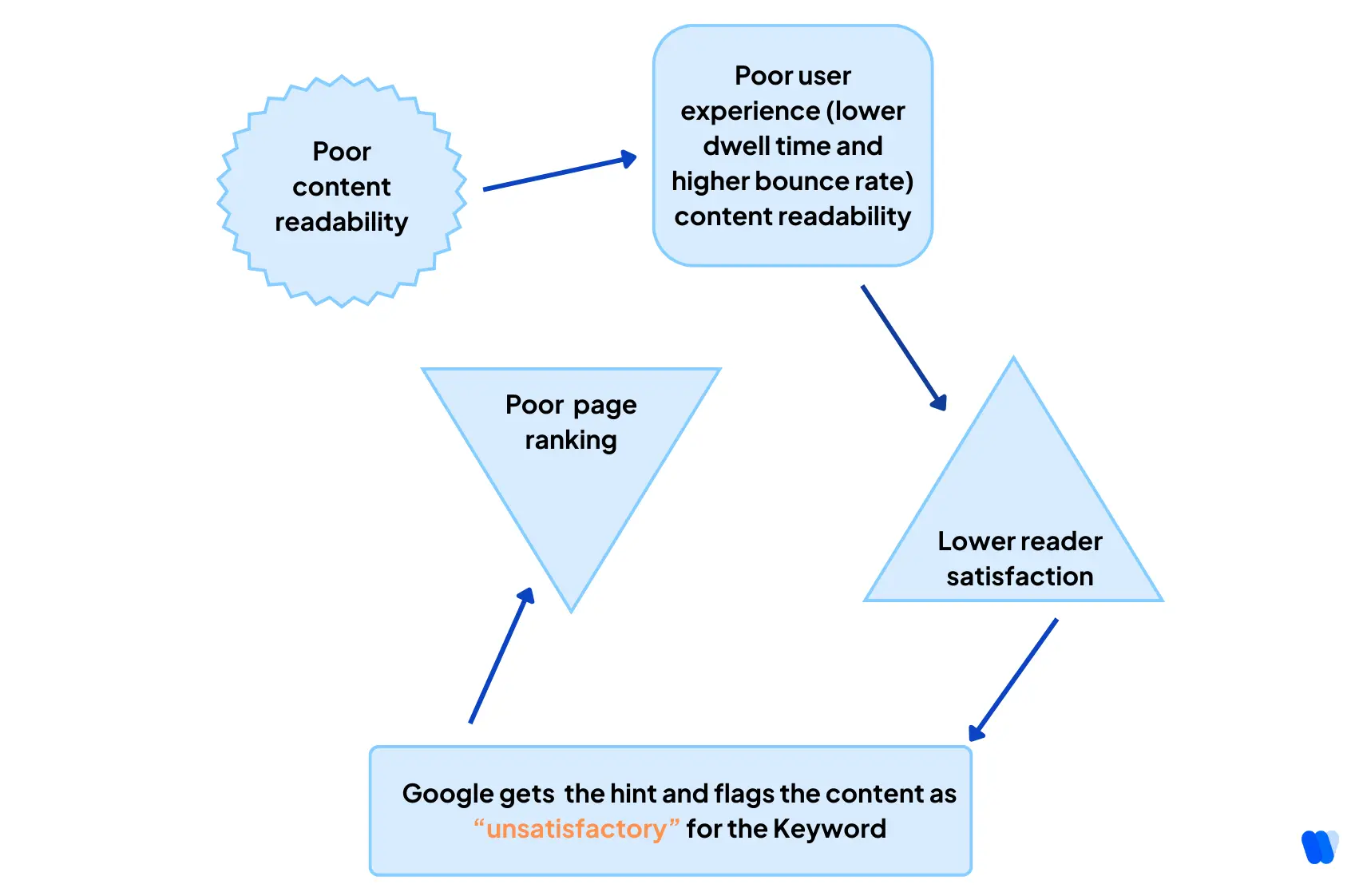
AI-generated content can be grammatically perfect but still fail the “can I skim this and still get value?” test.
Here’s why:
- Overuse of formal or archaic phrases: “It is evident that…” vs. “Clearly…”
- Lack of structural rhythm: AI tends to favor uniform sentence length, which can feel monotonous.
- Weak transitions: Abrupt topic shifts without context or connectors.
- Repetitive phrasing: Due to token prediction models, the same words or sentence patterns are reused frequently.
Setting Readability Goals for Different Content Types
Here’s how I set readability for different types of content:
| Content Type | Target Reading Level | Readability Goal |
|---|---|---|
| Blog Posts | Grade 7–9 | Broad audience, informative |
| Landing Pages | Grade 6–8 | Fast scanning, persuasive |
| Whitepapers | Grade 10+ | Detailed, expert-level tone |
| Product Guides | Grade 7–9 | Clear steps, no jargon |
I don’t chase perfect scores, and I aim for readability with purpose. If a topic is technical, I’ll maintain accuracy while simplifying the structure.
Additionally, these readability levels align with the goals outlined in a comprehensive LLM content creation strategy, particularly when producing AI-driven outputs at scale.
Want to Audit Your AI Content for Readability?
Try tools like Hemingway and Grammarly today, or better yet, use a workflow automation tool like KIVA, an AI SEO Agent to generate, analyze, optimize, and score the readability of your AI content end-to-end.
Comparing AI, Human & Edited Readability
To evaluate how different writing styles affect the readability score in AI content, I tested three versions of the same short paragraph: one is an AI-generated content, one written manually, and one edited version of the AI draft.
Topic: Benefits of Urban Green Spaces
Example Comparison:
“The presence of vegetated infrastructure within urban environments significantly contributes to the amelioration of air quality and the reduction of urban heat island effects.”
“Parks and trees in cities help clean the air and cool down hot areas.”
“Urban green spaces improve air quality and reduce heat, making cities healthier.”
| Version | Flesch Reading Ease | Grade Level | Notes |
|---|---|---|---|
| AI-Generated Draft | 45 | Grade 12 | Wordy, passive structure, and overly formal phrasing |
| Human-Written Version | 64 | Grade 8 | Clear message with a conversational tone |
| Edited AI Version | 72 | Grade 7 | Polished, easy to follow, while keeping a factual tone |
So, the clearer the structure, the more likely your content is to be cited by AI-generated answers, a core element among emerging GEO visible factors. And if you want to improve the readability of AI drafts even further before publishing, a free AI Humanizer tool by Wellows can help rewrite overly formal or robotic sentences into natural, easy-to-read language.
Optimizing Structure for AI & Readers
Readability isn’t just about sentence length or grade level. The way content is structured, through headings, bullet points, and formatting, plays a crucial role in how both humans and AI process text.
This structure is also critical in how your content appears in Search Engine Results Pages (SERPs), especially in featured snippets and AI overviews.
In fact, formatting directly influences how AI models extract and summarize your content. The clearer the structure, the more likely your content is to be:
- Cited by AI-generated answers
- Featured in knowledge panels or snippets
- Understood by readers scanning for takeaways
Formatting Techniques That Improve Readability and AI Comprehension
Here are the formatting strategies I consistently use when optimizing readability in AI-generated or AI-targeted content:
| Strategy | Why It Works |
|---|---|
| Use Headings (H2, H3) | Organizes content into scannable sections. AI uses these to identify and summarize topics. |
| Use Lists (Bullets & Numbers) | Breaks information into bite-sized pieces. Improves scannability and helps AI extract key points. |
| Use Tables | Ideal for structured data, comparisons, or stats. AI parses table formats more efficiently than long-form text. |
| Format Quotes | Using blockquote or italics highlights statements. AI identifies these as distinct, often factual segments. |
| Use Bold Text | Emphasizes critical terms or actions. AI prioritizes bolded phrases in summaries. |
| Stick to SVO (Subject-Verb-Object) | Clear sentence structures are easier for both users and AI to interpret. |
| Add Schema Markup | FAQ, HowTo, and other schema improve AI understanding and visibility in search. |
| Write Descriptive Alt Text | Helps AI understand visuals. Use keyword-aligned, context-aware descriptions. |
| Keep Sections Short (100–250 words) | Both users and AI prefer concise sections with a focused idea per block. |
Structure is also critical in preventing duplicate content from competing in rankings, which is where using a canonical tag becomes essential. Another common pitfall is content cannibalization in SEO, where multiple pages on the same site compete for the same keyword and dilute ranking signals.
Pro Tip: Structure Your Content Like a Roadmap
I approach content like a visual roadmap.
-
Headings act as directional signs.
-
Lists are quick checkpoints.
-
Bold text highlights the destination.
Artificial Intelligence (AI) enhances content readability by analyzing text and refining it for clarity, flow, and engagement. Through automation and intelligent suggestions, AI ensures that content is easy to understand, professional, and accessible to diverse audiences. AI tools detect hard-to-read sentences and rephrase them into simpler, more digestible forms. This makes content accessible without losing meaning, helping readers grasp ideas quickly. AI-driven writing assistants improve sentence structure, punctuation, and tone. They provide real-time corrections and style suggestions, ensuring polished, error-free text that aligns with professional standards. AI supports readability by breaking down long paragraphs, suggesting bullet points, and adding subheadings. This makes text scannable and user-friendly, especially for digital audiences who prefer skimmable formats. AI can adjust text complexity to fit different reading levels, whether for students, professionals, or general audiences. By tailoring language and tone, AI ensures content resonates with the intended reader group. AI not only translates content into multiple languages but also adapts phrasing and idioms to cultural contexts. This ensures messages are both understandable and relevant across global audiences. In summary: AI improves readability by simplifying language, enhancing grammar, structuring content effectively, tailoring it to specific audiences, and supporting multilingual communication. By leveraging these capabilities, businesses and writers can produce content that is clear, engaging, and universally accessible.How Can AI Improve the Readability of Content?
1. Simplifying Complex Sentences
2. Enhancing Grammar and Style
3. Structuring and Formatting Content
4. Adapting Content for Target Audiences
5. Multilingual and Cultural Adaptation
- Use Readability-Optimized AI Tools: : Choose AI platforms like GPT-4, Copy.ai, or Jasper, which provide features that focus on creating clear, concise, and engaging content. These tools often include readability scoring features to optimize sentence structure, tone, and word choice.
- Set Readability Parameters:: Before generating content, set guidelines for sentence length, tone, and complexity. Tools like Hemingway Editor or Grammarly can help you maintain shorter sentences and simpler vocabulary, enhancing the content’s readability.
- Break Content into Sections:: Structure the content with appropriate headers, subheadings, and bullet points. This improves scannability, making the content easier for readers to digest.
- Simplify Language:: Instruct the AI to use clear and straightforward language, avoiding jargon or overly complex words. Ensure that each sentence communicates one clear idea.
- Review and Edit:: After the AI generates content, manually review it for readability. Check for sentence length, passive voice, and overall clarity. Tools like Yoast SEO or Readable can help fine-tune the content for a higher readability score.
To generate content with AI and ensure a good readability score, follow these steps:
How I Edit AI Content for Better Readability
Here’s how I turn raw AI output into clear, reader-friendly, humanized AI content:
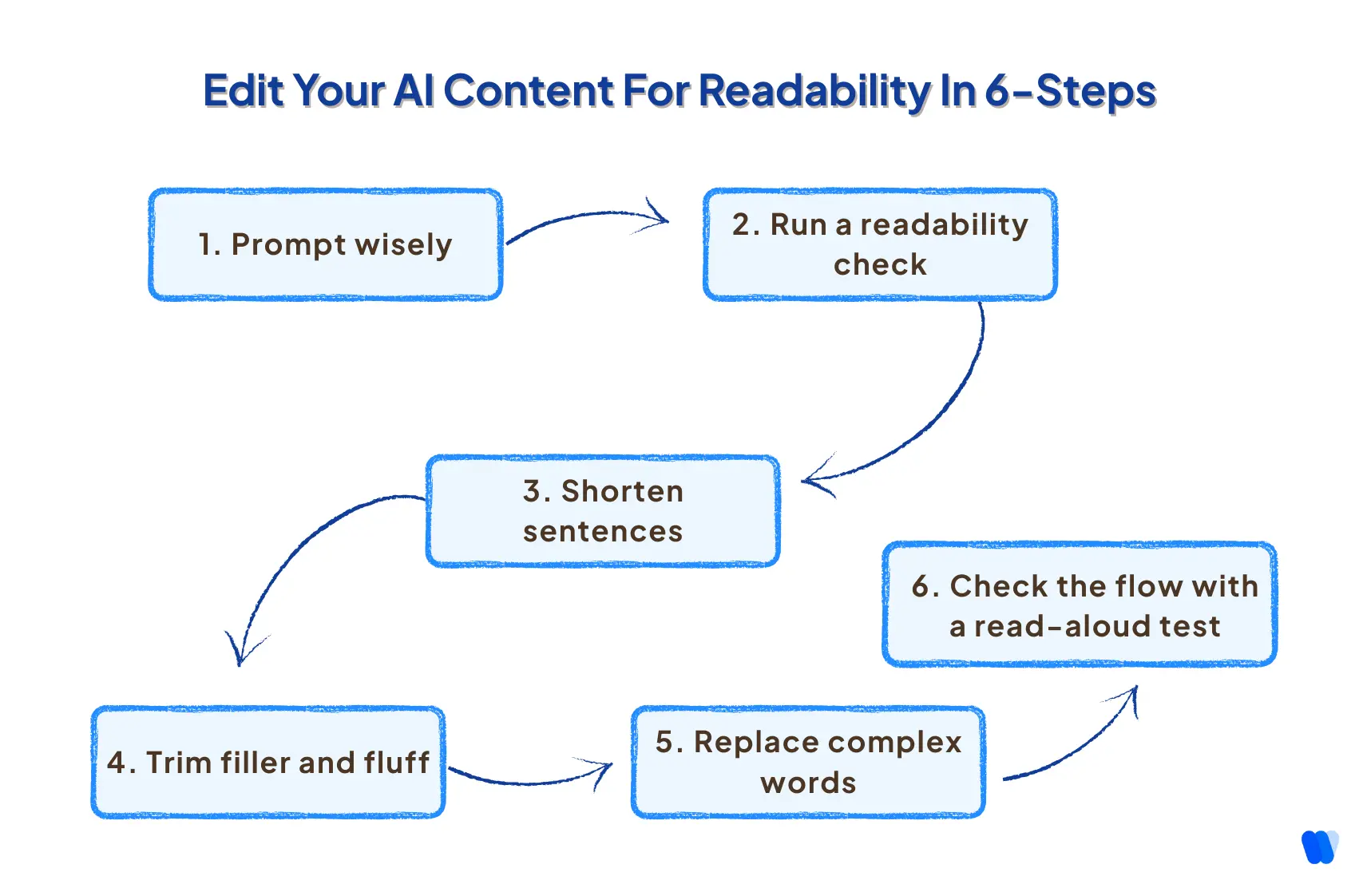
1. Prompt wisely
→ I always specify the audience and tone. “Write in simple, clear language” goes a long way.
2. Run a readability check
→ I paste the output into Hemingway or Readable.com and look at the initial grade level.
3. Shorten sentences
→ AI loves to string clauses together. I split them into clean, punchy lines.
4. Trim filler and fluff
→ I cut anything vague, redundant, or overly formal.
5. Replace complex words
→ “Utilize” becomes “use.” “Obtain” becomes “get.” Every swap improves flow.
6. Check the flow with a read-aloud test
→ If it’s hard to read aloud, it’s probably hard to read silently, too.
Common Pitfalls with AI Readability (and How I Fix Them)
Here are the most common pitfalls that drag down the readability score in AI content—and how to watch out for them:
1. Overly Long Sentences
Why it hurts: Long, winding sentences force readers to hold too many ideas in mind at once.
- How to spot it: More than 25–30 words in a single sentence.
- Quick fix: Break complex thoughts into two or three shorter sentences (12–20 words each).
2. Excessive Passive Voice
Why it hurts: Passive constructions (“The data was analyzed by the AI”) feel distant and less engaging.
- How to spot it: Look for “was … by,” “is … by,” or “were … by” patterns.
- Quick fix: Flip to active voice: “The AI analyzes the data.”
3. Jargon and Unexplained Technical Terms
Why it hurts: Specialized terms alienate readers who aren’t subject-matter experts.
- How to spot it: Any word or acronym unfamiliar to your target audience.
- Quick fix: Substitute with plain-language equivalents or include a brief parenthetical definition.
4. Lack of Structure and Chunking
Why it hurts: Walls of text overwhelm skimmers and make key points hard to find.
- How to spot it: Sections longer than 4–5 sentences without a subheading or list.
- Quick fix: Introduce H2/H3 headings, bullet or numbered lists, and keep paragraphs to 2–3 sentences.
To learn how to structure your content for better clarity and discoverability, explore this guide on Chunk Optimization for Search Visibility.
5. Inconsistent Tone or Register
Why it hurts: Shifting from formal to casual (or vice versa) confuses readers about your brand voice.
- How to spot it: Suddenly mixing contractions (“we’re”) with overly formal phrasing (“utilize”).
- Quick fix: Choose a tone—conversational or professional—and apply it consistently.
6. Overuse of Multi-syllabic Words
Why it hurts: Complex vocabulary raises the grade-level score and slows comprehension.
- How to spot it: Words with three or more syllables appearing frequently.
- Quick fix: Swap for shorter synonyms (e.g., “use” for “utilize,” “help” for “facilitate”).
7. Poor Pacing and Flow
Why it hurts: Abrupt topic jumps or insufficient transitions leave readers disoriented.
- How to spot it: Sections that feel disconnected or lack linking phrases (“however,” “for example”).
- Quick fix: Add brief transitional sentences to guide readers from one idea to the next.
8. Ignoring Readability Feedback
Why it hurts: Skipping live scoring tools means you miss obvious clarity issues.
- How to spot it: Noticing high bounce rates or low time-on-page metrics.
- Quick fix: Integrate a plugin (Yoast, Hemingway) or API (TextGears) and set minimum score thresholds.
How I Simplify AI-Generated Sentences for Clarity
One of the most effective ways I improve AI-written drafts is by trimming down sentences that sound formal, robotic, or unnecessarily complex. Below are a few real examples from my workflow, showing how I take an AI-generated sentence and make it more readable, without losing meaning.
Example 1: Overly Formal to Reader-Friendly
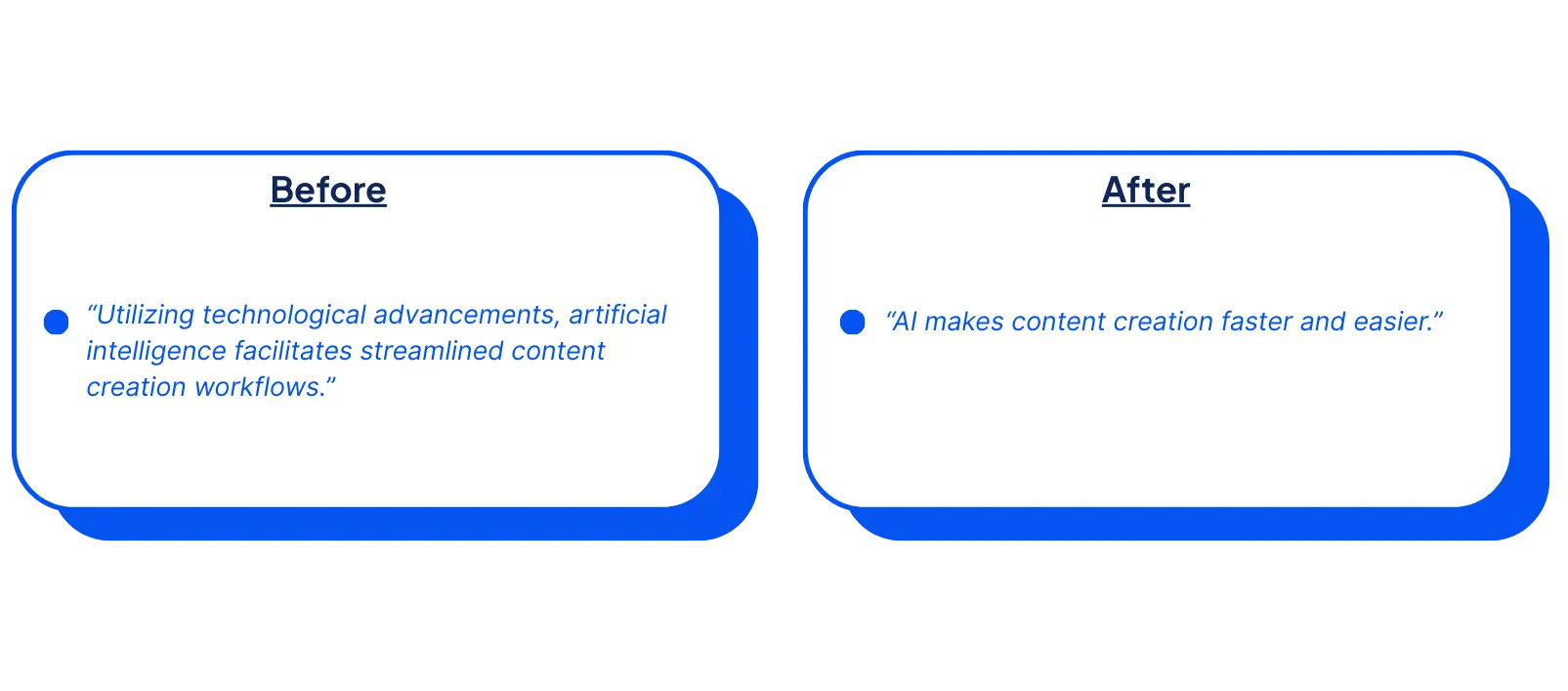
✔ Shorter, simpler
✔ Swaps jargon like “facilitates” with “makes”
✔ Reads more like how people speak
Example 2: Passive Voice to Direct and Active
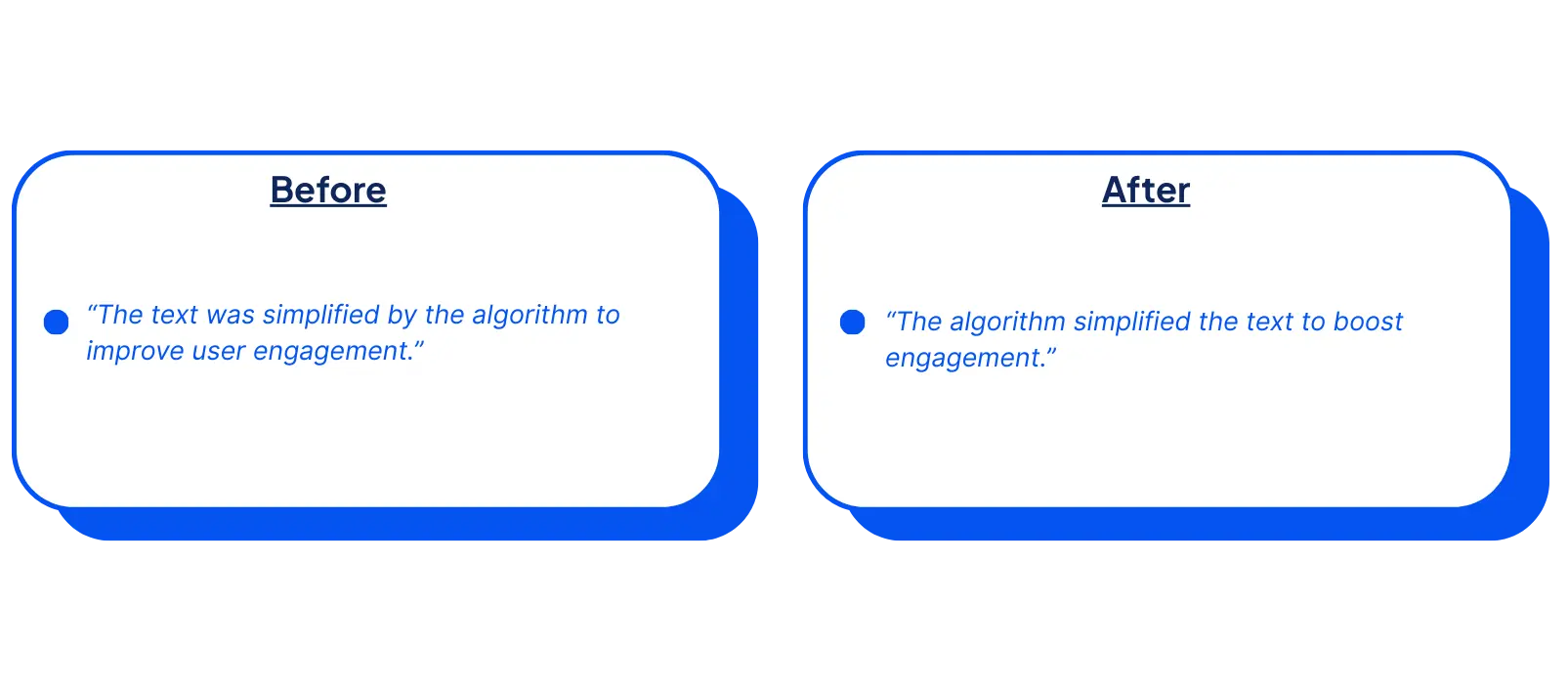
✔ Active voice improves flow
✔ Removes wordy structure
✔ Keeps technical accuracy
Example 3: Vague Generalization to Specific Insight
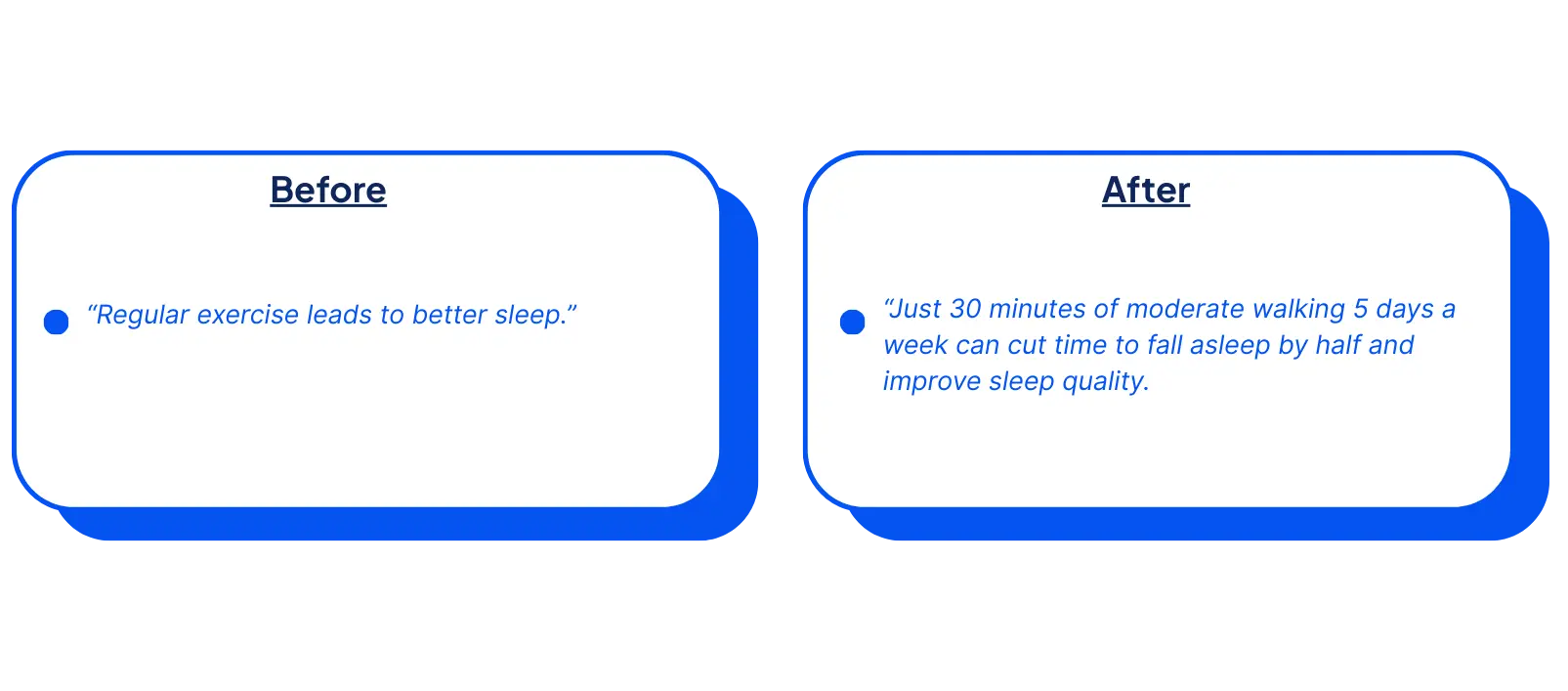
✔ Replaces “numerous benefits” with specific outcomes
✔ Avoids abstract phrasing
✔ Adds user value and relevance
Readability Audit Checklist for Your Next AI Content Draft
- Is the average sentence length under 20 words?
- Are 90% of sentences in active voice?
- Is the content chunked into small paragraphs?
- Are there subheadings every 150–200 words?
- Have you eliminated filler and redundant phrases?
- Did you run a readability score test (Flesch/Fog/SMOG)?
- Is it accessible to your lowest-knowledge persona?
What Challenges Exist in Measuring Readability of AI Content?
Measuring the readability score in AI content is not always straightforward. While traditional formulas can provide a baseline, several challenges make accurate evaluation more complex. These issues highlight the limitations of current tools and the need for more advanced assessment methods.
1. Complex Vocabulary and Sentence Structures
AI models often generate text with advanced vocabulary and lengthy sentence constructions. This increases reading grade levels and can reduce accessibility. For example, studies on AI-generated patient education materials have shown they frequently exceed the recommended sixth-grade reading level, making them less suitable for general audiences.
2. Inconsistency Across AI Models
Different AI systems produce content at varying readability levels. Comparative studies of multiple large language models reveal significant disparities—some create user-friendly text, while others lean toward overly technical outputs. This inconsistency complicates the evaluation of readability across models.
3. Lack of Personalization
AI-generated content typically follows a one-size-fits-all approach. It often fails to adjust complexity based on the reader’s literacy, education, or context. In fields like healthcare or law, this lack of personalization can cause misunderstandings or cognitive overload.
4. Overfitting to Surface-Level Features
Many readability assessment tools focus heavily on surface characteristics—such as punctuation, sentence length, or whitespace—without analyzing deeper meaning. This can lead to misleading scores that don’t accurately reflect how understandable the text is for real users.
5. Bias Against Non-Native English Writers
Detection systems sometimes misclassify non-native English writing as AI-generated. This bias not only skews readability evaluations but also risks unfairly penalizing multilingual or global writers, reducing inclusivity in assessment processes.
In summary: Assessing AI readability involves challenges like complex vocabulary, inconsistent outputs, lack of personalization, surface-level analysis, and bias against non-native writers. To overcome these issues, more nuanced methodologies that combine linguistic analysis, user testing, and context-aware AI evaluation are needed.
FAQs
AI applies formulas like Flesch-Kincaid or Gunning Fog Index, analyzing sentence length, syllables, and complex words. NLP models like BERT add contextual coherence checks beyond traditional metrics.
Yes, AI tools like Grammarly or ChatGPT revise drafts by shortening sentences, simplifying vocabulary, and fixing passive voice. However, human editing is often needed for nuance and tone.
A Flesch Reading Ease score between 60–70 is typically considered good for general audiences, reflecting an 8th–9th grade reading level. This range ensures clarity and accessibility without oversimplifying.
Popular readability formulas include Flesch Reading Ease, Flesch-Kincaid Grade Level, Gunning Fog Index, SMOG Index, Coleman-Liau Index, and Automated Readability Index (ARI). Each measures different elements such as sentence length, syllables, or word complexity.
Yes. Tools like Hemingway Editor, Grammarly, Readable.com, and AISEO provide readability analysis. These platforms highlight complex sentences, suggest improvements, and assign scores to help refine AI-generated content.
Readability directly impacts SEO by improving user experience. Content that is easy to read lowers bounce rates, increases dwell time, and encourages sharing—signals that search engines use to reward higher rankings.
Yes, with the right prompts and post-editing, AI-generated content can achieve high readability scores. Combining AI tools with human review ensures text is both technically optimized and contextually clear.
Read More Articles
- Content Marketing Agencies: A Complete Guide 2026
- Content Readability in SEO
- Long-Form vs. Short-Form Content
- How Small Brands personalized AI content
- How to Avoid Plagiarism
- Top Content Marketing Statistics in 2025
- 5 Tips to Triple Content Output Using AI Writing Assistants
- How to Rank in Gemini: SEO for AI Search Visibility
- Real-Time Alerts for Agency Clients
- How Agencies Find AI Visibility Gaps for Clients (2026)
- Agency Client Onboarding Using AI Search Visibility
Final Verdict: Readability Is a Responsibility!
You can have the best idea, the best data, and the best intention, but if your audience can’t digest it easily, it won’t land.
In a world flooded with content and short on attention, readability score in AI content isn’t just a technical detail. It’s a competitive advantage.
Whether you’re training a team, editing AI-generated drafts, or scaling your content library, optimizing for readability is one of the highest-leverage moves you can make for both performance and perception.