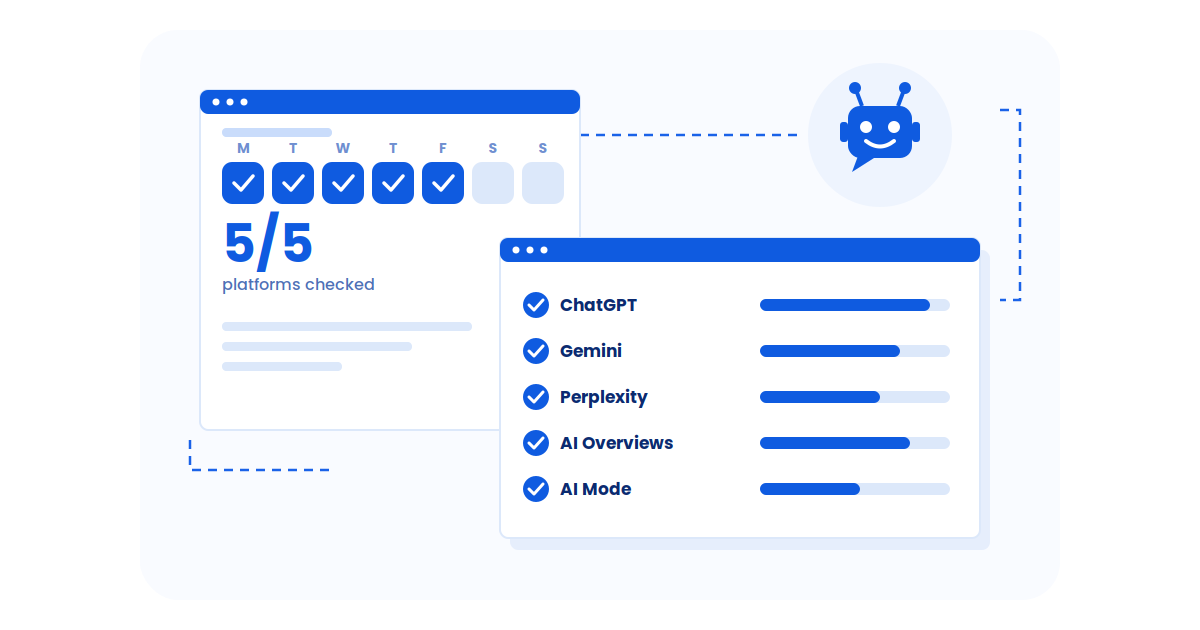
On Page SEO analysis checklist is the foundation of improving how a webpage performs in search results. It helps you evaluate key elements like content quality, headings, internal links, and metadata so you know exactly what needs attention. In fact, on-page SEO elements contribute 32.8% to website ranking positions.
Instead of producing long and overwhelming audit reports, modern URL-level analysis focuses on decision-oriented insights. You simply paste a URL, see what needs attention first, and get clear guidance on how to resolve each issue. This makes search engine optimization faster, more practical, and easier to confirm.
A proper audit evaluates a single user-provided page using 100+ signals related to on-page SEO, technical health, and AI-readiness. This blog explains how these audits work, what insights they surface, and how to act on them step by step.
- On-page SEO analysis focuses on improving how a single webpage is crawled, understood, and evaluated by search engines and AI systems.
- Modern SEO audits work at the URL level, showing prioritized issues instead of long, generic site-wide reports.
- Strong on-page SEO depends on clear content, proper structure, technical cleanliness, and machine readability.
- Effective analysis highlights what to fix first, explains why it matters, and provides clear guidance for each issue.
- The most valuable audits include a re-check loop, allowing teams to confirm fixes and track progress with Pass/Fail validation.
How To Analyze On-Page SEO?
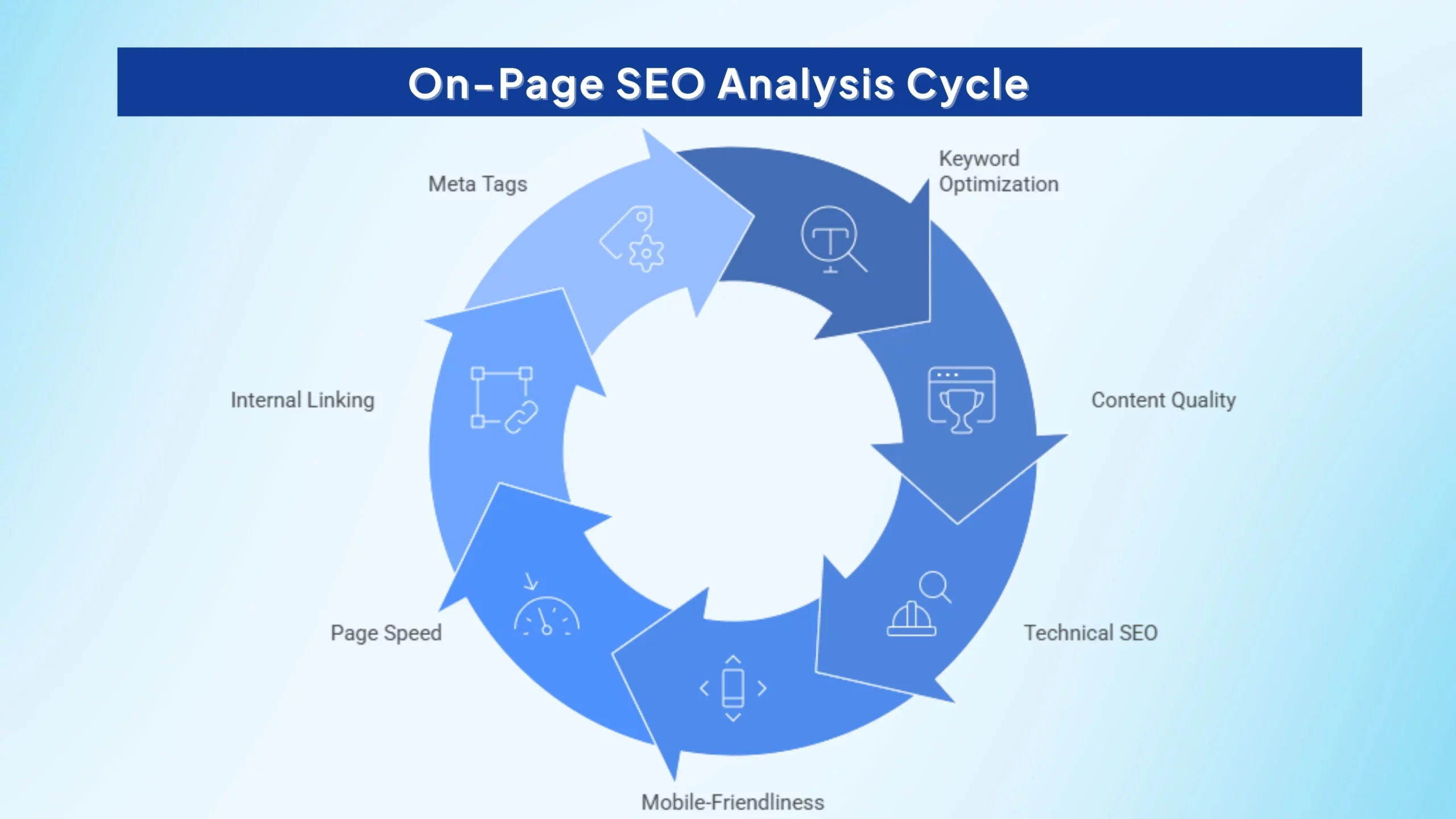
To analyze On Page SEO effectively, focus on the elements that directly impact how search engines crawl, understand, and rank your page. Use the checklist below to ensure nothing important is missed.
1. Keyword Optimization
Keyword optimization ensures that search engines and AI systems clearly understand what a page is about. In modern SEO, this is no longer about repeating keywords but about placing them naturally in the most meaningful locations.
Your primary keyword should appear early in the title and H1, supported by related terms in subheadings, meta descriptions, and body content. Overuse or forced placement reduces clarity and weakens machine interpretation.
How to optimize keywords in 2026
- The primary keyword is placed early in the title and H1, helping search engines and AI systems immediately understand the page topic.
- Related terms and natural variations are used in headings and body content to support topical relevance.
- Content is written for humans first, with keywords fitting naturally into the flow without disrupting readability.
- Keywords are stuffed unnaturally into sentences, making the content awkward and hard to read.
- The same phrase is repeated excessively, reducing clarity and increasing over-optimization risk.
- Keywords are forced into irrelevant sections, confusing both users and search engines about page intent.
Did you know?
A modern on-page SEO analysis tool checks where your main keyword appears on the page and how early it shows up in important places like the title and H1. It looks at whether related terms are used naturally and if keyword usage matches the page’s intent.
Instead of telling you to add more keywords blindly, the tool highlights weak or missing keyword signals, warns about over-optimization, and explains exactly how to improve clarity without stuffing. This helps beginners fix the right things first.
2. Content Quality
Content quality is the most important part of on-page SEO because it decides whether people and search engines understand your page. Simply put, good content is easy to read, useful, and clearly answers what the user is looking for.
High-quality content explains the topic step by step, uses simple words, and stays focused on the main question instead of adding unnecessary information. When your content flows naturally and provides real value, search engines and AI systems can understand it better and are more likely to trust and rank your page.
- Content is organized using clear headings and logical sections, making it easy to scan and understand.
- The page directly answers the search intent without unnecessary detours.
- Simple language and a natural flow improve readability for both humans and machines.
- Long, unstructured paragraphs make the page difficult to read and interpret.
- Filler content is added only to increase word count, reducing clarity and value.
- Readability is ignored, leading to poor user experience and weaker SEO signals.
Did you know?
What a modern SEO analysis tool checks
The tool reviews how your content is structured and how easy it is to understand. It checks headings, paragraph length, flow, and whether the content clearly answers the user’s question.
When issues are found, the tool explains what’s missing, why it matters, and how to improve readability for both people and machines. This removes guesswork and helps beginners write content that is clear, helpful, and trustworthy.
3. Technical SEO
Technical SEO focuses on making sure search engines can easily access and understand your webpage. If a page has technical problems, even the best content may not appear in search results.
Good technical SEO helps search engines crawl your page, index it correctly, and interpret its structure without confusion. This includes fixing broken links, avoiding duplicate pages, and ensuring the page loads properly, so nothing blocks your content from being seen.
How to Maintain Strong Technical SEO
- Broken links are fixed, allowing smooth crawling and clear site navigation.
- Each page uses a correct, self-referencing canonical to prevent duplication.
- Meaningful images include descriptive alt text.
- Crawl and index issues are prioritized and resolved.
- Broken links remain unresolved, wasting crawl budget.
- Duplicate URLs compete due to incorrect canonicals.
- Images lack alt text.
- Crawl and index errors are ignored.
Did you know?
The tool runs technical checks on a single page to make sure search engines can crawl and index it properly. It looks for broken links, duplicate URLs, missing alt text, crawl errors, and indexing blockers.
Issues are prioritized by impact, so beginners know what to fix first. High-risk problems that can stop a page from appearing in search results are clearly flagged and explained in simple terms.
4. Canonical Tags (High-Priority Signal)
Canonical tags tell search engines which version of a page is the main and correct one to index. They are especially important when similar or duplicate pages exist on a website.
If canonicals are set incorrectly, search engines may index the wrong page, split ranking signals between multiple URLs, or even remove the page from search results. That’s why canonical tags are considered a high-priority technical SEO signal and should always be checked first.
Canonical Best Practices
- Each page uses a single, self-referencing canonical.
- Canonicals point only to clean, indexable URLs.
- Duplicate URL signals are consolidated.
- Canonical issues are identified and fixed early.
- Canonicals point to redirected or non-indexable URLs.
- Multiple conflicting canonicals exist.
- Duplicate URLs compete for indexing.
- Canonical errors go unnoticed.
Did you know?
What a modern SEO analysis tool checks
Canonical tags are treated as fix-first issues. The tool checks whether the canonical points to the correct, indexable version of the page and whether multiple canonicals are causing confusion.
If a problem is found, the tool explains the indexing risk in plain language and provides clear steps to fix it. After changes are made, a re-check confirms whether the issue has moved from Fail to Pass, giving beginners confidence.
5. Mobile-Friendliness
Mobile-friendliness means your website works well on phones and tablets. Since Google uses mobile-first indexing, it mainly looks at the mobile version of your page to decide rankings.
If your site is hard to read, slow, or difficult to use on a mobile device, it can lose visibility in search results even if the desktop version looks perfect. Making pages easy to read and navigate on small screens is now essential for SEO.
How to Optimize for Mobile-First Indexing
- Responsive layouts adapt to all screen sizes.
- Text is readable without zooming.
- Navigation is touch-friendly.
- Mobile usability issues are resolved.
- Pages require zooming or horizontal scrolling.
- Important content is hidden on mobile.
- Intrusive pop-ups block content.
- Mobile usability errors are ignored.
Did you know?
The tool evaluates how your page behaves on mobile devices, including layout responsiveness, text readability, navigation usability, and mobile crawlability.
Mobile issues are prioritized based on how much they affect visibility and user experience. This helps beginners focus on fixing the mobile problems that actually matter for mobile-first indexing.
6. Page Speed & Core Web Vitals
Page speed and Core Web Vitals focus on how fast and stable your page feels for users. When a page loads quickly and doesn’t jump around while loading, visitors stay longer and interact more.
If a page is slow or unstable, users leave early and search engines may crawl it less effectively. That’s why improving speed and layout stability is important for both user experience and search visibility.
How to Improve Speed and Core Web Vitals
- Images and media are optimized.
- Unnecessary scripts are minimized.
- Layout shifts are reduced.
- Server response time is improved.
- Large images slow page loads.
- Heavy scripts delay interactivity.
- Layout shifts disrupt experience.
- Above-the-fold content loads slowly.
Did you know?
The tool measures page speed and Core Web Vitals such as loading time, layout stability, and interactivity. Instead of overwhelming you with raw numbers, it highlights performance issues that have the biggest real-world impact.
Fixes are prioritized so beginners know whether to focus on images, scripts, layout shifts, or server response first. This makes performance optimization practical and achievable.
7. Internal Linking
Internal linking means connecting one page of your website to another using links. These links help search engines understand how your pages are related and which ones are most important.
Good internal links make it easier for search engines to crawl your site and help users find useful content. When important pages are linked properly, they become easier to discover and perform better in search results.
How to Build Strong Internal Links
- Relevant pages are linked contextually.
- Anchor text is descriptive.
- Key pages are well connected.
- Broken links are fixed.
- Important pages remain orphaned.
- Generic anchors provide no context.
- Links are added unnaturally.
- Broken links disrupt crawl flow.
Did you know?
The tool checks how pages are connected internally and whether important pages are easy to discover. It identifies broken internal links, orphan pages, weak anchor text, and missed linking opportunities.
By showing which internal links matter most, the tool helps beginners improve crawl flow and page importance without overlinking or guessing.
8. Meta Tags & Descriptions
Meta tags and descriptions are the short pieces of text users see in search results. They don’t just describe your page, they help convince people to click on it.
When meta titles and descriptions are clear, relevant, and match what users are searching for, more people click your link. Higher click-through rates send positive signals to search engines and can improve your page’s overall performance.
How to Optimize Meta Tags
- Meta tags are unique and relevant.
- Titles are concise and readable.
- Descriptions match intent.
- Keywords are used naturally.
- Meta tags are duplicated.
- Titles are vague or too long.
- Descriptions mislead users.
- Keywords are stuffed.
Did you know?
The tool checks whether meta titles and descriptions are missing, duplicated, too long, or unclear. It also evaluates whether they match page intent and use keywords naturally, which is especially useful for Content Marketing Agencies managing multiple pages across different campaigns.
Instead of just flagging problems, the tool explains how to rewrite metas to improve click-through rates. This helps beginners understand why users click and how to fix weak search snippets.
9. Heading Structure
Heading structure refers to how you organize titles and subheadings on a page using H1, H2, and H3 tags. A clear heading hierarchy helps readers quickly understand what the page is about and find the information they need.
For search engines and assistive technologies, proper headings make content easier to interpret and navigate. When headings are used correctly, your page becomes clearer, more accessible, and easier to understand for both humans and machines.
Best Practices for Headings
- Exactly one H1 is used.
- Logical H1–H2–H3 nesting exists.
- Keywords appear naturally.
- Headings are unique.
- Multiple or missing H1s exist.
- Heading levels are skipped.
- Headings are used for styling.
- Duplicate headings appear.
Did you know?
The tool checks whether your page uses one clear H1 and follows a logical H1–H2–H3 structure. It flags skipped heading levels, duplicate headings, and headings used only for styling.
Once fixes are made, a re-check confirms the structure is correct. This helps beginners fix hierarchy issues that affect both accessibility and machine understanding.
10. URL Selection Guidance
URL selection guidance helps you choose the right pages to analyze and optimize. Not every page on a website has the same impact, so focusing on the most important ones saves time and delivers better results.
High-impact pages like pricing pages, landing pages, or pages already getting impressions are ideal to work on. Avoid low-value pages such as tag archives or thin posts, as improving them usually won’t make a noticeable difference.
Best URLs to Analyze
- Pricing and landing pages.
- Pages with impressions.
- High-intent comparison pages.
- Revenue-driving URLs.
- Tag and archive pages.
- Thin posts.
- Low-traffic utilities.
- Non-impact URLs.
Did you know?
It clearly warns against wasting effort on low-value pages like tag archives or thin posts. This helps beginners focus on URLs where improvements can actually make a difference.
Pain Point: The pricing page was losing organic traffic due to outdated metadata, weak heading structure, thin explanatory content, and missing schema. Internal debates slowed fixes because priorities were unclear.
How the SEO Analyzer Helped:
- Audited the pricing page URL only
- Flagged missing H1 and skipped heading hierarchy
- Identified duplicated meta titles hurting click-through rates
- Highlighted missing SoftwareApplication schema
- Ranked issues by impact so teams knew what to fix first
- Used re-check validation to confirm improvements after changes
Outcome:
- Clearer page structure for users and machines
- Improved crawlability and semantic clarity
- Higher CTR from search results
- Faster internal execution with fewer debates
- Why this works well here:
- Strongly reinforces OPTA’s decision-oriented positioning
- Matches SaaS ICP from the GTM doc
- Shows confidence-building via Pass/Fail validation
11. Schema & Machine Readability
Schema is a special type of code that helps search engines and AI systems understand what your content means, not just what it says. It adds extra context about your page, such as products, FAQs, or reviews.
While schema does not guarantee higher rankings or visibility, it makes your content easier for machines to interpret. This improves clarity, eligibility for rich results, and overall machine readability.
How to Use Schema Correctly
- Relevant schema types are used.
- Structured data is validated.
- Required properties are complete.
- Markup improves machine readability.
- Schema is missing or irrelevant.
- Required fields are empty.
- Markup is invalid.
- Rich result eligibility is lost.
Did you know?
The tool checks whether relevant schema is present, valid, and complete. It identifies missing schema, invalid markup, or empty required properties that reduce machine understanding.
Clear guidance is provided on how to fix schema issues, and a re-crawl confirms when structured data is detected correctly. This improves machine readability without promising rankings or rich results.
12. AI-Readiness
AI-readiness means structuring your content so AI systems can easily read, understand, and extract useful information from it. This goes beyond rankings and focuses on clarity, structure, and meaning.
When a page is AI-ready, its headings, formatting, and language are clear and well organized. This makes it easier for AI tools to interpret your content accurately and use it for summaries, answers, or analysis.
What Improves AI-Readiness
- Clear headings and hierarchy.
- Clean HTML and structured data.
- Snippet-friendly formatting.
- Strong semantic structure.
- Weak heading hierarchy.
- Cluttered HTML.
- Poor snippet formatting.
- Low semantic clarity.
Did you know?
The tool evaluates whether your page is easy for AI systems to interpret and extract information from. It checks semantic structure, clarity, formatting, and consistency.
Instead of promising AI visibility, the tool focuses on improving the inputs AI systems rely on, such as clean structure, clear headings, and readable content. This helps beginners future-proof pages without false guarantees.
13. Accessibility as an SEO Signal
Accessibility means making your website easy to use for everyone, including people who rely on screen readers or other assistive tools. When a page is accessible, it usually has clear headings, readable text, and descriptive image alt text.
Good accessibility also helps search engines understand your content better. Clear structure and readable elements improve crawlability and interpretation, which is why accessibility is an important on-page SEO signal.
- Alt text is descriptive.
- Heading hierarchy is correct.
- Layouts are readable.
- Crawl clarity improves.
- Alt text is missing.
- Headings confuse crawlers.
- Contrast is poor.
- Accessibility issues persist.
Did you know?
Accessibility issues are connected directly to crawlability and interpretation clarity. The tool checks alt text, heading order, readability, and layout clarity.
Rather than treating accessibility as compliance only, the tool explains how these issues affect search engines and assistive technologies, helping beginners improve both usability and SEO at the same time.
14. Validate Fixes with Re-Check and Pass/Fail Status
Validating fixes means confirming that the changes you made actually worked. Instead of guessing, you re-check the page to see whether each issue is resolved or still needs attention.
Pass/Fail status makes this process simple by clearly showing what’s fixed and what isn’t. This turns SEO into a repeatable workflow where you audit, fix, re-check, and improve with confidence.
Re-Check & Pass/Fail Validation
- Resolved issues are tracked.
- Re-crawls confirm fixes.
- Progress is measurable.
- Fixes are unverified.
- Assumptions replace proof.
- Issues reappear.
- SEO remains guesswork.
Did you know?
Each issue is shown with a clear Pass or Fail status at the URL level. After fixes are made, the page can be re-checked to confirm whether the issue is resolved.
This creates a simple proof loop for beginners: audit → fix → re-check → improve, turning SEO from guesswork into a measurable and repeatable process.
Pain Point: A high-intent product page was stuck on page 2 despite strong demand. The page suffered from duplicate content variants, incorrect canonical tags, slow load times, and missing Product schema.
How the SEO Analyzer Helped:
- Audited the single product URL instead of crawling the entire site
- Flagged incorrect canonical pointing to a filtered URL (high priority)
- Identified missing Product schema and weak image alt text
- Highlighted slow LCP caused by unoptimized product images
- Provided step-by-step fix guidance for each issue
- Re-checked the page after fixes to confirm issues moved from Fail → Pass
Outcome:
- Cleaner indexing with the correct product URL
- Improved page speed and machine readability
- Higher visibility for the product page
- Increased organic clicks and sales from search traffic
What Free Tools Can I Use For On-Page SEO Analysis Right Now?
Several free tools can be used for on page SEO analysis right now, helping you identify issues like content gaps, speed problems, technical errors, and usability weaknesses without spending money upfront.
Here’s a quick comparison of free on page SEO analysis tools:
| Tool | Best For | Key Strength | Free Availability | Price for Premium Plan |
|---|---|---|---|---|
| Semrush On Page SEO Checker | Competitor-based recommendations | Actionable SEO ideas tied to target keywords | Limited free reports | Starts at $129.95/month |
| Cocolyze On-Page SEO Checker | Full on-page audit overview | Checks content quality, UX, speed, and technical issues | Free trial available | Starts at €39/month |
| PageOptimizer Pro Free Checker | Content-focused improvements | Highlights optimization opportunities for rankings | Free single-page checks | Starts at $34/month |
| Google PageSpeed Insights | Performance + mobile speed | Google-backed speed and Core Web Vitals suggestions | Fully free | – |
| MozBar | Quick SEO metrics in-browser | Instant authority and on-page insights while browsing | Free browser extension | Included with Moz Pro ($99/month) |
| Lighthouse | Technical + accessibility audits | Automated checks for performance, SEO, and usability | Fully free | – |
It’s worth noting that single-page audits simplify the process even further, because instead of crawling an entire site, you can paste one important URL and instantly focus on what needs fixing first.
These SEO on page analysis tools are a great starting point for cleaner pages, better usability, and stronger SEO fundamentals.
SEO is no longer a single-player game.
– Neil Patel (motivational industry observation reminding that modern on-page SEO involves multiple signals).
What Is The Most Accurate On-Page SEO Analysis Tool?
Accuracy is essential in on-page SEO analysis because even small errors can limit rankings and visibility. A reliable tool should identify real issues, explain why they matter, and guide clear fixes. Without precise insights, optimization becomes guesswork instead of a structured process.
Among the available tools, Semrush and Ahrefs are widely considered the most accurate and dependable options. Both rely on large datasets, advanced crawling systems, and frequent updates. SEO professionals trust them to analyze content quality, technical health, and on-page signals effectively.
Semrush stands out for its detailed on-page audits that combine keyword optimization, content suggestions, and site health checks. It helps users understand how each element impacts performance. This makes tracking progress and improving pages more manageable.
Ahrefs is particularly strong in technical audits and deep crawling analysis. It detects even minor SEO issues and provides clear visibility into site structure. Together, Semrush and Ahrefs balance depth and usability, making them leading tools for accurate on-page SEO analysis.
What Does A Good On-Page SEO Score Look Like In Analysis Tools?
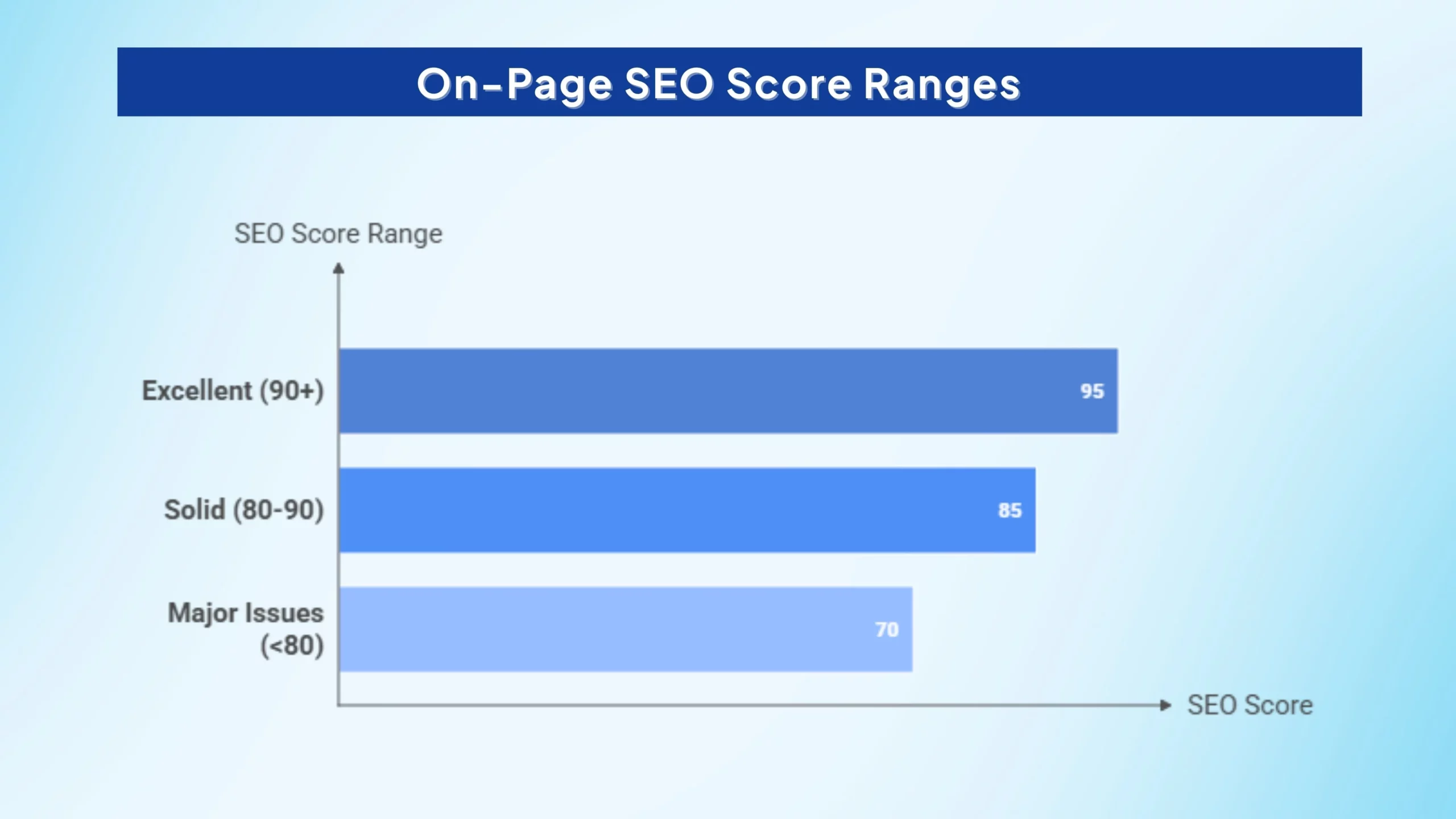
A good on-page SEO score typically falls between 80 and 100 out of 100. In most analysis tools, anything above 90 is considered excellent, meaning the page follows strong SEO best practices.
Scores in the 80–90 range are still solid but usually indicate a few improvements are needed. If a page scores below 80, it often signals major issues that could hurt search visibility.
Scores are only useful when they’re paired with clear direction. Different tools calculate scores differently, but most evaluate similar fundamentals, such as:
- Content quality and keyword usage
- Meta titles and descriptions
- Header structure (H1–H2 hierarchy)
- Image optimization and alt text
- Internal linking
- Mobile responsiveness and technical health
The most helpful modern tools go beyond a number. Instead of producing long generic audits, they work at the single-URL level, run 100+ on-page, technical, and AI-readiness checks, and show:
- What matters first (prioritized fixes)
- Step-by-step guidance on how to resolve each issue
- A re-check or re-crawl option to confirm improvements after changes
This creates a practical proof loop: audit → fix → validate → score improvement, helping teams focus on what actually moves a page from “good” to “excellent.”
How Does HTTPS Impact On-Page SEO Analysis Results?
HTTPS plays a critical role in on-page SEO analysis because it affects how search engines evaluate trust, performance, and user experience signals on a page. When a site uses HTTPS, many SEO tools and audits interpret it as a sign of technical reliability and modern web standards.
Here’s how HTTPS impacts on-page SEO analysis results:
- Search engine ranking signal: Google has confirmed HTTPS as a ranking factor. Pages served over HTTPS may receive a slight ranking advantage compared to HTTP pages, which SEO audits often flag as a priority technical fix.
- User trust and engagement signals: Browsers mark HTTP pages as “Not Secure,” which can discourage users from staying or interacting. HTTPS improves trust, leading to lower bounce rates and better engagement metrics that audits associate with stronger SEO health.
- Page speed and performance improvements: HTTPS enables modern protocols like HTTP/2, which improve loading speed and resource delivery. Faster pages score better in on-page SEO tools and Core Web Vitals assessments.
- Mobile-first indexing readiness: Since Google primarily evaluates the mobile version of a page, HTTPS is essential for meeting mobile-first indexing standards. SEO analysis tools often treat missing HTTPS as a critical mobile and indexing issue.
- Conversion and usability impact: Secure pages encourage users to submit forms, make purchases, and interact confidently. While conversions are not direct ranking factors, improved engagement and usability indirectly strengthen on-page SEO signals.
In short, HTTPS is not just a security upgrade. It directly influences how on-page SEO tools score trust, performance, and technical readiness, making it a foundational requirement in modern SEO analysis.
Should I Focus On Mobile Optimization In My On-Page SEO Audit?
Yes, you should focus on mobile optimization, and it must be a top priority in any on-page SEO audit. With over 60% of website traffic coming from mobile devices, your pages must perform well on smaller screens to stay competitive.
Here’s why it matters most:
- Google uses mobile-first indexing, meaning the mobile version of your site is the primary version Google evaluates for rankings. If your mobile experience is weak, your visibility can drop even if the desktop version looks perfect.
- A mobile-optimized site improves user experience through faster load times, responsive layouts, and smoother navigation, which helps reduce bounce rates.
- Mobile-friendly pages often lead to higher conversions, since users can easily scroll, click, and complete actions without friction.
Did you know?
What to check in a mobile-focused audit
- Responsive design across all screen sizes
- Mobile page speed, ideally loading in under three seconds
- Core Web Vitals (LCP, FID, CLS) for real usability signals
- Touch-friendly navigation, clear menus, and readable spacing
A strong on-page audit should always treat mobile performance as essential, not optional, because mobile is now the default way users and search engines experience your site.
What’s The Best Way To Audit Images And Alt Text In On-Page SEO?
The best way to audit images and alt text in on-page SEO is to review each page’s images for missing, duplicate, or poorly written alt attributes that affect accessibility and search visibility. A focused audit helps ensure search engines and screen readers clearly understand what each image represents.
A solid audit should focus on:
Did you know?
- Finding missing or duplicate alt text using SEO crawling tools
- Manually reviewing key pages if your site is small
- Writing alt text that is clear, concise, and descriptive (no keyword stuffing or “image of…” filler)
- Using empty alt tags for decorative images (alt=””)
- Keeping alt text unique across images
- Including keywords only when they fit naturally
- Testing with screen readers to ensure usability
- Regular maintenance as new images are added
Later on, this becomes even easier because automated URL-level audits can flag missing or weak alt text instantly, so you know exactly what to fix first without digging through every image manually.
Regular image audits keep your pages cleaner, more accessible, and easier for machines to interpret.
Did you know: Alt text on images acts as anchor text for links, improving SEO signals; linked image alt should describe the destination page. Top pages have 3.8x more backlinks, often tied to strong internal linking.
How Can I Benchmark My Site’s On-Page SEO Against Competitors?
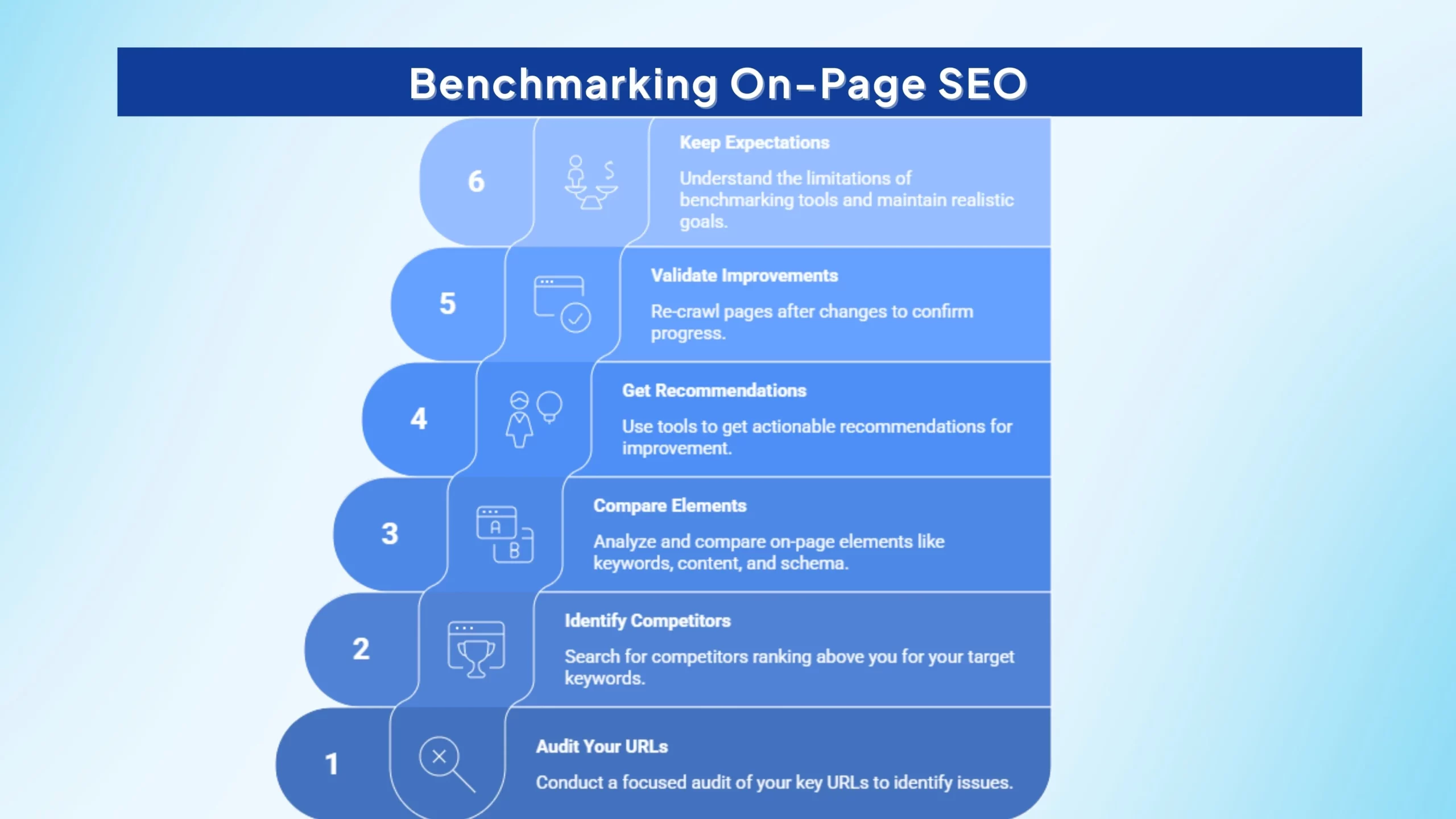
You can benchmark your site’s on-page SEO against competitors by comparing your key pages with those ranking above you and identifying clear gaps in structure, content, and technical setup. This helps explain why competitors outrank you and what to fix first instead of guessing.
Here’s a practical, modern approach:
- A clear pass/fail view
- Issues ranked by priority (do first → do next)
- Actionable guidance per fix
- Keyword placement in titles, H1s, and headings
- Content depth, originality, and structure
- Schema and machine-readable formatting
- Internal linking and image optimization
- Mobile speed and usability
- What the issue is
- Why it matters for rankings and crawlability
- Exactly how to fix it step by step
- Before/after issue status (Fail → Pass)
- Score movement after fixes
- A clear “resolved” indicator showing what still remains
- Not full-site crawlers
- Not guarantee systems for rankings or traffic
- Not auto-fix platforms
1. Start with a focused audit of your own key URLs
Before comparing competitors, audit the pages that matter most (pricing, landing pages, comparison pages). The most helpful tools today work at the single-URL level, running 100+ checks across on-page, technical, semantic, and AI-readiness signals.
Instead of long generic reports, you get:
2. Identify the competitors ranking above you
Search your target keywords and list the pages consistently in the top results. These are your true benchmarks.
3. Compare the core on-page elements side by side
Look at how competitors handle:
4. Use decision-oriented recommendations, not guesswork
The best competitor benchmarking tools don’t just surface problems, they explain:
5. Validate improvements with a re-check loop
One standout feature modern URL audit tools provide is the ability to re-crawl the same page after changes, so you can confirm progress with:
6. Keep expectations realistic
These tools help improve inputs like structure, clarity, and technical hygiene, but they are:
Benchmarking works best when it becomes a repeatable workflow: Audit → Compare → Fix → Re-check → Improve.
How Should I Prioritize Fixes After Completing An On-Page SEO Audit?
After an on-page SEO audit, the biggest mistake is treating every issue as urgent, which slows execution and creates confusion. A better approach is to prioritize fixes based on impact, effort, and crawl importance so teams know exactly what to fix first.
This prioritization is part of your execution workflow, not a scoring system or tool feature. It helps teams decide what to act on first after reviewing audit results, regardless of which on-page SEO tool was used.
Here is a simple priority framework to follow:
High PriorityMedium PriorityLow Priority1. High Priority (Fix First): Crawl and Indexing Blockers
These are issues that directly affect whether search engines can properly access and understand your page:
- Crawl and index errors
- Canonical tag problems
- Broken internal links (4XX)
- Missing redirects
- Severe page speed issues
Once you’ve cleared crawl/index blockers, use Crawl Budget SEO to make sure search engines spend their time on your most important URLs.
If these aren’t fixed, other optimizations won’t matter.
2. Medium Priority (Fix Next): Structure and Machine Clarity
Once the page is crawlable, focus on signals that improve interpretation and eligibility:
- Missing or weak schema markup
- Heading structure issues (missing H1s, skipped levels)
- Duplicate titles or thin metadata
These fixes strengthen relevance and readability for both search engines and AI systems.
3. Low Priority (Fix Later): Minor UX Refinements
These won’t usually block rankings but can improve engagement over time:
- Small layout adjustments
- Minor mobile spacing tweaks
- Non-critical performance polish
Confirm fixes with a re-check loop
Prioritization only works if you can verify progress. That’s why modern URL-level audit tools now include a proof loop: audit one page, fix the top issues, then re-check the same URL to confirm problems moved from Fail → Pass.
Later on, this tool-based validation step becomes essential because it turns SEO from guesswork into a measurable workflow:
Fix → Re-check → Confirm improvement → Move to the next priority.
This is how teams execute faster without getting buried in generic reports.
FAQs
On-page SEO analysis is the process of evaluating individual webpages to see how well they are optimized for search engines. It focuses on content quality, keywords, structure, and technical elements. The goal is to identify issues that affect rankings and user experience.
An on-page SEO technique is any optimization applied directly to a webpage to improve visibility in search results. This includes optimizing titles, headings, content, internal links, and metadata. These techniques help search engines understand and rank the page correctly.
The 80/20 rule in SEO means that 80% of results often come from 20% of efforts. In practice, a small number of high-impact fixes drive most ranking improvements. This is why prioritizing critical on-page issues matters most.
The four main types of SEO are on-page SEO, off-page SEO, technical SEO, and local SEO. Each focuses on a different aspect of visibility and performance. Together, they create a complete search optimization strategy.
Yes, you can run a solid on-page SEO analysis without paying for premium tools like Google Search Console, PageSpeed Insights, Lighthouse, and browser extensions such as MozBar. These help uncover indexing, speed, and basic on-page issues without any cost. While premium platforms offer deeper prioritization and fix guidance, free resources are enough to get started.
Major red flags n an on-page SEO analysis for e-commerce sites include duplicate content from product variations, slow page speed, poor mobile optimization, and missing or duplicate meta tags that hurt click-through rates. E-commerce sites also struggle with thin product descriptions, broken links, and weak technical setup that limits crawlability. Missing Product and Review schema is another common issue that reduces rich result visibility.
Conclusion
A strong on page SEO analysis helps you move beyond generic audits and focus on what truly improves a page’s performance. By prioritizing critical fixes, optimizing content structure, and ensuring technical clarity, you create pages that search engines and users can trust.
Ultimately, the best results come from URL-level action: audit, fix, and re-check progress with confidence. When you treat on-page SEO as a decision-oriented workflow, your site becomes faster, clearer, and more competitive over time.