When I first began creating web content, I didn’t know what header tags were. I simply made text bold or larger and hoped for the best. Over time, I realized structure is crucial. Without proper headers, even strong content gets buried in a messy layout.
HTML header tags organize your content, making it easier to read and understand while also signaling to search engines what your page is about.
Following clear HTML header tag guidelines ensures your structure is consistent, readable, and aligned with on-page SEO best practices.
In this guide, I’ll explain what header tags are, how to use them, and the best ways to structure your content effectively. Whether you’re writing your first blog or updating an old post, this guide will help you make your content clear, structured, and SEO-friendly.
Heading structure (H1–H6) is one of the on page SEO factors that helps search engines understand hierarchy and topic focus.
What Are Header Tags?
Header tags are like titles and subtitles that break your content into clear sections. They use HTML code like <h1>, <h2>, <h3>, and so on to show what’s important on a page.

Understanding header tags starts with grasping the basics of SEO. Think of them like a book. Your <h1> is the book title, <h2> are chapter titles, and <h3> are sub-sections within each chapter.
These tags help both readers and search engines understand your content’s structure. They make your page easier to read, scan, and rank better in search results.
In short, HTML heading tags give your content a clean layout and a strong SEO boost. They make sections clear for both users and search engines while improving readability.
How many `<h1>` tags should be on a single page?
For years, the standard SEO advice was to use just one <h1> tag per page, keeping the main topic clear for both readers and search engines. With the introduction of HTML5 and improvements in how search engines process content, this rule has become more flexible.
Google’s John Mueller has confirmed that having more than one <h1> tag on a page won’t harm your SEO. Search engines are smart enough to read and interpret multiple <h1> tags when they are applied in a logical way that matches the structure of the page.
That said, most SEO experts still recommend sticking to a single <h1> tag. Keeping one main heading ensures a clean hierarchy, avoids potential confusion, and makes it obvious what the page is about. The rest of your content should be organized with <h2> through <h6> tags to break down subtopics.
In short: You can use multiple <h1> tags without penalty, but the best practice is to have one <h1> as your main heading and use other levels for supporting sections. This creates a clear, well-structured page that works for both search engines and your audience.
What’s the difference between `<h1>` and the title tag?
The <title> tag and the <h1> tag are both important for SEO, but they play very different roles in your webpage. Understanding how they work together helps you optimize for both search engines and users.
<title> Tag:
- Location and Role: Found inside the <head> section of your HTML, the <title> defines the official page title. It shows up in browser tabs, search engine result pages (SERPs), and when someone bookmarks your site.
- SEO Value: Search engines rely heavily on the <title> to determine what your page is about. A strong, keyword-rich title tag can improve rankings and boost your click-through rate from SERPs.
<h1> Tag:
- Location and Role: Placed in the <body> of the page, the <h1> tag is the visible headline for your content. It’s the most prominent heading and signals to readers what the page is primarily about.
- SEO Value: The <h1> helps search engines and users understand the main focus of your content. When written clearly, it improves readability, organization, and overall SEO performance.
Why are header tags important for SEO?
Header tags, from <h1> through <h6>, play a critical role in shaping how both users and search engines interpret your content. Beyond just styling text, they create a logical framework that improves readability, accessibility, and SEO performance. Reviewing that structure against an on-page SEO checklist can also help you catch heading issues that weaken clarity, hierarchy, and search relevance.
1- Content Structure and Indexing
Header tags create a hierarchy that organizes your content into main topics and subtopics, something typically evaluated during a technical SEO audit. This makes it easier for search engines to crawl your site, understand context, and evaluate relevance. A well-structured hierarchy signals clarity, which can positively influence rankings.
2- Keyword Optimization
Placing important keywords in your <h1> and <h2> tags gives search engines strong clues about your page’s subject. When done naturally, this increases the chances of appearing in relevant searches, improving visibility without sacrificing readability.
3- Enhanced User Experience
Breaking content into clear, scannable sections helps readers absorb information faster. This improves engagement, encourages visitors to stay longer on your page, and reduces bounce rates — all of which are positive behavioral signals for SEO.
4- Accessibility Support
Screen readers rely on headings to help visually impaired users navigate through content. Proper use of header tags creates a logical flow that makes your content more inclusive and user-friendly, while aligning with best practices search engines support.
5- Potential for Featured Snippets
Well-crafted headings that answer common questions or introduce step-by-step processes can increase your chances of being featured in Google’s snippets. These highlighted answers boost visibility and often drive higher click-through rates from search results.
By using header tags strategically, you improve the overall structure of your page, enhance accessibility, and strengthen your SEO — creating content that performs better for both search engines and your audience.
How Header Tags Improve User Experience
Header tags aren’t just for SEO, they also make your content easier to read and enjoy. They guide your visitors through the page and help them find what they’re looking for faster. A good structure keeps people engaged and makes your content feel more professional.
This structure also plays a major role in how AI tools interpret and display your content in search. Learn how AI search is transforming SEO visibility and why structured content matters more than ever.
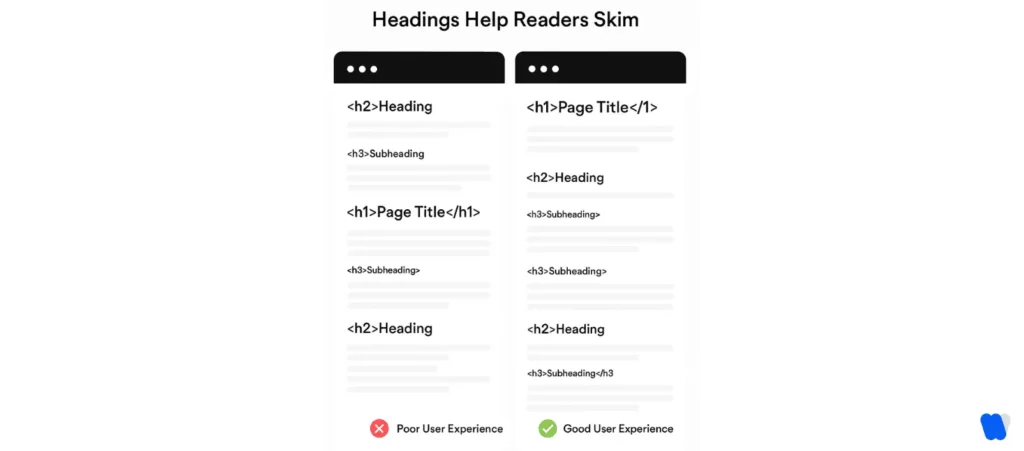
Enhancing Readability and Scannability
Most people don’t read every word, they scan. Headers break your content into clear sections, making it easier to skim and understand. This keeps your audience from feeling overwhelmed by long blocks of text.
Header usage can influence key SEO metrics, like bounce rate and time on page, by improving readability and engagement
Supporting Accessibility and Screen Reader Navigation
Header tags help people using screen readers move through your content with ease. These tools use headings to jump between sections, just like sighted users scan with their eyes. Using proper heading levels makes your page more inclusive for everyone.
Clear header structure boosts the overall readability score of a page, guiding users through logical sections.
Structuring Long Content for Better Engagement
Long articles can feel like a chore to read without structure. Well-placed headers act like signposts, showing readers what’s coming up next. This keeps them engaged and more likely to stay on your page longer.
What are the Benefits of Using <header> and `<footer>` Tags:
Using HTML5’s <header> and <footer> elements adds more than just structure to your page design—they also contribute to stronger SEO and accessibility. These semantic tags give search engines clearer signals about your site layout, while making your content easier for users (and assistive technologies) to navigate.
1. Benefits of Using <header> and <footer> Tags:
1- Improved Content Structure
The <header> tag is often used for elements like the site title, logo, navigation menus, or key headings, while the <footer> usually contains items such as copyright details, contact information, or related links. By applying these tags properly, you create a clear framework that search engines can crawl and interpret with ease.
2- Enhanced Accessibility
Screen readers and other assistive tools use semantic landmarks to help users move through a page. A defined <header> and <footer> provide those anchors, making your site more accessible and user-friendly. This aligns your site with accessibility standards while improving the browsing experience for all visitors.
3- SEO Advantages
Separating structural elements with <header> and <footer> allows search engines to distinguish between core content and supporting information. Using the header and footer tags can improve the search engine optimization for your page by providing that extra layer of clarity. This helps improve how your page is indexed, strengthens relevance signals, and supports higher visibility in search results.
Best Practices for Using Header Tags Like a Pro
Using header tags the right way can boost both your SEO and user experience. It’s not just about slapping on some bold titles; it’s about building a clear, logical structure.
At scale, maintaining this structure across dozens of pages becomes challenging—automation for agency workflows helps ensure consistency and saves time during optimization.
Follow these simple best practices for header tags in web design to get the most out of your headings:
- Use only one H1 per page to clearly define the main topic.
- Organize your content with H2s, H3s, and H4s in a logical flow—don’t skip levels.
- Include relevant keywords in your headers, but keep them natural and readable.
- Avoid keyword stuffing—focus on clarity over repetition.
- Make headers short and to the point (ideally 3–10 words).
- Use headers to reflect actual sections, not just for styling—use CSS for design.
- Keep formatting consistent across your site (like title case vs. sentence case).
- Write engaging, helpful headers that show value and guide readers.
- Align headers with search intent—answer questions or outline steps where needed.
- Check your header structure using SEO tools to spot duplicates or missing levels.
Every header should reflect user intent to help both search engines and readers navigate the content effortlessly.
What are the Common Mistakes to avoid when using heading tags?
Proper use of heading tags is essential for both search engine optimization (SEO) and user experience. Missteps in their application can lead to decreased readability and lower search rankings.
Here are some common mistakes to avoid:
Using Multiple H1 Tags on a Single Page
The H1 tag represents the main title of your page. Adding more than one can confuse both users and search engines about the primary focus of your content. To keep things clear, use a single H1 per page and rely on H2–H6 tags to organize subsections.
Skipping Heading Levels
Jumping from an H1 straight to an H3 disrupts the natural flow of your content outline. Following the proper sequence (H1 → H2 → H3, and so on) helps maintain logical structure, improves readability, and makes it easier for search engines to interpret hierarchy.
Keyword Stuffing in Headings
While keywords are important, cramming them into every heading makes content feel forced and unnatural. Search engines may also view it as over-optimization. Instead, use keywords sparingly and ensure headings remain meaningful and user-friendly.
Using Headings for Styling Purposes
Headings are not meant to be used as a design shortcut. Applying them just to enlarge or bold text sends misleading signals to search engines. Keep heading tags focused on structuring content and use CSS for visual styling.
Overusing Headings
Too many headings can overwhelm readers and make a page look cluttered. Each heading should serve a clear purpose—breaking content into sections that guide users through the material without diluting importance.
Neglecting to Use Headings
Leaving out headings altogether creates long, unbroken blocks of text that are hard to scan. Proper headings improve readability, provide navigation points, and make your content more inviting for both users and search engines.
By avoiding these common mistakes, you’ll build content that’s easier to read, more accessible, and better optimized for search visibility.
How to Add Header Tags (No Coding Experience Needed)
You don’t need to be a developer to use header tags effectively. Most content tools make it super simple, even if you’ve never touched HTML.
Here’s how you can add and manage HTML header tags easily:
Using HTML to Add Header Tags
Header tags in HTML are just wrapped around your text like this:
<h1>Your Title Here</h1>, <h2>Subheading Here</h2>, and so on.
Each tag tells the browser how important that line of text is in your content structure.
How to Add Headers in WordPress and Other CMS Platforms
In WordPress, just highlight your text in the editor and choose a heading level (H1, H2, H3) from the dropdown menu. Platforms like Wix, Squarespace, and HubSpot offer similar tools, no coding required. Always check that you’re using heading tags, not just bold or large font styles.
Tools to Analyze and Audit Header Tags on Your Website
Use tools that analyze header structure and enhance your SERP visibility by aligning with user expectations. You can use free tools to check your header structure. These tools show if you’ve used more than one H1, skipped levels, or missed key opportunities. A quick audit helps you fix small issues before they hurt your SEO or user experience.
Real Examples: Good vs. Bad Header Tag Usage
Sometimes the best way to learn is by seeing what works and what doesn’t. Let’s look at two simple examples to show the difference between good and bad header tag usage.
Good Example
<h1>How to Start a Vegetable Garden</h1>
<h2>Choose the Right Location</h2>
<h3>Sunlight and Soil Quality</h3>
<h2>Select Your Vegetables</h2>
<h3>Best Vegetables for Beginners</h3>
<h2>Prepare the Garden Bed</h2>
Why this works:
- Uses only one H1 for the main topic
- Breaks the content into logical sections using H2s
- H3s support the H2s with more detail
- Easy to scan and follow for both users and search engines
Bad Example
<h1>How to Start a Vegetable Garden</h1>
<h1>Choose the Right Location</h1>
<h3>Best Vegetables for Beginners</h3>
<h5>Sunlight and Soil</h5>
<h2>Prepare the Garden Bed</h2>
What’s wrong here:
- Uses multiple H1s, which can confuse search engines
- Skips heading levels (e.g., from H1 to H3 to H5)
- Headings are out of order and inconsistent
- Makes the page harder to read and structure properly
Clear header structure leads to better rankings and a smoother reading experience. Always build your content like an outline with one main title and clearly nested sections.
To layer this optimization into a full-scale SEO system—from keyword mapping to analytics—head to our complete SEO resource hub.
FAQs
<h2>Benefits of Drinking Water</h2>
This shows a subheading in your content.
Final Thoughts: Build SEO-Friendly and Reader-Friendly Content
Header tags may seem small, but they make a big difference. They help Google understand your content and make it easier for people to read.
Stick to one H1, follow a clear structure, and write helpful, keyword-rich headings. This will not only boost your SEO but also keep your readers happy and engaged.
Take a few minutes to review your past posts—improving your header tags can improve everything else. It’s a small change that leads to big results.