AI agents as web users are now at the center of a growing debate over who gets to access and reuse online content.
On June 30, 2025, Cloudflare blocked Perplexity AI from accessing websites through its infrastructure. The reason? Scraping, without disclosure, permission, or attribution. Within hours, an internet-wide debate ignited: What should be considered, AI agents or bots? Are they the future of search, or the end of content ownership?
This wasn’t just about Perplexity. It was a shot across the bow for every large language model (LLM) consuming the modern web — ChatGPT, Claude, Gemini, Deepseek, LLaMA, and the rest. These systems don’t just browse pages. They retrieve, synthesize, and respond.
But here’s the question brands, publishers, and SEOs are now asking: Are AI agents considered web users? What does AI as web users mean?
The graph shows AI agents, especially ChatGPT, driving growing referral traffic—reaching over 300M monthly referrals by mid-2025—signaling that users are increasingly shifting from traditional web search to LLMs for information. In other words: How do AI web users impact online traffic?
TL;DR — What You’ll Learn in This Blog:
- Why Cloudflare blocked Perplexity—and what it means for LLM access
- How LLMs behave more like users than bots (and why that matters)
- What this shift means for publishers, SEOs, and content creators
- How AI-generated answers change attribution, consent, and value exchange
- The real implications for web traffic, monetization, and data control
- Why we need a new framework to understand “usage” in the GEO era
Whether you believe it’s fair use, theft, or innovation, the reality is clear: LLMs are reshaping how content is consumed, making generative engine optimization important day by day. They’re not just intermediaries between users and websites. Increasingly, they are the interface. And they’re not clicking through.
What Are AI Agents As Web Users, And How Do They Interact With Websites?
AI agents as web users are software helpers that browse and use websites like humans do. Instead of only scraping pages or following fixed scripts, they can read what’s on the screen, understand context, and take actions to complete tasks for a user.
Think of an AI agent as a user sitting in front of a browser. It looks at visible elements (buttons, forms, text, errors), predicts the next best step, and keeps going until the goal is done. That’s why these systems are often called “web users,” not just crawlers.
Because of this shift, websites will increasingly need to be agent-friendly. Clear structure, strong entities, and clean UX paths help agents understand what’s happening and move through tasks faster.
How Do AI Agents Differ From Bots On The Open Web?
AI agents and traditional bots differ mainly in intelligence, adaptability, and independence. Bots are great for repetitive, fixed tasks, but agents are built to reason and complete goals end-to-end.
| Aspect | Traditional Bots | AI Agents (Web Users) |
|---|---|---|
| Core Behavior | Follow fixed scripts and rules (e.g., crawl, scrape, auto-reply). | Plan and act based on goals (e.g., find, decide, complete tasks). |
| Adaptability | Low. Break when layouts or flows change, need reprogramming. | High. Adjust to new pages, popups, or unexpected steps. |
| How They “See” A Site | Mostly read HTML and links. | Interpret the visible screen like a visitor. |
| Interaction Style | Page-driven (collect data from a page). | Goal-driven (finish an outcome across many pages). |
| Actions They Can Take | Limited to scripted steps. | Click, scroll, type, open menus, handle multi-step flows. |
| Task Complexity | Best for simple, repeatable tasks. | Handles complex, multi-stage work with reasoning. |
| Learning Over Time | None. Same behavior unless updated manually. | Improves with experience and context. |
| Autonomy | Needs tight human setup and monitoring. | Can operate independently and coordinate with other tools/agents. |
In short: bots “visit pages,” while AI agents “use websites.” Agents understand context, adapt in real time, and complete tasks like a human user would.
And because agents aim to communicate in a more human, brand-aligned way, it helps to polish their outputs so they don’t sound generic. A quick pass through the free AI Humanizer tool can refine AI-generated text into something natural, consistent, and audience-ready.
What Does it Mean to be a “User” of the Web Today?
For decades, the definition of a user was simple: a human with a browser. Someone who typed, clicked, scrolled, and triggered analytics. But that definition no longer holds.
Today, LLMs like ChatGPT, Claude, and Perplexity interact with the web interact with the web in ways that mirror traditional users—effectively AI agents as website users. They access content, extract meaning, and generate outputs that shape real human decisions—without ever loading a webpage in a browser.
| Feature | Human User | LLM (e.g., ChatGPT, Perplexity) |
|---|---|---|
| Requests and retrieves web content | ✔️ via browser | ✔️ via APIs or crawlers |
| Interprets page meaning | ✔️ reads and comprehends | ✔️ parses and synthesizes |
| Takes action on content | ✔️ clicks, shares, saves | ✔️ generates summaries, citations |
| Leaves analytics trail | ✔️ sessions, events | ❌ often invisible or masked |
| Returns for repeated engagement | ✔️ revisits, subscribes | ✔️ queries regularly at scale |
| Monetizes via ads, subscriptions | ✔️ ad views, purchases | ❌ no direct monetization |
LLMs don’t just crawl the web—they use it. They extract value, repurpose knowledge, and shape downstream user behavior. In many cases, they’re the first point of contact between content and human readers.
Why Cloudflare Banned Perplexity And What It Reveals About the Future of Web Access?
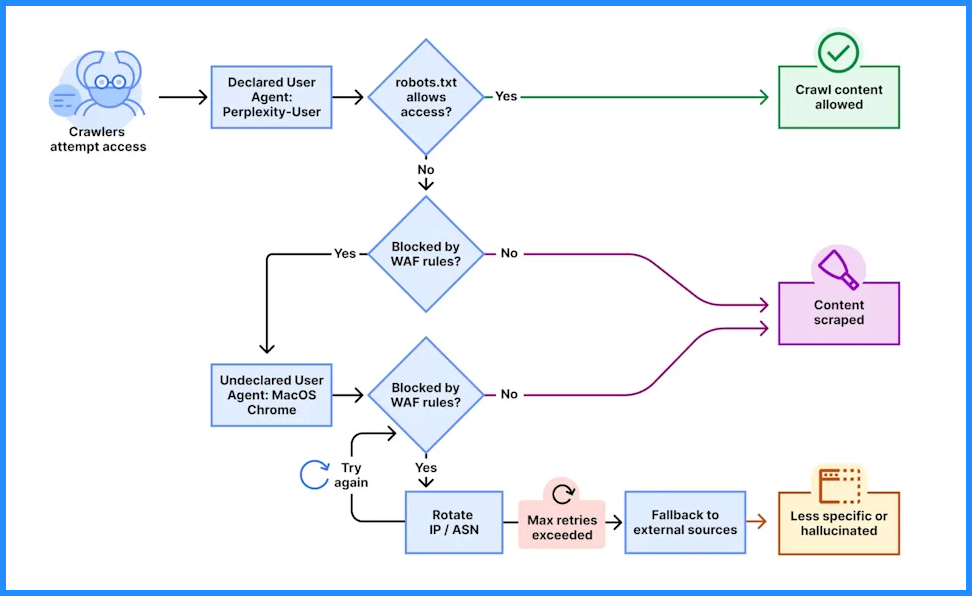
On June 30, 2025, Cloudflare blocked Perplexity AI from accessing sites on its network. Cloudflare said Perplexity was scraping at scale. It was ignoring robots.txt and llms.txt. It was not giving attribution. It was also hiding its identity through AWS and Azure routing.
Cloudflare called this a violation of publisher rights. It also raised a bigger question. Should LLM traffic count as AI agents as web users with access rights? Or should it be treated like bots that sites can block?
Perplexity disagreed. It said agents act for real people. So blocking them is like blocking users. That’s the core tension. Who owns access in an AI-driven web?
Front End View of
If the Internet is going to survive the age of AI, we need to give publishers the control they deserve and build a new economic model that works for everyone — creators, consumers, tomorrow’s AI founders, and the future of the web itself- CEO, Cloudflare
While Cloudflare frames the move as protecting publishers, critics see it as a land grab—positioning itself as a toll booth on the open web, deciding who gets access and at what cost.
How do LLMs Approach Web Search?
LLMs don’t browse like humans. They retrieve, filter, and synthesize—through tightly controlled systems and that’s the foundation of how to rank in Perplexity since the model can only cite what it can reliably fetch and extract.”. Here’s how it works:
Large Language Models (LLMs) enhance web search capabilities by combining real-time information retrieval with their generative abilities. This integration enables them to deliver responses that are more accurate, timely, and contextually relevant.
Retrieval-Augmented Generation (RAG):
One of the most widely used techniques is Retrieval-Augmented Generation (RAG). In this approach, the model retrieves relevant information from external sources, such as live web data, before producing an answer. The process typically involves:
- Retrieval: The LLM queries external databases or the internet to gather useful documents or data.
- Augmentation: The retrieved content is added to the model’s context.
- Generation: The model generates a response that blends both its existing knowledge and the newly acquired information.
This method ensures responses are grounded in the most recent and relevant data, reducing the risk of outdated or inaccurate answers.
Integration with Search APIs:
LLMs also leverage specialized search APIs to streamline real-time data access. These APIs provide large-scale search capabilities designed for LLMs, allowing them to efficiently retrieve, process, and integrate live web information into their outputs.
Challenges and Considerations:
While integrating web search significantly improves LLM performance, it also introduces a set of challenges:
- Information Overload: Pulling in too much or irrelevant data can overwhelm the model, making answers less clear.
- Data Quality: The accuracy of results depends on the reliability and credibility of the retrieved sources.
- Processing Costs: Real-time retrieval can be resource-intensive, impacting both efficiency and scalability.
To overcome these issues, advanced solutions have been developed that filter and prioritize retrieved content, cut through noise, and rank results by relevance. This not only optimizes token usage but also improves the clarity and quality of generated responses.
What Challenges Limit Autonomous AI Agents As Web Users?
Developing AI agents capable of autonomous web navigation presents several significant challenges:
Dynamic and Complex Web Environments
Modern websites rely heavily on dynamic content, client-side rendering, and advanced JavaScript frameworks. This makes it difficult for AI agents to consistently interpret and interact with web elements. Non-standard HTML, frequent design changes, and hidden scripts can all disrupt navigation and reduce reliability.
Visual Processing Limitations
Autonomous agents often struggle with visual reasoning, such as distinguishing key elements on cluttered interfaces or understanding spatial relationships between objects. These limitations can result in errors like selecting the wrong link, overlooking important content, or misinterpreting page layouts.
Data Quality and Bias
The effectiveness of AI agents depends on the quality of their training data. Biased, incomplete, or unrepresentative datasets can lead to flawed decision-making, discrimination, or limited generalization. This risk becomes particularly concerning in high-stakes areas such as healthcare, finance, or policy.
Security and Privacy Concerns
Because autonomous web agents interact directly with online systems, they are exposed to cyber threats such as adversarial inputs, phishing attacks, and data leaks. Ensuring strong safeguards, encryption, and privacy protocols is crucial, especially when handling sensitive or personal information.
Ethical and Legal Implications
AI agents acting independently raise complex questions of accountability and regulation. They may unintentionally breach copyright, violate terms of service, or make ethically questionable decisions. Clear legal guidelines, oversight mechanisms, and governance frameworks are required to manage these risks effectively.
Error Propagation in Multi-Step Tasks
Many navigation tasks involve multiple sequential actions, such as logging in, searching, and extracting data. Even a small mistake early in the workflow can compound into larger failures, making recovery difficult and reducing task completion success. Designing error-tolerant and self-correcting systems remains a key challenge.
Why This Matters
Here’s the uncomfortable truth: as a user, you don’t control how these systems search the web. You’re relying on:
- Index freshness (which you can’t influence)
- Retrieval scope (how many pages are fetched)
- Filtering layers (what gets passed to the model)
And each of those layers is optimized for cost, speed, and safety—not completeness.
That’s why AI agents as web users don’t experience the web the same way humans do. If ChatGPT limits itself to one webpage per query to reduce token usage, that affects your result.
If Perplexity deprioritizes a site that hasn’t been indexed recently, that affects what it cites. And if Gemini decides summaries are better than links, you may never reach the original source at all.
Are LLMs Replacing Humans in Online Discovery?
The web used to be a direct conversation between people and pages. A user searched, scanned results, clicked a link, and explored the site. But today, that first touchpoint is increasingly handled by something else entirely: a language model.
LLMs don’t just help with discovery — they’re starting to replace it.
According to Wall Street Journal, In June, 5.6% of search activity in the United States was directed to chatbots instead of traditional search engines—an increase from 2.48% in June 2024 and 1.3% in January 2024.
That’s not a rounding error. It’s the early signal of a structural shift. Here’s how the discovery chain now often works:
- User asks a question in ChatGPT, Perplexity, or Claude
- The model fetches sources, synthesizes an answer
- The user reads the answer — and never visits the original sites
- Credit, context, and traffic are stripped away
Here’s a visible representation of how ChatGPT searches the web:
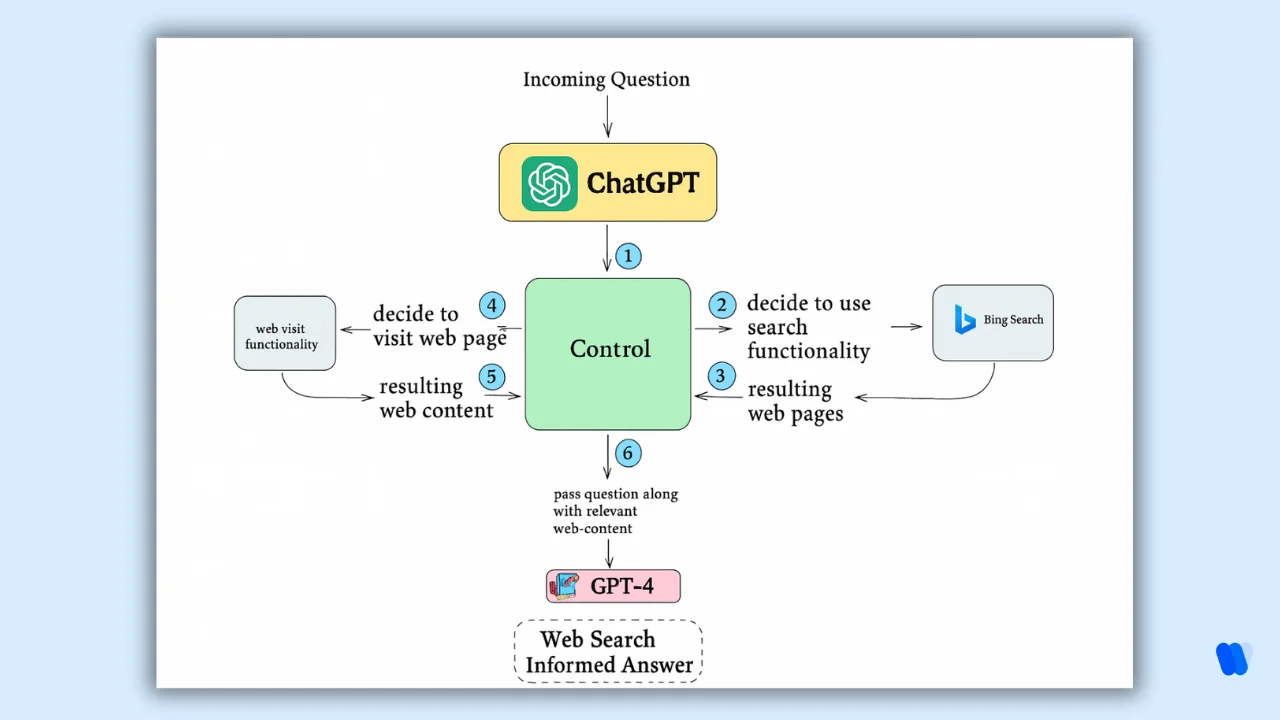
This means content is still being found, but not by humans. It’s being consumed, parsed, and reused by machines — then reshaped into answers that render visits optional.
How are AI Agents Transforming Web Browsing Experiences?
AI agents are reshaping web browsing by turning browsers into intelligent assistants that understand intent, automate processes, and deliver personalized interactions. This transformation can be seen through several key developments:
1. Rise of AI-Integrated Browsers
Companies are embedding AI into browsers to improve productivity and user experience:
-
Opera’s Neon Browser: Neon introduces built-in AI that can perform actions directly on webpages. With features like Neon Do, it autonomously navigates and completes tasks while prioritizing privacy and speed.
-
Microsoft Edge’s Copilot Mode: Edge now includes Copilot Mode, which helps users by structuring search flows, comparing information across multiple tabs, and enabling voice-based commands to streamline browsing.
2. Automation of Online Workflows
AI agents are reducing manual effort by managing complex digital tasks:
-
OpenAI’s Operator Tool: Operator interacts with forms, buttons, and menus to accomplish tasks like organizing to-do lists or planning trips, making browsing more action-driven.
-
TinyFish’s AI Agents: TinyFish develops intelligent web agents that simulate human browsing, automating tasks such as price tracking and large-scale data collection for industries like retail and travel.
3. Emergence of the Agentic Web
The internet is evolving into an ecosystem where AI agents act independently and collaboratively:
-
Agentic Web Frameworks: Frameworks like webMCP embed structured metadata into webpages, enabling AI systems to interpret and interact with content more effectively and with less computational cost.
-
SkillWeaver: This system allows agents to improve autonomously by discovering, refining, and reusing skills, making them progressively more capable over time.
4. Personalization and Interaction Upgrades
AI is making browsing experiences more tailored and interactive:
-
Personalized Engagement: By analyzing browsing history, location, and past purchases, AI agents deliver customized content, promotions, and recommendations.
-
Streamlined Support: Agents provide instant help for common queries, track orders, and resolve issues in real time, leading to more efficient customer service.
How AI Agents Are Changing Browsing And Web Revenue?
AI agents like ChatGPT, Claude, Gemini, and Perplexity are emerging as the new gateway to online information.
Rather than acting as passive tools, they now function as active intermediaries, retrieving, interpreting, and presenting knowledge directly to users.
This change is reducing the need for traditional human browsing and placing growing pressure on the ad-driven business models that have sustained the open web for decades.
Decline in Traditional Web Traffic
For years, the web economy thrived on clicks, pageviews, and subscriptions. Every visit translated into measurable engagement and monetization opportunities.
But AI agents are breaking this cycle. A user can simply ask a question, receive a summarized response, and move on—without ever landing on the original site.
The data confirms this trend. In the United States, chatbot-driven search activity grew from 1.3% in early 2024 to 5.6% by June 2025.
Meanwhile, ChatGPT and similar systems already generate over 300 million monthly referral interactions.
While this shows AI can still direct some traffic, the majority of interactions stop within the AI interface, leaving publishers invisible.
Pressure on Advertising Revenue
This shift undermines the traditional advertising model. Ads rely on human attention—impressions, clicks, and time spent on site.
But AI agents don’t view banners, skip videos, or trigger analytics events. Even when they use publisher content to build responses, they often fail to attribute the source, stripping away brand visibility.
Advertisers face what experts call an “attention lemons” problem: as more traffic flows through AI intermediaries, the quality of attention becomes uncertain.
This lowers trust in ad metrics, reduces pricing power, and destabilizes the very foundation of open-web monetization.
Emerging Monetization Strategies
In response, publishers and businesses are experimenting with new models better suited for an AI-first internet:
- API Access & Licensing – Delivering structured data through paid APIs or licenses so AI systems compensate publishers for usage.
- Generative Engine Optimization (GEO) – Going beyond SEO by structuring content to be machine-readable, improving the odds of being retrieved and cited in AI-generated answers.
- Direct AI Integration – Embedding services, product catalogs, or datasets inside AI platforms, ensuring visibility even if users never visit the website.
- Pay-to-Play Access – Restricting or gating AI crawlers unless access agreements are made, a trend highlighted by Cloudflare’s high-profile block of Perplexity in mid-2025
Implications for the Future of the Open Web
This transition forces a redefinition of what it means to “use” the web. Historically, a user was a human browsing pages.
Today, more of that role belongs to AI agents as web users acting on behalf of humans. If this trend accelerates, the ad-supported open web will struggle to survive in its current form.
Large publishers may adapt by striking deals with AI companies. Smaller creators risk becoming invisible.
The future will likely depend on new economic models. Licensing, API access, and AI partnerships may replace traditional clicks and impressions as the main engines of monetization.
AI agents are rapidly replacing human browsing as the primary gateway to information. That weakens ad revenue, but opens the door to direct integrations with AI platforms.
The open web won’t disappear, but its economic structure is being rewritten. Visibility will depend as much on machines retrieving content as on humans clicking links.
How Can Marketers Adapt to LLMs Crawling Web Search?
As large language models (LLMs) like ChatGPT, Perplexity, and Google’s Search Generative Experience reshape the search landscape by surfacing direct answers instead of only listing web links.
Marketers need to shift their strategies to stay relevant and visible. Here are some practical approaches:
Did you know?
Structure Content for Machine Readability
LLMs look for precise, structured information. To boost discoverability:
- Use Clear Headings and Takeaways: Break content into logical sections with descriptive titles and provide upfront summaries to support AI extraction.
- Leverage Modular Content: Present ideas in independent blocks so that each section can stand on its own when pulled into AI-generated answers.
This makes your content easier for AI to process and more likely to be included in responses.
Establish Topical Authority
Search models lean toward trusted and authoritative sources. To strengthen your position:
- Build In-Depth Content Hubs: Cover key industry themes with comprehensive guides and related posts to reinforce your brand’s expertise.
- Invest in Digital PR: Share original data, insights, or reports that earn citations from credible publications.
A reputation for authority improves your chances of being referenced by AI-driven search systems.
Optimize for Conversational Queries
Because LLMs are designed around natural language, it’s important to align content with how users phrase questions:
- Provide Direct Answers: Anticipate FAQs in your niche and respond with clear, concise explanations.
- Adopt a Conversational Tone: Mirror how people ask questions so your content feels natural in AI-powered results.
This alignment increases the likelihood of your material being pulled into AI answers.
Ensure Technical Accessibility
If your site isn’t technically accessible, LLMs may miss your content. To prevent that:
- Keep Websites Crawlable: Check robots.txt and ensure that essential information isn’t hidden behind scripts or gated content.
- Add Structured Data: Use schema markup so AI can better understand your content’s meaning and context.
Strong technical foundations improve the way LLMs interpret and surface your content.
Monitor AI Visibility
Understanding how your brand appears in AI-generated outputs is crucial:
- Track Mentions Across AI Tools: Regularly review how platforms like ChatGPT or Google’s AI Overviews reference your brand.
- Adjust Based on Insights: Correct inaccuracies and fill content gaps to shape how AI represents your brand.
Consistent monitoring helps refine your strategy and maintain presence in the AI-first search ecosystem.
By taking these steps, marketers can successfully adapt to the rise of LLM-powered search, ensuring their content remains visible, credible, and aligned with AI-driven discovery.
How Can Wellows Help You Adapt To LLMs Crawling Web Search?
Wellows is an AI Search Visibility platform built to align your content with how modern LLMs discover, interpret, and reuse information. Instead of optimizing only for human clicks, Wellows helps you stay visible where AI agents pull answers — so you’re not just ranked, you’re included.
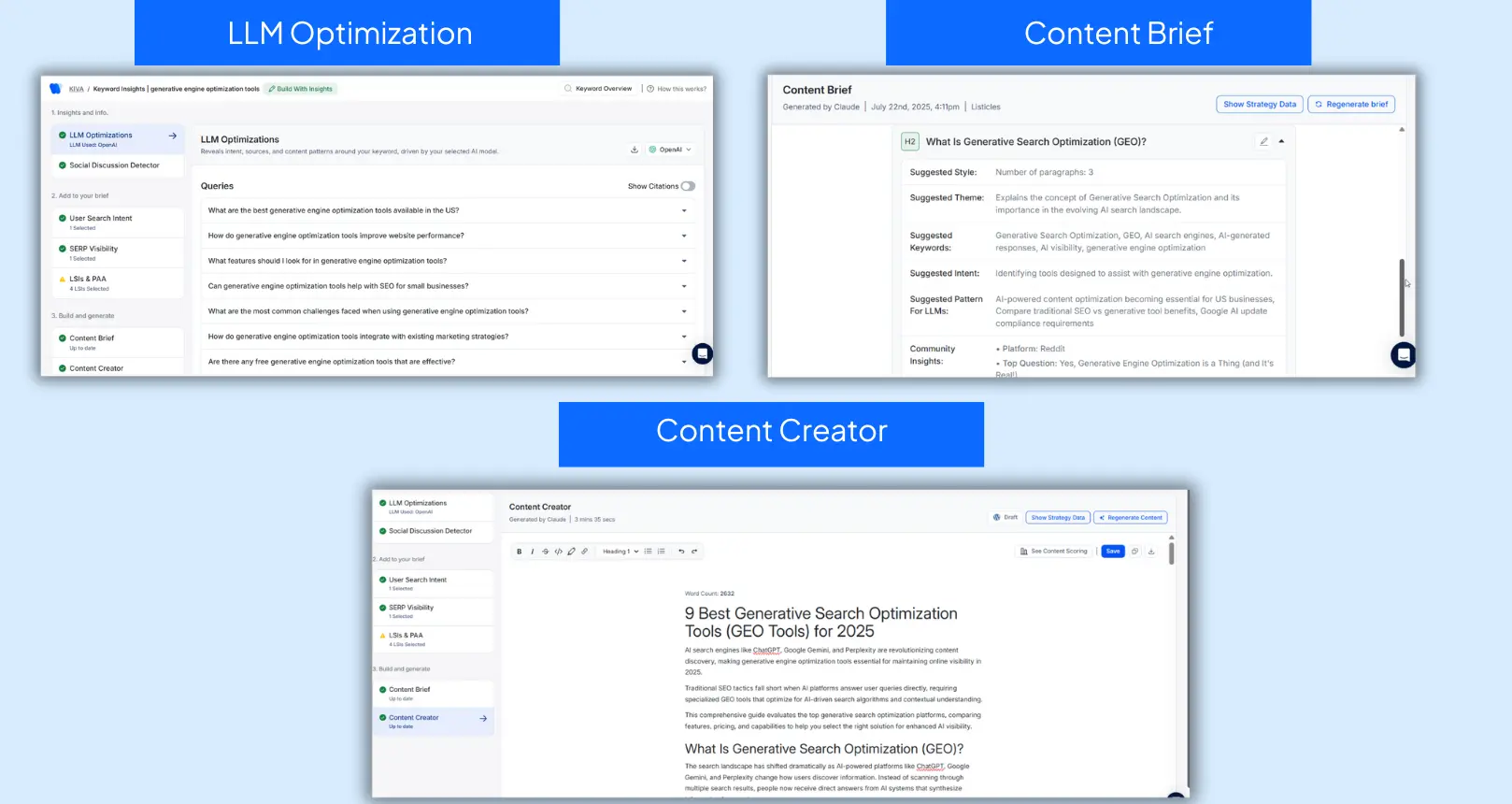
- LLM Optimization (OpenAI Only) shows which queries ChatGPT prioritizes and what content formats it is most likely to retrieve and cite.
- Content Briefs generate LLM-friendly outlines with clean semantic structure, suggested patterns, and real community-driven insights.
- Content Creator (powered by KIVA, a legacy Wellows feature) supports content creation and improves AI visibility by producing drafts designed for retrieval, citation, and synthesis inside LLM pipelines.
The Most Advanced AI-Powered Browsers For Autonomous Web Navigation In 2026
AI browsers in 2026 are not just normal browsers with a chatbot. The best ones can understand your goal, read what is on the screen, and take actions across websites. Think of them like a helper that can browse with you or even for you.
Here are the leading AI-powered browsers that offer the most advanced autonomous navigation features in 2026, built for a world where AI agents as web users increasingly browse and act on our behalf.
1. Microsoft Edge With Copilot Mode
Edge added Copilot Mode to make browsing more task-based.
- It can summarize pages and compare information from multiple tabs.
- It helps you stay organized by grouping searches into topics.
- It supports voice-style browsing for faster actions.
- Microsoft is pushing it toward deeper automation like bookings, with user consent.
Best for: people who want AI help while still using a familiar browser.
2. ChatGPT Atlas By OpenAI
ChatGPT Atlas is built around agent-style browsing. It is designed to do tasks inside the browser, not just answer questions.
- It keeps a ChatGPT panel open while you browse.
- It can fill forms, follow steps, and complete tasks end-to-end.
- It remembers preferences so tasks get easier over time.
- Desktop versions are ahead, with mobile versions rolling out.
Best for: users who want hands-free browsing and task completion.
3. Perplexity Comet
Comet mixes Perplexity AI search with browser automation.
- Strong AI search and instant page summaries.
- Helps with research, writing, and sorting info across tabs.
- Lets users give natural language commands to handle tasks.
- Still improving safety for sensitive workflows.
Best for: research-heavy users who want AI search plus light autonomy.
4. Opera Neon
Opera Neon is one of the most “agent-first” browsers in 2026. It is built to act like a real assistant on the web.
- Understands intent and completes multi-step tasks.
- Lets users describe what they want in simple language.
- Can adjust when a website changes flow or layout.
Best for: users who want a browser that can behave like an autonomous worker.
5. Fellou Browser
Fellou is built from the ground up for autonomous agent browsing.
- Can plan tasks and execute actions across sites.
- Designed for deeper automation, not just chat.
- Focuses on finishing workflows like bookings, research, and tool-based tasks.
Best for: power users who want strong automation as the main feature.
Final Take
If you want the highest level of autonomous browsing in 2026, the top picks are:
- Most autonomous: Opera Neon, Fellou, ChatGPT Atlas
- Best hybrid help: Edge Copilot Mode, Dia, Perplexity Comet
The web is shifting from human-first browsing to agent-first task completion. These browsers are the front line of that change.
For a comprehensive view of the AI search ecosystem, explore our detailed breakdown of the best AI search engines in 2026.
How Do AI Web Agents Handle Websites That Keep Changing Their Layout?
Websites change all the time. A checkout button moves. A menu label switches from “Billing” to “Payments.” A new popup shows up after login. Traditional bots usually fail here because they depend on fixed scripts and exact page structures.
AI web agents handle these changes more smoothly because they don’t just follow code rules. They read the page like a human and adjust their actions when the site looks different.
Did you know?
They use computer vision to read what’s visible
Instead of relying only on HTML selectors, many agents “see” the page. They scan the screen, locate buttons, forms, and menus by their appearance and position, and then interact with them. So even if the website redesigns its layout, the agent can still spot the right element visually.
They follow your intent, not a rigid path
When you give an instruction, the agent focuses on the goal. For example, if you ask it to “download invoices,” it looks for meaning on the page — words like “invoices,” “billing,” or “transactions.” If the site renames or relocates that section, the agent keeps searching for the intent instead of stopping.
They adapt while the page changes mid-task
Web pages are dynamic. Content loads late, forms update, or modals appear unexpectedly. AI agents watch these changes in real time. If something blocks the flow, they pause, re-check the screen, and choose a new step. This keeps them moving even on messy or fast-updating sites.
So overall, AI web agents stay reliable on changing websites because they combine visual understanding, intent-based navigation, and real-time re-planning. That’s why they work far better than older bots on modern, constantly evolving web experiences.
What Security Risks Come With Letting AI Agents Access My Accounts?
Yes. Letting AI agents as web users log into your web accounts or handle personal data can be useful, but it also opens new security risks. These systems don’t just read pages — they can take actions. So if something goes wrong, the damage can be bigger than with normal browsing.
1.Prompt Injection Attacks (Hidden Instructions On Web Pages)
AI agents treat web content as input. Attackers can hide malicious instructions inside a page (or even in comments, listings, or embedded text). The agent may follow those instructions and leak data, click unsafe links, or perform actions you didn’t ask for. This is one of the biggest risks in 2026 and affects most AI browsers and agents.
Why it matters: you might be on a normal site, but a hidden prompt could trick the agent into doing something dangerous in the background.
2.Excessive Permissions And Privilege Escalation
Agents often need permissions like reading emails, using saved logins, or accessing your history to complete tasks. If you give them more access than needed, a compromised agent can do far more harm.
Why it matters: the more power the agent has, the more an attacker can do if they hijack it. Security playbooks recommend “least privilege,” meaning agents should only get the minimum access required.
3.Data Leakage Through Agent Memory Or Logs
Many agents store “memory” to personalize browsing. That memory can accidentally retain sensitive details (credentials, addresses, private messages). If the system is breached, those stored traces can leak.
Why it matters: even if you never meant to share certain details, the agent may hold onto them.
4.Tool Misuse And Unintended Actions
Agents can chain tools together — browser actions, plugins, payment flows, file access. If they misunderstand context (or are manipulated), they might complete the wrong action, such as sending a message to the wrong person or confirming the wrong purchase.
Why it matters: this is not “just a wrong answer,” it is a wrong action.
5.Supply Chain Vulnerabilities
Agents rely on third-party models, browser layers, extensions, and APIs. If any dependency is compromised, attackers can enter through that route.
Why it matters: your security is only as strong as the weakest tool the agent depends on.
How To Reduce These Risks (Practical Checklist)
- Use least privilege: only give an agent access to what it must use.
- Require confirmation for actions: keep a human approval step for payments, logins, or messages.
- Separate browsing contexts: use AI agents for low-risk tasks, and a normal browser for banking or sensitive accounts.
- Watch activity logs: prefer agents that show clear logs of what they did.
- Avoid saving passwords inside the agent: use a password manager so credentials stay outside the agent’s memory.
Bottom line: AI agents can save time, but giving them direct access to your accounts adds a new attack surface. If you use them, start with controlled, low-risk tasks and keep sensitive logins behind strict approvals.
- User Intent in Generative Engines: How to Understand User Intent in Generative Engines?
- Pattern Recognition: How Can Pattern Recognition Improve Visibility in AI-Generated Answers?
- Reddit for GEO: Why Generative Engines Love Reddit?
FAQs
LLMs reduce reliance on search result pages by answering queries directly. This lowers click-through traffic and forces marketers to optimize content for inclusion in AI-generated answers—not just for traditional search rankings.
SEO focuses on ranking in search engine results. GEO is about making your content structured, retrievable, and usable by LLMs so that it can appear in AI-generated outputs—even when no links are shown.
Yes. Many LLMs retrieve public content from the web unless explicitly blocked via robots.txt or infrastructure rules. Some platforms like Cloudflare have begun enforcing these boundaries, sparking debate over consent and access.
LLMs favor original, structured content that is concise, source-backed, and clearly written. Use schema markup, clear headings, and straightforward language to make your content more likely to be retrieved and cited.
Yes, but only with safe controls. Good agents use your approval for logins and sensitive actions, and they work best when passwords stay in a password manager instead of inside the agent.
What Comes Next for Web Discovery in the Age of GEO?
AI agents as web users are turning generative search into the new front door of the internet. Generative search isn’t a side feature anymore. It’s where discovery starts. As LLMs become the default way people find, filter, and receive information, the old search model is being rewritten.
That’s why Generative Engine Optimization (GEO) is no longer optional. It sits above SEO as a strategic layer. It focuses not just on ranking for humans, but on being retrieved, cited, and trusted by AI systems.
Web discovery is shifting away from clicks. It’s moving toward content availability inside LLM pipelines. The winners won’t be the loudest brands. They’ll be the most usable, the most parsable, and the most aligned with how machines now judge relevance.
Key Takeaways for the Impact of LLMs on Web Search
- Inclusion > Indexing Being crawled isn’t enough. You need to be structured, trusted, and retrievable to appear in generative answers.
- Optimize for Retrieval, Not Just Ranking Use clear headers, concise answers, structured formats, and up-to-date metadata to improve machine usability.
- Monitor AI Surfacing To check how your content appears in LLM, let’s say in perplexity, use the Perplexity visibility tracker, and track which pages are cited, which are ignored, and how AI agents actually retrieve your content.
- Build Machine-Friendly Authority LLMs reward clarity, originality, and specificity. Publish source material, expert quotes, data-backed insights—not vague summaries.
- Expect a Pay-to-Play Future As models scale, access may be gated. Partnerships, opt-ins, or paid access to your content may determine whether you’re in or out.
- GEO Complements SEO Don’t abandon traditional optimization—it feeds the index that generative models still rely on. But now, it’s the floor, not the ceiling.