On page SEO factors are the elements you optimize directly on a webpage, such as content, structure, keywords, and HTML signals, to help search engines understand what the page is about and whether it satisfies user intent. These SEO on page factors determine how clearly your content is interpreted, ranked, and surfaced in search results.
On-page SEO is the foundation of how search engines understand, rank, and display your content. Pages lacking clarity, structure, or intent alignment struggle to rank and earn AI citations, making LLM citation tracking an essential complement to on-page SEO
Did you know?
In this guide, I have shared the most important on page SEO factors influencing rankings today, including the most important on-page seo factors 2026 for Google and AI-driven search systems.
What is On-Page SEO?
On-Page SEO refers to the practice of optimizing individual web pages so search engines can better understand their content and relevance.
It includes everything you can directly control on a page, such as content quality, keyword usage, headings, internal links, images and videos, alt text, URLs, and HTML elements like title tags and meta descriptions.
When done correctly, on-page SEO improves visibility, increases click-through rates, and makes your content easier for both users and AI systems to read, interpret, and cite.
What are the 13 Most Important On-page SEO Factors for Ranking Higher in Google in 2026?
Essential on page SEO factors are the elements you optimize directly on a webpage to improve its relevance, clarity, and visibility in search results. These on page factors in SEO help search engines understand your content while ensuring it satisfies user intent.
Below is an on page SEO factors list covering these 13 on page factors SEO, along with practical tips to help you optimize each one effectively.
Visual Assets and Media Support
Title Tags and Meta Descriptions
URL Structure and Page Hierarchy
Internal Linking and Contextual Signals
User Experience and Engagement Signals
Page Speed and Core Web Vitals
Mobile Optimization and Responsive Design
1. Content Quality and Search Intent Alignment
Content quality is the foundation of all on page SEO factors. Search engines reward pages that satisfy user intent and fully cover the topic, not those built around keyword repetition.
Even small intent mismatches can lead to ranking drops, which is why aligning structure, depth, and format with user expectations matters more than word count. Using an on-page SEO checklist can help you review these elements systematically and catch gaps before they affect performance.
Understanding Search Intent
Search intent reflects why a user performs a search. Most queries fall into three main categories:
- Informational: Users want answers, explanations, or step-by-step guidance
- Transactional: Users want to buy, sign up, or complete an action
- Navigational: Users want to reach a specific website or brand
- Commercial: Users are researching options, comparing products or services, or evaluating solutions before making a decision
Intent mismatch is a frequent cause of visibility loss in AI SEO. For example:
- Publishing a sales page for an informational query
- Writing a shallow definition when users expect a full guide
- Leading with CTAs before answering the core question
- Search engines interpret poor engagement as a signal that the page did not meet user expectations.
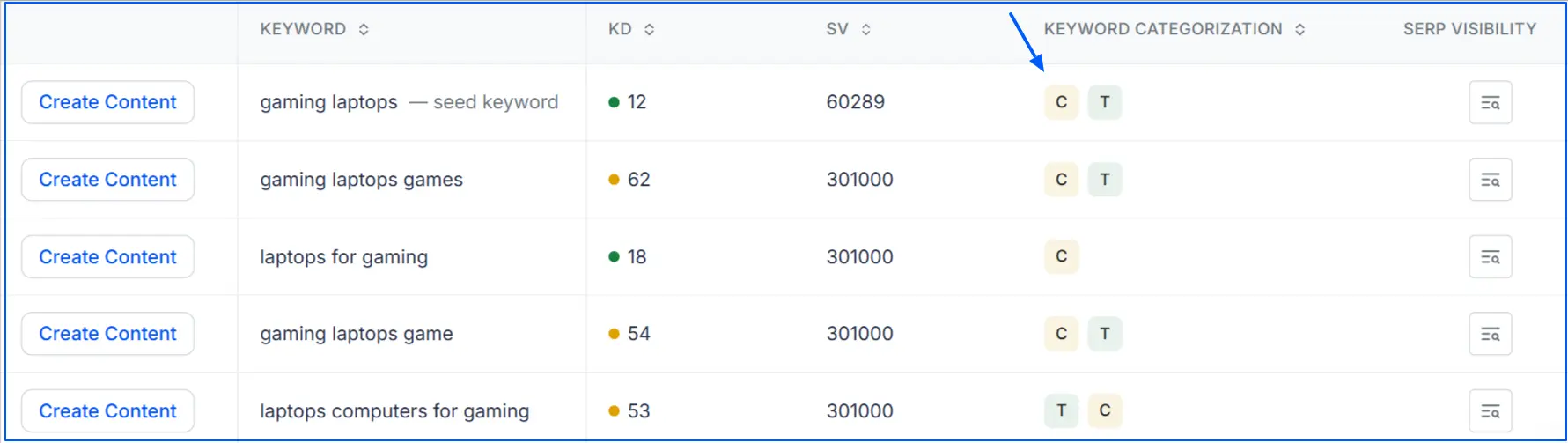
You can use Wellows to check the search intent for your keyword.
Topical Depth and Semantic Coverage
Strong on-page SEO focus on covering the entire topic, not just targeting a single keyword. Pages that answer related questions and include supporting context are easier for search engines to understand and trust.
To improve topical depth:
- Address related subtopics users commonly search for
- Use connected entities, attributes, and real-world examples
- Answer follow-up questions naturally within the content
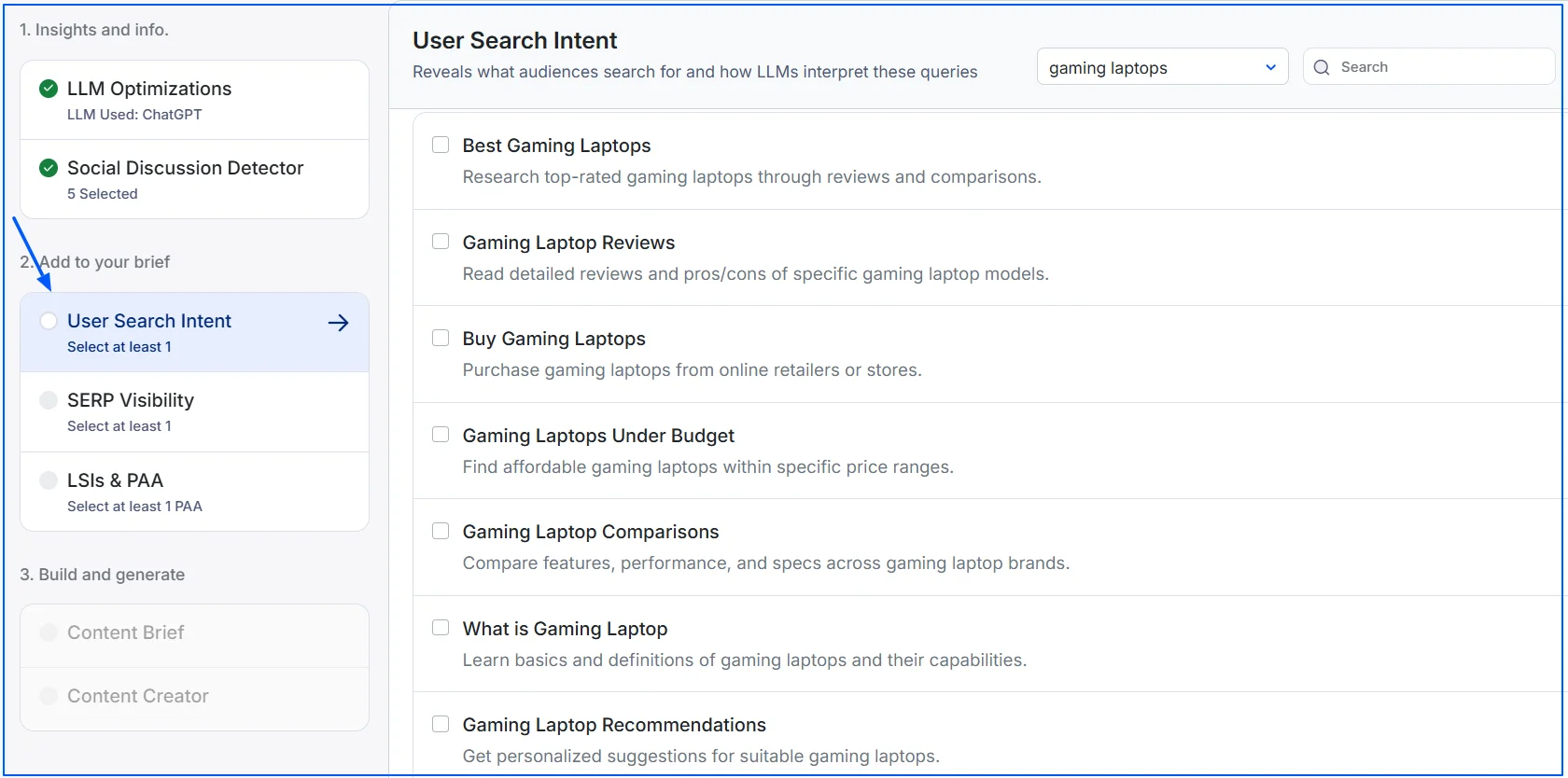
This semantic coverage increases topical authority and improves visibility across multiple related queries. Wellows help you analyze user search intent and identify relevant entities to cover for deeper semantic coverage.
Content Freshness and Accuracy
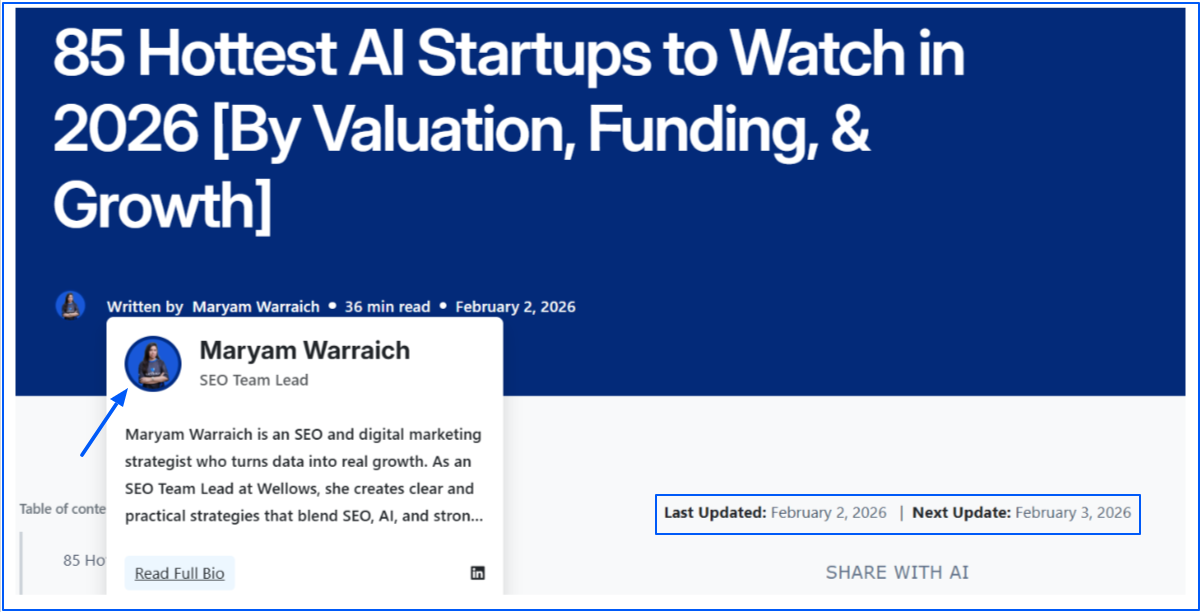
Freshness matters most for topics that change frequently, such as tools, statistics, pricing, or SEO best practices. Outdated information weakens credibility and reduces rankings over time.
Focus on:
- Adding new insights when search intent evolves
- Revising sections affected by industry changes
- Updating statistics, examples, and screenshots

For evergreen topics, accuracy is more important for Generative Engine Optimization (GEO) than constant updates. As long as the content remains correct and useful, it can rank consistently with minimal refreshes.
E-E-A-T (Experience, Expertise, Authoritativeness, Trustworthiness)
E-E-A-T strengthens on page SEO factors by helping search engines evaluate content quality and credibility. Pages that demonstrate real expertise and experience are more likely to rank and be cited.
Ways to improve E-E-A-T on-page:
- Show first-hand experience, examples, or case references
- Use clear author information and credentials
- Cite reliable sources for factual claims
- Keep content accurate, transparent, and up to date
2. Visual Assets and Media Support
Visual elements enhance content clarity and user engagement, which indirectly supports On Page SEO Factors. Images, charts, and diagrams help explain complex ideas and keep users on the page longer.
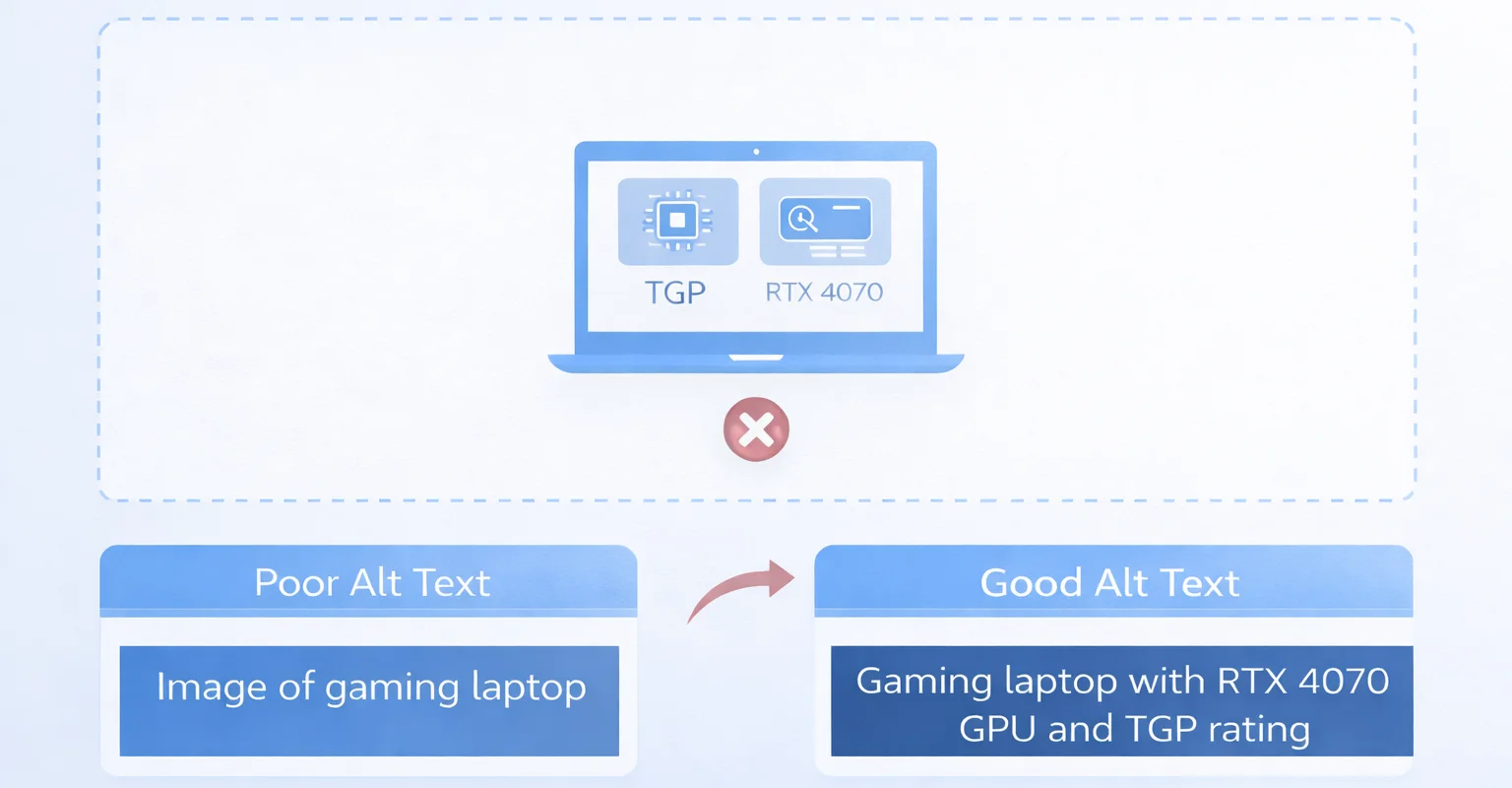
Here are the best practices on how to optimize images with alt text for on-page SEO without slowing down your site:
- Write clear, descriptive alt text that explains what the image shows and include a keyword only when it fits naturally
- Use relevant images that support the content, not generic stock photos
- Place visuals near related content sections
- Use modern image formats like WebP or AVIF and compress files to reduce size without losing quality
- Resize images to their displayed dimensions and use responsive images so the correct size loads on each device
- Lazy-load images below the fold while keeping above-the-fold images loading immediately
- Serve images through a CDN with proper caching to improve load speed and reliability
Well-optimized visuals improve user experience and reinforce topical relevance without distracting from the main content. Here is an example of what a poor and good alt text means:
Always ensure to minimize file size of your visuals. It helps reducing page load time. When mobile load time rises from 1s to 10s, bounce probability increases 123%.
3. Title Tags and Meta Descriptions
Title tags and meta descriptions are important when optimizing for on page SEO because they influence how your page appears in search results and whether users click on it.
Writing SEO-Friendly Title Tags
Title tags help search engines understand what a page is about and help users decide whether to click. A strong title balances keyword relevance with readability.
Google says title links are “critical” for giving users quick insight into relevance, and it may rewrite them based on page signals.
Best practices for title tags:
- Place the primary keyword naturally toward the beginning
- Avoid keyword stuffing or repeating variations
- Use clear language that reflects the page content
- Length matters, but clarity matters more:
- Aim for 50–60 characters as a guideline
- Remember Google truncates by pixel width, not character count
- Test titles on desktop and mobile where possible
Using modifiers can improve CTR when done naturally:
- Examples include “best,” “essential,” “guide,” “checklist,” or “updated”
- Only use modifiers that genuinely match the content
Meta Descriptions and Click Behavior
Meta descriptions do not directly influence rankings, but they strongly impact click behavior. In many cases, Google rewrites descriptions, but a well-written one still helps guide the snippet.
Effective meta descriptions focus on users:
- Explain what the page covers in plain language
- Highlight a clear benefit or outcome
- Support the title without repeating it
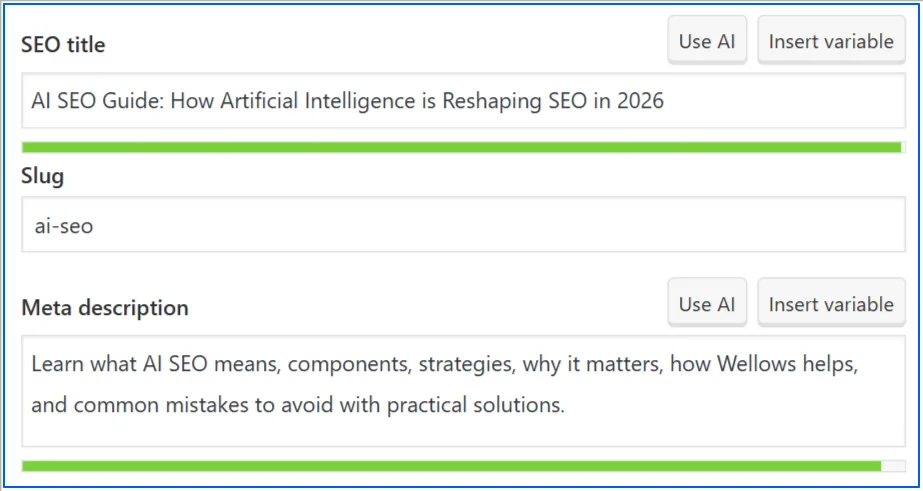
Here is an example of meta title and meta description where AI SEO keyword is used contextually:
4. URL Structure and Page Hierarchy
URL structure and page hierarchy are important factors for on page SEO because they affect crawl efficiency, clarity, and how search engines understand the relationship between pages.
A clean, logical structure helps both users and search engines navigate your site with less friction.
Short, Readable URLs
Short URLs are easier to understand, remember, and share. They also reduce the risk of truncation and duplication issues.
Best practices for readable URLs:
- Use lowercase letters and hyphens
- Include only the main keyword or topic
- Remove unnecessary words like “and,” “the,” or “of”
Logical Folder Structure
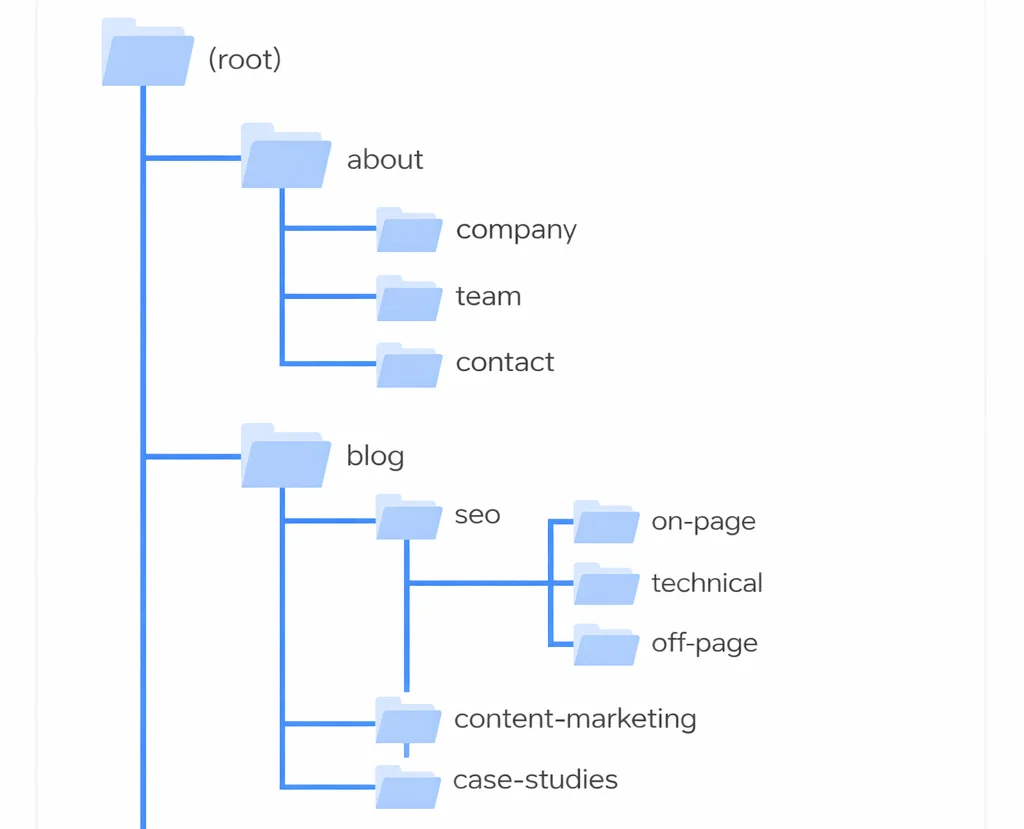
Folder structure helps define content relationships across your site. A logical hierarchy shows how pages fit together topically.
Effective folder structures:
- Group related content under one category
- Keep depth shallow whenever possible
- Reflect how users naturally browse the topic
For example, grouping all SEO-related guides under one directory helps reinforce topical authority.
Avoiding Parameters and Duplication
URL parameters can create multiple versions of the same page, leading to duplication and crawl waste. While parameters are sometimes necessary, they should be handled carefully.
To minimize issues:
- Avoid unnecessary tracking parameters in indexable URLs
- Use canonical tags for duplicate or similar pages
- Keep internal links consistent and point to the preferred URL
5. Heading Structure (H1–H6)
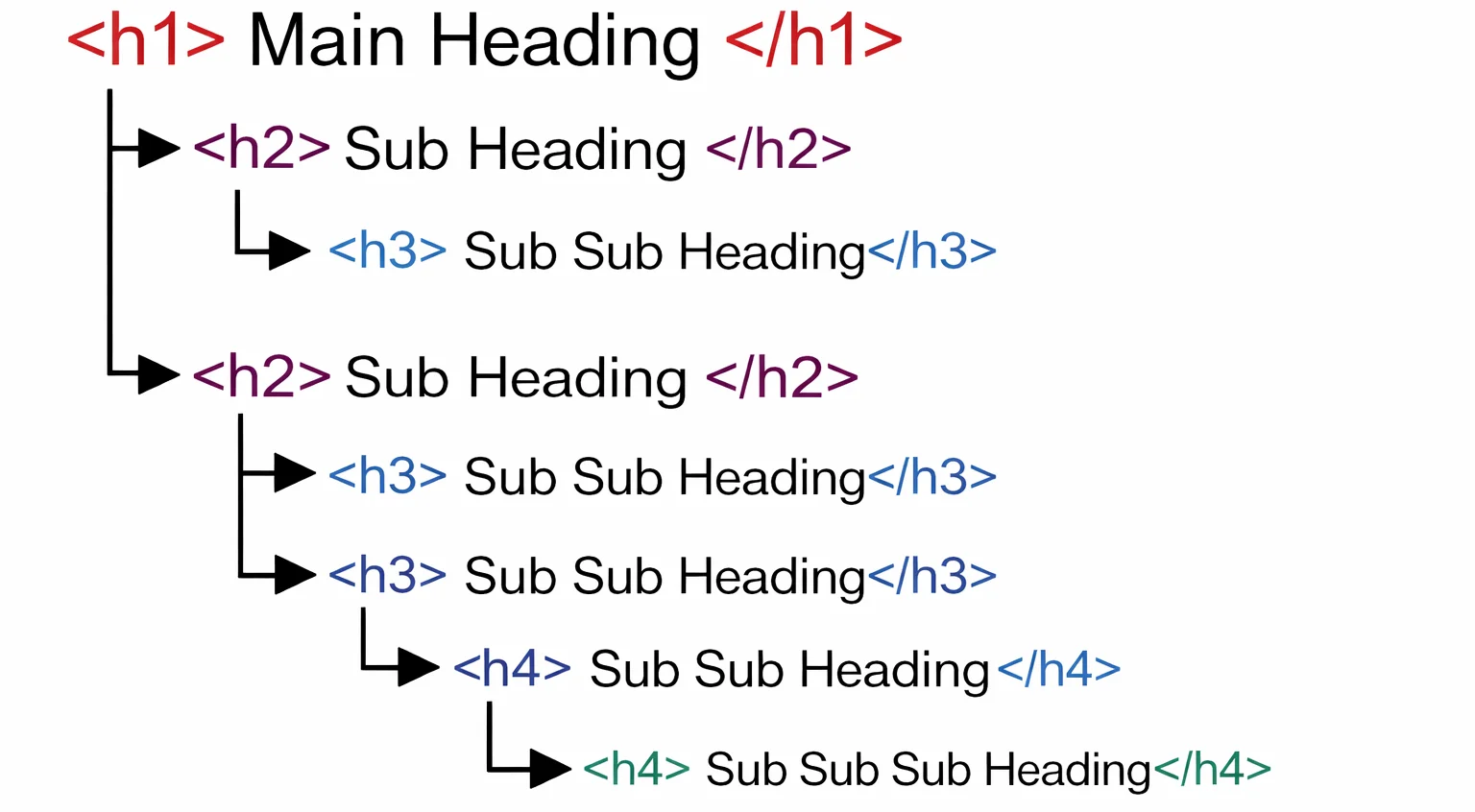
Heading structure defines how content is organized and understood. Clear headings improve readability and help search engines identify the main topic and supporting sections.
A logical hierarchy also makes content easier to extract for featured snippets and AI-generated answers, especially when each section answers a clear question. Here is an example of how logical heading structure looks like:
One Clear H1 Per Page
The H1 should communicate the primary purpose of the page. It acts as the main topic signal and should closely match the dominant search intent behind the query.
Best practices for H1 usage:
- Use one H1 per page
- Match the primary keyword and intent naturally
- Clearly describe what the page delivers
Using H2s and H3s for Topic Expansion
H2s and H3s help break the topic into logical sections and subtopics. They support semantic SEO by showing how ideas relate to each other within the page.
Effective use of H2s and H3s:
- Expand on related subtopics and follow-up questions
- Use descriptive, intent-focused phrasing
- Place direct answers immediately below each heading
When and How to Use H4, H5, and H6 Headings
H4, H5, and H6 headings are useful for deeper content layers but should be used carefully. They work best when a section requires detailed breakdowns or step-by-step explanations.
6. Keyword Usage and Placement
Keyword usage is one of the most visible on page SEO factors, but it must be handled carefully. Search engines now focus more on meaning and relevance than exact-match repetition, so keywords should support clarity, not control the content.
Primary Keyword Placement
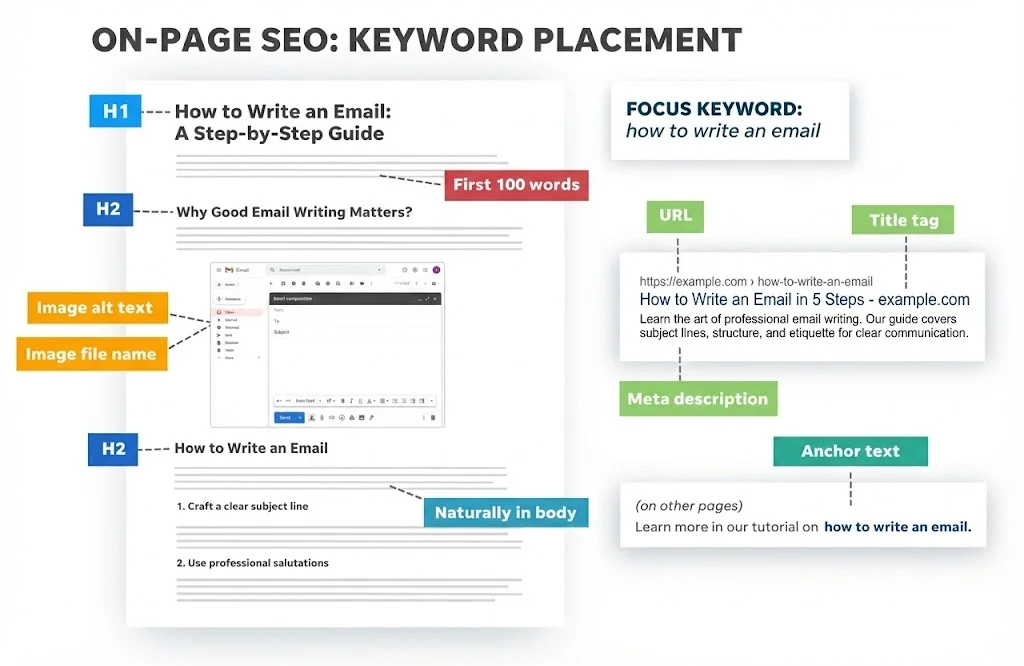
The primary keyword should appear in key locations where search engines and users expect to see it. These placements reinforce relevance without relying on repetition.
- Include it naturally in the title tag
- Use it once in the H1
- Mention it within the first paragraph and conclusion
- Add it in meta description
Avoid forcing the keyword into every section. Natural inclusion is more effective than targeting a specific keyword density, which can make content sound unnatural and harm user experience.
Here is an example of where you can use keywords in your blogs:
Secondary and Long-Tail Keywords
Secondary and long-tail keywords help expand topical relevance and capture supporting queries related to the main topic. They allow a page to rank for multiple variations without competing against itself.
To use them effectively:
- Map secondary keywords to relevant H2 or H3 sections
- Use long-tail phrases where they fit naturally in context
- Answer related questions instead of repeating the primary keyword
7. Internal Linking and Contextual Signals
Anchor Text Best Practices
Anchor text should describe what users will find after clicking the link. It acts as a relevance signal and helps both users and search engines set expectations.
Best practices for anchor text:
- Use descriptive, natural phrases
- Avoid generic anchors like “click here” or “read more”
- Match the linked page’s topic without exact-match overuse
Strategic Internal Link Placement
Where links are placed matters as much as how many you add. Contextual links carry more value than footer or sidebar links.
Smart placement includes:
- Linking from high-authority pages to important content
- Adding links where users naturally need more detail
- Keeping links relevant to the surrounding text
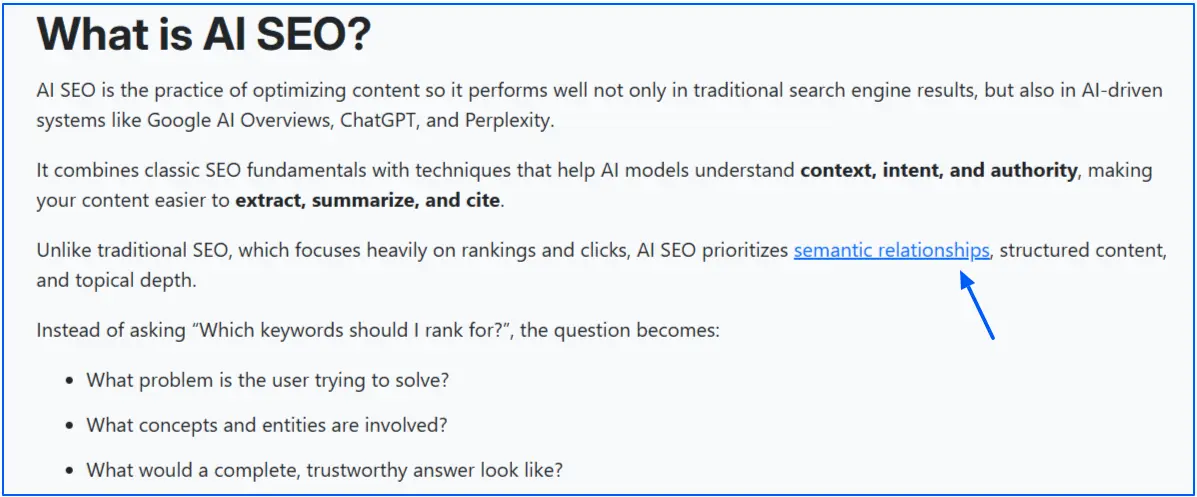
For example, in our blog on AI SEO, we have contextually internal linked the blog on Semantic Relationships in SEO.
Before adding links from high-authority pages, complete an on-page SEO analysis to map content relationships.
8. Outbound Links
Outbound links help add context and credibility to your content by referencing relevant, authoritative sources. When used correctly, they support trust and strengthen on page SEO without leaking value.
Best practices for outbound links:
- Link only to high-quality, trustworthy, and relevant sources
- Use descriptive anchor text that explains the value of the link
- Place links naturally within the content, not in bulk lists
- Avoid linking to low-quality or competing pages unnecessarily
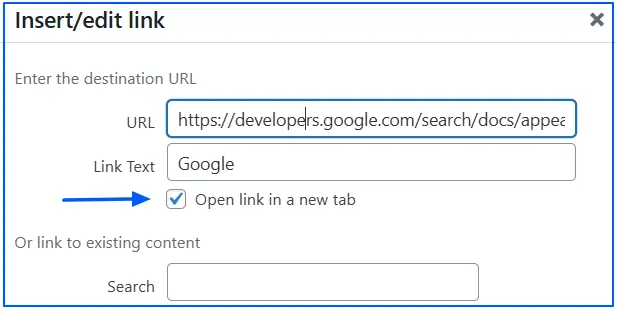
- Open external links in a new tab to keep users on your site (You can find this option on your site’s editor)
9. User Experience and Engagement Signals
User experience directly influences how well a page performs once it ranks. Pages that are easy to read, navigate, and understand tend to keep users engaged, which supports long-term visibility.
When users find what they expect quickly and can consume the content without friction, engagement improves naturally.
Readability and Formatting
Readable content keeps users on the page and encourages them to continue scrolling. To improve readability:
- Use short paragraphs to reduce cognitive load
- Break up text with lists and tables where appropriate
- Add visual breaks such as subheadings or images
Time on Page and Interaction Signals
While search engines do not use time on page as a direct ranking factor, engagement patterns help evaluate whether a page satisfies user intent.
Ways to improve interaction signals:
- Make content scannable with clear headings
- Answer the main question early in the page
- Align the introduction with what the title promises
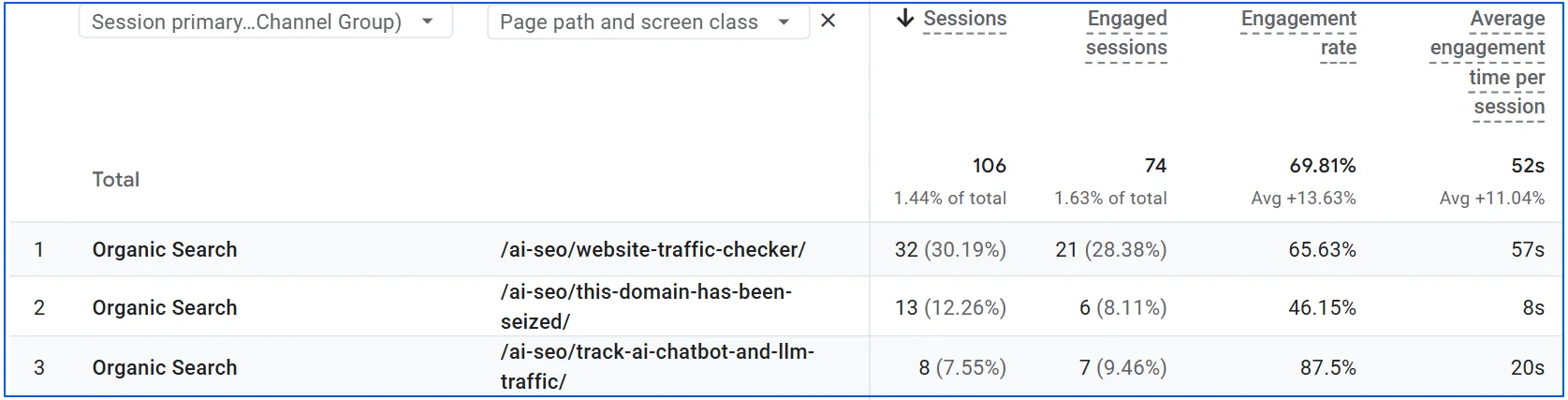
You can use Google Analytics to track engagement rate and engagement time, which show how long users stay on a page and whether they are actively engaging with the content.
10. Page Speed and Core Web Vitals (On-Page Perspective)
Page speed is a supporting but important part of SEO, especially when competing pages are similar in relevance and quality. Even strong content can underperform if a page feels slow, unstable, or frustrating to use.
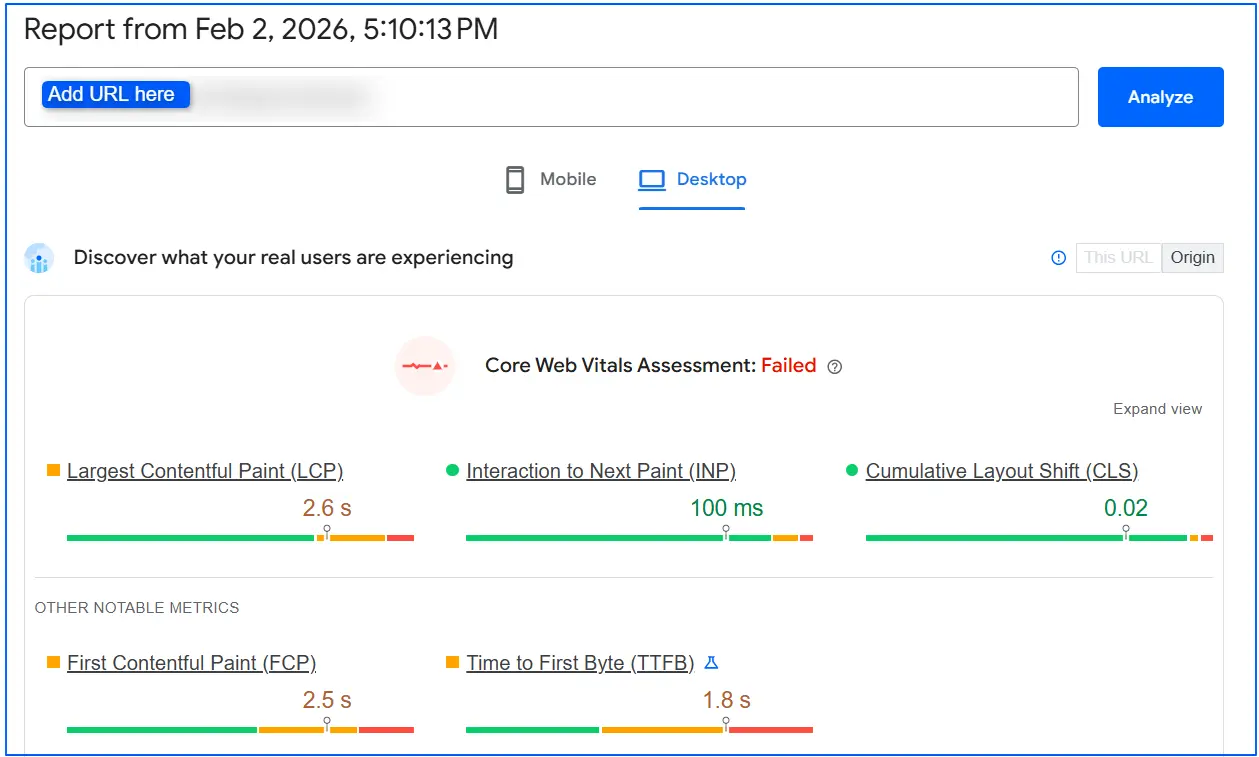
Core Web Vitals measure how real users experience a page while it loads and responds. The three key metrics are:
- LCP (Largest Contentful Paint): How fast the main content becomes visible
- CLS (Cumulative Layout Shift): How stable the page layout is while loading
- INP (Interaction to Next Paint): How quickly the page responds to user actions
Good scores mean users can see, read, and interact with content without delays or unexpected movement. For performance, Google‘s “good” targets are LCP ≤ 2.5s, CLS ≤ 0.1, and INP < 200ms, which is why slow pages can bury great content.
You can check Core Web Vitals for your blog on PageSpeed Insights and review related technical SEO issues to identify performance bottlenecks that may affect rankings.
11. Mobile Optimization and Responsive Design
Mobile optimization is a key factor because search engines primarily evaluate the mobile version of a page. Mobile users bounce fast on slow pages, as load time goes from 1s to 10s, the probability of a mobile visitor bouncing increases 123%.
If the mobile experience is poor, rankings can suffer even if the desktop version is strong.
Content Parity Between Mobile and Desktop
Content parity means the mobile version of a page contains the same core content as the desktop version. Missing text, hidden sections, or reduced internal links on mobile can weaken relevance signals.
To maintain parity:
- Keep main content, headings, and links consistent
- Avoid hiding important sections behind tabs unnecessarily
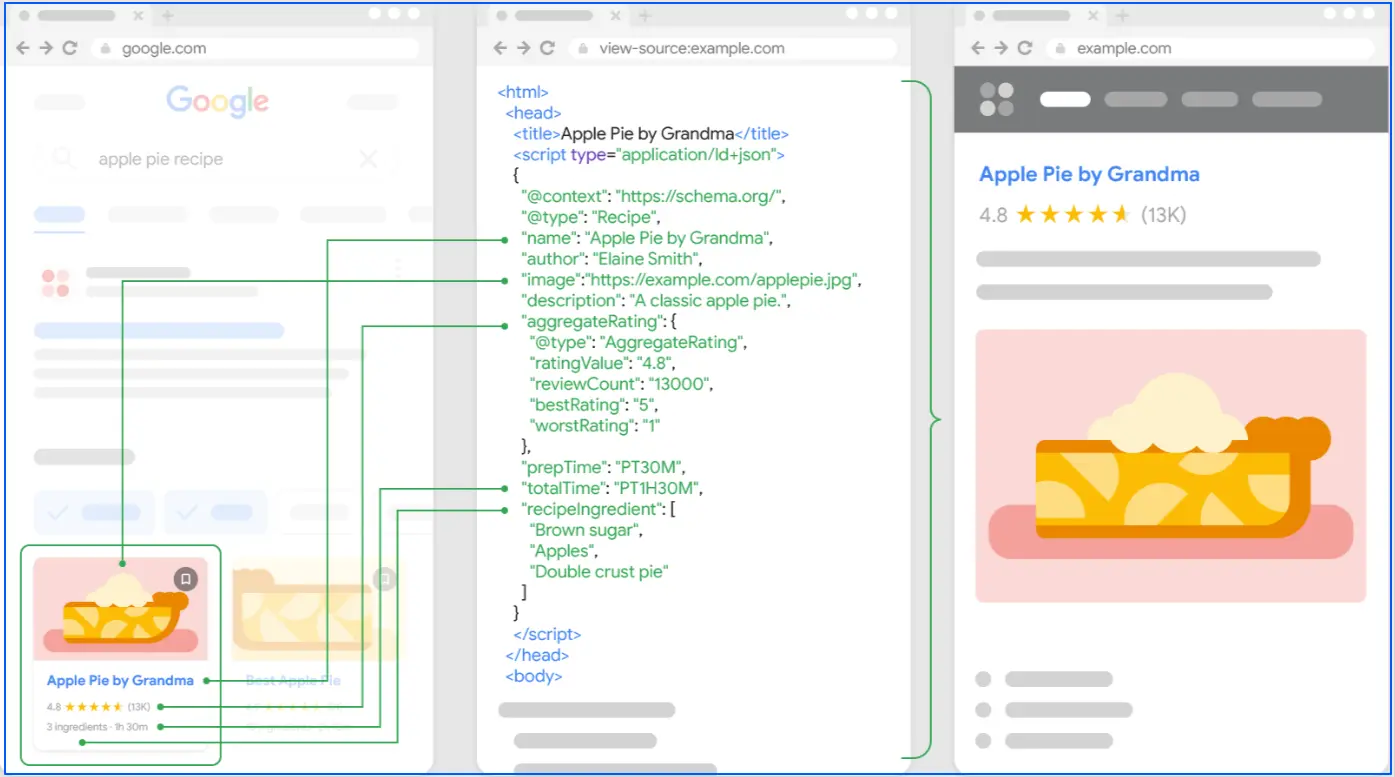
- Ensure structured data and metadata match across versions
Here is an example of how a food business can add structured data on their sites:
Touch-Friendly Layouts
Mobile users interact differently than desktop users. Pages must be easy to tap, scroll, and navigate without frustration.
Best practices for touch-friendly design:
- Use adequately sized buttons and links
- Space clickable elements to prevent mis-taps
- Avoid intrusive pop-ups that block content
A smooth mobile experience improves usability, engagement, and overall page performance. For deep insights on responsive design, you can follow technical SEO checklist.
12. Structured Data and Schema Markup
Structured data and schema markup support SEO by helping search engines better understand the context and purpose of your content. While schema does not guarantee higher rankings, it improves content clarity and eligibility for rich results.
According to research, schema markup (rich snippets) boosts CTR by 20-80% across industries. When implemented correctly, structured data also makes it easier for AI systems to extract accurate information from your pages.
Best practices include:
- Use only relevant schema types (Article, FAQ, Breadcrumb)
- Ensure marked-up content appears visibly on the page
- Keep schema updated when content changes
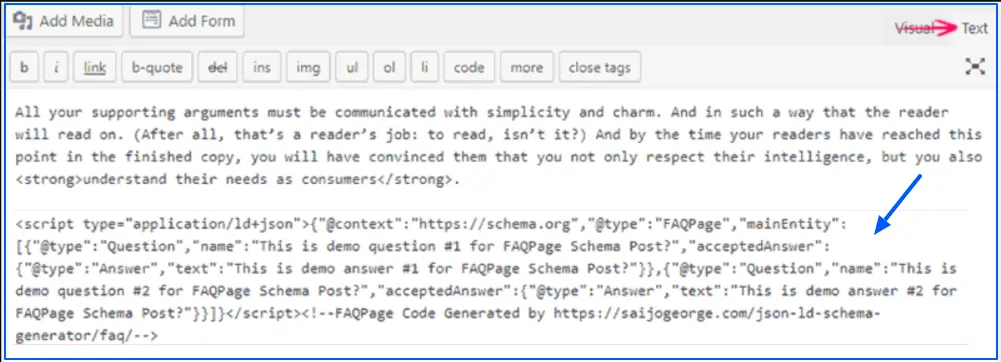
Below I have shared an example of how you can add FAQ schema in your blogs.
If you are aiming to optimize for AI overviews, it is important to note that there’s no special schema required for AI Overviews, focus on quality + crawlability + structure.
13. Geotagging (For Local Search)
Geotagging supports local search by adding location-based signals to your content. It helps search engines understand where a business or service is relevant, improving visibility for location-specific queries.
Best practices for geotagging:
- Include city and region naturally within page content and headings
- Add a Google Map embed on relevant local pages
- Optimize image filenames and alt text with location context where relevant
- Avoid keyword stuffing or forcing location terms unnaturally
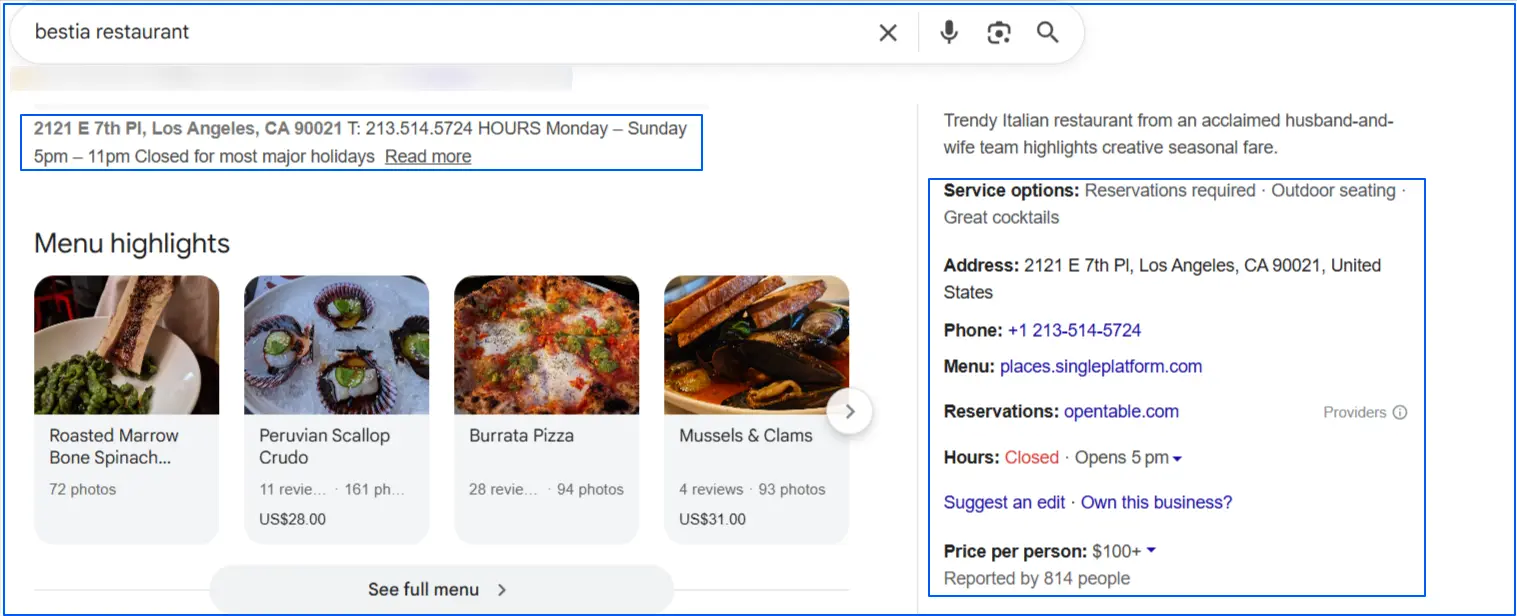
- Use local business schema with accurate NAP details
When implemented correctly, geotagging strengthens local relevance while keeping the content natural and user-focused. For example, if you are running a restaurant business, adding these details for local search helps you get visibility in SERP.
What is the Difference Between On-Page SEO and Off-Page SEO?
While both approaches aim to improve search rankings, they focus on different SEO factors. On-page SEO deals with optimizations you make on your website, while off-page SEO focuses on external signals that build authority.
| Factor | On-Page SEO | Off-Page SEO |
|---|---|---|
| Definition | Optimizing elements within your website | Optimizing signals outside your website |
| Control | Fully under your control | Largely influenced by external sources |
| Focus | Content, structure, and relevance | Authority, trust, and popularity |
| Key Elements | Content quality, keywords, headings, internal links, URLs, metadata, page speed | Backlinks, brand mentions, reviews, social signals |
| Examples | Optimizing title tags, improving content depth, adding internal links, fixing page speed | Earning backlinks, guest posting, brand mentions, online reviews |
| Primary Goal | Help search engines understand what a page is about | Prove the page is trustworthy and authoritative |
| Impact Area | Relevance and user experience | Authority and credibility |
| Dependency | Foundation for SEO performance | Works best when on-page SEO is strong |
How Can I Make My Pages AI-Friendly as Part of On-Page SEO in 2026?
In 2026, on-page SEO is no longer just about ranking on Google. You must optimize your blogs for AI visibility and intentionally create content that AI systems can extract, trust, and cite. Modern AI engines read content at the passage level, evaluate structure and credibility, and prioritize pages that clearly answer questions.
Below is a streamlined, practical framework to help your existing pages get cited by AI and guide how you should create new AI-ready blogs going forward.
AI systems extract answers in small, self-contained passages. Each major section should focus on one idea only and begin with a 1–2 sentence summary that directly answers the question.
Keep sections concise, ideally between 50 and 300 words, and use descriptive H2 and H3 headings that read like clear queries or answers. This makes your content easier for AI to retrieve and quote accurately.
AI models favor content that gets to the point immediately. Answer the core question within the first two or three sentences of a section using simple, declarative language.
If a paragraph can stand alone as a quoted answer without extra context, it is well-optimized for AI extraction and citation.
Use a consistent heading hierarchy (H1 → H2 → H3) and avoid skipping levels. Structure content using semantic HTML elements like <article>, <section>, <figure>, and <table> so AI systems can clearly understand meaning and relationships.
Clean structure improves both accessibility and extraction accuracy.
AI understands topics through entities and relationships, not keyword repetition. Cover related concepts, attributes, tools, and real-world examples naturally within the content.
Explain ideas clearly, link internally to related pages, and expand into follow-up questions users commonly ask. This semantic depth increases topical authority and AI confidence.
AI prefers content that looks reliable and complete. Use definitions, tables, lists, and concise summaries where helpful, and support factual claims with links to primary sources such as official documentation, studies, or datasets.
Add a visible Sources or References section to increase citation potential.
Use JSON-LD with relevant schema types such as Article, FAQPage, and HowTo. Include author details, publisher information, datePublished, and dateModified.
Schema does not guarantee citations, but it improves eligibility and helps AI systems interpret your content correctly.
AI systems favor pages users can easily consume. Use short paragraphs, scannable layouts, and tables for complex ideas.
Ensure fast loading, visual stability, and mobile-friendly design. Strong Core Web Vitals (LCP, CLS, INP) prevent high-quality content from being ignored due to poor experience.
Display a visible Last updated date and refresh statistics, examples, and tools regularly. Remove outdated references and ensure freshness signals align across content, schema, and sitemaps.
Maintained content builds trust for both users and AI systems.
To increase AI citations, publish new blogs that answer specific questions, cover a topic end-to-end, and provide original explanations, comparisons, or frameworks.
Pages designed as authoritative reference points are more likely to be reused, summarized, and cited by AI engines.
- OpenAI crawlers (such as OAI-SearchBot and GPTBot), which are used to discover and evaluate web content for AI answers
- Perplexity crawlers, which rely on robots.txt rules for content access
- Anthropic’s ClaudeBot, which also respects robots.txt opt-in and opt-out controls
AI systems can’t cite your content if they can’t access it. Make sure your robots.txt, CDN, or WAF rules are not blocking the crawlers you want visibility from. Check and allow discovery for:
This should be aligned with Google’s AI features guidance as well. Ensure your site allows crawling, uses strong internal linking, delivers a good page experience, and presents important content as visible text rather than hidden or JS-only elements.
Blocking these crawlers can silently remove your pages from AI discovery, even if your on-page SEO is strong.
How Wellows Improves AI Search Visibility for Your Blogs?
Content is the most critical part of on-page SEO, especially when it comes to AI-driven search visibility. Wellows helps you uncover content gaps by identifying topics and queries where your competitors are being cited in platforms like ChatGPT, Perplexity, Google AI Overviews, AI Mode, and Gemini, while your content is missing.
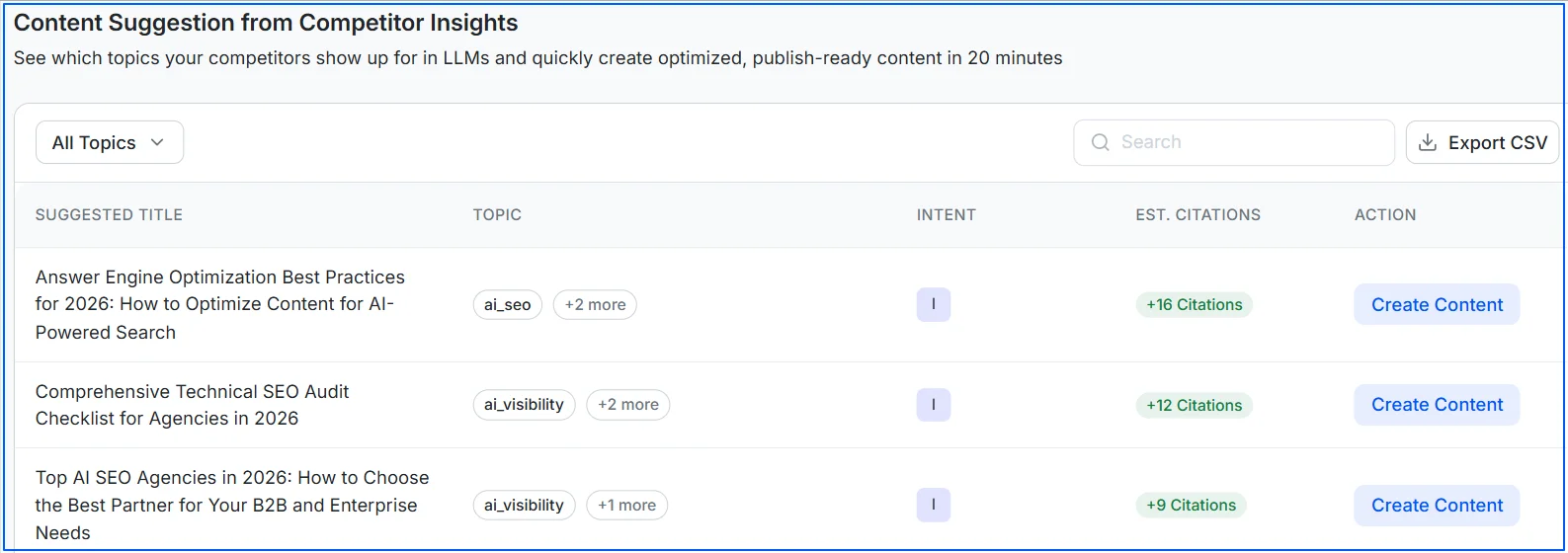
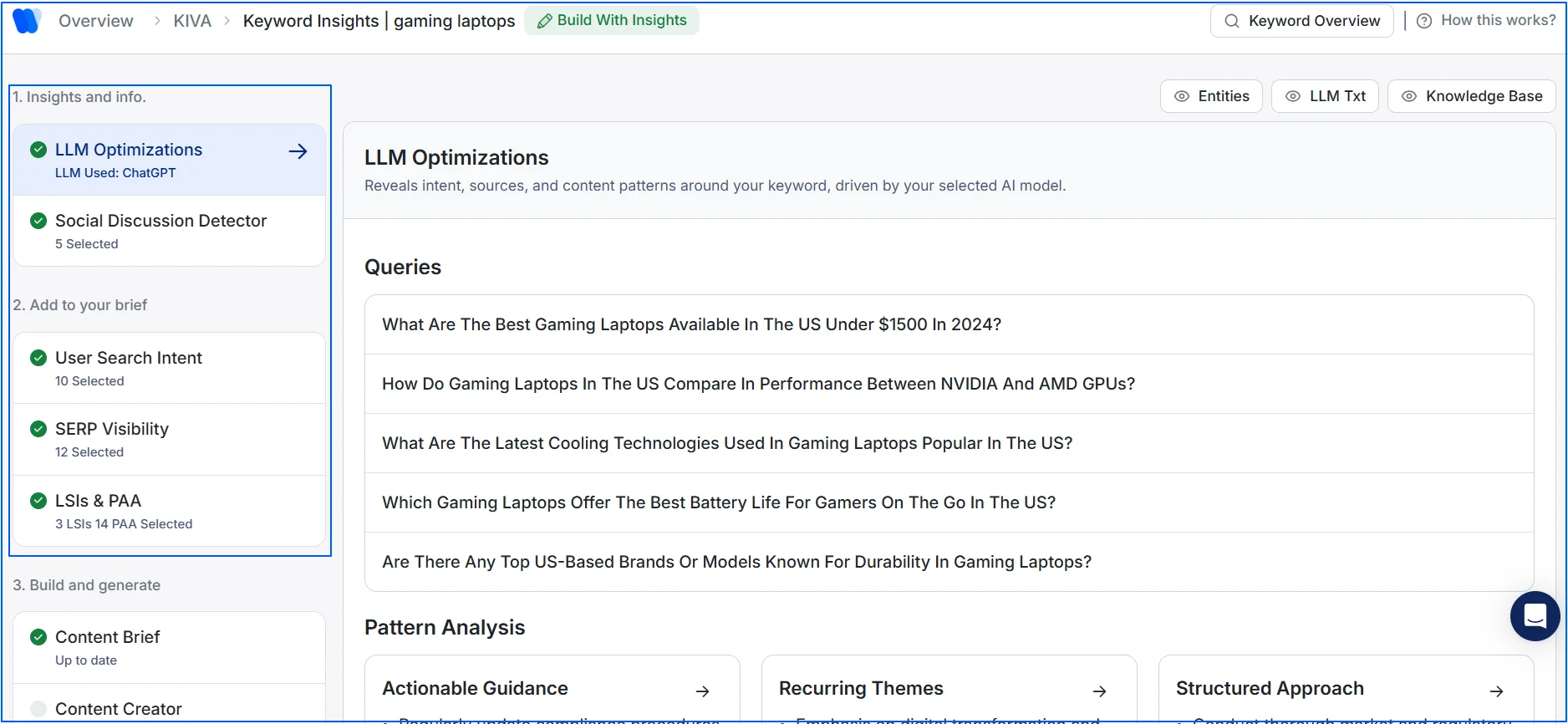
Within its workflow, Wellows gives you two options. You can either create content instantly or review each insight in detail, including LLM queries, social discussions, user search intent, SERP visibility, LSIs, and People Also Ask data, before generating content.
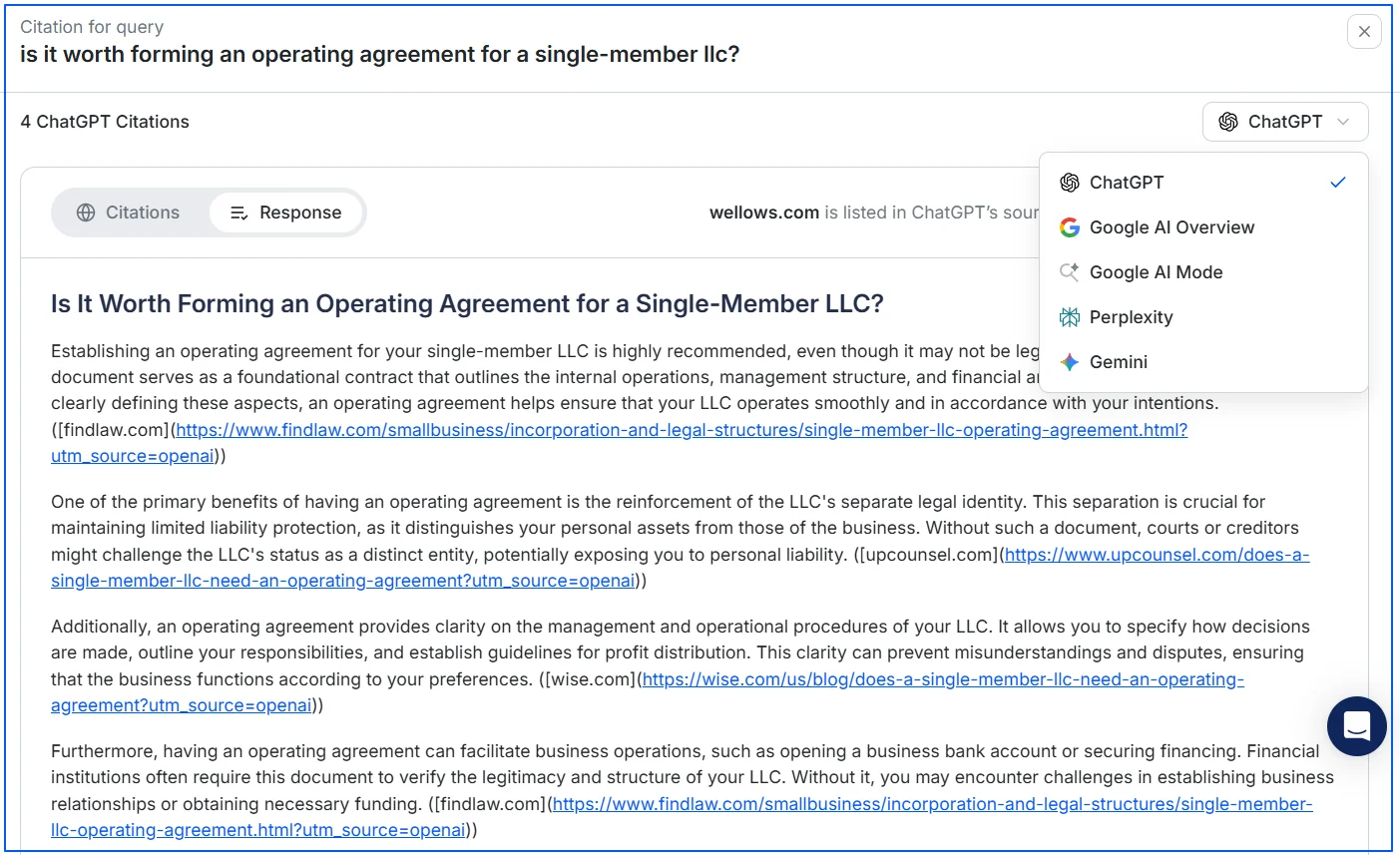
It also reveals which competitor content AI platforms cite for specific queries, helping you optimize your pages through LLM citation tracking to improve visibility where it matters most.
What are the Biggest On-page SEO Mistakes Beginners Make and How to Fix them?
Beginners usually make a handful of repeatable on-page SEO mistakes that quietly limit rankings and clicks. The table below shows what to fix first, why it matters, and the fastest way to correct it.
You can prioritize these based on impact and effort, starting with quick wins and moving to medium-effort and advanced fixes.
| Priority Level | On-Page SEO Mistake | Why It’s a Problem | How to Fix It |
|---|---|---|---|
| Quick Win | Missing or poorly written title tags | Title tags are a strong relevance signal and the main text users see in search results | Write unique, descriptive titles per page. Place the main keyword near the front and keep titles around 50–60 characters (or under ~600px width). |
| Quick Win | Missing or irrelevant meta descriptions | Meta descriptions influence click-through rate even if they don’t directly rank | Write unique, compelling descriptions (120–160 characters) that summarize the page and highlight a clear benefit or action. |
| Quick Win | No H1, multiple H1s, or poor heading structure | Headings help search engines and users understand topic hierarchy | Use one clear H1 per page for the main topic. Organize sections with logical H2 and H3 headings. |
| Quick Win | Keyword stuffing or unnatural keyword usage | Hurts readability and can trigger quality issues | Write for users first. Use the main keyword naturally in the title, H1, first paragraph, and a few relevant places. Use variations and related terms. |
| Quick Win | Missing or poor image alt text | Misses accessibility and image search signals | Add descriptive alt text to every image. Describe what’s shown and include keywords only when relevant. According to a case study, optimizing image alt text boosted HubSpot’s image traffic by 779%. |
| Quick Win | Poor or messy URLs | Long or unclear URLs reduce crawl clarity and trust | Use short, lowercase, hyphenated URLs that clearly describe the page topic (example.com/on-page-seo-mistakes). |
| Quick Win | Broken links and 404 errors | Creates bad UX and wastes link equity | Crawl the site to find broken links. Fix URLs, restore pages, or add 301 redirects to relevant alternatives. |
| Medium Effort | Thin or low-quality content | Pages that don’t satisfy intent struggle to rank | Expand content to fully answer the query. Add examples, data, visuals, and supporting sections for depth and completeness. |
| Medium Effort | Duplicate content or keyword cannibalization | Ranking signals get split between similar pages | Consolidate similar pages, differentiate intent, or use rel=canonical to signal the preferred version. |
| Medium Effort | Missing or incorrect canonical tags | Multiple URLs dilute ranking signals | Add correct canonical tags and ensure internal links and sitemaps point to the preferred URL. |
| Medium Effort | Poor mobile optimization | Google uses mobile-first indexing | Use responsive design, fix viewport issues, and test pages with Google’s Mobile-Friendly Test. |
| Medium Effort | Slow page speed or poor Core Web Vitals | Slow pages increase bounce rates and reduce rankings | Compress and lazy-load images, minimize CSS/JS, use caching and a CDN, and improve LCP, CLS, and INP metrics. |
| Medium Effort | Not using HTTPS | Security trust issue and minor ranking factor | Install an SSL certificate and redirect all HTTP URLs to HTTPS using 301 redirects. |
| Medium Effort | Weak internal linking | Limits crawlability and authority flow | Add contextual internal links from relevant pages using descriptive anchor text. |
| Advanced | Not matching search intent | Even optimized pages fail if intent is wrong | Analyze top-ranking pages and match the dominant intent (informational, transactional, comparison, etc.). |
| Advanced | Missing structured data (schema) | Missed rich result and AI extraction opportunities | Add relevant JSON-LD schema (Article, FAQ, Product, Breadcrumb) and validate it with testing tools. |
| Advanced | Images not optimized for size and responsiveness | Large images hurt speed and mobile UX | Use WebP or AVIF formats, responsive images (srcset), and set width/height to prevent layout shifts. |
| Advanced | Over-reliance on JavaScript rendering | Content may not be crawled or indexed efficiently | Use server-side or hybrid rendering and ensure critical content is visible in the HTML quickly. |
| Advanced | Incorrect use of noindex or robots.txt | Can accidentally block important pages or resources | Audit robots.txt and meta robots. Ensure CSS/JS are crawlable and validate indexing in Search Console. |
| Advanced | Poor handling of pagination and parameters | Causes index bloat and duplicate titles | Use canonical tags, rel=”next”/”prev” where useful, or noindex low-value paginated pages. |
| Advanced | Not monitoring Search Console errors | Issues compound when ignored | Regularly review Google Search Console for coverage, performance, mobile usability, and enhancement issues. |
What are the Best On-Page SEO Tools?
Below are the top 5 tools that helps you with on-page SEO in 2026:
| Tool | What It Does | Why It’s Useful | Free/Paid |
|---|---|---|---|
| Wellows | AI visibility insights and content gap suggestions for LLM citations | Helps find topics and queries where competitors get cited by AI systems so you can optimize or create content to earn citations | Paid (offers a free trial + free demo) |
| Google Search Console | Search performance and indexing diagnostics | Shows clicks, impressions, CTR, indexing issues, and page-level signals to guide on-page improvements | Free |
| Screaming Frog SEO Spider | Site crawler for on-page auditing | Finds missing/duplicate titles, H1 issues, broken links, redirects, canonicals, and more across the site | Free + Paid |
| PageSpeed Insights (Lighthouse) | Performance and Core Web Vitals checks | Highlights speed and UX issues like LCP, CLS, and INP, plus specific fixes that improve on-page performance | Free |
| Semrush On Page SEO Checker | Page-level optimization recommendations | Suggests improvements based on competitors, SERP features, and semantic keywords to strengthen relevance and CTR | Paid |
FAQs
An on-page SEO factor is any element you can optimize directly on a webpage to improve its relevance and visibility in search results. This includes content, keywords, headings, internal links, metadata, and user experience elements.
The top on page SEO factors include search intent alignment, content quality, title tags, headings, internal linking, keyword placement, page speed, mobile optimization, and structured data.
The main components of on-page SEO are content quality, HTML elements (titles, meta descriptions, headings), and page structure, including URLs and internal links.
The four pillars of SEO are on-page SEO, technical SEO, off-page SEO, and content strategy. Together, they determine relevance, accessibility, authority, and long-term performance.
For on-page SEO optimization, a fair freelancer rate is usually $15 to $30 per page for quality work covering titles, headings, internal links, and basic schema. Simpler fixes may cost less, while strategic or high-priority pages can range higher depending on depth and expertise.
A focused on-page SEO audit for a 100-page website typically costs $1,000 to $6,000, with most projects falling in the $1,500 to $3,500 range. The final price depends on audit depth, page-level review, and whether strategy or implementation guidance is included.
On-page SEO factors are elements you control on your webpage to improve search rankings, primarily focusing on content quality, HTML tags (titles, headers, metas, alt text), URL structure, and user experience (UX) like page speed and mobile-friendliness, all optimized around specific keywords to help search engines understand and rank your page for relevant searches.
Conclusion
On page SEO factors shape how search engines and AI systems understand, evaluate, and rank your content. From titles and headings to internal links, images, schema, and page experience, every on-page element works together to signal relevance, clarity, and trust.
On-page SEO works best when it’s treated as a system, not a checklist. Focus on intent, structure, and clarity, fix common mistakes early, and keep pages accurate over time. That approach helps your content rank consistently and stay visible as search and AI-driven discovery evolve.