If you’re wondering how many internal links per page SEO, there’s no magic number. As a default guideline, for blog content, aim for ~1 contextual internal link every 200–300 words (≈3–5 per 1,000 words).
Aim for strategic links that genuinely help users discover related, valuable content, following the principle of quality over quantity. In this blog, I will discuss the best practices for internal linking, how to balance SEO value with user experience, and the mistakes to avoid when adding too many or too few links. I’ll also share practical tips to build a strong linking structure.
If you’re wondering how many internal links per page is ideal for SEO, the key takeaway is:
- There’s no fixed number, but most pages perform best with 3-5 internal links per 1000 words.
- Long-form and category pages can naturally include more links (10–30+) as long as they stay relevant.
- Too many links can dilute SEO value and overwhelm users, so quality always matters more than quantity.
A smart internal linking strategy improves crawlability, user navigation, and rankings when links are placed naturally and contextually. Start with an on page SEO analysis to identify where contextual links add the most value.
Internal Links on the Page vs Internal Links to the Page
Understanding internal linking becomes much easier when you separate these two concepts:
| Type of Internal Link | What It Means |
|---|---|
| Outgoing (links on the page) | The internal links you place while writing guide readers to other relevant pages on your site. |
| Incoming (links to the page) | Internal links from other pages to this page help it get discovered and build internal authority. |
This distinction matters because incoming internal links often have a stronger impact on visibility. That visibility gap becomes even more important in AI search, where teams improve internal linking but still cannot tell whether domain authority matters for AI citations, giving larger domains a repeat advantage that standard SEO reporting cannot reveal.
For example, Zyppy’s analysis of 23 million internal links across 1,800 sites found that pages receiving 40–44 incoming internal links earned nearly 4× more Google Search clicks than pages with only 0–4, showing how important internal links to a page can be for performance.
What’s the Recommended Number of Internal Links on a Webpage for Better SEO Rankings?
The recommended number of internal links on a webpage for better SEO rankings depends on the content length. Here is the realistic internal link ranges. These numbers refer to contextual links placed naturally within the main body (not menu, footer, sidebar, product-grid links):
| Content Length | Suggested Contextual Internal Links |
|---|---|
| 500–1,000 words | 3–5 contextual links |
| 1,500–2,000 words | 7–10 contextual links |
| 3,000+ words | 8–20 contextual links |
Rule of thumb: Aim for roughly 1 internal link every 200–300 words, but adjust downward if the links start to feel forced or distracting.
Google Search Central documentation emphasizes that crawlable links are essential for discovery and site structure, and links should be created primarily for usability and clarity rather than quantity.
How Do I Decide the Right Number of Internal Links Per Page for My Website’s SEO?
Choosing the right number of internal links per page is not about following a strict formula. Instead, it requires balancing SEO best practices, content depth, and most importantly, user experience. The goal is to guide readers naturally while helping search engines understand your site structure.
Here are the key factors to consider:
- Short pages (under 1,000 words): Include 2–5 internal links This keeps linking useful without distracting the reader.
- Medium pages (1,500–2,000 words): Aim for 7–10 internal links This allows you to connect supporting topics and related resources.
- Long-form content (2,000+ words): You can add 10–20 internal links Longer content naturally offers more opportunities to guide readers deeper into your site.
- Remove broken links
- Update outdated references
- Improve link placement
- Strengthen site structure over time
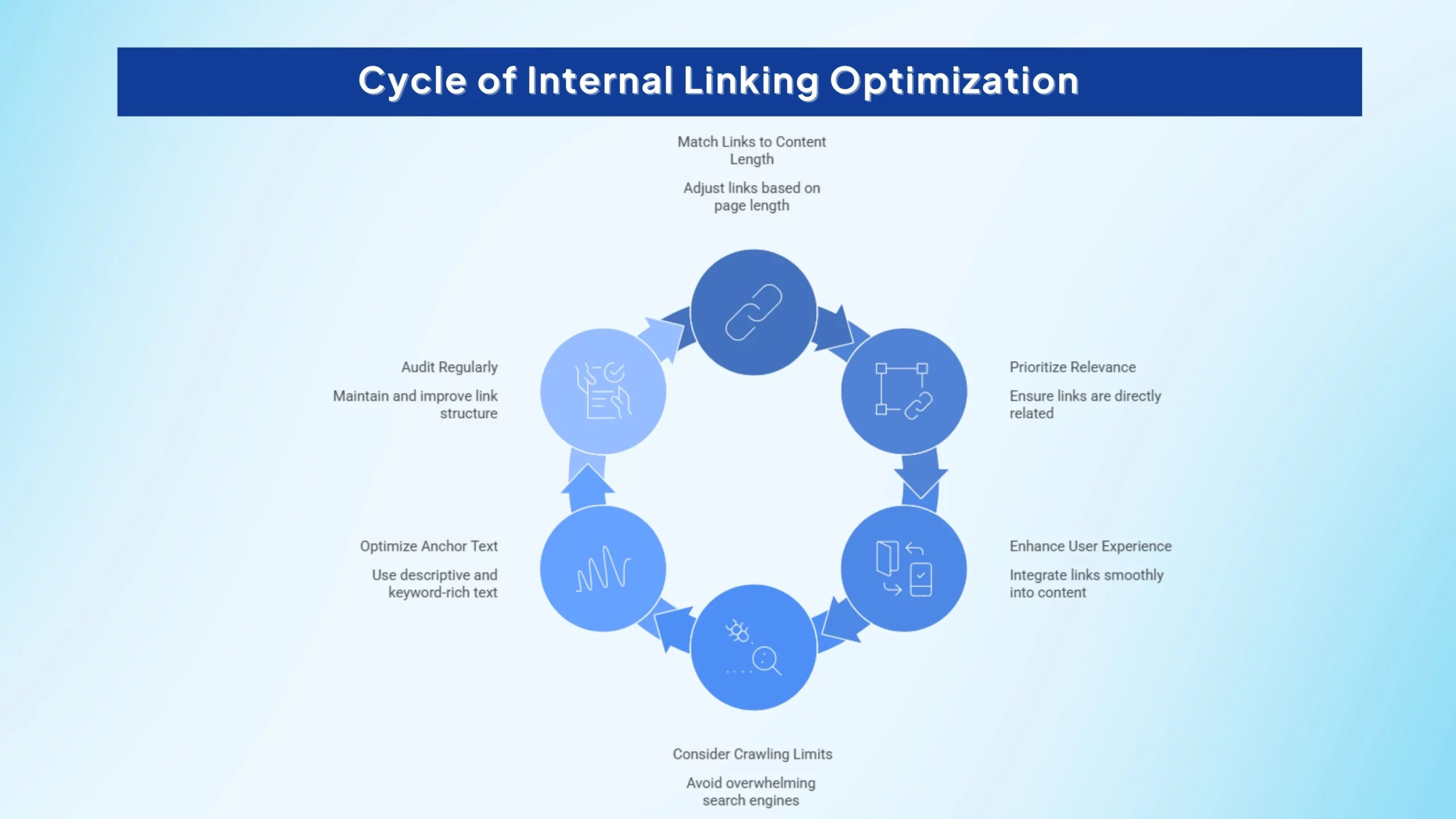
1. Match Internal Links to Content Length
A good starting point is to adjust internal links based on how long and detailed the page is:
2. Prioritize Relevance Over Quantity
Internal links should always point to pages that are directly connected to the topic. Adding too many unrelated links can weaken your strategy and reduce their overall SEO value.
The focus should always be: Does this link genuinely help the reader?
3. Keep the User Experience Natural
Links should blend smoothly into the content flow. Overloading a page with excessive links can overwhelm visitors and make the page feel spammy.
A clean, reader-friendly layout always performs better over time.
4. Remember the Google-First Rule
Google says there’s no magical ideal number of links. If you think it’s too much, it probably is.
Too many links can make your site look like “one giant mass of pages” with no clear structure.
5. Use Optimized Anchor Text
Anchor text matters. Instead of generic phrases like “click here,” use descriptive and keyword-relevant text that explains what the linked page is about.
This helps both users and search engines understand context.
6. Audit Your Internal Links Regularly
Internal linking is not a one-time task. Regular audits help you:
If You Want a Number, What’s the Safest Default for Internal Links?
If you prefer a simple rule to follow, the safest default is to add around 1 contextual internal link for every 200–300 words of content.
This keeps your linking natural, useful, and easy for readers to follow without turning the page into a list of distractions.
Adjust based on how the content flows: if you feel like you’re forcing links just to meet a target, reduce the count. But if your article covers multiple subtopics, related resources, or deeper supporting pages, it’s perfectly normal to include more links naturally where they add value.
What is the 80/20 Rule for SEO (and How to Apply It to Internal Links)?
Use internal linking like an SEO shortcut by focusing on the pages that matter most.
Follow these steps:
- Identify the top 20% of pages that drive ~80% of your results (traffic, leads, revenue).
- Make those pages your hub or pillar pages (the ones you want Google to prioritize).
- For every new article you publish, immediately add:
- 1 internal link to a hub/pillar page
- 1 internal link to a money page (service, product, category) if relevant
- Within 48 hours, add 5–10 internal links from existing related posts pointing into the new article so it gets discovered and indexed faster.
That’s it: prioritize your best pages, link to them consistently, and push internal links into new content quickly.
What Are The Different Types of Internal Links?
Not all internal links work the same way. Here are the main types you’ll use across a website:
- Contextual links (in-body): Links placed naturally inside your content paragraphs. These are the most valuable for SEO because they provide clear relevance and guidance.
- Navigation/menu links: Links in your site’s main menu that help users and search engines access key sections quickly.
- Breadcrumb links: Hierarchical links (Home → Category → Page) that show page structure and improve crawlability.
- Related posts/modules: Links shown in “Related Articles” or “Recommended Posts” sections that encourage deeper browsing.
- Footer links: Links in the footer area. Useful for important pages, but too many can weaken structure signals.
- Image links (alt text matters): Clicking an image can act as an internal link. Use descriptive alt text so search engines understand the destination.
- Pagination links: Links like Page 1 → Page 2 in blog archives or product listings that help Google crawl deeper content.
Why You Shouldn’t Use Too Many Links?
Using too many links can confuse search engine crawlers like Google and Bing. If a page is overloaded, crawlers may skip some links, which can prevent certain pages from being discovered and indexed properly.
Too many links can also dilute the authority passed through each link and make your page look spammy. On top of that, excessive links are harder to manage and can hurt user experience, especially when too many outbound links send visitors away.
Too Few Internal Links: What Happens and How to Fix It
Having too few internal links can quietly hurt your SEO.
- Pages stay orphaned or underlinked: If no other pages link to a URL, Google may treat it as unimportant or miss it entirely.
- Slow discovery and indexing: New content takes longer to get found when internal links aren’t pointing to it.
- Weak internal authority flow: Link equity doesn’t move through your site effectively, so important pages struggle to rank.
Fix: Add contextual links from related posts, connect new pages to hub/pillar content, and ensure every important page has multiple internal paths leading to it.
Stats to know: Ahrefs found 66.2% of sites have at least one page with only one dofollow incoming internal link.
What Are Internal Link Examples (Good vs Bad)?
Here’s a quick way to spot strong internal linking versus weak linking.
Good internal link:
“Want to improve your site structure? Check out our guide on SEO site architecture.”
Bad internal link:
“Click here to learn more.”
Internal Links Example
A strong internal link uses descriptive anchor text and points to a page that genuinely helps the reader continue their journey.
For E-commerce Sites, What’s the Best Number of Internal Links Per Category Page for SEO?
Category pages often have dozens or even hundreds of product links. That’s completely normal for e-commerce sites, and you shouldn’t focus on counting those product-grid links.
What you control (and what matters most) is the internal linking structure that helps users and search engines understand your store.
That said, SEO best practices provide a useful benchmark.
- Breadcrumbs (category > subcategory) to reinforce hierarchy
- Links to key subcategories to guide deeper navigation
- A short copy block with 3–8 contextual links to:
- Buying guides
- Bestsellers
- Related categories
Keep important categories within a few clicks from the homepage so they stay easy to discover and prioritize.
Faceted navigation warning: Don’t let filters create infinite crawl paths; handle this with proper indexation rules.
Key Takeaway
For e-commerce category pages, aiming for high-quality internal links is a strong SEO strategy. Focus on links that guide visitors to meaningful products or sections, improve site navigation, and help search engines crawl your store efficiently.
In internal linking, quality and usability always outperform excessive quantity.
How Many Internal Links Are Too Many on a Product Page for SEO?
When optimizing a product page for SEO, internal links can be extremely helpful, but only when used in moderation. Adding too many links can overwhelm visitors, distract them from purchasing, and reduce the SEO value of each link.
So, how many internal links are considered “too many”?
Recommended Internal Links for Product Pages
Did you know?
For most e-commerce product pages, a safe and effective range is:
- 5–10 internal links per product page
These links should support the buyer journey by pointing to:
- Related or recommended products
- Main category or collection pages
- Size guides or shipping information
- Buying guides or helpful blog resources
This keeps the page useful without feeling cluttered.
When Do Internal Links Become Too Many?
Did you know?
Internal links become excessive when:
- They distract users from the main product and CTA
- They appear spammy or unnatural
- Too many links compete for attention
- Link equity becomes diluted across unnecessary destinations
A product page packed with unrelated links can confuse both shoppers and search engines.
Best Practices for Internal Linking on Product Pages
Did you know?
To avoid overlinking, follow these key SEO principles:
- Keep Links Relevant: Every link should add real value and connect logically to the product or customer intent.
- Integrate Links Naturally: Links should fit smoothly into the content, not feel forced or stuffed into descriptions.
- Place Links Strategically: Add them where users need guidance most, such as in the intro, product details, or FAQ sections.
Fact to know: Zyppy found the strongest correlation around 45–50 incoming internal links to a URL, then the correlation declined (often because the links became sitewide/nav).
What’s the SEO Guideline for Maximum Internal Links on a Homepage?
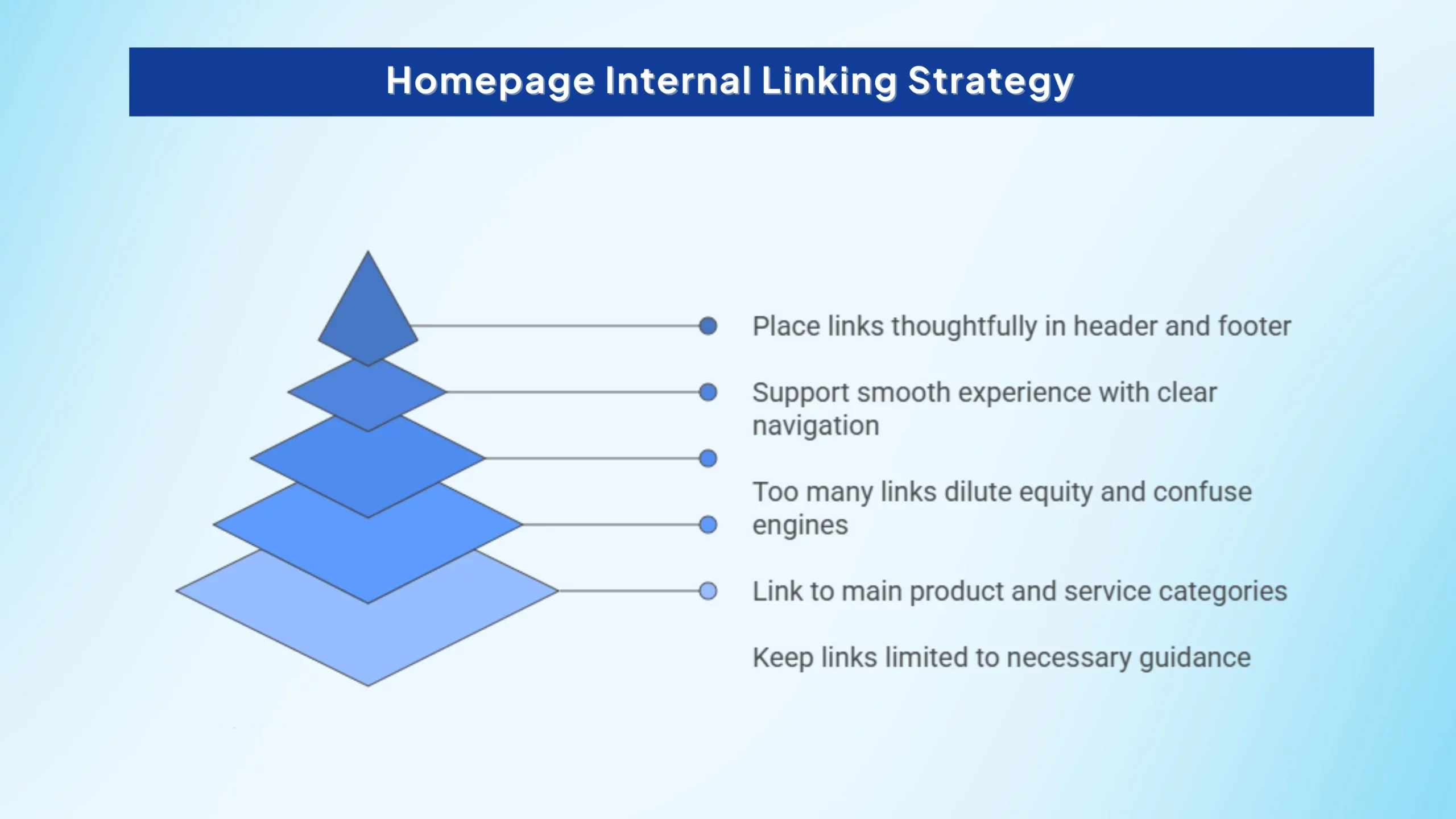
When it comes to homepage internal linking, SEO is less about hitting a specific number and more about maintaining a balance between navigation, usability, and crawlability. While Google does not set a strict limit, adding too many links can reduce their effectiveness and create a cluttered experience for visitors.
- Main product or service categories
- Core landing pages
- Important blog or resource hubs
- Cornerstone content
- Dilute link equity
- Confuse search engines about page priorities
- Overwhelm visitors
- Reduce engagement and conversions
- Clear navigation menus
- Structured footer links
- Naturally placed contextual links within content
- Header navigation
- Featured sections
- Content blocks
- Footer menus
1. No Fixed Maximum, But Keep It Reasonable
There is no official maximum number of internal links allowed on a homepage. However, SEO best practice suggests keeping links limited to what is necessary for guiding users to the most important parts of your website.
A homepage should act as a clean entry point, not a link directory.
2. Focus on Key and High-Value Pages
Your homepage internal links should primarily point to:
Each link should serve a clear purpose in helping users navigate.
3. Avoid Link Overload
Too many internal links on a homepage can:
A cluttered homepage often hurts both UX and SEO performance.
4. Prioritize User Experience and Layout
Homepage linking should support a smooth experience through:
The goal is to keep the homepage visually clean and easy to explore.
5. Strategic Placement Matters
Instead of adding links randomly, place them thoughtfully in:
This ensures search engines and users can quickly access your most valuable pages.
Should I Reduce Internal Links Per Page If My SEO Is Dropping?
If your SEO performance is declining, it’s natural to question whether internal linking could be part of the issue. In some cases, reducing internal links per page may help, especially if your pages are overloaded with links that confuse users or dilute SEO value. However, the solution isn’t simply removing links, it’s about improving link quality and structure.
1. Too Many Links Can Hurt More Than Help
Did you know?
Pages packed with excessive internal links can:
- Overwhelm visitors
- Make content feel cluttered or spammy
- Dilute the authority passed through each link
- Reduce clarity for search engine crawlers
If internal linking is uncontrolled, it may contribute to SEO drops.
2. Maintain a Balanced Linking Range
Did you know?
A healthy guideline is:
- 7–10 internal links per 2,000 words
- Or roughly one internal link every 200–300 words
This keeps linking helpful without overwhelming the page.
3. Quality Matters More Than Quantity
Did you know?
Instead of cutting links randomly, focus on whether each link is:
- Relevant to the topic
- Useful for the reader
- Pointing to high-value pages
- Supporting site structure and navigation
Purposeful internal links strengthen SEO, while unnecessary ones weaken it.
4. Improve Anchor Text for Better Context
Did you know?
Anchor text plays a big role in SEO. Use:
- Descriptive, natural wording
- Keyword-relevant phrases (without stuffing)
- Variety instead of repeating the same anchor repeatedly
This helps search engines better understand your linked pages.
5. Audit Links Regularly
Did you know?
SEO drops are often tied to broken or outdated internal links. Regular audits help you:
- Remove broken links
- Update irrelevant ones
- Strengthen linking to priority pages
- Improve overall site experience
Final Takeaway
Yes, reducing internal links can help if your pages are overloaded or poorly structured, but the real goal should be optimization, not elimination.
Focus on:
- Balanced link count
- Relevant placements
- Strong anchor text
- Regular link maintenance
A clean and intentional internal linking strategy will improve both user engagement and SEO recovery over time.
What SEO Professionals Say About Internal Links Per Page?
In a community discussion among SEO professionals, several practical insights came up repeatedly about internal linking.
Instead of treating internal links as a strict numbers game, most agreed that smart linking is about structure, relevance, and user support.
- There’s no fixed magic number: Internal linking doesn’t follow one universal rule. The right amount depends on the page type, topic, and purpose.
- Links should be added only when relevant: The strongest internal links are the ones that naturally guide readers to helpful next steps, not links added just to “boost SEO.”
- Link volume should scale with content length: Longer pages can support more internal links, as long as each one improves navigation and adds genuine value.
Source: SEO community discussion on internal links per page
Beyond link density, the health of a site’s internal linking structure also affects whether key pages accumulate enough topical authority to get cited in AI-generated answers. For agencies auditing client sites, AI visibility tracking for agencies adds another dimension to internal linking strategy: pages that are well-connected internally and well-cited externally tend to appear in LLM answers far more consistently than pages that pass SEO metrics but lack third-party validation.
- On Page SEO Factors: 13 On Page SEO Factors You Must Focus on in 2026
- Startups Can Build a Distribution Moat: How Startups Can Build a Distribution Moat Before Competitors Do
- AI Misunderstood Startup: How AI Misunderstood What My Startup Does
- Ignoring AI Search: The Real Cost of Ignoring AI Search
- Tech Startups: Top Tech Startups Redefining AI, Robotics, and Others
FAQs
SEO experts suggest 3–5 links for short posts, 7–10 for standard articles, and 10–25 for long-form pages, depending on length and relevance. Too many links can remove site structure signals (everything links to everything), making it harder for search engines to understand what’s important.
Yes, aiming for around 5 internal links per page is a good starting point, especially for short to medium-length content. However, the ideal number depends on page length, with longer pages often needing 10–25 links to guide users properly. Focus on relevant, well-placed links rather than forcing a fixed number.
For a new blog, aim for 3–5 internal links in short posts and 5–12 links in standard articles to help search engines discover your pages faster. Long-form content can naturally include 10–25 links if relevant. The key is using contextual, helpful links instead of overloading the page.
The ideal internal linking density depends on page length, with 2–5 links for short pages, 7–10 for medium content, and 10–20 for long-form articles. Too many links can dilute value, while too few can limit navigation and link equity flow. The best strategy is to keep links relevant, contextual, and user-focused.
Conclusion
Internal linking is a powerful SEO strategy when used correctly, and the right number of links depends on your page length, purpose, and relevance. Instead of chasing a fixed number, focus on adding links that genuinely help users explore your content naturally. A balanced approach improves crawlability, distributes authority, and strengthens site structure.
Ultimately, the best results come from using how many internal links per page is ideal for SEO as a guiding principle rather than a strict rule. Prioritize contextual, user-focused links that support navigation and boost engagement. With smart internal linking, your pages can rank better while delivering a smoother experience for readers.