Creating content takes time, effort, and creativity. But publishing a blog post once and moving on wastes its full potential. In fact, the HubSpot State of Marketing Report 2025 found that businesses that regularly refresh and repurpose content generate 76% more traffic than those relying only on new posts.
That’s why many marketers now repurpose content with AI to extend the life and reach of their content, without starting from scratch. AI-powered workflows keep content fresh, ensuring it stays relevant to both search engines and audiences.
Backed by data, Statista’s Content Marketing Outlook 2025 shows that 65% of marketers now use AI tools for content repurposing, making it clear that the strategy isn’t just optional—it’s increasingly essential for staying competitive.
Now with artificial intelligence for content repurposing, repurposing becomes faster and smarter. Content repurposing with AI technology helps transform a single post into a multi-platform campaign in seconds.
So, what is content repurposing? It’s the process of taking one original asset—like a blog post—and turning it into different formats for different platforms. For example:
- Turning a blog into a Twitter thread
- Turning tips into Instagram carousels
- Summarizing an article for a LinkedIn post
- Creating a short video for TikTok or YouTube Shorts
This strategy allows you to serve different audiences on different platforms—all from a single source.
And how does AI supercharge the process? Instead of hours spent manually reformatting or rewriting, AI can handle much of the heavy lifting in seconds. With just a few prompts, you can:
- Summarize long content
- Rewrite in different tones or styles
- Generate visuals, captions, or scripts
- Resize and reformat for platform-specific needs
The result? You get more mileage from every blog you create.
Why Repurpose Content with AI?
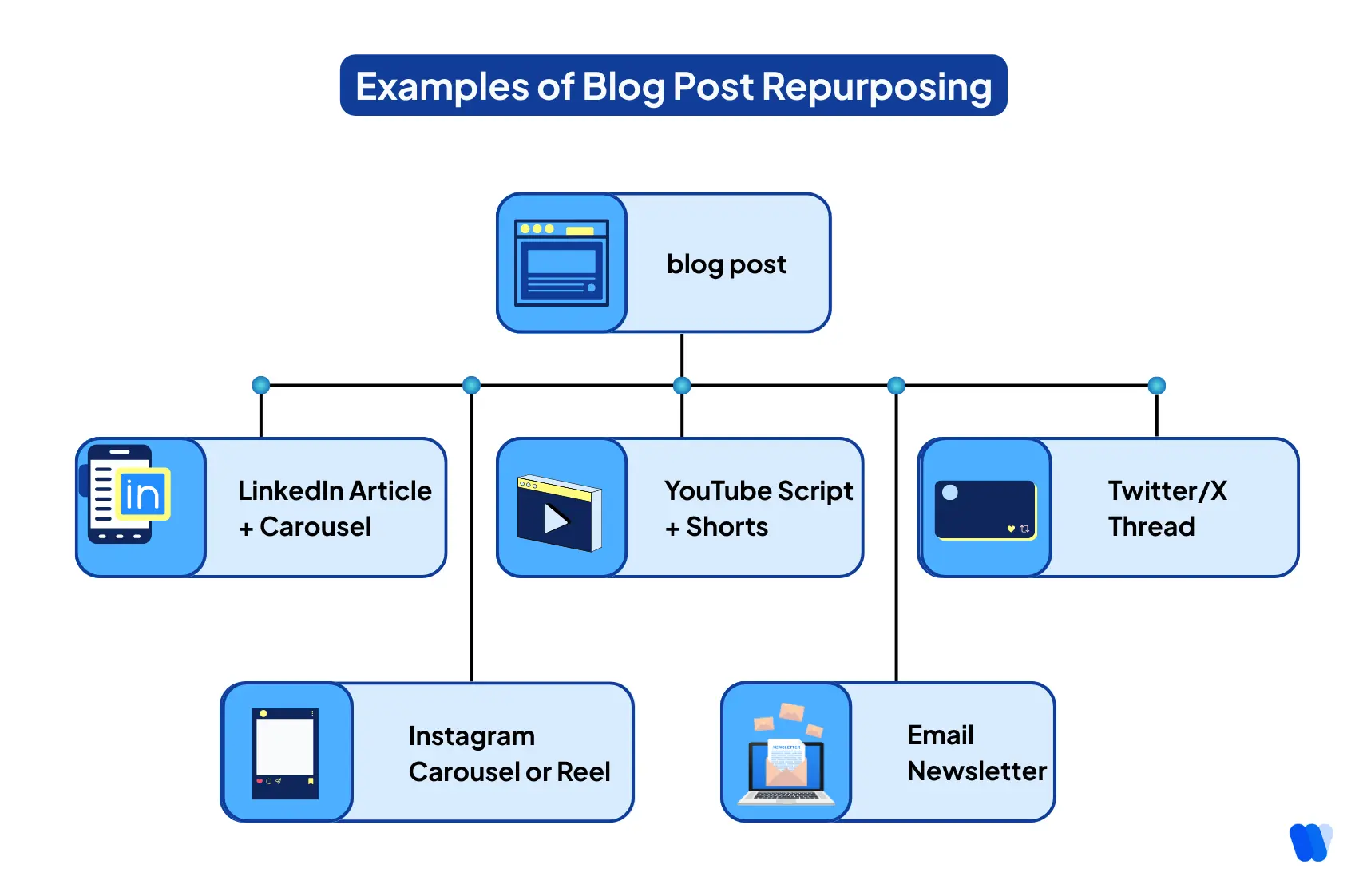
With today’s AI solutions for content repurposing, marketers can quickly transform one blog post into multiple platform-specific assets while maintaining quality and optimizing their AI content strategies.
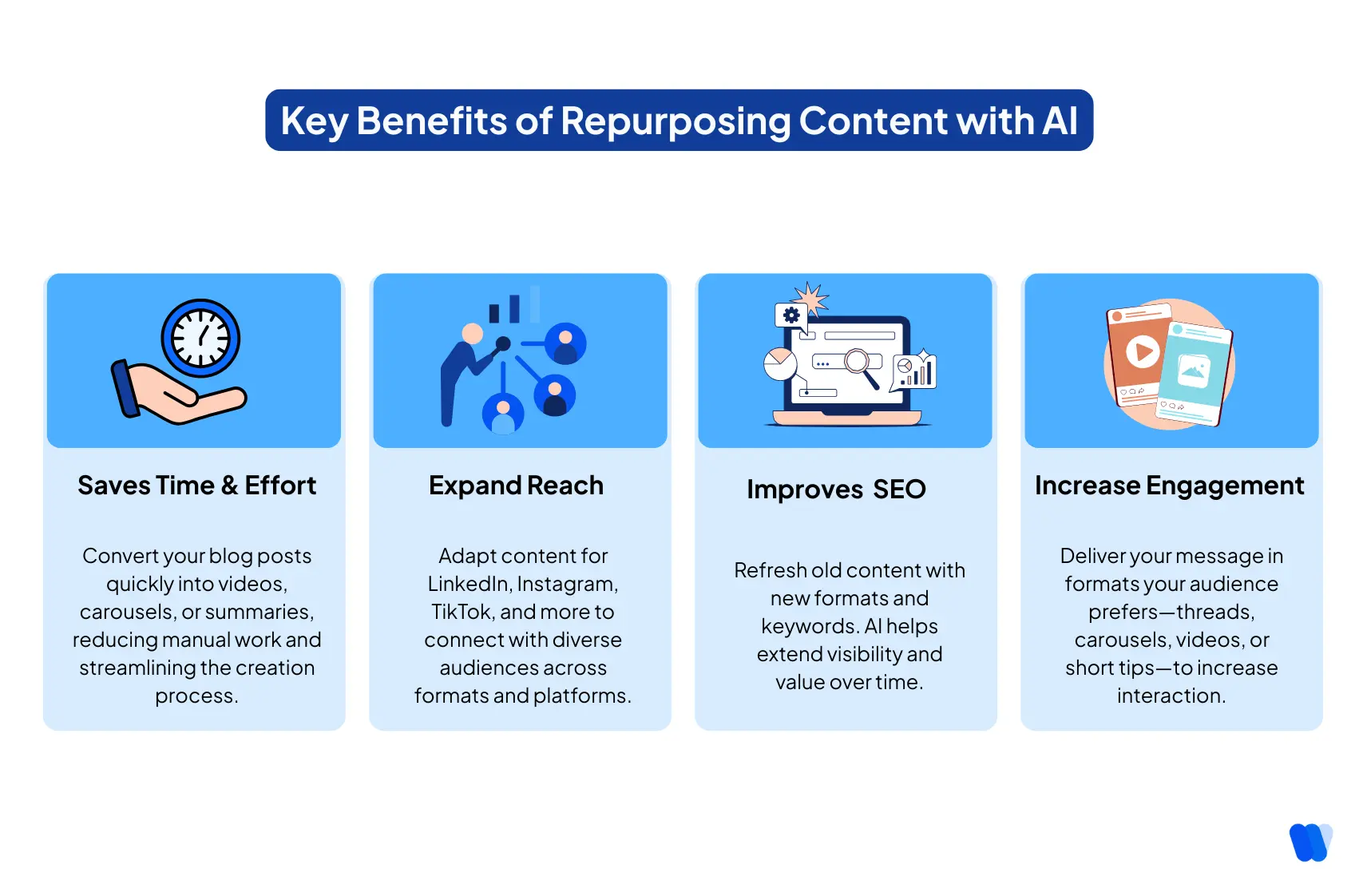
Repurpose content with AI offers several key benefits:
- Save Time & Effort:
AI can automatically turn a long blog post into different content types (summary, infographic, video, etc.), dramatically reducing manual work. If the AI version still sounds too mechanical, the free AI humanizer tool by Wellows can refine tone and improve clarity before republishing.
This time, efficiency means you can create multiple pieces of content faster. If your team is struggling to keep up with content volume or deadlines, check out these 5 signs your content team needs AI now to see if it’s time to level up.
- Increase Reach:
By adapting content for each platform, you tap into diverse audiences. A single blog article can reach professionals on LinkedIn, visual learners on Instagram, or short-form enthusiasts on TikTok. AI helps quickly format content for these channels, allowing you to reach wider, diverse audiences across multiple platforms.
- Boost Engagement:
Some users prefer visuals, others prefer short tips or videos. AI enables you to present your ideas in multiple formats—threads, reels, carousels, and videos—tailored to what your audience engages with most.
- SEO and Longevity:
Breathing new life into older blog posts via AI extends their lifespan and SEO value. Each repurposed piece (a YouTube video description, a LinkedIn post, etc.) can include relevant keywords and backlinks to your site, improving search visibility.
But repurposing only works long-term if you’re also watching for content decay—when older pages slowly lose impressions, CTR, and rankings as intent and SERPs shift.
Just make sure you’re not creating overlap that leads to content cannibalization, where multiple pages compete for the same keyword.
In short, AI helps maximize the value of every piece of content, ensuring your best ideas continue working for you over time.
AI dramatically improves content repurposing efficiency by automating time-consuming tasks that once required hours of manual effort. With the right prompts, it can quickly summarize long-form articles into concise key points, reformat text for platform-specific requirements (like character limits for X or slide-ready bullets for LinkedIn carousels), and even generate scripts, captions, and visuals. Instead of rewriting or redesigning everything from scratch, AI-powered tools handle the heavy lifting, allowing creators to focus on strategy, storytelling, and audience engagement. The result? Faster turnaround times, more content variety, and greater reach across multiple channels—all without burning out your team or blowing your budget. For best results, start with a well-structured article using a blog posting checklist; repurposing great inputs creates great outputs.How Does AI Improve Content Repurposing Efficiency?
Step-by-Step Guide to Automating Content Repurposing for SEO
 Repurposing content for SEO can be significantly streamlined with automation and AI-powered tools. By following a structured approach, you can maximize the visibility and impact of existing content while reducing manual workload. Here’s a step-by-step process:
1. Audit Existing Content
Start by identifying high-performing or near-ranking content. Tools like Google Search Console can highlight blog posts or pages that are close to breaking into the top five search results. Refreshing these with updated keywords, stronger headings, or multimedia elements makes them prime candidates for repurposing.
You can also pair this with content research with AI to uncover underperforming topics or content gaps that deserve repurposing and amplification.
2. Choose the Right AI Tools
Select automation platforms that fit your workflow. For example, tools like Automata can monitor your blog feed or YouTube channel and automatically generate new assets, supporting over 150 different input/output combinations. This ensures scalability and variety in your repurposing strategy.
3. Define Platforms and Formats
Decide where and how your repurposed content will live. From social posts, newsletters, and infographics to short-form videos or podcasts, aligning formats with your target audience ensures each piece feels native to its platform.
4. Automate Content Transformation
Use AI to convert content into multiple formats. A blog can become a video script, which can then be turned into a TikTok or YouTube Short. Embedding these videos back into the original blog not only boosts engagement but also strengthens SEO performance through multimedia enrichment.
5. Optimize for Each Platform
Every platform has unique tone, style, and formatting requirements. AI can reframe content to suit LinkedIn’s professional voice, Instagram’s visual storytelling, or Twitter/X’s concise updates. Tailored repurposing enhances authenticity and audience engagement.
6. Set Up Automation Workflows
Streamline distribution with tools like Repurpose.io or Buffer, which can automate cross-platform scheduling, publishing, and messaging. This consistency reduces manual effort and ensures content reaches audiences at optimal times.
7. Track Performance and Refine
Use analytics tools to measure the success of your repurposed content. Metrics like engagement, traffic, and conversions reveal what formats resonate most. Apply these insights to refine future repurposing workflows for continuous improvement.
By automating content repurposing with AI, you can boost SEO, expand reach across platforms, and get more value from every content asset—all while freeing your team from repetitive, time-consuming tasks.
How Does AI Assist in Repurposing Content for Social Media?
Artificial Intelligence (AI) significantly enhances the process of repurposing content for social media by automating and optimizing various tasks, enabling marketers to efficiently adapt existing materials across multiple platforms.
Key Ways AI Assists in Content Repurposing:
- Automated Content Transformation: AI tools can convert long-form content into concise formats suitable for social media. E.g., Repurpose.io transforms videos into TikTok/Instagram clips.
- Platform-Specific Adaptation: AI ensures repurposed content fits platform styles. Tools like ContentIn convert blogs into carousels, tweets, or newsletters.
- Enhanced Visual Content Creation: Apps like Unfold provide ready-to-use templates for eye-catching visuals without design expertise.
- Efficient Scheduling and Posting: AI tools like DrumUp automate scheduling and content discovery to streamline management.
- Data-Driven Insights and Optimization: Monitoring tools such as YouScan analyze engagement and sentiment to refine strategies.
Examples of AI Tools Facilitating Repurposing:
Step-by-Step Strategies for Repurposing Blog Posts for Social Media
When you repurpose content with AI for social media, an AI-assisted workflow can streamline the process.
Wondering can AI repurpose content for different platforms? Absolutely—here’s how to adapt one blog for LinkedIn, Instagram, TikTok, X, and YouTube. Each platform has its own style and audience, so your repurposing tactics should be tailored accordingly.
Repurposing Blog Posts for LinkedIn
LinkedIn is ideal for professionals who want value-rich, actionable content. When repurposing blog content here, focus on clarity, insight, and credibility.
Why LinkedIn?
- Over 950 million users worldwide (as of 2024)
- Preferred platform for B2B marketing and thought leadership
- Higher organic reach for long-form and carousel content
Step-by-Step Strategy
- Summarize Key Insights
Start by distilling your blog post into 3–5 main points. Use an AI writing tool like ChatGPT to extract:
- The blog’s central idea
- Key data, stats, or takeaways
- A concise summary in a professional tone
- Draft a Short LinkedIn Article
LinkedIn Articles support longer content, but should still be scannable. Structure your AI-assisted article like this:
- Headline: Clear and curiosity-driven
- Intro: Hook readers with a question or problem
- Body: Use subheadings and bullet points
- Conclusion: Offer a takeaway and call to action
Tip: Rewrite in first person (“Here’s what I’ve learned…”) for authenticity.
- Create a Carousel Post
Carousel posts (multi-slide graphics) are highly engaging. Use Canva or Simplified to turn blog sections into swipeable slides.
Good carousel formats:
- “5 Lessons from [Blog Topic]”
- “Step-by-Step: How to [Do X]”
- “What Most People Get Wrong About [Topic]”
AI can break down long paragraphs into slide-sized text automatically.
- End With Engagement
Always finish your LinkedIn post with one of these:
- A question to invite comments
- A link to the full blog
- A CTA like “Follow for more” or “DM me for details”
Best Practices for LinkedIn
- Use a clean, professional tone
- Mention relevant industries or roles (e.g., “marketers,” “founders”)
- Add hashtags like #ContentMarketing, #AItools, or #ThoughtLeadership
- Tag people or brands if appropriate (AI tools like Taplio can suggest this)
Repurposing Blog Posts for Instagram
Instagram is a visual-first platform. When repurposing blog content here, your focus should be on bite-sized insights and eye-catching visuals.
Why Instagram?
- Over 2 billion active users
- Strong engagement with educational and inspirational posts
- Ideal for visual storytelling, short tips, and quote cards
What Works Best
Use AI to extract highly visual or impactful parts of your blog post. Great formats for Instagram include:
- Quick tips or listicles
- Quote graphics
- Infographics
- Short Reels (15–30 seconds)
- Carousel posts with step-by-step slides
For Example, A blog titled “10 Ways to Improve SEO” becomes a 10-slide Instagram carousel or a 15-second Reel with one tip per screen.
Step-by-Step Strategy
- Extract Visual Snippets
Use ChatGPT or Jasper to:
- Pull 3–5 key points
- Rewrite them into short, catchy lines
- Suggest one-sentence captions or slide copy
- Design Posts with AI-Powered Tools
Tools like Canva (with Magic Design) or Adobe Express can:
- Auto-generate post templates
- Match your brand colors
- Suggest layouts for quotes, stats, or how-tos
Use large, legible fonts and high contrast for mobile readability.
- Create Captions and Hashtags
Let AI generate Instagram-friendly captions with:
- Emojis for visual flow
- Hooks in the first line (e.g., “Want more views on your blog posts?”)
- CTAs like “Save this” or “Link in bio”
AI tools like Copy.ai or CaptionAI can also generate popular hashtags relevant to your niche (e.g., #MarketingTips, #ContentRepurposing, #AIContent).
- Repurpose as Reels or Stories
Use video generation tools like Lumen5 or Pictory to create short video clips from your blog:
- One tip per slide or scene
- Add AI-generated voiceover or subtitles
- Resize to 9:16 for Reels or Stories
Pro Tip: Use AI to create a script, then record it or let the tool narrate it for you.
Repurposing Blog Posts for Twitter (X)
Twitter, now X, is a fast-paced platform. It rewards concise, insightful, and high-engagement content. When you repurpose content with AI for X, aim to spark conversation or deliver clear, quick wins.
Why Twitter/X?
- Ideal for short-form content
- Strong presence of creators, marketers, and thought leaders
- Threads perform well for storytelling and step-by-step advice
What Works on Twitter
- Single-tip tweets
- Multi-part threads
- Quick statistics or facts
- Quotes from blog posts
- Links with strong hooks
Step-by-Step Strategy
- Break Down the Blog Post
Use AI to extract key sections of your blog into tweet-sized takeaways. The best format:
- 1 core idea per tweet
- Plain language, no jargon
- Strong opening and clear structure
You can ask tools like ChatGPT: “Break this blog into a 6-tweet thread, each tweet under 280 characters.”
- Draft a Hook Tweet
The first tweet of a thread must grab attention. Effective hook types include:
- A bold claim
- A surprising stat
- A question that addresses pain points
- A promise of value (e.g., “Here’s how I turned 1 blog into 5 posts…”)
AI tools like TweetHunter or Hypefury can generate multiple hook variations. Choose one that sparks curiosity and feels native to your niche.
- Structure a Thread
Good threads follow a mini-story or tip-based format:
- Start with the hook
- Follow with 3–7 short tweets explaining steps or points
- End with a takeaway or CTA (link to your blog, ask a question, invite comments)
Example thread structure:
- Hook
- Problem or context
- Tip 1
- Tip 2
- Tip 3
- Summary or insight
- CTA (link or comment prompt)
You can also add polls or images where relevant for engagement.
- Use Hashtags and Mentions Wisely
Twitter still supports hashtag discovery. AI can recommend hashtags that boost visibility (e.g., #ContentMarketing, #CreatorTips, #AIAutomation).
Use mentions if you reference tools, experts, or collaborators. But keep hashtags and mentions limited—too many reduce readability.
Repurposing Blog Posts for TikTok
TikTok thrives on short, engaging video content. Repurposing your blog into TikTok videos allows you to reach a younger, visually oriented audience.
Short-form video is perfect for AI for repurposing video content—tools can auto-generate scripts, captions, and video cuts.
Why TikTok
- Over 1.5 billion users worldwide
- High organic reach potential
- Strong engagement with educational and behind-the-scenes content
What to Repurpose
Your blog likely contains several ideas or tips that can be turned into short-form video segments. Look for:
- How-to instructions
- Quick tips or myths
- Surprising stats or insights
- Short stories or examples
Step-by-Step Strategy
- Select a Video-Friendly Section
Choose one idea or tip from your blog that you can explain in under 60 seconds. Avoid broad overviews. Instead, focus on a single takeaway that can stand alone.
Use AI tools to:
- Summarize a key section
- Rewrite it into a conversational script
- Suggest a compelling hook for the first 3 seconds
- Create the Video With AI Tools
Use AI-driven platforms like Lumen5, Pictory, or InVideo to build short videos from blog content.
These tools can:
- Turn text into slides with motion graphics
- Add stock footage, icons, and animated text
- Automatically generate captions for accessibility
If you appear on camera, use an AI teleprompter app to follow your script smoothly.
- Format for Mobile Viewing
TikTok videos should be:
- Vertical (9:16 aspect ratio)
- 15 to 60 seconds long
- Fast-paced and visually dynamic
- Captioned, since many users watch without sound
Most video tools now support one-click resizing for TikTok.
- Add Sound and Captions
Choose background music from TikTok’s library. Add on-screen text or subtitles using either:
- TikTok’s built-in caption tool
- Automated subtitle features in Lumen5 or Pictory
Captions improve retention and accessibility.
- End With a Clear Call-to-Action
Close each video with a simple next step, such as:
- “Check out the full blog”
- “Follow for more tips”
- “Visit the link in bio”
Repurposing Blog Posts for YouTube Shorts & Videos
YouTube offers two powerful formats: Shorts for fast discovery and full-length videos for deeper storytelling. Both are ideal for turning blog content into engaging visual assets.
Why YouTube?
- YouTube is the second-largest search engine and the top video discovery platform
- YouTube Shorts (under 60 seconds) have massive organic reach
- Long-form videos build brand authority and drive traffic over time
With AI-driven repurposing of podcasts, creators can quickly turn a single recording into dozens of shareable formats.
YouTube Shorts Strategy (Under 60 Seconds)
Goal: Deliver one tip, idea, or stat from the blog in a highly visual, engaging format.
- Select a Single, Punchy Takeaway
- Pick one quick tip, myth, or stat from the blog
- Make sure it can be explained in 15–60 seconds
- Write a Short Script
Use AI to summarize the point in a conversational, energetic tone. Structure:
- Hook (0–3 sec): Grab attention (“Most people don’t know this about…”)
- Value (3–50 sec): Deliver the insight or how-to
- CTA (50–60 sec): End with “Subscribe for more” or “Read the blog for full details”
- Use AI Tools for Video Creation
Tools like Lumen5, Pictory, or InVideo can:
- Convert text into vertical videos with stock visuals
- Add music, captions, and scene transitions
- Export in 9:16 format ideal for Shorts
- Optimize in YouTube Studio
- Use a keyword-rich title (“1 Tip to Improve SEO in 15 Seconds”)
- Include the blog URL in the description
- Add relevant hashtags (#YouTubeShorts, #BlogTips)
Full-Length YouTube Video Strategy (2–10 Minutes)
Goal: Present the blog content in a visual storytelling format, broken into segments.
- Structure the Video Based on Blog Sections
Turn your blog outline into a video outline:
- Intro: Hook + what the video will cover
- Body: 3–5 main sections or tips from the blog
- Outro: Summary + call to subscribe + blog link
Use AI to rewrite each section in a spoken tone.
- Create Visual Slides or B-Roll
- Use Canva or Visme to build slide visuals for key tips
- Use stock video or your screen if demoing something
- AI can help suggest image prompts or pull quotes from the blog
- Record Voiceover or Use AI Narration
- Record your own audio using a script
- Or use Descript or Pictory to generate AI voice narration
- Keep pacing steady and tone conversational
- Edit and Upload
- Add dynamic transitions, music, and subtitles
- Export in 16:9 format (1920×1080) for full-length YouTube
- Include timestamps in the description for longer videos
- Add your blog link in the first line of the description and in-video text
Tips for Both Formats
- Repurpose one blog → multiple Shorts + 1 long-form video
- Cross-link videos and blog for SEO and traffic
- Use YouTube’s community post or Stories feature to promote newly uploaded content
- Use analytics to track watch time and drop-off rates
Alternatives to YouTube for Sharing AI-Generated Shorts
If your team prefers to store and share AI-generated short videos without relying on YouTube, several alternative platforms integrate smoothly with repurposing tools. These options provide professional hosting, analytics, and workflow-friendly features:
Vimeo
A professional-grade video hosting platform offering high-quality uploads and advanced privacy controls. Vimeo integrates with popular repurposing tools, making it easy to manage, embed, and distribute short videos across multiple channels.
Wistia
Designed for business needs, Wistia combines video hosting with marketing and lead-generation features. It integrates seamlessly with repurposing and CRM tools, helping teams track performance while maintaining brand consistency.
SproutVideo
A secure hosting solution that includes customizable video players and detailed viewer analytics. SproutVideo works with various marketing and repurposing platforms, supporting content distribution strategies for both internal and external audiences.
Vidyard
A video platform built for sales and marketing workflows. Vidyard provides hosting, analytics, and personalization options while integrating with repurposing tools, making it ideal for sharing Shorts with clients or prospects.
Cincopa
A multimedia hosting platform supporting video, audio, and images. Cincopa’s integration with repurposing tools and content management systems allows for flexible distribution and organization of AI-generated Shorts.
By using these platforms, teams can host, analyze, and distribute short-form videos efficiently—without relying on YouTube—while still keeping their repurposing workflows smooth and connected.
How Do People Use AI Video Generation for Content Repurposing?
AI video generation tools have transformed content repurposing by enabling creators to efficiently transform existing material into engaging video formats. Here’s how individuals and organizations leverage these technologies:
1. Turning Blogs or Long-Form Content into Short Clips
AI can summarize a blog post or identify highlight moments in webinars/podcasts and convert them into concise clips for TikTok, Instagram Reels, or YouTube Shorts. Tools like Taja.ai automate captioning, music, and formatting for platform-ready videos.
2. Adapting Videos for Different Platforms
Each platform has unique requirements (dimensions, duration, style). AI tools such as Snapy.ai can instantly reformat one piece of content for LinkedIn, Instagram, or YouTube, ensuring it looks native everywhere.
3. Adding Captions and Translations for Accessibility
Automated captions improve retention, while AI-powered translations extend reach to global audiences. This helps one video serve multiple demographics without extra effort.
4. Converting Video Back into Text-Based Assets
Beyond visuals, AI transcription tools turn video content into blog posts, guides, or social media snippets—catering to readers who prefer written content.
5. Automating Scheduling and Distribution
Platforms like Repurpose.io or Quso.ai distribute content across channels at optimal posting times based on audience activity.
6. Streamlining Workflows
By automating clipping, captioning, and resizing, AI tools free creators to focus on strategy while repurposed content keeps flowing consistently.
In short: AI video generation doesn’t just save time—it multiplies the impact of a single piece of content across multiple platforms and formats.
How to use AI to repurpose long-form content into shorter formats?
With the help of AI, transforming lengthy content into bite-sized formats like summaries or social media updates becomes faster and more efficient. Here are some standout tools:
Best AI Tools for Content Repurposing
Jasper AI
Hypotenuse AI
Scalenut
Anyword
Predis.ai
By leveraging these AI tools, you can efficiently transform long-form content into engaging, shorter formats tailored for multiple platforms.
What Are the Considerations for Selecting an Automation Tool for Content Repurposing?
When selecting an automation tool for content repurposing, it’s important to weigh several factors to ensure the tool supports both your workflow and long-term strategy. The right platform should simplify content management while enhancing quality and distribution. Here are the key considerations:
1. Ease of Use
A user-friendly interface reduces the learning curve, allowing your team to focus on strategy and creativity rather than navigating complex dashboards.
2. Multi-Format Support
Look for tools that handle different content types—blogs, videos, podcasts, or social snippets—so you can repurpose content across a wide range of platforms without switching software.
3. Integration Capabilities
Smooth integration with your existing stack (CMS, social platforms, email tools, analytics software) ensures seamless workflows and eliminates manual data transfers.
4. Automation Features
Scheduling, bulk uploading, and automatic posting are must-have features for maintaining consistency and saving time on repetitive tasks.
5. Content Quality Preservation
The tool should ensure that repurposed content remains engaging, polished, and aligned with your brand’s voice and standards.
6. Customization Options
Flexibility to adapt aspect ratios, formats, tones, and styles is crucial for tailoring content to the unique requirements of platforms like LinkedIn, Instagram, or TikTok.
7. Editing & Enhancement Tools
Capabilities like trimming, cropping, adding subtitles, or branding elements help refine repurposed content for maximum impact.
8. Analytics & Insights
Detailed performance data enables you to identify what formats and platforms resonate most with your audience, guiding smarter content decisions.
9. Collaboration Features
For teams, built-in collaboration functions—such as shared libraries, feedback options, and role-based access—streamline project management.
10. Scalability
The tool should handle your current workload and grow with your business needs, supporting more platforms or higher content volumes over time.
11. Pricing & ROI
Consider subscription costs, usage limits, and potential time savings to ensure the tool delivers long-term value without overspending.
12. Customer Support & Reliability
Responsive support and reliable uptime are essential for keeping repurposing workflows on track, especially during time-sensitive campaigns.
By evaluating these factors, you can confidently choose an automation tool that not only simplifies repurposing but also drives efficiency, consistency, and measurable results.
What Are The Common Challenges When You Repurpose Content with AI
While AI makes it easier to repurpose content with AI, it’s not without its hurdles. Here’s a breakdown of common issues content creators face—and how to solve them effectively.
| Challenge | Solution |
|---|---|
| Loss of brand tone | Always review and refine AI output to match your brand’s voice and style |
| Generic or vague content | Provide clear instructions and examples in your AI prompts |
| Duplicate content concerns | Rewrite each post using AI paraphrasing; tailor it to the platform |
| Over-automation feels impersonal | Add personal stories, commentary, or specific examples to humanize posts |
| Too many tools, too steep a curve | Start with 1–2 platforms (e.g., Canva + ChatGPT) before scaling up |
| Changing platform algorithms | Stay current with platform trends; adjust formats and frequency as needed |
| Low engagement from recycled posts | Use analytics to identify what resonates before republishing |
Tips to Avoid These Issues
- Use structured prompts:
The more specific your input, the better the AI output. Example: “Rewrite this paragraph as a 3-tweet thread for beginner marketers.”
- Create a content library:
Store reusable blog snippets, templates, visuals, and AI prompts in one place. This speeds up repurposing and reduces duplication.
- Refresh your evergreen content:
Don’t repost old blog content without updating it. AI can help modernize examples or revise statistics to reflect current data.
- Maintain platform awareness:
Social media changes fast. What works today may not work tomorrow. Use AI tools that stay updated with current best practices and engagement metrics.
- Content Marketing Stats: Top Content Marketing Statistics to Know in 2025 (Including AI Trends)
- SERP LLM Trends: How To Create Content Based on SERP and LLM Trends
- AI Content Detection: AI Content Detection in 2025: Trends to Watch
- Ultimate Guide: Content Marketing Agencies: A Complete Guide 2026
- AI Content Prompts: 77 Must-Try AI Prompts for Content Marketing Team
FAQs
AI automates tasks like summarizing blogs into captions, generating visuals, and creating platform-specific posts. It ensures faster adaptation of content into formats suited for LinkedIn, Instagram, X, TikTok, and YouTube.
AI tools like Lumen5 and Pictory turn written content into video scripts, add visuals, subtitles, and background music, making blogs more engaging for platforms like YouTube Shorts, TikTok, and Instagram Reels.
AI analyzes audience behavior and platform trends to adjust tone, style, and format. This ensures that repurposed content feels tailored—professional on LinkedIn, casual on Instagram, or snappy on Twitter.
Yes. AI transcription tools like Otter.ai can convert webinars into text, which can then be refined into blog posts, guides, or newsletters, extending the reach of video content into written formats.
AI can transform course materials into formats like quizzes, summaries, videos, or interactive content. This helps educators and brands make learning resources more accessible and engaging.
Emerging trends include real-time content adaptation, AI-generated interactive media, voice and AR/VR integration, and hyper-personalized content repurposing across global platforms.
Conclusion: Make the Most of Every Blog Post With AI
To sum up, repurposing content isn’t just a productivity hack but rather a growth strategy. By combining AI tools with smart planning, you can extend the reach of every blog post without burning out or starting from scratch.
Instead of asking “What should I post next?”, you ask: “Where else can I use what I’ve already created?”
AI helps you repurpose content with AI faster and better.
If you want to transform content with AI, these workflows help you scale and engage. The benefits of AI in content strategy go beyond speed—it’s about making every idea work harder.