When I started paying attention to the “People Also Ask” (PAA) boxes on Google, I noticed something interesting: the questions people were actually engaging with weren’t always the ones listed in traditional keyword tools. That was my first sign that there’s a real opportunity hidden in those dropdowns.
That experience showed me that how to use People Also Ask data can become a strategic layer in AI content planning. It’s one of the simplest ways to uncover real-time search behavior, fill content gaps, and improve topical coverage, all without guessing what your audience wants to know.
What is People Also Ask in Google Search?
The “People Also Ask” section is a box in Google’s search results that lists follow-up questions related to the query a user typed. It usually shows up near the top of the page and expands when clicked, revealing a short answer and a link to the source.
How the PAA Box Works in Google SERPs
- PAA questions are dynamically generated.
- Clicking one reveals more related questions.
- These often reflect what users tend to search for after their initial query.
The People Also Ask feature in SERPs offers a near-real-time look at what users want next, and it’s this evolving, curiosity-driven behavior that makes PAA so powerful for content planning and building topical authority.
How to Use People Also Ask Data?
Learning how to use People Also Ask data goes beyond just knowing what it is. PAA insights help uncover hidden search intent, long-tail opportunities, gaps in existing content, and even queries often used in voice search. It’s not about chasing high-volume keywords—it’s about addressing what people are actually curious about. That’s why People Also Ask SEO has become a go-to strategy for content marketers aiming to rank for specific, intent-driven questions.
Here’s how to make the most of it:
-
Find real search intent – Use PAA questions to understand what people want beyond keywords.
-
Build stronger outlines – Add PAA questions as H2s or H3s to shape your blog posts.
-
Create FAQ sections – Answer common PAA queries directly in your content for quick wins.
-
Refresh old articles – Update existing posts with new PAA insights to stay relevant.
-
Plan clusters – Group related PAA questions together to build pillar pages and supporting articles.
By consistently using People Also Ask data this way, you cover the topics your audience actually searches for—making your content more helpful, visible, and competitive.
Why Is Google’s People Also Ask Important?
The People Also Ask (PAA) feature in SERPs has become a valuable signal for both search intent and content opportunity. Here’s why it matters:
- High Visibility on SERPs:
PAA boxes often appear near the top of Google search results, giving featured answers prominent visibility even if the page isn’t ranked #1. - Direct Answer Opportunity:
If your content is optimized to answer common PAA questions, it increases your chances of being featured in that box, driving more organic clicks. - Real-Time Reflection of Search Behavior:
Unlike static keyword tools, PAA updates dynamically based on real queries. This makes it a living insight stream into what users care about right now. - Builds Topical Authority:
By consistently addressing relevant PAA questions across your content, you demonstrate depth—something Google rewards with better rankings. - Low Competition, High Intent Queries:
Many PAA entries are long-tail, question-based searches with lower competition but strong user intent, making them ideal for content targeting.
How to Analyze People Also Ask Data for Keyword Research?
I started manually clicking around on Google, but that got tedious. So, later I tested tools to make the process easier. Let me show you both ways on how to find People Also Ask questions:
Collect PAA Questions Manually Using Google Search
You can do this in a pinch:
- Search your topic on Google
- Expand PAA questions
- Copy them into a doc or spreadsheet
- Repeat with related keywords
Works well for niche topics or quick audits. However, I then found a solution to automate PAA extraction, allowing me to scale this process across multiple pages and topics without spending hours manually clicking dropdowns. Especially when pairing it with an AI content brief that structures FAQs and subtopics in advance.
This workflow aligns perfectly with content research with AI — where AI doesn’t just extract PAA data but contextualizes it into themes and opportunities for your next cluster or campaign.
Scaling PAA Extraction Without Manual Work
Manually collecting People Also Ask questions from Google works fine if you’re handling one or two topics. But when you’re working across multiple clusters or need insights from more than just Google, learning how to use People Also Ask data efficiently becomes essential to avoid a time-consuming and inconsistent process.
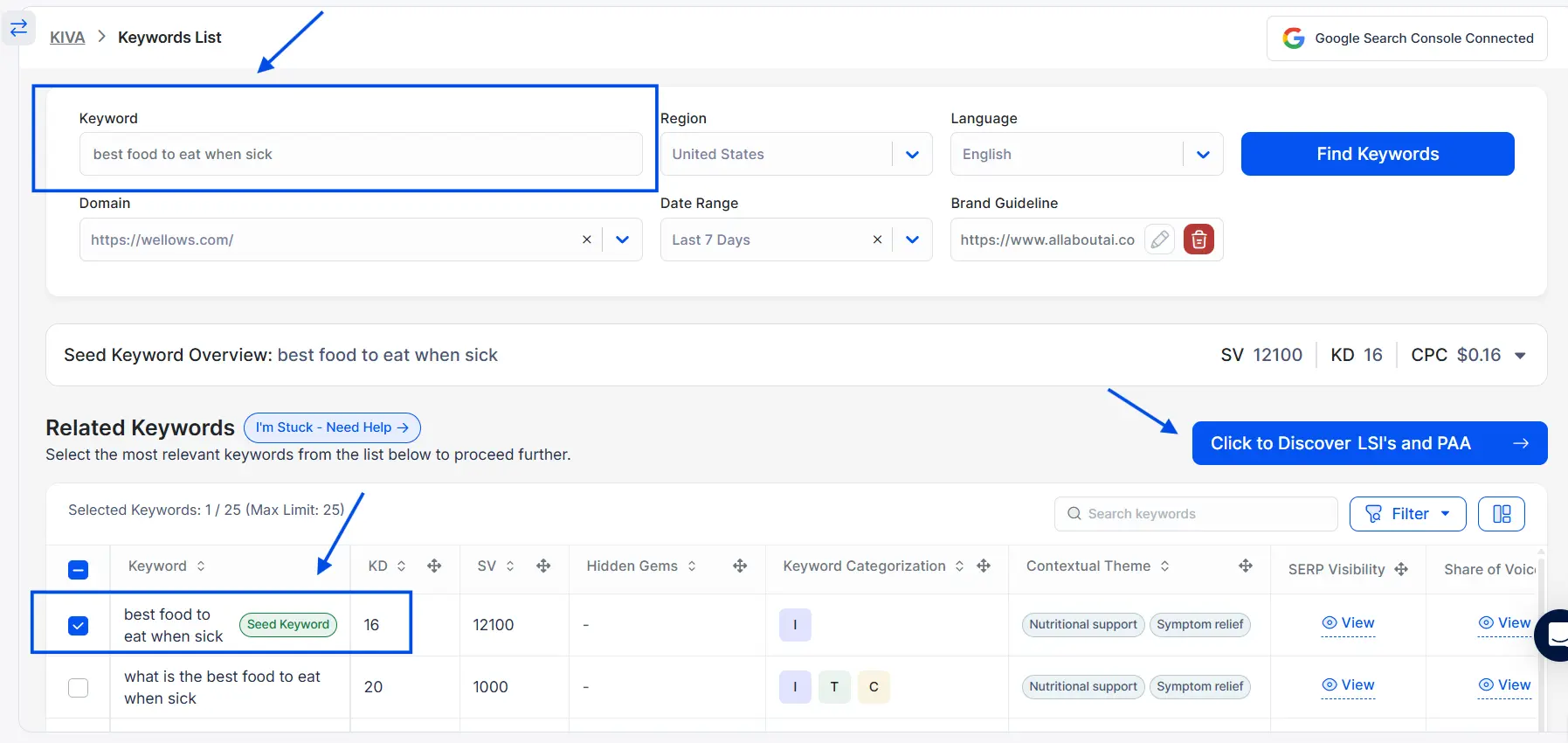
I use KIVA, an AI SEO agent that extracts PAA data not just from Google, but also from Yahoo and Bing. It helps me spot overlooked questions and cross-platform intent variations I’d otherwise miss, especially when building content hubs or refining topical coverage.
How to Collect PAA Questions Efficiently with KIVA
Here’s what I use KIVA for:
- Start by entering your primary or secondary keywords into KIVA to fetch relevant PAA questions across multiple search engines.

- KIVA pulls real-time People Also Ask questions from Google, Bing, and Yahoo
- Export clusters and suggested follow-up queries
- With one click, generate editable content briefs or tables that include your selected PAA clusters—ready to hand off to your content team or plug into your CMS.
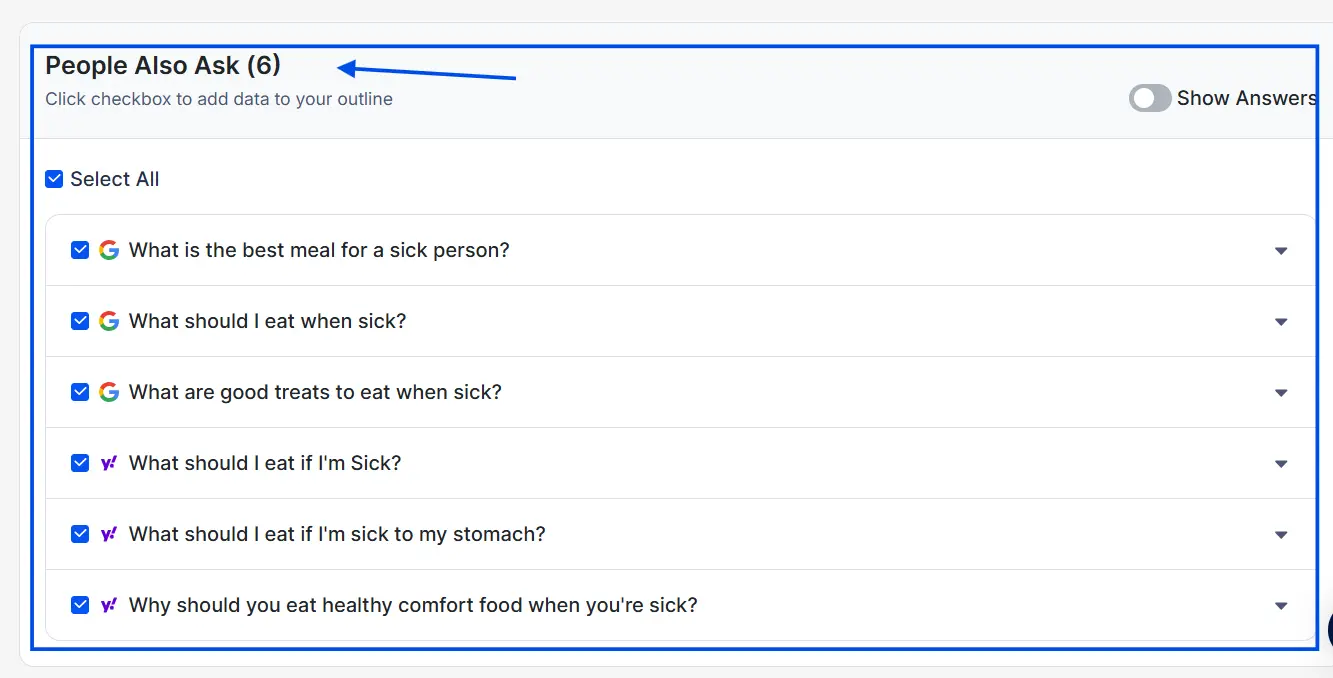
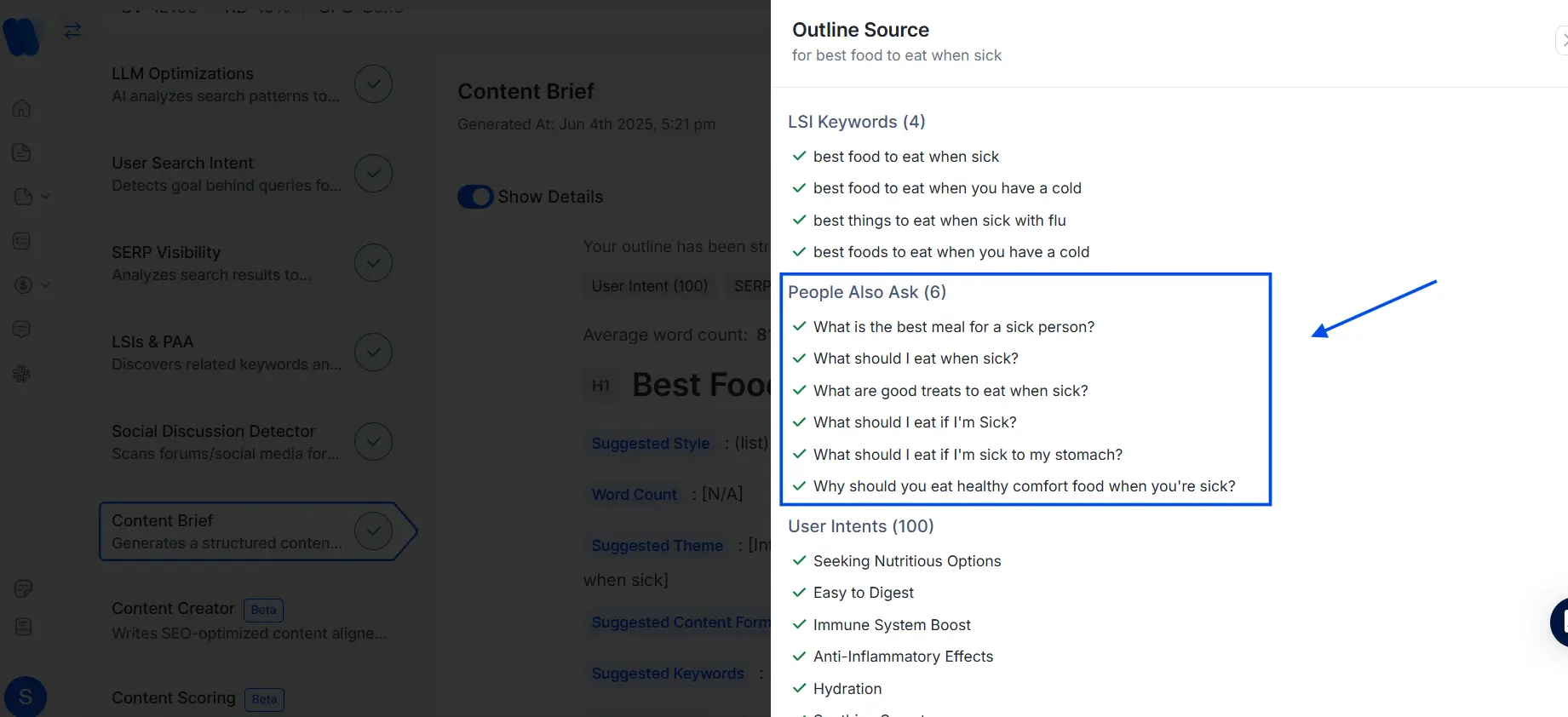
Unlike most methods that only extract from the Google People Also Ask box, KIVA maps search behaviors across multiple SERPs, which helps strengthen topical coverage across platforms.
How to Use People Also Ask Data for Blog Post Ideas?
Once you’ve gathered a decent batch of PAA questions, the next step in how to use People Also Ask data is to transform them into structured blog post ideas that align with user intent and your overall AI content marketing workflow.
Group PAA Questions by User Intent
Try bucketing them by what the user wants from the query:
- Informational: “What is topical authority?”
- Comparative: “Is topical coverage better than keyword targeting?”
- How-to: “How do I build topical authority?”
- Transactional: “Best tools for topic clustering”
Understanding intent helps you decide if this question belongs in a blog post, product page, or FAQ.
Build Content Clusters Using PAA Data
Here’s how I build clusters using PAA:
1. Choose a broad topic (e.g., email marketing)
2. Extract PAA questions across several variations
3. Group similar ones (e.g., how to write subject lines, best times to send)
4. Create:
- A pillar page: “Complete Guide to Email Marketing”
- Cluster content: blog posts or videos answering individual PAA queries
It’s like letting the search engine outline your content strategy for you.
Find Content Gaps with PAA Question Analysis
Open one of your key pages and ask:
- Are these PAA questions covered?
- If yes, are they in the right format (Q&A style)?
- If not, where can I add them naturally?
One underrated benefit of extracting PAA data at scale is how it exposes regional and engine-specific question variations. For example, the phrasing of a question on Yahoo might differ slightly from what appears in Google, but the intent remains the same. KIVA has helped me catch these subtle variations when planning for multilingual or multichannel content.
How to Use People Also Ask Data in Content Strategy ?
This is where the insights become content.
Write Content That Answers PAA Questions
You don’t need to write like a robot. Just be clear and direct. If your answers still feel stiff or overly formal, you can run them through a free AI Humanizer tool to make the tone more natural and reader-friendly before publishing.
- Use the PAA question as a subheading (H2 or H3)
- Answer it directly in 1–2 sentences
- Follow with supporting details or examples
Example:
H3: What is topical coverage in SEO?
Topical coverage refers to how comprehensively a website covers a subject area. It signals to search engines that your site has deep expertise on the topic.
You can also tie these insights back to your AI-driven content strategies to ensure that PAA optimization scales across clusters.
Where to Add FAQ and Schema Markup for PAA Optimization
You can add PAA-style Q&A:
- At the end of blog posts
- On landing pages with high bounce rates
- In resource hubs or glossary pages
Use the FAQ schema to tell search engines explicitly that you’re answering questions, which is central to improving search visibility with FAQ schema when targeting People Also Ask boxes and AI-generated answers.
It’s not just about collecting the right questions; it’s also about how to optimize for People Also Ask once you have them. Formatting, brevity, and people also ask schema markup all matter.
Update Existing Pages with New PAA Insights
Here’s a checklist of how you can update your old pages:
- Find 3–5 relevant PAA questions not yet answered
- Add each as a subsection or FAQ entry
- Refresh date and meta description
- Submit for indexing via Search Console
This helps refresh older URLs without reinventing the wheel.
How PAA Helps Build Topical Authority
Answering the right questions builds both search visibility and user trust.
Use PAA Data to Structure Pillar Pages
Pillar pages can feel intimidating. PAA makes them more manageable.
Let’s say your main topic is AI in content marketing. PAA reveals sub-questions like:
- What is AI content marketing agencies?
- How do AI tools personalize campaigns?
- Is AI replacing content marketers?
These become your H2s. Each can link out to deeper cluster posts if needed.
Strengthen Internal Linking with PAA-Based Topics
Use PAA questions to interlink across your site:
- Link related blog posts that answer follow-ups
- Add “Read more” under answers in the FAQ sections
- Create navigation paths based on what users ask next
- Prevent issues like content cannibalization in SEO, where multiple pages compete for the same query instead of supporting one another
It keeps your internal structure aligned with search behavior.
How to Measure the Impact of PAA Optimization
Not everything shows results overnight, but here’s what I watch.
Metrics to Track PAA Performance in Search
- Impressions on new or updated content (Google Search Console)
- Click-through rates for pages now ranking in PAA
- Time on page and scroll depth
These hint at whether people find the Q&A format helpful.
How to Rank in ‘People Also Ask’ boxes [5 Proven Steps]
- Answer Common Questions Clearly: Identify frequently asked questions in your niche and provide concise, direct answers. Aim for responses that are approximately 40–50 words in length, as this is the average length of answers featured in PAA boxes.
- Use Question-Based Headings: Structure your content with headings that reflect common user queries. Utilizing question formats in your headings can align your content with the types of questions featured in PAA boxes .
- Organize Content for Easy Parsing: Employ clear formatting such as bullet points, numbered lists, and tables to make your content easily scannable. This structure aids Google’s algorithms in extracting relevant information for PAA boxes .
- Implement FAQ Schema Markup: Adding FAQ schema to your pages helps search engines understand the question-and-answer format of your content, increasing the likelihood of being featured in PAA boxes.
- Monitor and Update Content Regularly: Keep your content up-to-date and monitor its performance in search results. Regular updates ensure that your information remains relevant and accurate, which can improve your chances of being included in PAA boxes .
Many of these same formatting principles also apply to brands exploring how to optimize for Google AI Overviews, since both PAA and AI summaries prioritize concise, extractable answers.
What are the Benefits of Using People Also Ask Data?
The People Also Ask (PAA) feature is more than a curiosity box in Google. It’s a live reflection of what users really want to know. Using this data can help you improve search visibility, strengthen topical authority, and connect better with your audience.
Boosts Visibility
PAA boxes appear very close to the top of Google search results. Even if your website isn’t ranking on the first position, being featured inside a PAA answer puts your content in front of users quickly. This extra exposure can increase clicks, traffic, and brand awareness without needing the top organic spot.
Covers Search Intent
Traditional keyword tools often miss the real questions users ask. PAA questions reveal intent directly, showing the follow-up queries people care about. By answering these questions, you cover more search journeys, capture long-tail traffic, and reduce the risk of missing what your audience is searching for.
Builds Topical Authority
Google values depth and expertise. When your content consistently answers multiple PAA questions around a subject, it shows search engines that your site is a trusted resource. Over time, this builds topical authority, making it easier for all your related pages to perform better in rankings.
Provides Real-Time Insights
PAA is not static. The questions evolve as user behavior changes, making it a live stream of search curiosity. Unlike fixed keyword databases, PAA gives you fresh insights that reflect what people are searching right now. This helps you update your content strategy in real-time and stay relevant.
Opens Low-Competition Wins
Many PAA questions are long-tail queries with little competition. They are easier to target compared to broad, high-volume keywords. This gives smaller brands and newer websites a chance to capture meaningful traffic, build trust, and grow visibility with less effort compared to competing on saturated keywords.
People Also Ask data gives you higher visibility, deeper intent coverage, stronger authority, and easier wins — all by answering the questions your audience is already searching for.
Read More Articles
FAQs
It helps you move beyond keywords. By mapping user questions into your content, you create more relevant articles, improve engagement, and naturally build topical authority.
Look at the intent behind each question. If users ask “how” or “why,” they want explanations. If they ask “best” or “which,” they want comparisons. Treat PAA as a signal of what content formats to create.
PAA shifts as search behavior changes. A good practice is to refresh your data every 3–6 months, or whenever you notice declining impressions in Search Console.
Related searches show alternative queries at the bottom of Google. PAA reveals follow-up questions people ask mid-journey. Both help, but PAA is more intent-driven.
Yes, but with limits. PAA reflects real user behavior in real-time, but it can vary by location, device, and phrasing. Use it as directional insight, not absolute truth.
Most are informational (what, why, how), but you’ll also find comparative and transactional queries. These are opportunities to create different content formats.
Google generates PAA dynamically based on billions of searches. Each time a user expands a question, new related ones may appear — making it a live feedback loop.
Combine PAA with other features like featured snippets, related searches, and autocomplete. This holistic view helps you design content strategies that meet intent across multiple entry points.
You can use PAA questions to structure blog posts, build content clusters, and create FAQ sections. Updating old posts with new PAA insights also strengthens topical authority and improves visibility.
Final Thoughts
PAA isn’t a trick. It’s a lens into what people genuinely want to know and a signal for what your content should be answering. Whether you’re mapping out an editorial calendar or updating a single post, learning how to use People Also Ask data gives you a direct line to user curiosity.
It’s not about chasing search volume; it’s about relevance. These questions show up because people are asking them. And the more I leaned into this approach, the more I realized: this isn’t extra work. It’s smarter work.