Automation for agency workflows is now the only practical way for SEO agencies to manage multiple clients, constant keyword research, and endless content optimization without burning out—time is the most limited resource.
Every month, hours disappear into finding the right keywords, creating content briefs, optimizing pages, and keeping up with changing SERPs.
The answer lies in automating agency workflow processes through intelligent systems. Leading agencies rely on the AI search visibility platform for agencies to automate SEO workflows, surface smarter insights, and optimize performance across human and AI-powered search.
These solutions have become essential for agencies that want to stay competitive and scale efficiently.
This guide breaks down the exact automation stack agencies set up first, the order that creates the fastest lift, and how to turn those workflows into measurable SEO + AI visibility gains.
TL;DR: Key Takeaways on Agency Workflow Automation
- Why Agencies Need Automation Now: SEO agencies lose the most time on repeat admin: keyword research, briefs, reporting, and task coordination. Automation removes those bottlenecks so teams can focus on strategy and client delivery.
- Biggest Time Drains to Fix First: The highest-frequency tasks create the fastest lift: onboarding, lead routing, recurring reporting, and role-based task assignment. These repeat across every client and are easy to standardize.
- What to Automate in Your First 30 Days: Start in order: Week 1 onboarding → Week 2 lead routing → Week 3 reporting → Week 4 task routing. That sequence stabilizes delivery, protects revenue flow, and cuts operations drag early.
- How Automation Gives Agencies Time Back: When briefs, clustering, reporting, and coordination run automatically, agencies reclaim 8–12+ hours per client per month, reduce burnout, and scale without adding headcount.
- Best Strategy (Automate + Track Visibility): Automation works best when tied to live performance signals. Use one system to monitor rankings, citations, and competitors, then feed those insights back into the workflow for continuous improvement.
What Are the Biggest Time Drains in SEO Workflows?
Running SEO for multiple clients isn’t just about creating strategies—it’s about executing dozens of small, repetitive tasks that quickly eat up your schedule. This is where automation for agency workflows becomes a game changer, especially when you consider the difference between traditional tools and agents explored in Tools vs Agents.

Many teams are already making this shift, and there’s a clear reason why marketers are replacing spreadsheets and SOPs with AI agents: manual workflows can’t keep up with today’s search complexity. By automating these core processes, agencies free themselves from repetitive admin work and refocus on creative strategies, client growth, and performance-driven campaigns.
Here are the areas where agencies lose the most time:
1. Manual Keyword Research and Clustering
Google’s index now contains over 400 billion web pages, and 15% of daily queries are entirely new—meaning keyword research involves massive volumes of data and continuous updates. (Exploring Topics, 2025)
Finding the right keywords, analyzing intent, and grouping them into keyword clusters can consume 10–15 hours per client each month.
2. Content Brief Creation
Building comprehensive SEO-friendly briefs with keyword placements, header tags, and SERP insights is another time-heavy process, often taking hours for each piece of content.
3. Content Optimization and Publishing
From ensuring strong on-page SEO and compliance with meta tags to optimizing content for better search performance, these tasks demand significant effort especially when dealing with multiple client agencies websites.
4. Tracking Keyword Performance
Monitoring keyword rankings through Google Search Console keyword analysis, traffic, and visibility across platforms is essential but eats up several hours monthly. Pulling this data from multiple tools and formatting reports adds to the workload.
5. Adapting to SERP and Intent Changes
Search engine results and user intent change constantly, requiring regular audits, a structured technical SEO audit, updates, and a technical SEO checklist for agencies to keep fixes prioritized across multiple clients. This constant monitoring and adjustment process is time-intensive and difficult to scale.
What Does Automation Give Agencies Back Each Month?
Automation doesn’t just “save time” in theory. It removes repeat admin across every client, so your team gets real execution hours back to spend on higher-value work.
- Take On More Clients Without Hiring When onboarding, briefs, and agency reporting aren’t manual, your team can scale accounts without adding headcount.
- Ship Faster With Less Backlog Automated topic clusters, briefs, and task routing cut lead time, so projects move from planning to publishing without delays.
- Focus On Strategy Over Admin Time that used to go to spreadsheet work gets redirected into content strategy, link building, and optimization that drives outcomes.
- Lower Burnout And Improve Retention When repetitive work disappears, teams stay sharper, more creative, and less likely to churn.
Time recovered isn’t just efficiency — it’s capacity you can reinvest into growth and better client results, especially for solo marketers who juggle every part of SEO themselves.
What are the Benefits of Automating Agency Workflows?
Automation in SEO isn’t just about saving time—it reshapes how agencies operate and grow. By reducing repetitive tasks, agencies checklist unlock new advantages that go far beyond efficiency.
1. Scale Without Increasing Headcount: Instead of hiring more staff for every new client, automation lets you take on more accounts with the same team. This makes growth more sustainable and profitable.
2. Improve Client Satisfaction: Faster turnaround times, consistent deliverables, and data-driven insights translate into happier clients. Automation helps you deliver quality work quickly, strengthening trust and retention.
3. Free Up Teams For Creative & Strategic Work: When manual tasks are automated, your team can focus on higher-value work like strategy, content direction, and client growth instead of admin.
4. Enhance Accuracy And Consistency: AI-powered automation reduces human error in tasks like keyword clustering, SERP tracking, and on-page optimization, and staying consistent at scale also depends on how to maintain brand voice.
5. Reduce Burnout & Boost Team Retention: Cutting repetitive, time-draining tasks creates a healthier workflow where people stay motivated and are less likely to burn out.
Which Automation Workflows Should New Marketing Agencies Set Up First?
Implementing automation workflows is essential for a new marketing agency to boost efficiency and cut down time spent on repetitive tasks. Start with the workflows below to stabilize operations early and free your team for higher-value work.
1. Start with the highest-frequency tasks
Automate processes that repeat across every client or campaign. These give the fastest payoff and are easiest to standardize:
- Client onboarding automation (welcome emails, intake forms, kickoff scheduling)
- Lead capture and nurturing (form → CRM → tags → follow-up emails)
- Recurring reporting and analytics (dashboards auto-refresh + scheduled delivery)
2. The first automations that create instant lift
- Client onboarding automation: Send welcome emails automatically, collect client details via digital forms, and trigger kickoff meetings so every new client gets the same smooth start.
- Lead capture and nurturing: Route inbound leads from website/forms into your CRM, tag them properly, and start a personalized follow-up sequence without manual handoffs.
- Social media scheduling: Pre-schedule posts across channels to keep a consistent presence without daily manual publishing.
- Proposal and contract automation: Generate proposals from templates, send contracts for e-signature, and auto-follow up to speed up sales cycles and reduce errors.
- Reporting and analytics: Automate performance reports on a set cadence so clients stay updated and your team avoids repetitive data compiling.
- Task assignment and workflow management: Auto-create tasks, assign owners, and set deadlines in your PM tool so projects move forward without constant coordination.
3. Simple priority stack (onboarding → lead routing → reporting)
- Onboarding: Standardize how clients enter your system.
- Lead routing: Prevent leads from slipping through gaps.
- Reporting: Keep results visible with minimal manual effort.
Once these are running, layer in proposals, social scheduling, and task automation to scale smoothly as your client load grows.
30-Day Automation Stack For New Agencies
| Week | Automation Focus | What Gets Automated |
|---|---|---|
| Week 1 | Onboarding Automation | Deal won → contract → invoice → kickoff form → PM setup |
| Week 2 | Lead Routing Automation | Form fill → CRM record → tags → nurture sequence |
| Week 3 | Reporting Automation | Live dashboards → scheduled send → internal review gate |
| Week 4 | Task Routing Automation | New project → role-based auto-assign → reminders |
This order stabilizes delivery first, then protects revenue flow, then removes reporting drag, and only after that optimizes internal workload.
How Agencies Improve AI Search Visibility With Wellows?
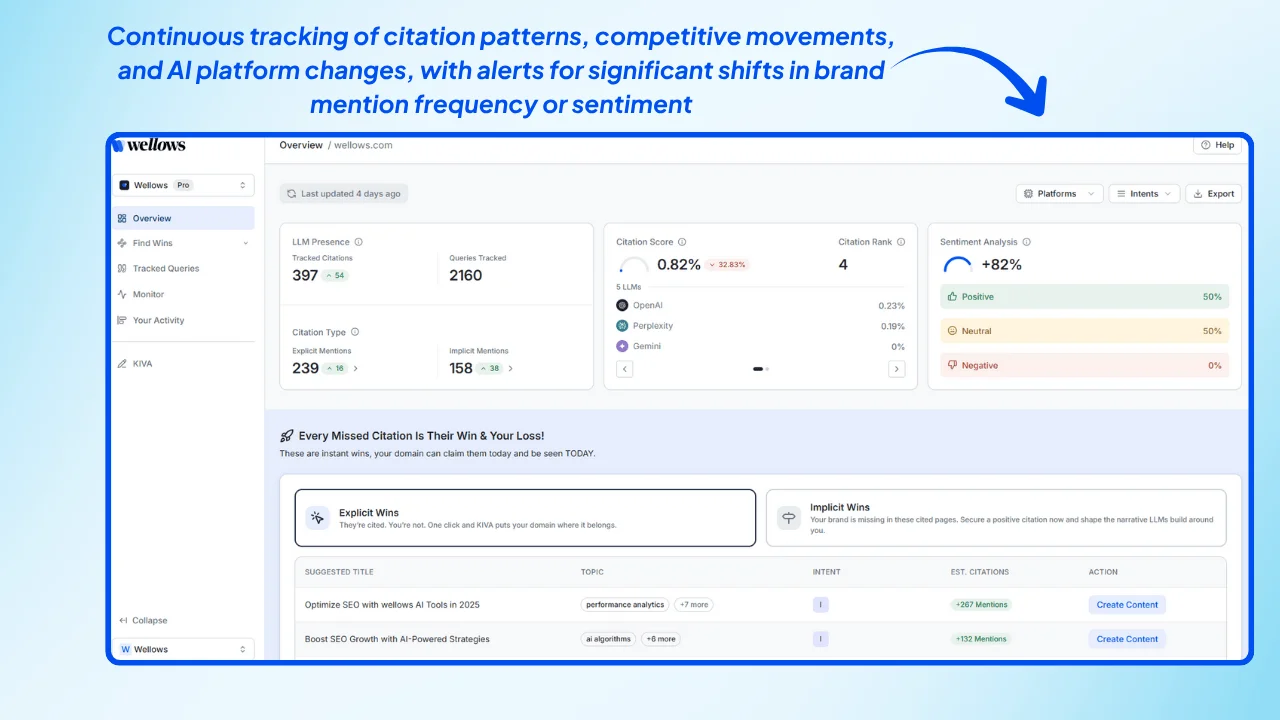
Agencies lose time when they manually check multiple AI platforms, track mentions, pull citations, compare competitors, and rebuild reports. Wellows AI search visibility platform fixes that by unifying visibility signals across major AI engines into one workflow.
It shows how clients appear inside ChatGPT, Gemini, Perplexity, AI Mode, and Google SGE, then turns those signals into clear actions your team can ship fast optimizing for AI SEO automation.
Here’s What Agencies Get:
1. Unified Tracking Across AI Engines
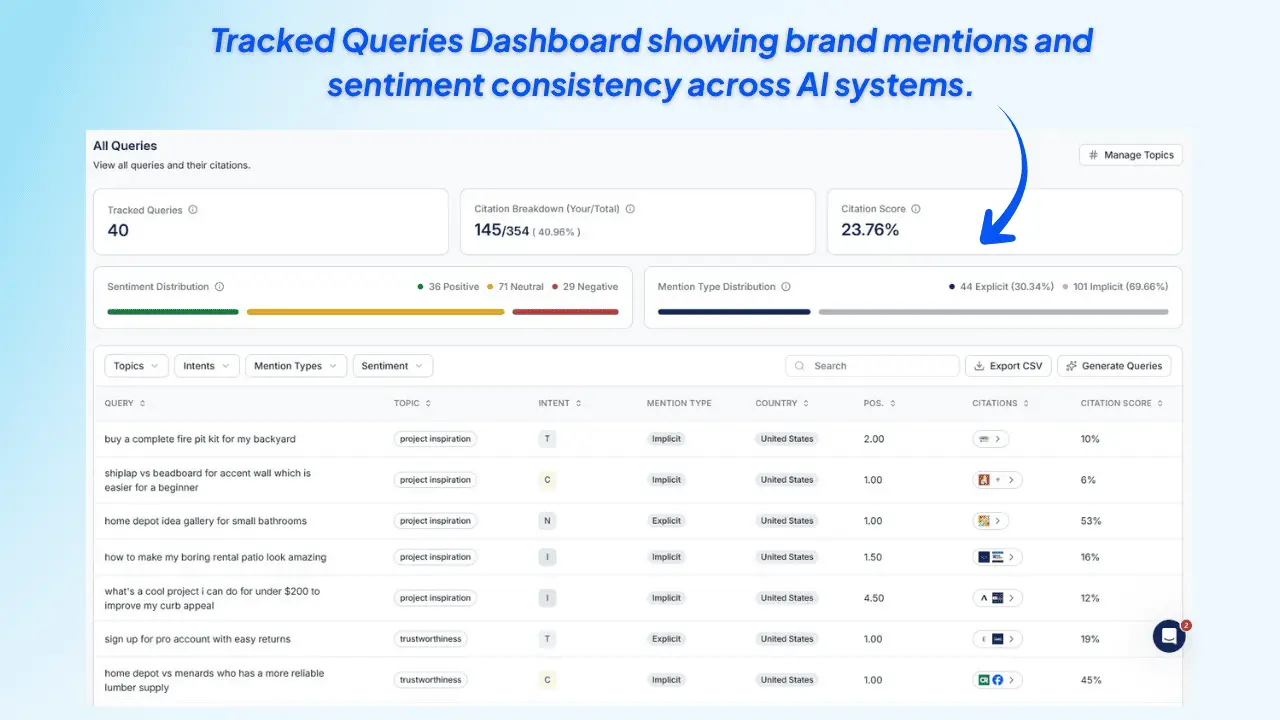
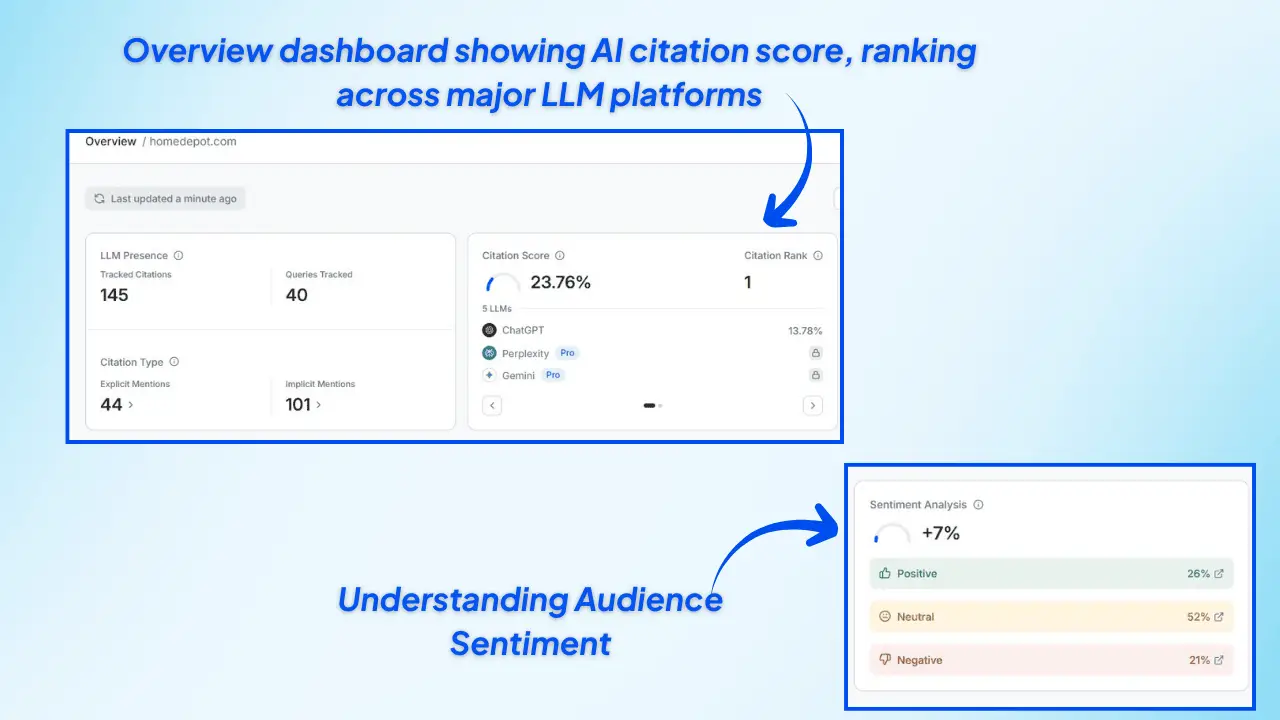
With Tracking, one live dashboard captures client mentions, citations, and sentiment across top AI search tools. This replaces separate manual checks per platform.
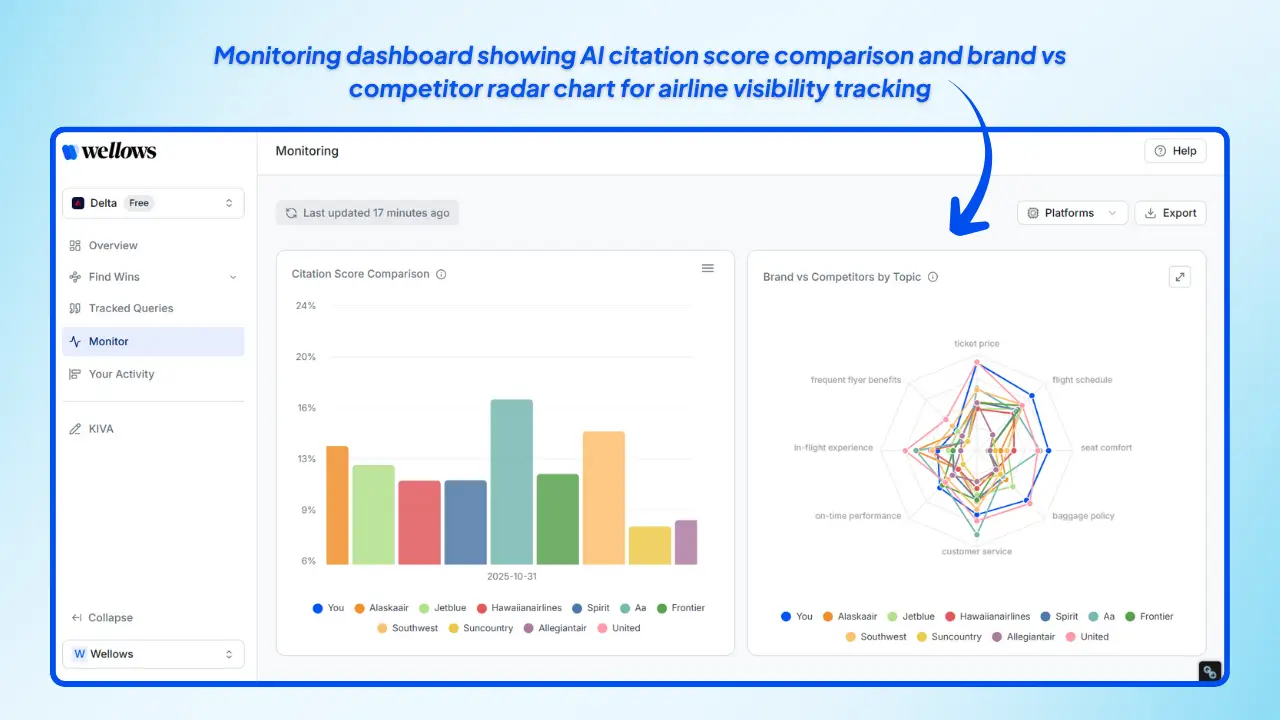
2. Citation Score + Competitor Comparisons
Strategize faster using the Citation Score, sentiment visibility, and side-by-side competitor comparisons—so you can prioritize what to fix first.
3. Implicit Wins + Explicit Wins
- Implicit Wins: pages used by AI where your client is not credited.
- Explicit Wins: direct citation gaps across ChatGPT, Gemini, Perplexity, AI Mode, and Google AI Overviews.
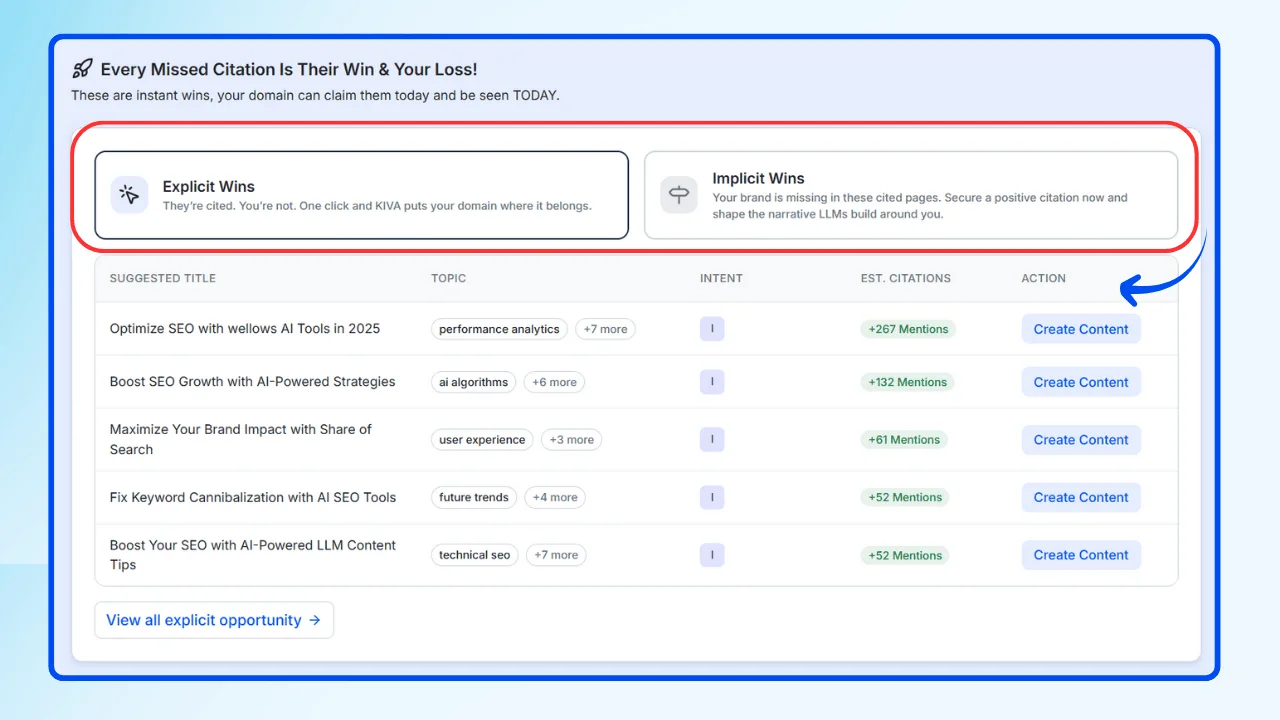
This turns missed visibility into clear agency opportunities.
4. Daily Monitoring
Monitoring refreshes visibility shifts daily, surfacing competitor movement and new discovery opportunities without rerunning audits.
5. Multi-LLM Visibility Coverage
Using Multiple LLMs comparisons, you can see where each client is strong or weak across AI platforms, then focus effort where visibility is slipping.
6. Research-Backed Visibility Insights
Its latest AI visibility research analyzed 7,000+ queries, covering 485K+ citations across 38K+ domains, to identify what drives AI recognition and citations and you can apply those same insights in practice using the LLM Query Builder tool to generate and test high-intent prompts at scale.
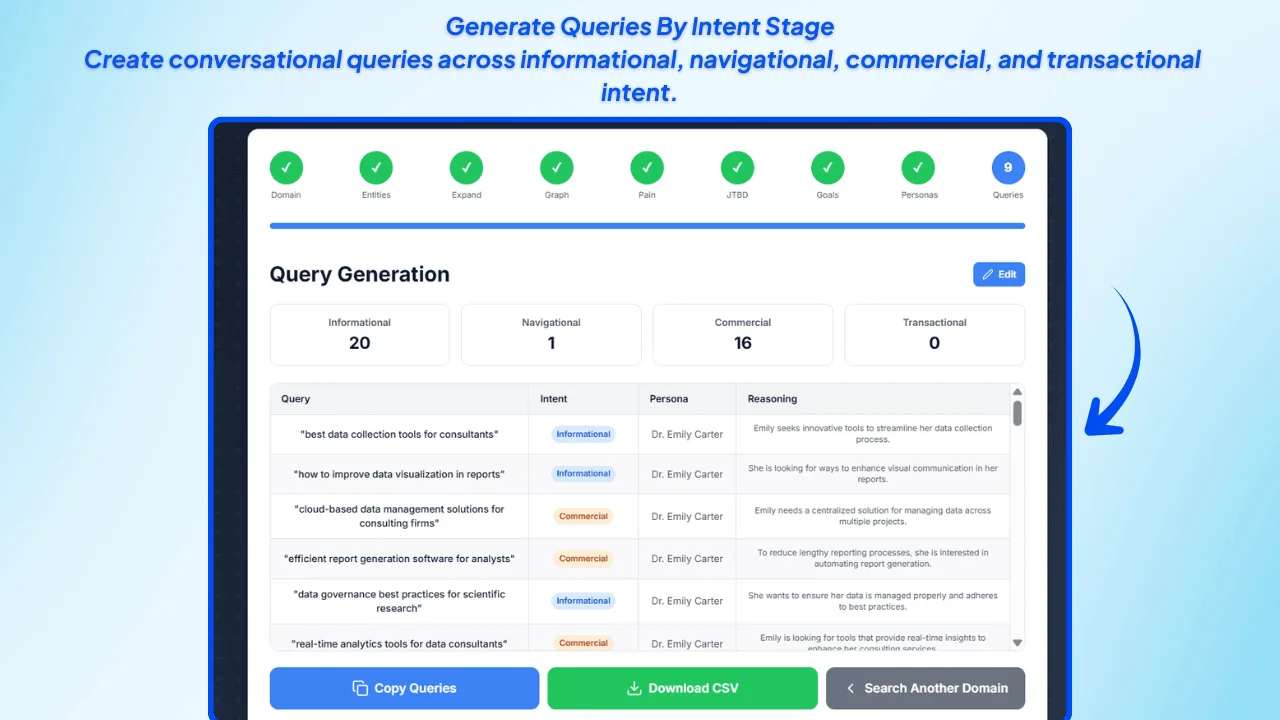
7. Execution Support With KIVA (Legacy Feature)
When you need to publish, the platform includes KIVA as a legacy execution feature that converts live community signals into content briefs aligned to your product expertise.
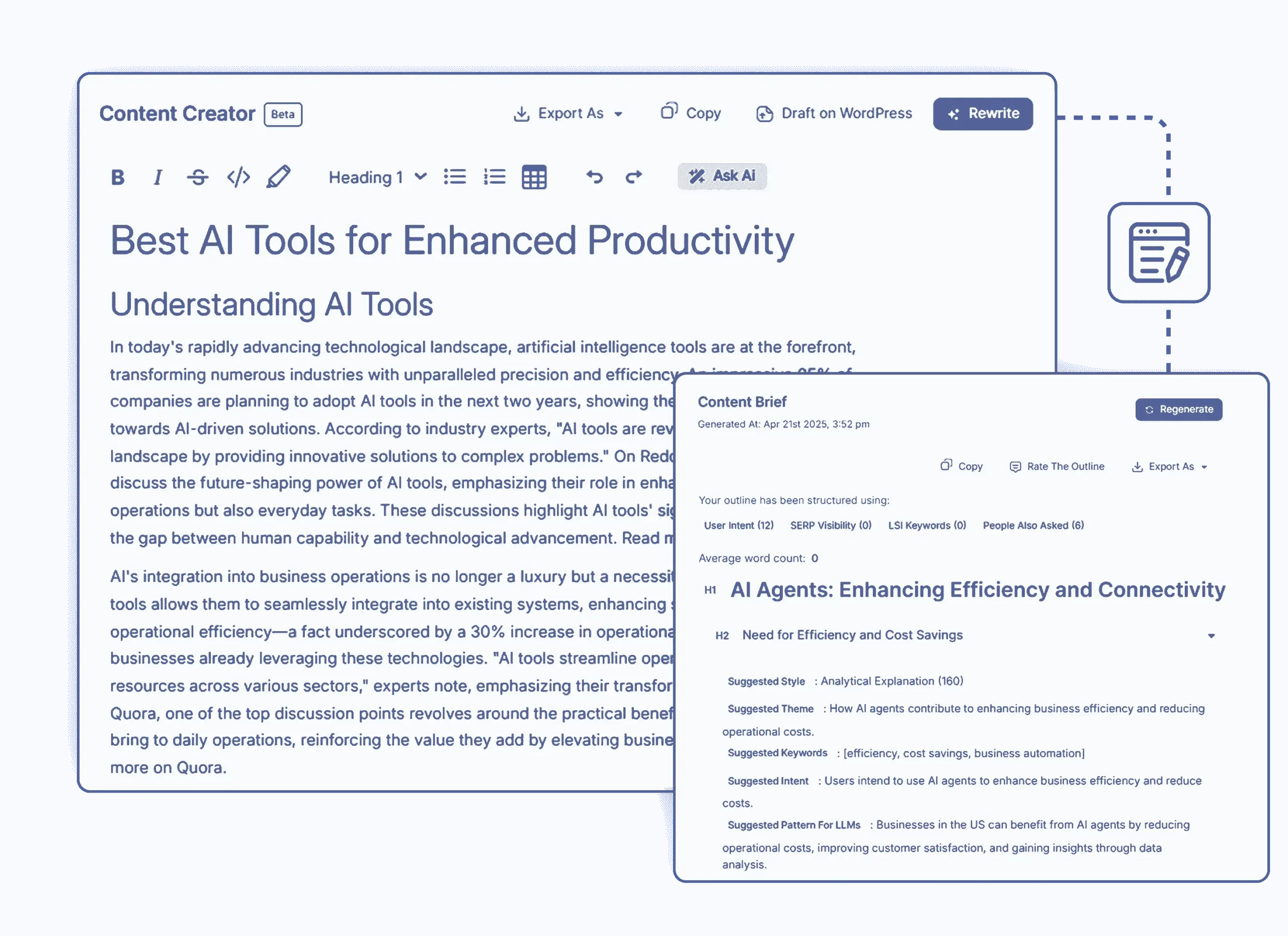
Used by 6,341+ brands and agencies and available with a 7-day trial, this workflow helps agencies track, monitor, and grow client visibility across AI search with less manual effort.
How Can Agencies Automate Client Onboarding Workflows?
A smooth onboarding system makes every new client feel guided, while protecting your team from repetitive admin. The goal is simple: once a deal is won, everything else should flow automatically in the right order.
- Build One Central Source Of Truth: Start by running onboarding through a single CRM. When a client moves to “won,” the CRM becomes the trigger that kicks off every next step, so client info never lives in scattered docs or inbox threads.
- Trigger Contracts Automatically: Connect your CRM to an e-signature tool so contracts generate from templates and send the moment a deal closes. Once the client signs, the workflow should update their status without anyone chasing approvals.
- Auto-Generate Invoices After Signing: Link your billing system so a signed contract instantly creates an invoice with predefined terms. This keeps billing consistent, fast, and error-free across clients.
- Send Kickoff Forms Without Follow-Ups:
Use a standardized kickoff questionnaire and send it automatically right after payment or signature. The form should collect everything you need to start delivery, so your team isn’t emailing back and forth for basics.
Jotform AI Form Generator is a quick way to create client intake and onboarding forms from a simple prompt, then embed or share them to collect responses without manual form building.
- Create The Project Workspace And Tasks On Submit: As soon as the kickoff form is completed, auto-build the delivery environment: create the project in your PM tool, generate folders, and assign starter tasks based on role. That way every client launches with the same clean structure.
- Automate Client Communication Touchpoints: Set up short email sequences that confirm each milestone (contract received, invoice paid, kickoff submitted) and clearly explain what’s next. Clients stay informed, and your team avoids manual status updates.
- Connect Everything With One Automation Layer: Tie your CRM, contracts, invoicing, forms, and PM system together through an automation connector. Keep the flow linear and predictable: win deal → send contract → send invoice → send kickoff → create project.
When onboarding runs like this, every new client starts faster, your team avoids repetitive setup work, and delivery begins with zero chaos.
What Automation Workflows Help Agencies Reduce Admin Work?
The fastest way for agencies to reclaim time is to automate the repeatable, rule-based tasks that happen across every client. These workflows cut admin load while keeping delivery consistent and predictable.
1. Client Onboarding Automation: Trigger a standardized onboarding flow the moment a deal is won—auto-send welcome emails, collect intake details through forms, and schedule kickoff calls so every client starts smoothly without manual chasing.
2. Project Management Automation: Auto-create recurring tasks, assign owners by role, and set deadlines when a new project or milestone is triggered. This removes routine coordination and keeps delivery moving without constant follow-ups.
3. Invoice And Expense Automation: Automate billing with recurring invoices, payment reminders, and digital expense tracking. This reduces errors, speeds up cash flow, and eliminates time lost to manual finance admin.
4. Marketing Execution Automation: Automate repeat marketing actions such as email nurtures, lead tagging, and social publishing. Connected workflows handle routine execution so strategists and creatives stay focused on client-facing work.
5. Appointment Scheduling Automation: Replace back-and-forth scheduling with automated booking links that handle availability, confirmations, and reminders. Meetings get locked in faster, and no one has to manage calendars manually.
6. Reporting Automation: Pull data into dashboards automatically, refresh on a schedule, and deliver reports to clients without manual compiling. This keeps updates consistent and frees hours every month.
Best Practices for Agency Workflow Automation
Adopting automation is powerful, but success depends on how you implement it. Agencies that follow proven best practices see faster adoption, smoother workflows, and greater results.
1. Start Small and Scale Gradually
Don’t try to automate everything at once. Begin by automating agency workflow processes that are the most repetitive—such as keyword clustering or reporting—then expand to content briefs, scoring, and publishing as your team gets comfortable.
2. Keep Humans in the Loop
Automation handles repetitive processes, but human expertise is still vital for creativity, strategy, and nuanced decision-making. Balance AI-driven efficiency with human oversight to maintain quality.
3. Integrate Automation Into Existing Workflows
For best results, choose tools that fit seamlessly with your current CMS, analytics, and project management systems. This reduces friction and keeps your team working efficiently.
4. Measure Impact and ROI
Track the time saved, number of clients managed, and performance improvements from automation. Automation metrics lose meaning when Technical SEO Issues—like crawl waste, indexing problems, or broken internal structures—silently block performance gains. Regular measurement helps agencies separate workflow wins from foundational issues and refine automation where it actually compounds results.
5. Stay Updated With Evolving AI Tools
Automation technology evolves quickly. Make it a practice to monitor new features and updates so your agency continues to benefit from the latest capabilities.
Why Agencies Need AI-Powered SEO Platforms?
For most agencies, the real challenge isn’t lack of skill—it’s lack of time. Agencies typically spend 10–15 hours per client each month on keyword research and clustering, content briefs, and endless SERP checks, leaving little room for big-picture strategy.
This is why automation for agency workflows with AI-powered SEO platforms is no longer optional—it’s essential for growth.
Instead of wasting a day pulling keyword data or drafting outlines, AI search can do it in minutes—and often with greater accuracy. Automation takes care of the heavy lifting, so your team isn’t stuck in spreadsheets or toggling between tools.

In the U.S., 5.6% of desktop search traffic now goes to AI-powered interfaces (e.g., ChatGPT)—more than double the rate from last year—making it essential for agencies to optimize not just for traditional SERPs but also for AI-driven discovery. (The Wall Street Journal, 2025)
Automation removes the repetitive layers so your specialists can stay on strategy, creative pivots, and client-facing wins — the work clients actually pay for.
How Can Agencies Automate Recurring Client Reporting?
The clean setup is: one reporting hub pulls live data, a locked template formats it, and a scheduler sends it without manual work.
1. Choose A Reporting Hub With Scheduling
Use a reporting platform that can pull data from your channels and send reports automatically. Tools like Whatagraph let agencies schedule recurring emails with dashboard links or attached reports, removing manual delivery work.2. Connect All Data Sources Once
Integrate GA4, Search Console, ads, CRM, and social accounts into the hub so metrics refresh live. Porter Metrics and Whatagraph are built to aggregate cross-channel data for client reporting.3. Lock A Reusable Client Template
Create one branded template per service type, then clone it per client and only adjust filters. This keeps reports consistent and avoids rebuilding from scratch.4. Add A Light Review Gate
If your platform supports it, require internal review before sending. Whatagraph includes a “review before send” option so you can approve reports only when they look clean.5. Schedule Delivery Per Client
Set frequency (weekly/monthly), delivery day, and timezone for each client. Whatagraph supports automated schedules at multiple intervals.6. Automate Sends With A Connector If Needed
If your reporting hub can’t email reports natively, use Zapier to trigger on a schedule → export report → email it to clients. Zapier’s monthly reporting automations cover this flow.7. Monitor And Tune Monthly
Check connectors, KPIs, and client asks each month. Automation stays useful only if the metrics and narrative stay aligned to outcomes.FAQs
Conclusion
Time is the one thing agencies can’t make more of — but they can use it smarter. The difference comes down to how you handle tasks: manually, or through automation for agency workflows that remove repetitive SEO admin and protect your team’s capacity.
When onboarding, clustering, briefs, reporting, and task routing run automatically, you unlock time for strategy, link-building, client relationships, and the creative work that actually drives results.
If your agency is ready to scale without burning out your team, it’s time to move to smarter workflows. The right system connects your tools, standardizes execution, and keeps delivery consistent — so you can focus on growth, not grunt work.
Wellows continues to evolve with new automation capabilities. You can track the latest changes in the Wellows Release Notes & Updates.
![85 Hottest AI Startups to Watch in 2026 [By Valuation, Funding, & Growth]](https://wellows.com/wp-content/uploads/2026/01/hottest-ai-startups.webp)